
A Production-Ready Blueprint for Enterprise Ecosystem Integration on VMware Cloud Foundation
Broadcom VCF Technical Product Solutions Architecture
Session Resources: VMware Explore Video #APPB1147LV | GitHub vks-consumption-models
As enterprise organizations adopt VMware Cloud Foundation (VCF), the VMware vSphere Kubernetes Service (VKS) becomes the bridge to modern scale, enabling platform engineering teams to deliver standardized Kubernetes environments on private cloud infrastructure. However, as highlighted by Hugo Phan and Skand Purohit in VMware Explore Session #APPB1147LV, standing up a Kubernetes cluster is only half the battle. The real challenge lies in architecting a secure-by-design DevOps ecosystem that balances developer velocity with enterprise governance and control.
Enterprise DevOps and security teams frequently face three operational hurdles when expanding cloud-native workloads on-premises:
- Fragmented Tooling and Friction: Developers do not want to abandon familiar public cloud pipelines or re-learn internal toolchains.
- Delivery Security Risks: Static, long-lived kubeconfig files or service account tokens stored in pipeline variables expose production clusters to significant security vulnerabilities.
- Observability and Secret Governance Gaps: Deploying workloads without automated supply chain scanning, runtime secret injection, and closed-loop Application Performance Monitoring (APM) guardrails increases operational toil.
This technical deep dive presents a production-ready blueprint that integrates VKS directly into enterprise DevOps stacks using GitHub, Harness, Wiz, Artifactory, Dynatrace, and the VCF Secret Store. By transforming VKS into both an ephemeral build infrastructure and a secure application runtime platform, organizations can maximize their VCF investment without ripping and replacing existing tooling.
Architectural Mapping: Public Cloud (AWS) to On-Premises VCF / VKS
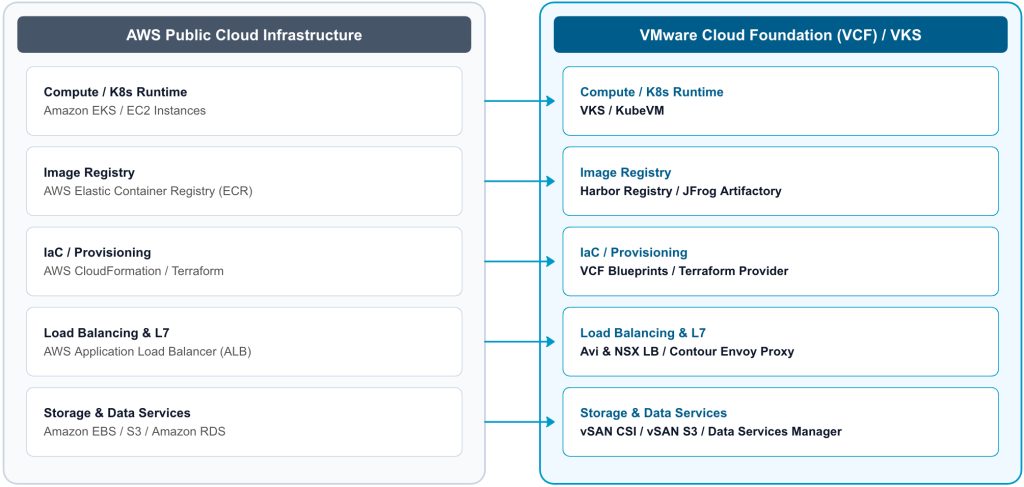
A common misconception among platform architecture teams is that migrating from hyperscalers (such as AWS) to on-premises private cloud requires rebuilding delivery pipelines from scratch. As demonstrated in the session, VMware Cloud Foundation provides 1:1 functional equivalency for public cloud native constructs.
The Supervisor Architecture and Paravirtualization
At the core of VCF lies the vSphere Supervisor. By exposing declarative Kubernetes Custom Resource Definitions (CRDs) directly at the vSphere control plane, the Supervisor translates declarative YAML manifests down to underlying VMware infrastructure resources without forcing developers to interact with vCenter UI.
|
1 2 3 4 5 6 7 8 9 10 11 12 13 14 15 16 17 18 19 20 21 22 23 |
# Declarative Infrastructure CRDs exposed on vSphere Supervisor apiVersion: vmoperator.vmware.com/v1 kind: VirtualMachine metadata: name: travel-portal-app spec: className: best-effort-large imageName: ubuntu-22.04-vks powerState: poweredOn --- apiVersion: cluster.x-k8s.io/v1beta1 kind: Cluster metadata: name: vks-prod-cluster-01 spec: topology: version: v1.30.1+vmware.1 controlPlane: replicas: 3 workers: machineDeployments: - class: node-pool-large replicas: 3 |
When requests hit the Supervisor API Server, dedicated controllers coordinate resource instantiation:
- VKS Controller and VM Operator: Translates Cluster API specifications into vCenter API calls to provision virtual machines for control plane and worker nodes.
- Network Plugins and Operators (CNI and AKO): Interfaces with NSX and Avi Load Balancer to dynamically assign IP addresses, configure VPC subnets, and publish L4/L7 load balancer virtual IPs.
CSI Controller: Binds persistent volumes to vSAN storage policies, providing paravirtualized storage access to guest cluster workloads.
The End-to-End DevOps Architecture and Software Supply Chain
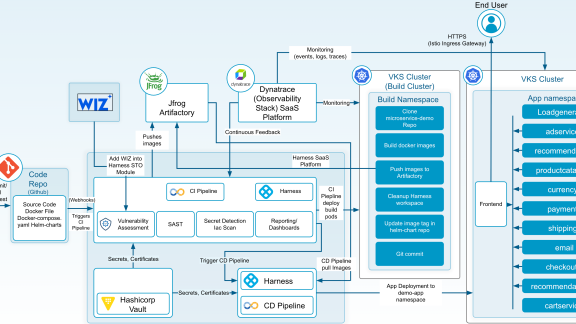
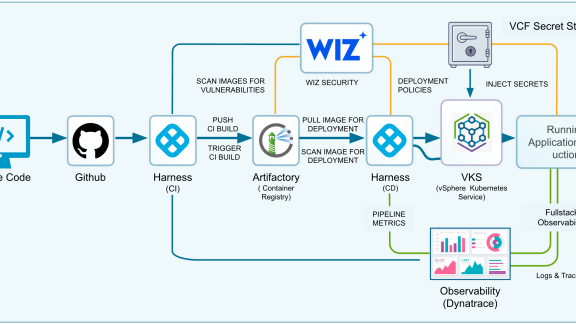
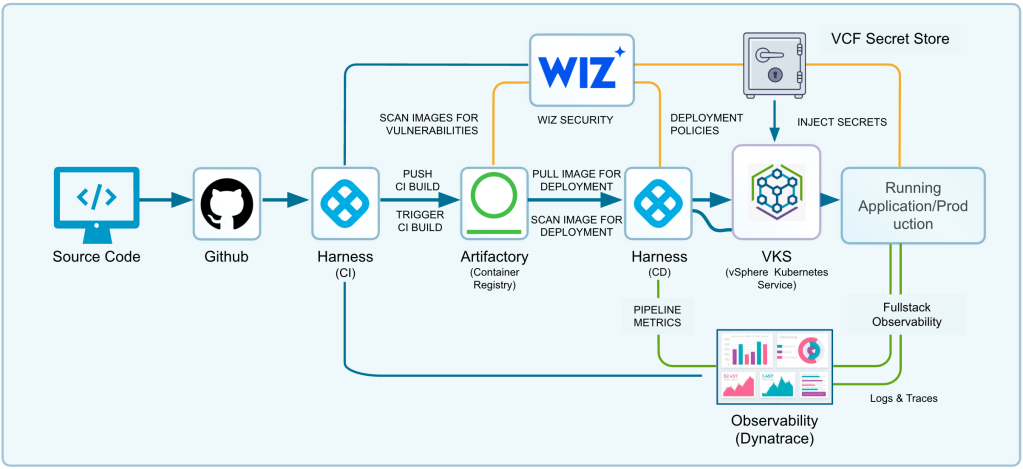
To achieve a secure, automated software supply chain, the blueprint integrates six core ecosystem components operating across dual VKS clusters:
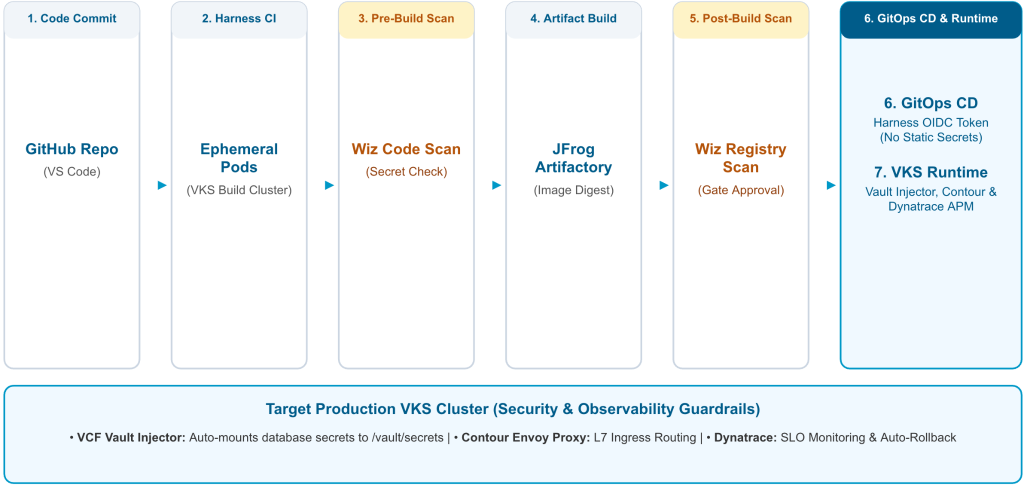
Key Architectural Innovations
- Dual-Cluster Topology and Ephemeral Build Pods: Harness CI leverages a dedicated VKS Build Cluster. Build steps execute as short-lived, ephemeral Kubernetes pods that auto-terminate upon completion, eliminating workspace pollution and reducing attack surface.
- Secure OIDC Authentication (No Static Kubeconfig Files): To eliminate the risk of embedding static kubeconfig files or cluster admin tokens in CI/CD platforms, Broadcom and Harness co-engineered VKS OIDC Integration. The Harness Delegate requests a short-lived OIDC identity token from the enterprise Identity Provider (IDP). The target VKS production cluster validates the token dynamically, granting ephemeral RBAC authorization before self-expiring.
- Dual-Stage Wiz Security Gates: Pre-build CLI scans source code for static vulnerabilities and secrets before compilation; post-build scans pull container images directly from Artifactory to verify base image layers before authorizing CD promotion.
- Runtime Secret Injection via VCF Secret Store: Workloads deployed to VKS consume sensitive database credentials directly from the supervisor-integrated VCF Secret Store. The VKS Vault Injector intercepts pod creation, dynamically mounting credentials into memory at /vault/secrets without persisting secrets in Git or container images.
Deep Dive: Live Demo Walkthrough by Skand Purohit
During the breakout session, Skand Purohit walked through a live demonstration showcasing an automated application update for a Go-based microservice application titled Travel Portal. Below is the complete step-by-step execution path recorded in the session demo:
Step 1: Code Modification and Git Commit in VS Code
The developer opens the Travel Portal repository in VS Code and modifies web/templates/login.html, updating the title header from ‘Travel Portal’ to ‘Travel Explore Portal’. The commit is pushed to GitHub.
Step 2: Webhook Interception and Ephemeral Harness CI Execution
GitHub fires a webhook payload to Harness CI, triggering the travel-portal-explore pipeline. Harness schedules ephemeral build pods inside the dedicated NS-01 namespace on the VKS Build Cluster.
Step 3: Wiz Pre-Build Source Code and Secret Scan
Before compiling binaries, the Wiz CLI scans source code for static vulnerabilities and embedded secrets. Upon verification, the build proceeds.
Step 4: Container Compilation and Artifactory Registry Push
The build pod compiles the Go binary, packages it into a chiseled container image, tags it with the build ID, and pushes it to Artifactory.
Step 5: Wiz Image Vulnerability Scanning and Promotion Gate
Harness triggers a post-build Wiz scan. Wiz pulls the image digest from Artifactory, performing a layer-by-layer security check before approving CD promotion.
Step 6: GitOps CD Deployment with Short-Lived OIDC Authentication
Harness CD requests a short-lived OIDC token from the enterprise IDP and executes a rolling update deployment targeting the travel-portal namespace on the VKS production cluster.
Step 7: Runtime Secret Injection via VCF Secret Store
As VKS schedules the pods, the VKS Vault Injector intercepts creation, fetching database credentials managed on the Supervisor and mounting them into memory at /vault/secrets/db-creds.
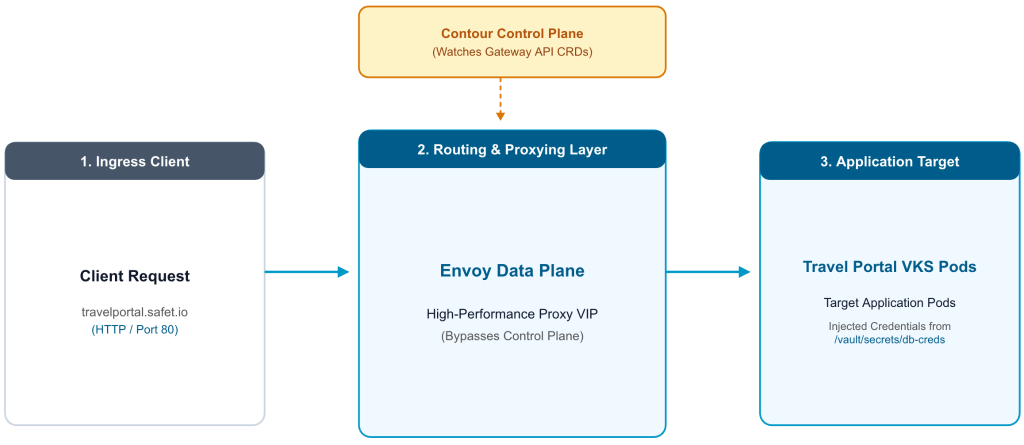
Step 8: Layer 7 Gateway API Routing with Contour and Envoy Proxy
Traffic ingress is configured using the Kubernetes Gateway API and Contour add-on, routing requests sent to travelportal.safet.io directly into Envoy VIPs.
Step 9: UI and Injected Secret Verification
Navigating to http://travelportal.safet.io confirms the updated ‘Travel Explore Portal’ header is live and database login succeeds using dynamically mounted Vault secrets.
Step 10: Full-Stack Observability and Guardrails with Dynatrace
Dynatrace ingests real-time telemetry. If deployment SLOs are violated, Harness automatically triggers an automated rollback to the previous stable revision.
Enterprise Customer Adoption Patterns
Enterprise organizations across sectors are actively implementing this VKS ecosystem architecture to modernize private cloud operations:
| Industry Sector | Primary Business Driver | Ecosystem Integration Pattern |
| Global Commercial Airline | Replicate AWS DevOps practices on-premises with zero pipeline modification | Harness + VKS + Wiz + Dynatrace + Artifactory + GitHub |
| Healthcare Organization | Lower TCO by replacing Anthos clusters with native VKS environments | GitHub Actions + VKS + Harbor + Dynatrace |
| Financial Services (FSI) | Expand cloud-native footprint while strengthening security compliance | Harness + VKS + Wiz + Dynatrace + CyberArk + GitLab |
| Financial Services (FSI) | Reduce licensing costs by migrating bare-metal OpenShift to VCF/VKS | Argo CD + VKS + VCF Supervisor Services |
Key Takeaways and Getting Started
Transforming your VMware Cloud Foundation deployment into a high-velocity application platform boils down to five fundamental principles:
- Preserve Developer Experience: Bring VKS into your existing DevOps ecosystem rather than forcing developers to adapt to proprietary platform tools.
- Build Once, Promote Everywhere: Maintain artifact consistency by promoting the exact container image digest across environments after passing security gates.
- Automate Security and Eliminate Static Credentials: Enforce pre/post-build Wiz scanning and eliminate static kubeconfig files using short-lived OIDC tokens and VCF Vault secrets.
- Extend Observability into Deployment: Close the loop with Dynatrace telemetry to validate SLOs and automate deployment rollbacks.
Maximize VCF ROI: Leverage VKS to turn private cloud infrastructure into an automated, self-service developer platform.
Explore Session Resources:
• Watch Session Video (Explore Video Archive #APPB1147LV)
• GitHub Consumption Models Repository: https://github.com/vmware/vks-consumption-models/tree/main/ecosystem-integration/harness-artifactory-dynatrace-wiz-secretstore
Frequently Asked Questions
Here is an FAQ section tailored to help VI Admins, Platform Engineers, and Application Developers quickly grasp the key takeaways, operational impacts, and architectural choices outlined in the blog post.
For the VI Admin (vSphere and Infrastructure Administrator)
Q: How does VMware vSphere Kubernetes Service (VKS) fit into my existing vCenter infrastructure? Do I need to learn Kubernetes to support my app teams?
A: VKS runs natively on top of the vSphere Supervisor, turning vSphere compute, storage, and networking into a declarative Kubernetes platform. You continue managing underlying physical clusters, ESXi hosts, and vSphere Namespaces using familiar vCenter controls and storage policies. Developers consume Kubernetes APIs directly, while internal Supervisor controllers (such as VM Operator and Network Operator) automatically handle VM instantiation and networking in the background.
Q: How are network load balancers and IP addresses dynamically provisioned for VKS clusters?
A: Through the Network Operator (AKO) running on the Supervisor, VKS interfaces directly with NSX Advanced Load Balancer (Avi). When a developer or platform engineer requests a Kubernetes Service or Gateway API resource, AKO automatically provisions virtual IPs (VIPs) and configures L4/L7 load balancing without requiring manual network ticket requests.
Q: Where do application secrets live, and how are they protected from being exposed on vSphere storage or hosts?
A: Sensitive credentials (such as database passwords and API keys) are managed natively via the VCF Secret Store. Using the supervisor-integrated VKS Vault Injector, secrets are injected directly into pod memory at runtime under /vault/secrets and are never written to disk, stored in Git repositories, or exposed in vCenter VM properties.
For the Platform Engineer (DevOps and K8s Platform Architect)
Q: Why should we use short-lived OIDC tokens instead of static kubeconfig files or service account tokens in our CI/CD pipelines?
A: Storing static kubeconfig files or cluster-admin tokens inside CI/CD pipeline secrets creates a high-severity security vulnerability. With the co-engineered Harness OIDC Integration, the Harness Delegate requests short-lived OIDC identity tokens from your central Identity Provider (IdP) per build execution. The target VKS cluster validates the token on the fly, grants temporary RBAC privileges for the deployment, and auto-expires the session immediately afterward.
Q: What is the benefit of a dual-cluster topology with ephemeral build pods for CI/CD?
A: Isolating build workloads on a dedicated VKS Build Cluster (NS-01) ensures that resource-heavy compilation and container packaging tasks do not impact production application workloads. Running build steps inside ephemeral pods means workspace environments are completely fresh, self-contained, and automatically destroyed after execution, preventing workspace pollution and reducing attack surfaces.
Q: How does the pipeline enforce supply chain security before code reaches production?
A: The architecture implements a two-stage Wiz security gate:
- Pre-Build Scan: The Wiz CLI scans git source code commits for static vulnerabilities and embedded credentials before binary compilation.
- Post-Build Scan: Once the image is pushed to JFrog Artifactory, Wiz pulls the image layers directly from the registry to inspect base dependencies. Harness CD requires an explicit security gate approval from Wiz before initiating deployment to VKS.
Q: How do we prevent bad deployments from impacting users if a performance degradation occurs?
A: Dynatrace APM continuously monitors real-time telemetry, pod health, and response latency against predefined Service Level Objectives (SLOs). If a new deployment violates an SLO (e.g., error rate spike), Harness triggers an automated closed-loop rollback to the previous stable revision without manual intervention.
For the Application Developer (Software and Microservice Developer)
Q: Do I need to rewrite my application manifests or pipelines when moving microservices from AWS (EKS) to VKS on-premises?
A: No. VKS is a fully conformant Kubernetes runtime. Because VCF maps 1:1 with AWS constructs (EKS → VKS, ECR → Artifactory/Harbor, ALB → Avi and Contour, EBS → vSAN CSI), your existing YAML manifests, Helm charts, and GitHub webhooks work without architectural refactoring.
Q: How does my microservice securely consume database credentials at runtime without hardcoded config files?
A: You don’t need to bake credentials into environment variables or container images. The VKS Vault Injector intercepts pod creation and automatically mounts database credentials as a virtual file at /vault/secrets/db-creds. Your application simply reads the credential file from disk at startup.
Q: How does Layer 7 ingress and web routing work for my VKS microservices?
A: VKS uses the modern Kubernetes Gateway API managed by Contour (control plane) and Envoy Proxy (data plane). You declare standard Gateway and HTTPRoute resources in your namespace to map custom hostnames (e.g., travelportal.sfo.io) directly to your backend service endpoints.
Discover more from VMware Cloud Foundation (VCF) Blog
Subscribe to get the latest posts sent to your email.