
When you start pushing containerized applications into enterprise environments, the real work begins on Day 2. Provisioning a Kubernetes cluster is the easy part; managing, securing, and scaling it reliably across production environments is where platform teams run into friction. Modern workloads demand integrated tooling out of the gate: secure image management, automated delivery pipelines, dynamic cluster scaling, and deep system visibility.
In our recent webinar, Operationalizing VMware vSphere Kubernetes Service with Add-Ons, we broke down how VMware vSphere Kubernetes Service (VKS)—running natively in VMware Cloud Foundation (VCF)—helps reduce this operational friction through integrated Supervisor Services and Cluster Add-Ons. Missed the webinar? Watch the replay here.
Here is a breakdown of how these architectural building blocks simplify Day 2 operations.
Core Building Blocks of VKS
Broadcom provides a curated set of cluster add-ons that deliver many commonly needed Day 2 Kubernetes capabilities related to images, ingress, observability, and more. VKS structures operational tooling into two straightforward extension mechanisms:
- vSphere Supervisor Services: Shared services running at the Supervisor Control Plane level that provide central capabilities, like container registries and deployment engines, across your entire vSphere environment.
- Cluster Add-Ons: Curated set of Carvel packages included for deployment into VKS workload clusters. They allow operators to declaratively deploy these add-ons (and recently Helm charts) to individual guest clusters in an automated and durable manner.
Harbor Simplifies Image Management
Enterprise workloads require a central, trusted place to store and pull container images. Harbor acts as an enterprise-grade OCI registry running directly as a native Supervisor Service.
- Enterprise Identity and RBAC: Harbor connects directly to existing identity providers using LDAP or OpenID Connect (OIDC) to enforce access control.
- Automated Vulnerability Scanning: Tools like Trivy automatically scan images for security risks, generating detailed CVE reports broken down by severity. Deployments can be blocked based on scan results.
- Image Governance: Helps ensure that VKS clusters only pull signed, verified container images from secured internal repositories.
Automate Application Deployments with ArgoCD
Managing cluster deployments manually with kubectl creates configuration drift and unnecessary toil. Running ArgoCD as a vSphere Supervisor Service provides an automated continuous delivery pipeline across all your VKS clusters.
- Single Source of Truth: Application manifests, Helm charts, and kustomize.yaml files stay stored in version control (like Git).
- Automated Drift Reconciliation: ArgoCD continually compares live cluster states against Git repositories and can automatically reconcile configuration drift based on configured synchronization policies.
- Seamless Rollouts: ArgoCD pulls verified manifests, fetches images from Harbor, and deploys multi-tier microservices straight onto target VKS clusters.
Cluster Autoscaling Work in Practice
To keep applications performant without wasting infrastructure resources, VKS integrates the Cluster Autoscaler directly into the Cluster API layer.
Administrators simply define worker pool limits directly inside the cluster deployment manifest. Below is an example of a Cluster Autoscaler configuration.
|
1 2 3 4 5 6 7 8 9 10 11 12 13 14 15 16 17 18 19 20 |
YAML apiVersion: cluster.x-k8s.io/v1beta1 kind: Cluster metadata: name: vks-cluster namespace: test-namespace spec: topology: version: v1.35.0---vmware.2-vkr.4 controlPlane: replicas: 1 workers: machineDeployments: - class: node-pool metadata: annotations: # Set minimum and maximum limits for dynamic worker provisioning cluster.x-k8s.io/cluster-api-autoscaler-node-group-min-size: "0" cluster.x-k8s.io/cluster-api-autoscaler-node-group-max-size: "3" name: nodepool-linux |
- Dynamic Scale-Up: When pending pods can’t be scheduled due to exceeding CPU or memory resources, the Autoscaler automatically requests new worker VMs from vSphere.
- Scale-to-Zero Support: Worker pools can drop down to zero during off-peak hours, handing unneeded compute and memory back to the supervisor pool.
Gain Full Visibility Across Clusters
Keeping track of modern microservices requires clear telemetry from both the cluster infrastructure and the running applications.
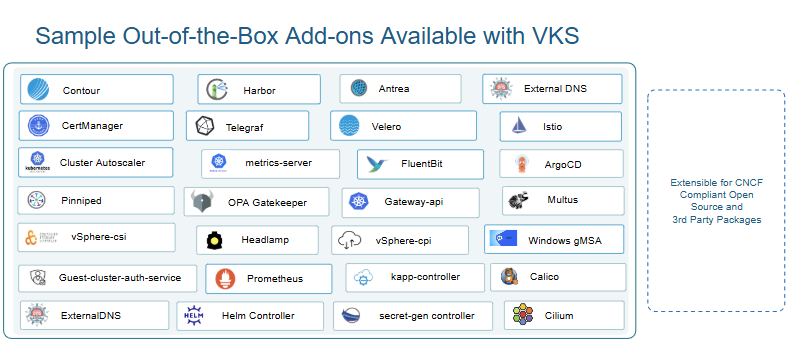
To solve this, VKS includes Carvel-based open-source collection agents—such as Telegraf, Prometheus, and FluentBit—directly as modular cluster add-ons so you can automatically collect metrics and logs out of the box.
By streaming telemetry directly into VMware Cloud Foundation Operations, team members get a clear, centralized view of cluster health, resource utilization, and live pod metrics.
Tooling Is Available in the VKS Add-On Ecosystem
VKS gives platform operators the flexibility of out-of-the-box system packages alongside popular CNCF open-source integrations.
Top Questions Answered
Below you’ll find some of the top questions from the webinar and customer engagements.
A: VKS is natively embedded within VCF. You can host all the toolchain packages, OS images, and Kubernetes releases locally. Use your local content library and VCF Software depot (Fleet Depot). The VCF CLI or kubectl can then be directed to pull exclusively from your internal registry, keeping the entire lifecycle offline and compliant. Access detailed instructions here.
A: No. You are not forced to use default VKS images. While VKS provides built-in, fully supported node images based on Photon OS and VCF-optimized Ubuntu OS, starting in VCF 9.1 (with VKS 3.6 / VKr 1.35+), Broadcom introduced the Image Baker tool integrated directly into the VCF CLI via the vcf kr bake subcommand.
This enables platform teams to declaratively build custom, enterprise-compliant node images using Red Hat Enterprise Linux (RHEL), Windows (customers bring their own license for RHEL and Windows), Ubuntu, or Photon OS.
Image Baker uses OCI-based Buildkit backed for Linux environments to systematically curate the guest filesystem. It automatically injects the required Kubernetes distribution binaries, container runtime components, CNI plugins, and vSphere integration packages into your custom OS.
A: Yes, for containers running on workload clusters.
While you can use your existing image registry third-party image registry for application container workloads, from VCF 9.1+ a regional Harbor will also get deployed and serve as the mandatory OCI container registry and Software Depot proxy (depot.kube-system.svc) for your VCF region. This instance will host necessary artifacts to deploy Supervisor Services (such as Argo CD or Contour), VKS cluster add-ons, VCF CLI plugins, and vSphere Kubernetes Releases (VKrs).
A: Yes, but this requires modern versions of the VCF stack. Support for scaling node pools down to zero (and scaling up from zero) was introduced for VKS version 3.3 and TKr version 1.31.4 or newer.
When scaling to zero, the autoscaler needs to know the compute capacities (CPU, memory) and scheduling constraints of a node pool even when no nodes exist. To support this, administrators must add specific annotations to the cluster manifest so the autoscaler can accurately simulate if a pending pod would fit on a newly spun-up node in that empty pod. Refer to Broadcom TechDocs: About Cluster Autoscaling for a configuration example.
A: Argo CD complements CI systems by providing Kubernetes-native GitOps reconciliation. The relevant VCF benefit is that it can run locally and support environments with connectivity/data-residency constraints. This out-of-the-box declarative engine enables enterprise teams to adopt Kubernetes continuous delivery (CD) practices seamlessly.
A: You can expose ArgoCD using either a Layer 4 Load Balancer service or a ClusterIP combined with an ingress controller for Layer 7 routing. Additionally, when managing ArgoCD on the Supervisor, be sure to use the official ArgoCD CLI available from the Broadcom Support Portal, which is specifically optimized to work seamlessly with the vSphere Supervisor control plane.
A: Yes. Starting with VKS version 3.5, you can declaratively include VKS Carvel add-ons directly within your cluster deployment manifest (Helm package support was added in VKS version 3.7). When the cluster is created, VKS automatically provisions and configures packages like Cert-Manager, Contour, or other supported tools as part of the initial bootstrap process—eliminating the need for manual post-deployment installations. Learn more in Broadcom TechDocs.
Next Steps
Setting up a Kubernetes cluster is only one step in the process. The real value of VKS comes when you turn it into a complete, end-to-end platform. This allows you to deliver true operational speed for developers while maintaining the security, governance, and operational controls IT administrators demand. By bringing together native Supervisor Services and modular Cluster Add-Ons, you can eliminate manual toil and build an automated environment built for scale.
Need help building out your VKS solution? Contact your Broadcom Account Manager today to learn how VCF Professional Services and partners like Capstone IT Solutions can help accelerate your platform journey.
Discover more from VMware Cloud Foundation (VCF) Blog
Subscribe to get the latest posts sent to your email.