
If you’ve been watching Memory Tiering build momentum in the VMware Cloud Foundation (VCF) ecosystem, I’m glad you’ve asked the obvious next question about how to actually plan for this in your environment. Let’s talk about that because the Memory Tiering Assessment Tool (MTAT) v3.0 is here to answer it.
MTAT is a workload planning and sizing utility designed to help system administrators, engineers, and architects evaluate and plan memory tiering deployments. It analyzes your environment’s active and consume memory, and helps you optimize memory allocation across different performance tiers all through a dynamic, browser-based interface that spins up instantly on your local machine.
Why Memory Tiering Matters
Let’s step back for a moment, because this is worth understanding before we dig into the tool itself.
One of the biggest budget constraints in modern data centers isn’t software licensing or networking; it’s hardware CapEx, specifically DRAM. It’s expensive, it fills up fast, and when you run out, you’re buying new servers. Memory Tiering flips that equation by using NVMe storage as a secondary memory tier for cold or dormant pages. You can increase your effective memory footprint by up to 4x all while leveraging your existing server slots for inexpensive NVMe devices.
That’s not a small thing. That’s the kind of savings that changes a CapEx conversation.
The golden rule to keep in mind here is simple. A workload’s total active memory must be 50% or less of your physical DRAM capacity for tiering to work well. MTAT tells you instantly whether your workloads meet that bar, no spreadsheets required.
What MTAT Can Do for You
MTAT is built around one core idea, and it’s a straightforward one. It takes the manual labor out of qualifying and planning a Memory Tiering deployment. Here’s a look at what it brings to the table.
Pull Historical Performance Data Directly from vCenter
Real-time memory stats only tell you what’s happening right now. That’s useful, but it’s not the whole picture and when you’re making a capital investment decision, “right now” isn’t good enough. MTAT can pull historical performance data directly from vCenter, giving you a time-series view of how your workloads have actually behaved over the past 24 hours, 7 days, or 30 days.
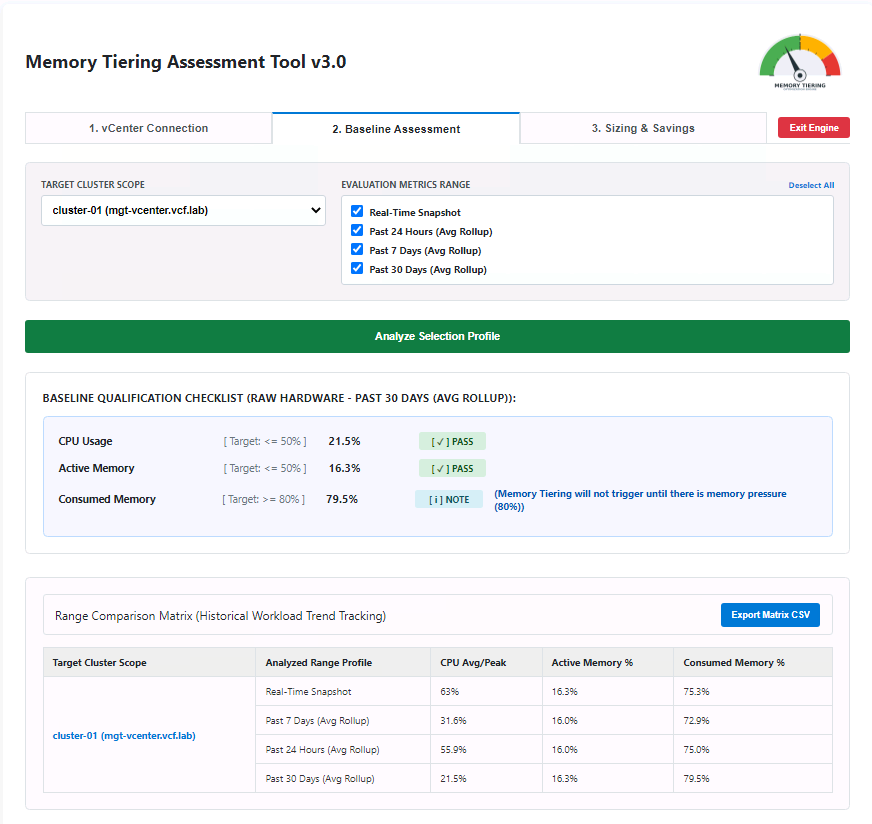
This is why looking into historical trends matters so much for tiering decisions. A VM that looks like a great tiering candidate at 2 p.m. on a Tuesday might be a very different story during end-of-month batch processing. By surfacing that historical context, MTAT helps you qualify workloads with confidence, not just a snapshot in time.
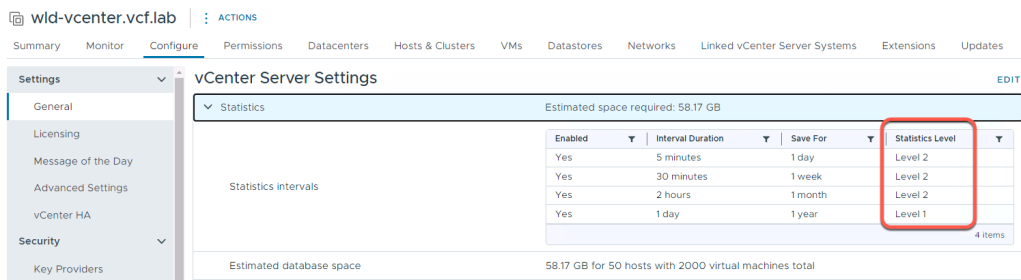
Note that to take full advantage of this capability, vCenter’s Historical Intervals should be set to Statistical Level 2 or higher. If statistics are set lower, MTAT gracefully falls back to default ranges (real-time) and you’ll have less data to work with. Increasing statistics retention periods will result in additional space required for the vCenter database.
Surface Large Page Utilization
Here’s a detail that’s easy to miss but has real implications for tiering performance, specifically large pages. When a VM uses large memory pages (2MB rather than the standard 4KB), the hypervisor has less granular control over which pages are “cold” and eligible to move to the NVMe tier. This blog explains how large memory pages play into Memory Tiering.
MTAT surfaces large page utilization as part of the workload assessment, so you can see exactly how much of a VM’s memory footprint is backed by large pages. This gives you the full picture before you commit to a tiering plan and it doesn’t disqualify a workload automatically. It just helps you go in with your eyes open.
Run from Anywhere Windows, macOS, or Linux
MTAT is now hosted in an official VMware repository, which removes the InfoSec friction that used to come with third-party scripts. The repository provides both a PowerShell file and a Windows executable, and the PowerShell version runs cross-platform Windows, macOS, and Linux all work via PowerShell Core.
Getting MTAT running requires a few straightforward things. You’ll need VMware PowerCLI (specifically the VMware.VimAutomation.Core module) installed. MTAT performs a pre-flight check at launch and will flag this immediately if it’s missing. You’ll need a modern web browser, since the tool spins up a local web server and launches a dynamic HTML5 interface. And you’ll need network connectivity to your target vCenter server over HTTPS (port 443), along with valid credentials that have read access to the vSphere inventory and historical performance statistics. MTAT defaults to TCP port 8600 for the local engine and will automatically increment to the next available port if that one is occupied, so don’t worry about port conflicts.
Explore Memory Ratios and Size Your NVMe Drives with Ease
One of the most common questions people ask when they start planning for Memory Tiering is how do I figure out how much NVMe I actually need? MTAT makes this remarkably straightforward.
The default memory tiering ratio is 1-to-1, meaning equal amounts of DRAM and NVMe. But that’s a starting point, not a rule. MTAT lets you explore different DRAM-to-NVMe ratios interactively and immediately see what each scenario means for your specific environment. Want to understand what a 1-to-2 ratio looks like for your workloads? Adjust the ratio and the tool recalculates everything in real time required NVMe capacity per host, whether your workloads still clear the 50% active memory threshold, and what the hardware cost delta looks like at each option.
Figuring out the right NVMe drive size follows the same intuitive flow. Describe your target configuration and MTAT tells you the minimum drive size you need factoring in your workload’s active memory profile, the tiering ratio you’ve chosen, and your hardware’s DIMM channel-balancing requirements.
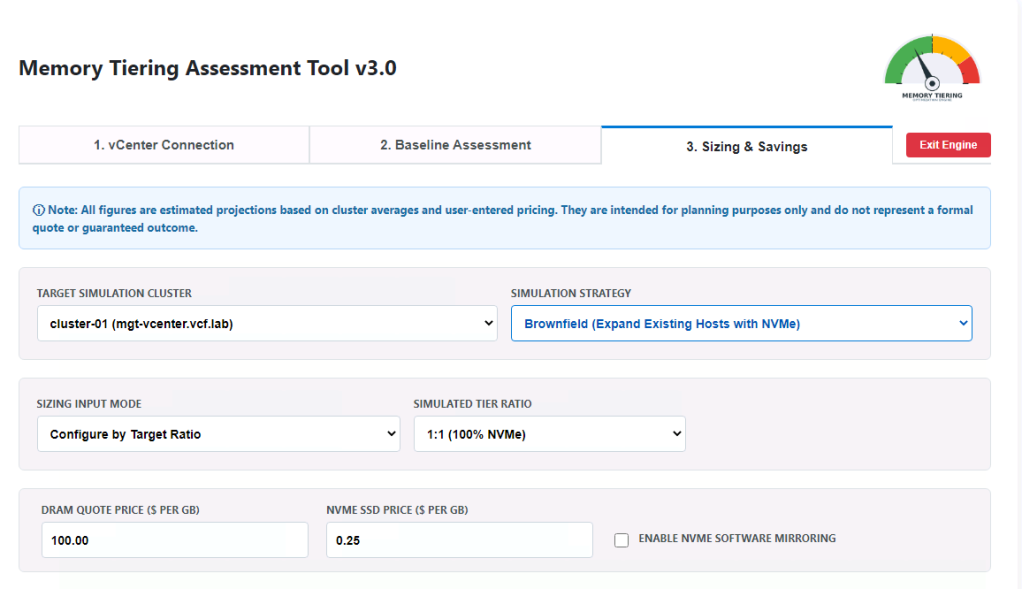
Deliver a Clean, Executive-Ready TCO Analysis
MTAT includes a fully standalone Sizing and TCO section, a first-class experience with its own dedicated workspace. This is where the tool really earns its keep for anyone who needs to take a business case to leadership.
You enter your host specifications, your DRAM and NVMe pricing, and your target architecture. The Sizing engine calculates the minimum DRAM and NVMe capacity each node needs to safely support your tiered workloads, factoring in the 50% active memory rule, the 128GB DRAM floor, and DIMM channel balancing all in one pass. The TCO engine then puts a dollar figure on the delta between your current hardware footprint and the tiered alternative, giving you a side-by-side comparison that’s easy to share and easy to act on.
The financial math focuses purely on what matters most, which is the actual hardware cost. It reflects the cost of bare-metal chassis and memory media (DRAM and NVMe), so these are not all the savings you can potentially get, you will achieve additional savings by factoring in licensing discounts, server and/or VM consolidation ratios, etc. The result is a repeatable, defensible artifact you can bring into a procurement conversation or a business case review. No custom spreadsheets, no manual reconciliation.
Enforce Real-World Hardware Guardrails
It’s one thing to produce a sizing recommendation. It’s another to make sure that recommendation is something you can actually build. MTAT builds real hardware realities directly into the math, enforcing a 128GB minimum DRAM floor and automatically balancing DIMM channels in 64GB increments.
Important Consideration
All figures are estimated projections based on cluster averages and user-entered pricing. They are intended for planning purposes only, and do not represent a formal quote or guaranteed outcome.
Ready to Get Started?
Get MTAT v3.0 today from the official VMware repository and start assessing your environment. Whether you’re planning a greenfield deployment or evaluating your existing cluster’s tiering readiness, MTAT will show you what’s possible and what it’s worth.
The path to VCF 9 is a lot shorter than you think.
Discover more from VMware Cloud Foundation (VCF) Blog
Subscribe to get the latest posts sent to your email.