If you’re managing Kubernetes alongside traditional virtual machines, vSphere Supervisor in vSphere 9.0+ and VMware Cloud Foundation (VCF) 9.0+ serves as your unified control plane. But when it comes to setting up the infrastructure, one question always comes up from teams designing these environments:
“Which load balancers are supported, and how do I choose the right one for my vSphere Supervisor?”
The answer depends entirely on your existing networking architecture, your licensing, and how much traffic management control you want to hand off to the platform versus the development teams. Let’s break down the supported platform load balancers in vSphere 9+ and VCF 9+, look at how they map to your network topology, and explore where you can still leverage application-specific flexibility.
The Three Core Platform Load Balancer Options
vSphere Supervisor supports three platform load balancer options. Your choice determines how core infrastructure services – including VM Service virtual machines, native vSphere Pods, and VMware vSphere Kubernetes Service (VKS) cluster control planes – receive Layer 4 connectivity. Each option is designed for a different networking architecture and operational model.
1. Foundation Load Balancer and NSX Load Balancer: Out-of-the-Box Layer 4 Connectivity
If you need integrated Layer 4 (IP:Port) load balancing out of the box, Foundation Load Balancer (FLB) and NSX Load Balancer (NSX-LB) are the primary platform load balancer options. Both provide native Layer 4 connectivity for Supervisor-managed workloads.
Which one you use depends on your environment:
- FLB: Included out of the box and available with both VMware vSphere Foundation (VVF) and VCF entitlements.
- NSX-LB: Included with VCF for environments using NSX networking.
Both platform load balancers provide Layer 4 connectivity for Supervisor-managed workloads, including:
- VM Service VMs: Virtual machines deployed through VM service into a vSphere Namespace.
- vSphere Pods: Container workloads that run directly on the ESX hypervisor.
- vSphere Kubernetes Service (VKS) Clusters: CNCF-conformant Kubernetes clusters and the applications running within them.
What about Layer 7 (Application) Routing?
FLB and NSX-LB provide Layer 4 services at the platform level, but application teams can still use Kubernetes-native ingress and traffic management solutions such as Contour, Istio, Gateway API within VKS clusters. This enables Layer 7 capabilities including HTTP routing, path-based routing, and TLS termination using familiar Kubernetes tooling.
2. Avi Load Balancer: Enterprise-Grade Advanced Traffic Management
Organizations that require advanced application delivery controllers (ADC) across their cloud infrastructure, Avi Load Balancer (Enterprise Edition) extends the platform with Layer 7 traffic management, security, and analytics capabilities.
When selected as the platform load balancer for the vSphere Supervisor, Avi Enterprise adds advanced application delivery services at the platform level, including:
- Layer 7 Traffic Management: Advanced HTTP/HTTPS routing, content switching, and policy-driven traffic management.
- Web Application Firewall (WAF): Intelligent, distributed protection against vulnerabilities and web exploits at the edge.
- Advanced Monitoring & Analytics: Real-time visibility into application performance, end-to-end latency, and user traffic patterns.
- Integrated DNS & Global Server Load Balancing (GSLB): Multi-site availability and traffic distribution across disparate geographic locations.
If your operational model requires centralized security governance, deep analytics, or cross-cloud consistency, Avi provides advanced application delivery, security, and traffic management services across multiple environments.
Choosing a Platform Load Balancer by Workload Network
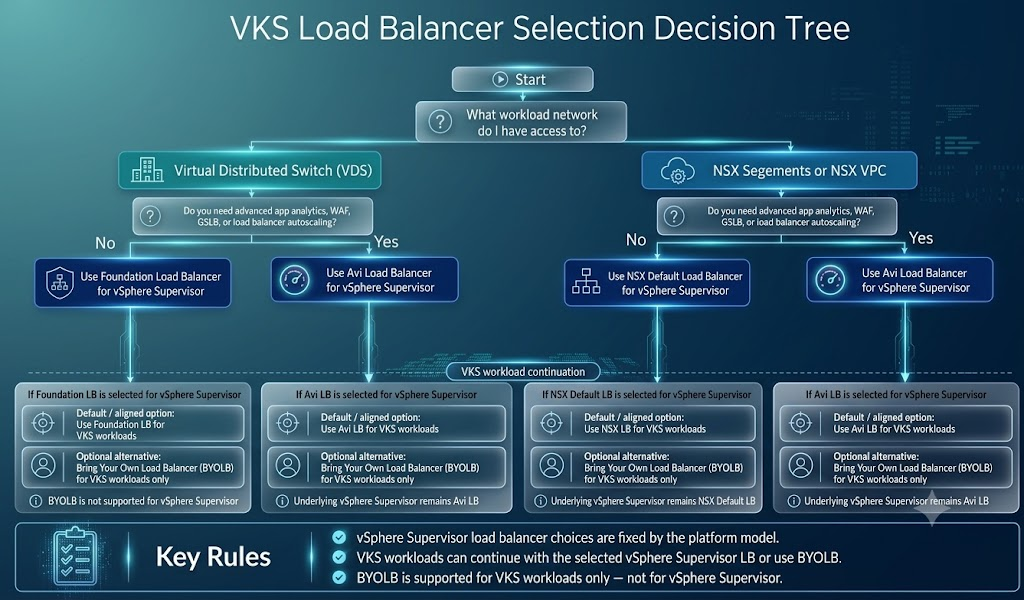
Your workload networking architecture determines which platform load balancer options are available during vSphere Supervisor deployment. The following networking models map to the supported platform load balancers:
- vSphere Distributed Switch (VDS): Supports Foundation Load Balancer (FLB) or Avi Load Balancer for environments using traditional vSphere networking.
- NSX Segment: Support NSX Load Balancer or Avi Load Balancer for environments using nSX networking.
- NSX Virtual Private Cloud (VPC) : Supports Avi Load Balancer and is designed for cloud-native environments that use NSX VPC networking.
Flexibility at the VKS Cluster Level
One of the strengths of VKS is that selecting a platform load balancer for Supervisor does not limit the load balancing options available to the workloads running within VKS clusters.
Because VKS clusters are upstream-conformant Kubernetes clusters, they support standard Kubernetes ingress controllers, load balancer implementations, and other Kubernetes-native application delivery solutions.
This allows infrastructure teams to standardize on FLB, NSX-LB, or Avi for the platform while giving application teams the flexibility to choose the application delivery solution that best fits their workloads. If you are designing the end-to-end workflow for how your teams will deploy, manage, and consume these clusters, check out the official VMware vSphere Kubernetes Service Consumption Blueprint for a complete architectural guide.
At-a-Glance: Platform Load Balancer Comparison
This table summarizes the key differences between the supported platform load balancers:
| Feature / Capability | Foundation Load Balancer (FLB) | NSX Load Balancer (NSX-LB) | Avi Load Balancer (Enterprise) |
| Support Network Types | VDS | NSX Segment or NSX VPC | VDS, NSX Segment or NSX VPC |
| Primary Routing Layer | Layer 4 (IP:Port) | Layer 4 (IP:Port) | Layer 4 & Layer 7 |
| Entitlement Required | VVF or VCF | VCF | Avi Enterprise License |
| Out-of-the-Box Ingress / WAF | No (Use VKS Ingress) | No (Use VKS Ingress) | Yes (Native Platform Features) |
| Advanced Analytics & GSLB | No | No | Yes |
| VKS Override Supported | Yes | Yes | Yes |
Final Thoughts
Choosing the right platform load balancer ultimately comes down to your workload networking architecture and operational requirements. Whether you’re looking for integrated Layer 4 connectivity with FLB or NSX-LB, or advanced Layer 7 application delivery with Avi, vSphere Supervisor provides a supported path for each deployment model.
The decision tree below provides a quick reference to help you select the platform load balancer that best fits your environment.
For step-by-step deployment instructions and prerequisites for your specific network type, check out the full vSphere Supervisor Installation and Configuration Guide. Once your Supervisor and load balancers are configured, you can learn how to operationalize and bootstrap your Kubernetes environments by following the VMware vSphere Kubernetes Service Consumption Blueprint.
Discover more from VMware Cloud Foundation (VCF) Blog
Subscribe to get the latest posts sent to your email.