
vCenter VM hardware has remained at version 10 (compatible with ESX 5.5 and later) since VMware vSphere 5.5. With the release of vSphere with VMware Cloud Foundation 9.1, it is now upgraded to version 17.
Note: Depending on the UI, KB, or TechDoc page, you may see the terms “virtual machine compatibility,” “compatible with ESX version,” or “virtual machine hardware version” used interchangeably. For clarity, when talking about virtual machine hardware version 17, we refer to it as “Compatible with ESXi 7.0 and later” in the vSphere Client.
About the vCenter Virtual Hardware Version Upgrade
During major upgrades (8.x to 9.1.0) or minor updates (9.0.x to 9.1.0) using the reduced downtime upgrade method, the vCenter VM hardware version is upgraded automatically from 10 to 17 because a new vCenter VM is created.
After performing an in-place update (9.0.x to 9.1.0) of vCenter, the vCenter VM hardware version needs to be upgraded manually. This process requires the vCenter VM to be powered off.
If the vCenter VM is “self-managed,” power it off and perform the VM hardware upgrade to version 17 using the ESX host client. See the documentation Upgrade Virtual Machine Compatibility by Using the VMware Host Client.
If the vCenter VM is managed by another vCenter, power it off and perform the VM hardware upgrade to version 17 using the vSphere Client. See the documentation Upgrade the Compatibility of a Virtual Machine Manually.
VM hardware upgrades are not reversible and you cannot downgrade VM hardware versions. Before updating the vCenter VM hardware version, take a VM snapshot or backup.
Important: Be sure to select Compatible with ESXi 7.0 and later (i.e. version 17). If you select a later version, the vCenter will be in an unsupported state. You will need to revert to snapshot or restore from an earlier vCenter backup.
You can also schedule the hardware version upgrade on the next reboot.
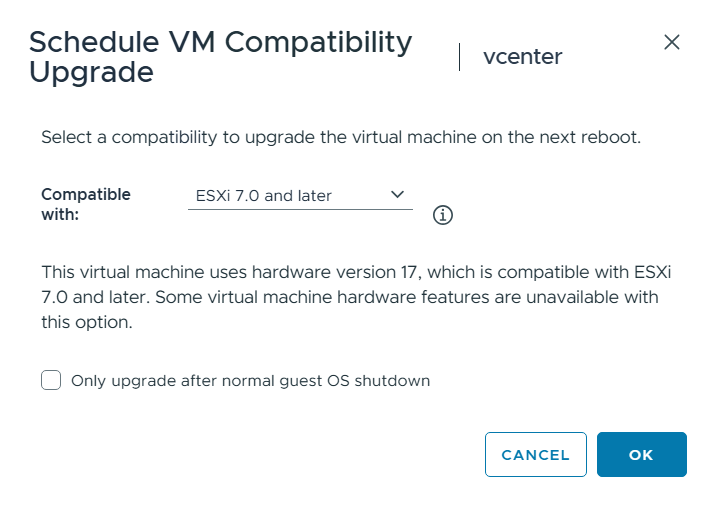
See the documentation Schedule a Compatibility Upgrade for a Virtual Machine.
Pro Tip: Enable the scheduled hardware version upgrade before you begin the in-place update of vCenter to version 9.1. Since the update requires a reboot, you can update vCenter to 9.1 and the VM hardware version with one reboot cycle.
Why version 17?
The short answer is: backwards compatibility. Virtual hardware version 17 can run on ESX 7.0 and later. We understand that sometimes infrastructure upgrades can move slowly, and outdated and even unsupported hardware is still being used in production environments. Allowing vCenter version 9.1 to run on older ESX versions gives customers some flexibility to run vCenter version 9.1 while also making that transition to new hardware platforms. Cross-vCenter migration will easily allow that vCenter VM to migrate to new infrastructure once it is ready.
Will the vCenter virtual hardware be upgraded again?
Yes. Our goal is to maintain the vCenter VM hardware version using an N-1 model based on major ESX versions. For example, the latest major version of ESX is 9.x so the N-1 version would be 8.x.
We also need to take into consideration that vCenter is always upgraded before ESX. We cannot upgrade the vCenter VM hardware to a version that a still-not-upgraded ESX is unable to handle.
For the full list of VM hardware versions, see:
https://knowledge.broadcom.com/external/article/315655/virtual-machine-hardware-versions.html
Discover more from VMware Cloud Foundation (VCF) Blog
Subscribe to get the latest posts sent to your email.