
Tracking VMware Cloud on AWS consumption across hosts, SPLA, and non-host charges today requires manual data pulls and waiting for invoice every quarter. Customers building FinOps practices and mature cloud financial operations have consistently asked for programmatic access to this data, in a format their existing tools can consume.
Today, we’re delivering on that with three new Usage Report APIs for Host Usage, Microsoft SPLA Usage, and Miscellaneous Usage (non-host charges) covering networking charges like EIP, TGW, data transfer, and Direct Connect.
These Usage Report APIs provide daily-granularity usage data through clean, filterable endpoints that integrate directly into your existing cost management, BI, and reporting workflows. Whether you’re tracking costs, analyzing consumption patterns, or building custom dashboards, these APIs give you the flexibility to retrieve and organize usage data on your terms.
All three APIs are available now to all VMware Cloud on AWS customers.
What’s Available
1. Host Usage Report API
GET /activityanalytic/{org_id}/hosts/{freq}/usage-report
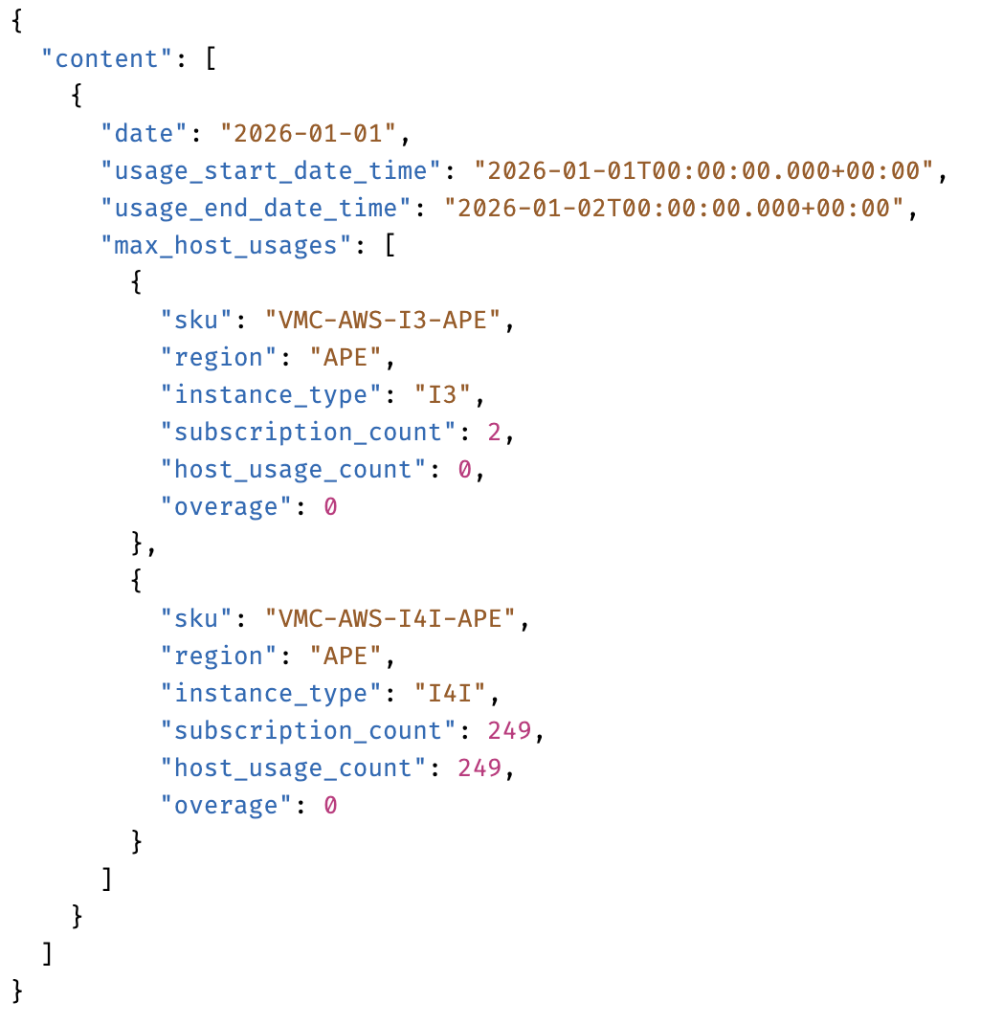
Retrieve daily host consumption data for any date range, broken down by instance type and region group. Each record includes the SKU, region, instance type, subscription count, actual host usage count, and overage. This gives you the data needed for forecasting invoices, understanding usage spikes, financial planning, chargeback, and subscription right-sizing.
The API returns the maximum host usage per day, per instance type, per region group. Values are aggregated across all SDDCs, allowing you to compare actual consumption against subscriptions purchased. Host usage data is available starting from 2025-02-01.
For more details please review the API details on the developer portal.
Sample API Response:
2. SPLA Usage Report API
GET /activityanalytic/{org_id}/spla/{freq}/usage-report
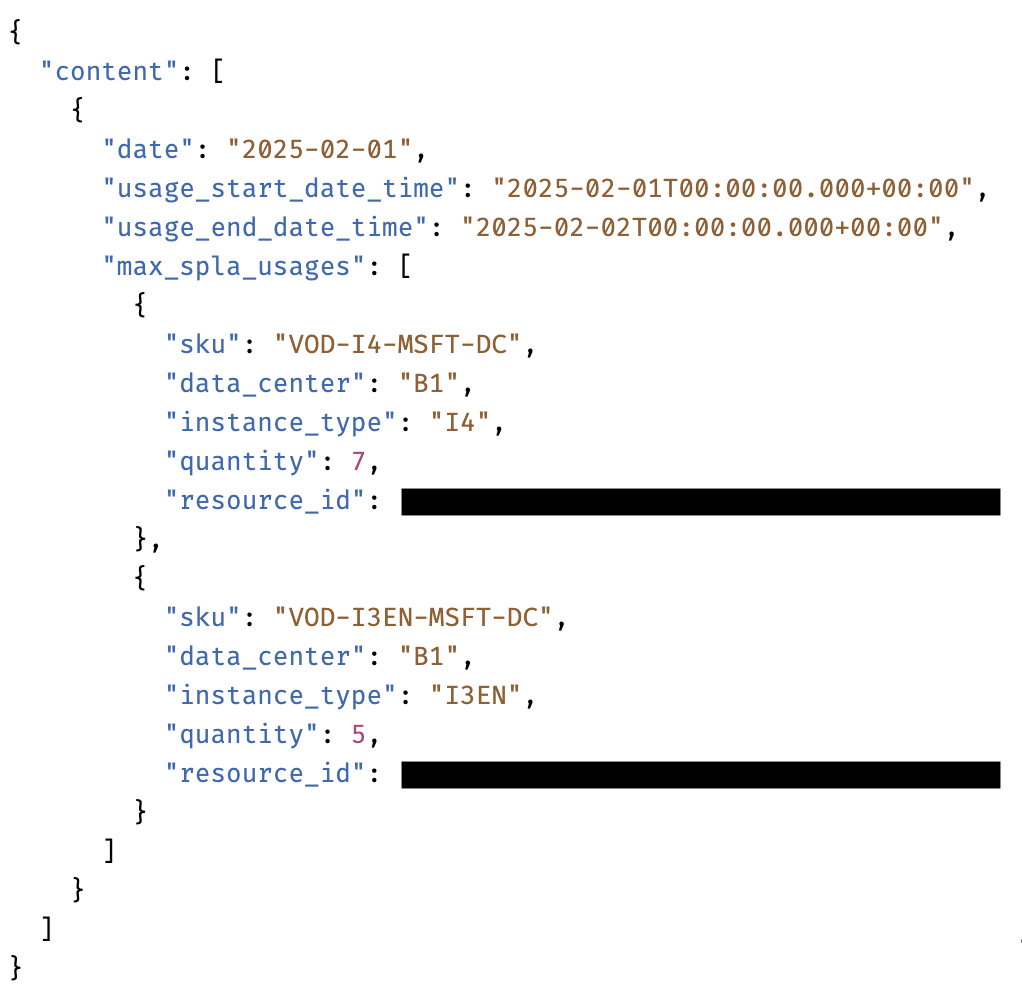
Access your Microsoft SPLA usage data programmatically, broken down by instance type, SKU, quantity, and resource ID (SDDC ID). This API enables you to precisely track license consumption across your SDDCs and validate upcoming SPLA charges.
The API considers the maximum SPLA usage for the day per instance type, SPLA license type, and SDDC. SPLA usage data is available starting from 2026-01-01.
SKU Format: VOD-<Instance Type>-MSFT-<License Type>
Instance types: I3, I4I, I7I, I3EN
License types:
- DC : Windows DC Server, Commercial
- DCA : Windows DC Server, Academic
- SQL : MSFT Windows SQL Server Enterprise, Commercial
- SQLA : MSFT Windows SQL Server Enterprise, Academic
We will be adding SKU descriptions in a future update for easier reference.
For more details please review the API details on the developer portal.
Sample API Response:
3. Miscellaneous Usage Report API (Non-Host Networking Charges)
GET /activityanalytic/{org_id}/misc/{freq}/usage-report
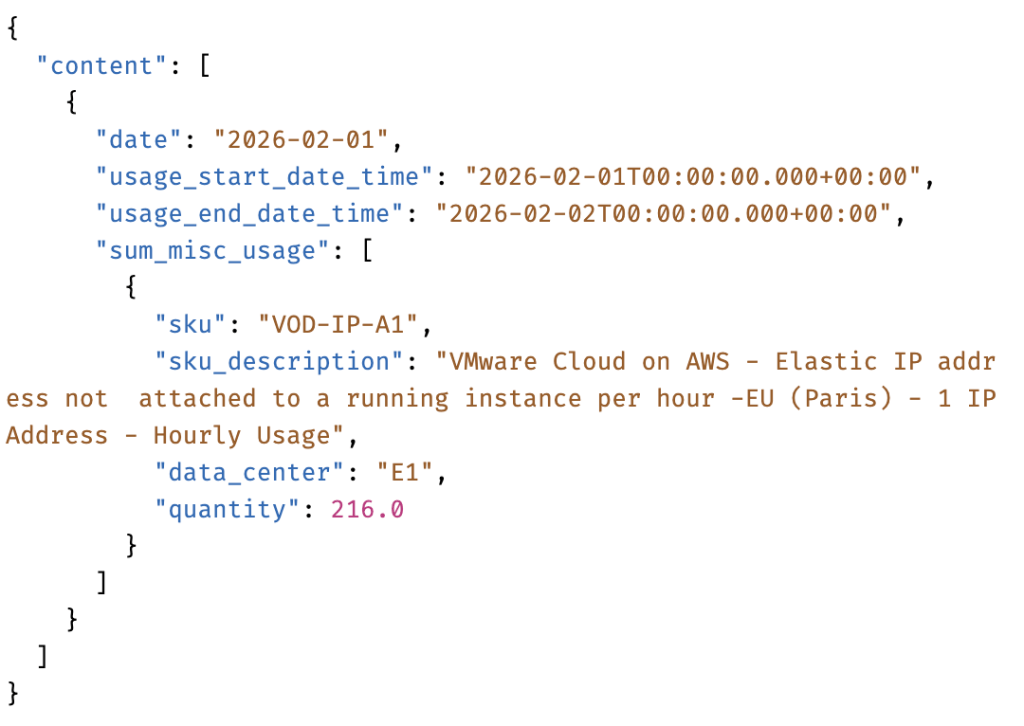
Retrieve daily usage data for supplemental and add-on charges. This gives you full visibility into networking and ancillary costs that contribute to your total cost of ownership.
Charge types covered:
- Egress Data Transfer (Per GB)
- Cross Region Data Transfer (Per GB)
- Direct Connect (Per GB)
- Elastic IP (Per IP Address, Per Hour)
- Transit Connect (Per Hour, Per GB, Per Attachment)
Daily quantities are summed across each charge type. Historical data is available from 2026-01-01 onward.
For more details please review the API details on the developer portal.
Sample API Response:
Key Capabilities
All three APIs share a common set of capabilities designed for operational integration.
- Custom date ranges. Query any start and end date to match your reporting periods, billing cycles, or ad-hoc analysis needs. The maximum range per API call is 31 days, but you can call the API multiple times to retrieve data across longer periods.
- Granular filtering. Filter results by region, instance type, SKU, and other key attributes to retrieve exactly the data you need.
- Sort and filter operations. Standard query parameters for organizing and structuring API responses to match your downstream tooling.
- Daily granularity. Day-level records across all three endpoints, providing the resolution required for trend analysis, anomaly detection, and accurate cost allocation.
Use Cases
- Invoice forecasting. Track daily consumption against subscription entitlements to identify overage trends early and project upcoming invoice totals across all charge types.
- Usage dashboards and reporting. Integrate host, SPLA, and miscellaneous usage data into your BI platform or cost management tools for a unified view of VMC spend.
- Capacity planning. Analyze host usage trends over time to inform subscription renewal decisions and capacity forecasting with actual consumption data.
HTML Usage Report Generator
For teams that need a visual summary without building API integrations, we’re also releasing the HTML Usage Report Generator. This command-line tool produces a Broadcom-branded HTML report combining host, SPLA, and miscellaneous usage data into daily trend charts, Non-Host Charges Usage API Documentationfiltering controls, and detailed data tables.
For setup instructions and usage examples, see the Interactive Usage Report Generator – KB Article.
Getting Started
All three APIs are available now. To start retrieving usage data:
- Authenticate using your VMware Cloud on AWS API credentials.
- Identify your organization ID from the VMC console.
- Choose your endpoint and specify a date range (up to 31 days per call).
- Add optional filters for region, instance type, or SKU to narrow results.
For complete API references, authentication details, and additional examples:
- Host Usage API Documentation
- SPLA Usage API Documentation
- Miscellaneous Charges (Non-Host Charges) Usage API Documentation
What’s Next
We’re continuing to invest in usage visibility with enhanced visualization in the VMC console, additional filtering and aggregation capabilities, and bulk export options for large datasets.
For questions, feedback, or feature requests, reach out to your account team. Your input directly informs our roadmap.
Discover more from VMware Cloud Foundation (VCF) Blog
Subscribe to get the latest posts sent to your email.