Cybersecurity Awareness Month is underway, and the rapid growth of generative AI makes robust defense strategies more critical than ever. Organizations must move beyond basic awareness to build practical, active defenses that protect their VMware Cloud Foundation (VCF) private clouds from increasingly sophisticated, AI-driven threats.
To help you strengthen your security posture, VMware is excited to introduce an updated series of VMware vDefend and Avi Cybersecurity Hands-on Labs. These interactive labs offer actionable frameworks and practical walk-throughs designed to give you direct experience safeguarding your VCF environments against modern cyber risks.
Connecting Theory to Hands-on Learning
Have you ever found it challenging to translate network security theory and concepts into practical, hands-on experience as a Network Security Engineer, SOC Analyst, or Platform Administrator?
This challenge is the reason why VMware developed the vDefend and Avi Security Hands-On Labs (HOL). Across these labs, you will learn to secure VMware Cloud Foundation with VMware solutions:
- Micro-Segmentation & Zero Trust: Gain granular visibility into lateral traffic flows and enforce zero-trust security policies down to the individual workload level.
- Advanced Threat Prevention: Detect and analyze active threats using integrated intrusion prevention (IDS/IPS), Network Traffic Analysis (NTA), and behavioral analysis.
- Modern Load Balancing & Network Modernization: Transition seamlessly to software-defined load balancing to optimize application performance, availability, and traffic management.
Learn at Your Own Pace with Hands-on Labs
You’re in the driver’s seat! Tackle targeted scenarios to solve immediate technical challenges, or follow a structured, step-by-step track to build total operational mastery. Starting with foundational firewall protection with DFW 1-2-3-4 and progressing to Advanced Threat Prevention ATP 1-2-3 with Virtual Patching to secure your VCF Infrastructure and Workloads, this progressive path lets you pick your own adventure.
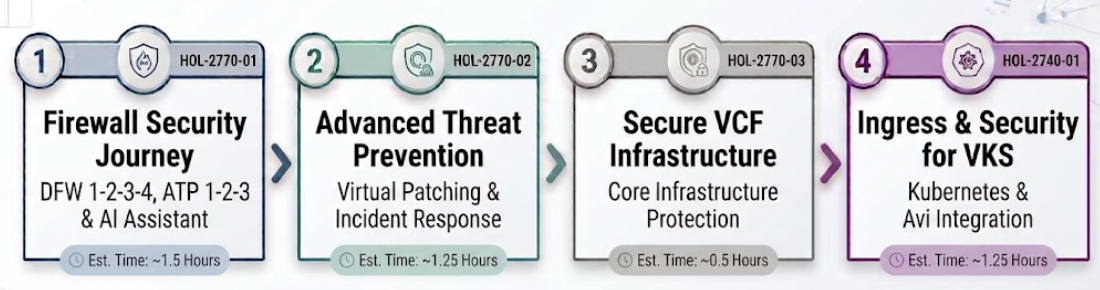
Figure 1: The recommended vDefend HOL Learning Path
HOL-2770-01: Firewall Security Journey with DFW 1234, ATP 123 and AI Assistant for vDefend – Firewall Estimated Time: ~1.5 Hours
What you will learn: Master Zero Trust across the greenfield or brownfield of your VCF private clouds! Walk through the vDefend Distributed Firewall (DFW) 1-2-3-4 workflow to progress from core infrastructure protection to full application micro-segmentation. Next, learn ATP 1-2-3, new guided workflow that accelerates the deployment of Advanced Threat Prevention (IDPS, NTA, NDR) from months down to weeks and lastly learn how to leverage AI Assistant for vDefend – Firewall to accelerate troubleshooting workflows and streamline day-to-day firewall administration.
HOL-2770-02: Firewall with Advanced Threat Prevention and Virtual Patching Estimated Time: ~1.25 Hours
What you will learn: Stop exploit attempts in their tracks. Discover how VMware vDefend’s virtual patching instantly shields vulnerable workloads at the network edge—protecting them long before traditional patches can be applied. You will also learn how leveraging correlated threat detection and campaign across IDPS, NTA, and NDR shortens incident response times.
HOL-2770-03: Secure VCF Infrastructure with vDefend Firewall Estimated Time: ~0.5 Hours
What you will learn: Your VCF environment is only as secure as the infrastructure underneath it, so this lab starts there. You will follow best practices for securing VCF with vDefend, enable the predefined security policies, and see exactly how those policies protect your environment. It is the short lab in the series and a great first win to help you finish with a hardened VCF foundation of how vDefend policy protects it.
HOL-2740-01: Security & Advanced Ingress Capabilities with vDefend & Avi for VKS Estimated Time: ~1.25 Hours
Access vDefend VKS lab.What you will learn: Containers move fast. Your security has to keep up. In this lab, you will learn how to integrate VMware Avi Load Balancer and VMware vDefend with VMware Cloud Foundation (VCF 9.1) Kubernetes Services (VKS). Understand how full defense-in-depth is implemented for VKS clusters with east-west lateral security covering namespace isolation, service isolation, and cross-workload (K8s to VM) egress security with VMware vDefend.
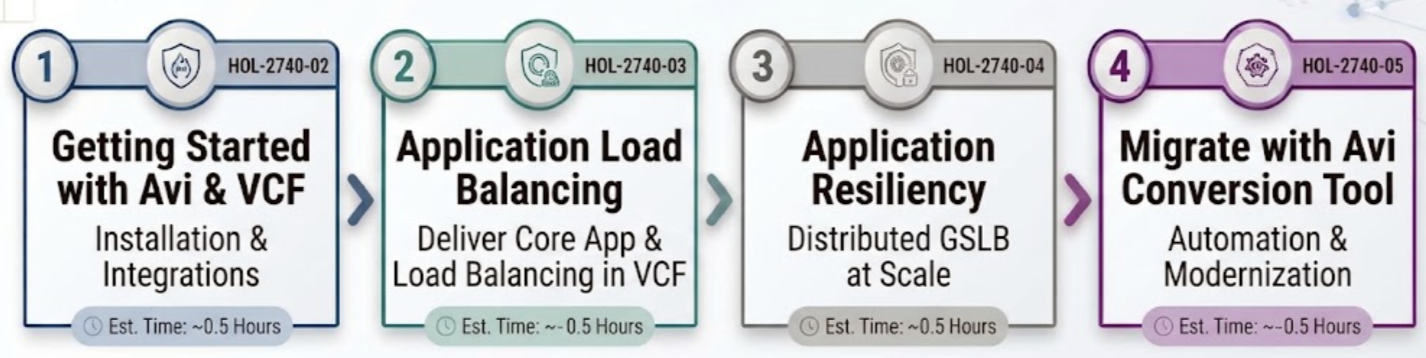 Figure 2: The recommended Avi HOL Learning Path
HOL-2740-02, 2740-03, 2740-04, 2740-05: Avi Load Balancer with Security at Scale for your VCF Infrastructure Estimated Time: ~2.0 Hours
What you will learn: Take VMware Avi Load Balancer for a spin across VCF. Four hands-on labs take you from first install to global scale and migration, with time in Controllers, Service Engines, and NSX/vCenter integrations, covering load balancing, application acceleration, and application-aware security (WAF). You can also see how Avi works with VCF Automation to load balance container-based apps.
▸ HOL-2740-02: Getting started with Avi and VCF: Learn how Avi integrates with VMware Cloud Foundation.
▸ HOL-2740-03: Getting started with application load balancing: Deliver core load balancing for your applications in VCF, with application acceleration and application-aware security.
▸ HOL-2740-04: Application resiliency with Avi GSLB: Use global server load balancing (GSLB) to keep distributed applications resilient across sites.
▸ HOL-2740-05: Migrate with the Avi Conversion Tool: Move from your existing load balancer to Avi using automated conversion tooling.
Benefits of vDefend and Avi Hands-on Labs
Throughout these labs, you will learn to secure VMware Cloud Foundation with our solutions:
- Build a repeatable, measurable path to Zero Trust.
- Learn about Distributed Firewall, Gateway Firewall, IDS/IPS, NTA, and NDR.
- Shield vulnerable workloads quickly with Distributed Virtual Patching
- Secure your VCF Infrastructure
- Automate Application Delivery and Analytics, Security with Load Balancer
vDefend and Avi Session Highlights from VMware Explore 2026
These HOL Labs are represented in vDefend and Avi sessions showcased at VMware Explore 2026 in Las Vegas. If you missed this event, you can view the sessions on demand.
vDefend 1-2-3-4 for Distributed Firewall: Unified workflows for auto-tagging, continuous DFW monitoring, and enforcement alerting. Watch the session
Advanced Threat Prevention (ATP) and Virtual Patching: Proactive AI-driven threat defense and virtual patching for newly detected exploits. Watch the session
VMware vSphere Kubernetes Service (VKS) with vDefend: How Avi, AKO, and vDefend eliminate manual networking friction for K8s. Watch the session
Web Application Security with Avi Load Balancer: Unify web and API protection with a 360-degree integrated security stack. Watch the session
Special thanks to Stijn Vanveerdeghem, Frank Snyder, and Nick Robbins for their hard work and support with Hands-on Labs and assistance with this blog.
Learn more with these resources:
- VMware vDefend announcement: VMware vDefend Advances Multi-Layer Lateral Security, Deployment Automation and Performance for the Frontier AI Era
- VMware Avi announcement: Avi Strengthens Web Application Security, Boosts Performance and Improves Operational Efficiency
- HOL Video: What is VMware Hands-on Labs?
- HOL Blog: The Next Gen of VMware Hands-on Labs Blog
- HOL Main Portal: Explore All VMware Hands-on Labs