
While organizations continue to advance their zero trust lateral security initiatives, routine firewall operational and troubleshooting tasks frequently tie up limited IT resources – consuming time, introducing risk and hindering business agility. Additionally, modern security operations face significant challenges in analyzing and correlating complex security alerts, which often lead to visibility gaps, high false-positive rates, and delayed incident responses.
To accelerate lateral security operations and reduce operational downtime, VMware introduced an AI Assistant for VMware vDefend as a GenAI-powered assistant that is embedded directly into the platform. This simplifies security operations, expedites firewall troubleshooting, and streamlines threat analysis through natural language interactions.
The Three Pillars of Intelligence
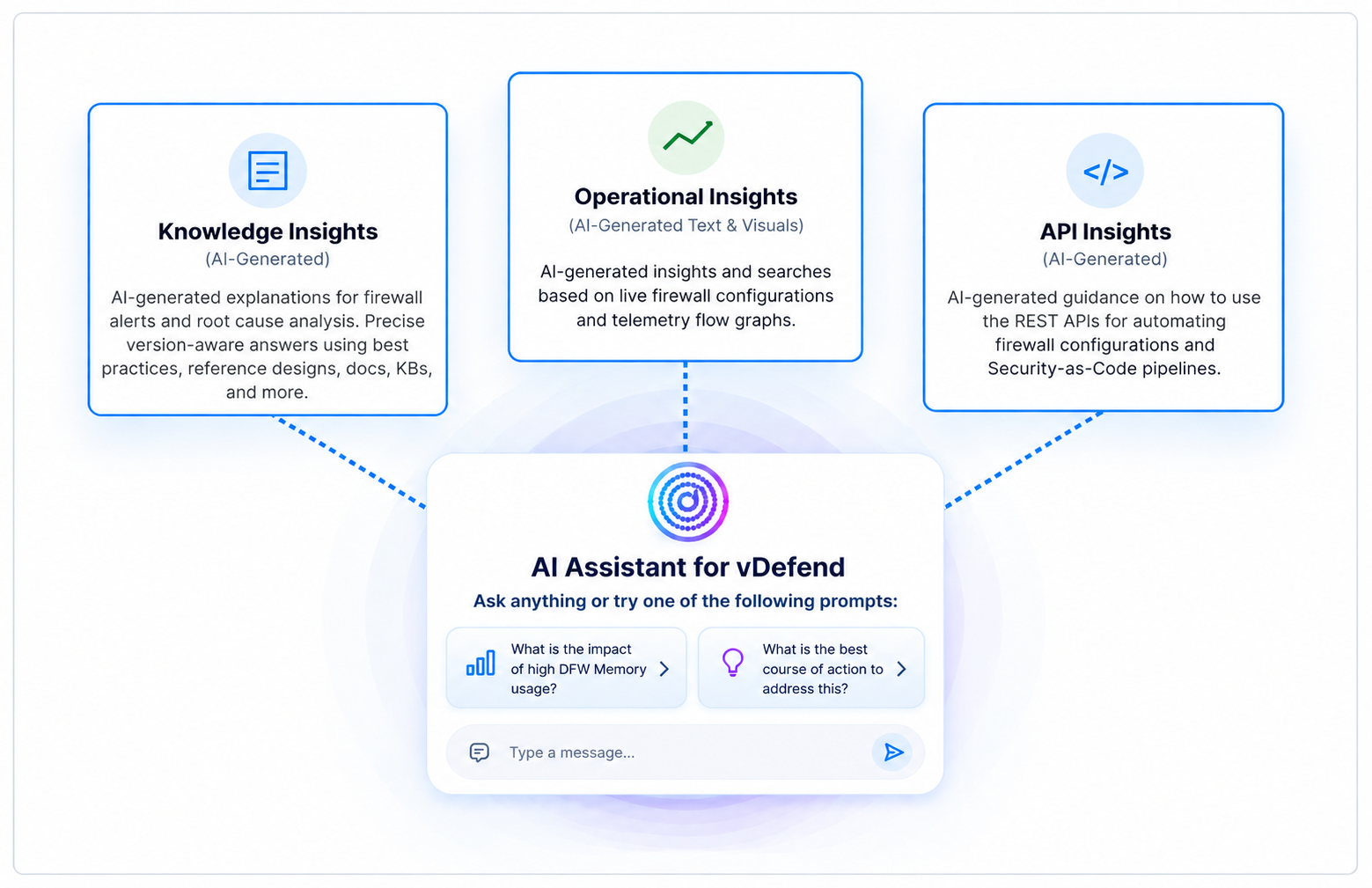
Figure 1: AI Assistant for vDefend
The solution structures its core capabilities into three primary insight engines:
1. Knowledge Insights
Delivers version-specific, authoritative guidance for firewall planning, configuration best practices, design scale limits, and root-cause alerts based on official VMware documentation, reference architectures, and knowledge base articles. It helps answer questions. It helps answer questions regarding how to create firewall configurations according to best practices, such as Firewall Group and Tag creation, ApplyTo field usage, and CLI host troubleshooting commands.
2. Operational Insights
Provides AI-generated insights based on live firewall configurations, real-time policy violations, and firewall alerts, making it easy to detect shadowed rules and traffic bottlenecks.
3. API Insights
Translates UI screens and administrative intent into REST API calls for vDefend and SSP, offering full UI contextual awareness and powering seamless API Insights to facilitate the automation of firewall tasks.
Activating AI Assistant for vDefend
Operating natively within Security Services Platform for vDefend (SSP 5.2), the AI Assistant for vDefend provides an embedded chat interface accessible directly from any operational screen without requiring a browser plugin. AI Assistant for vDefend requires internet connectivity for two purposes:
1. AI Assistant for vDefend leverages a Large Language Model (LLM), including Google Gemini and Microsoft Azure OpenAI, which understands, summarizes, and generates content in response to user prompts. The system enforces strict data privacy boundaries:
Data is sent to the cloud only after your explicit consent. Any transmitted data is used strictly to answer your specific prompts.
Your data is never used to train or retrain the underlying LLM, and the LLM does not persist your data.
2. AI Assistant for vDefend can periodically download new AI Assistant bundles from vDefend Threat Intelligence Service (VTIS). These bundles contain updates to vDefend technical documentation, knowledge base articles, and APIs for operational insights.

Figure 2: AI Assistant for vDefend High-Level Architecture
Using AI Assistant for vDefend for Firewall Monitoring and Troubleshooting
To streamline firewall operations, AI Assistant for vDefend provides version-aware design guidance and offers real-time API and configuration insights to improve security operations efficiency.
Before introducing new security policies across production hosts, the infrastructure team can utilize the AI Assistant to validate system limits, assess the operational health of the firewall components, and run host capacity checks prior to enabling IDPS Turbo Mode.
-
Prompt: “Run a DFW health check.”
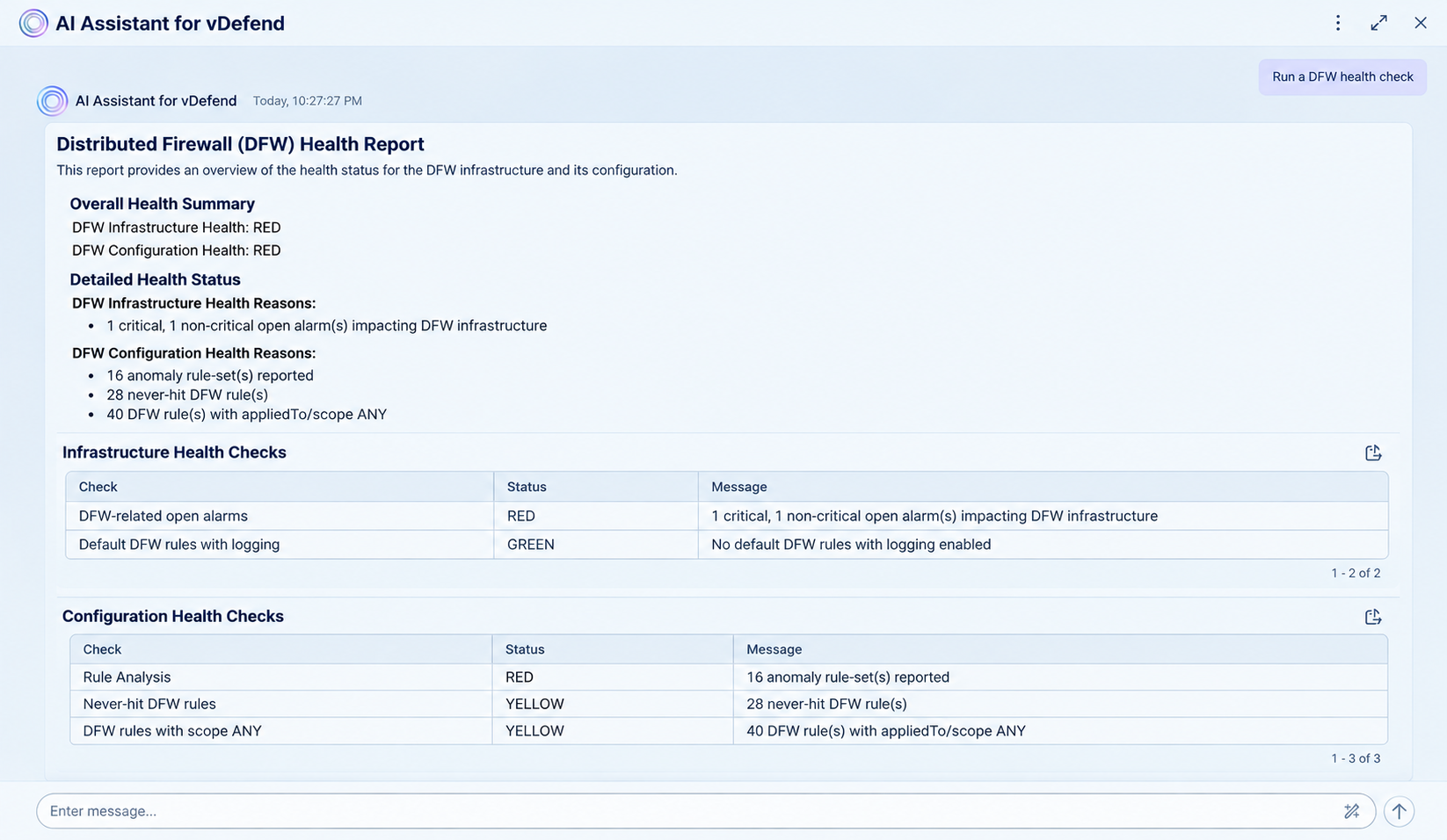
The AI Assistant runs pre-checks, inspects host CPU/memory allocations, kernel states, and software builds, surfacing open alarms and rule anomalies, and providing operational clearance or clear failure details before enabling IDPS Turbo Mode. Admins can also query about scale enhancements between vDefend versions or request guidance on group cleanup.
When faced with a ticket inquiring why a particular virtual machine cannot talk to another, the security administrator can utilize the AI Assistant to investigate lateral communication paths and verify that the Firewall is not contributing to the problem. Instead of filtering through raw IPFIX flow tables or logs, the security administrator simply prompts:
-
Prompt: “Can you show me a flow graph of what LON.PROD.IT.VDI.14 has been talking to over the last 30 days?”
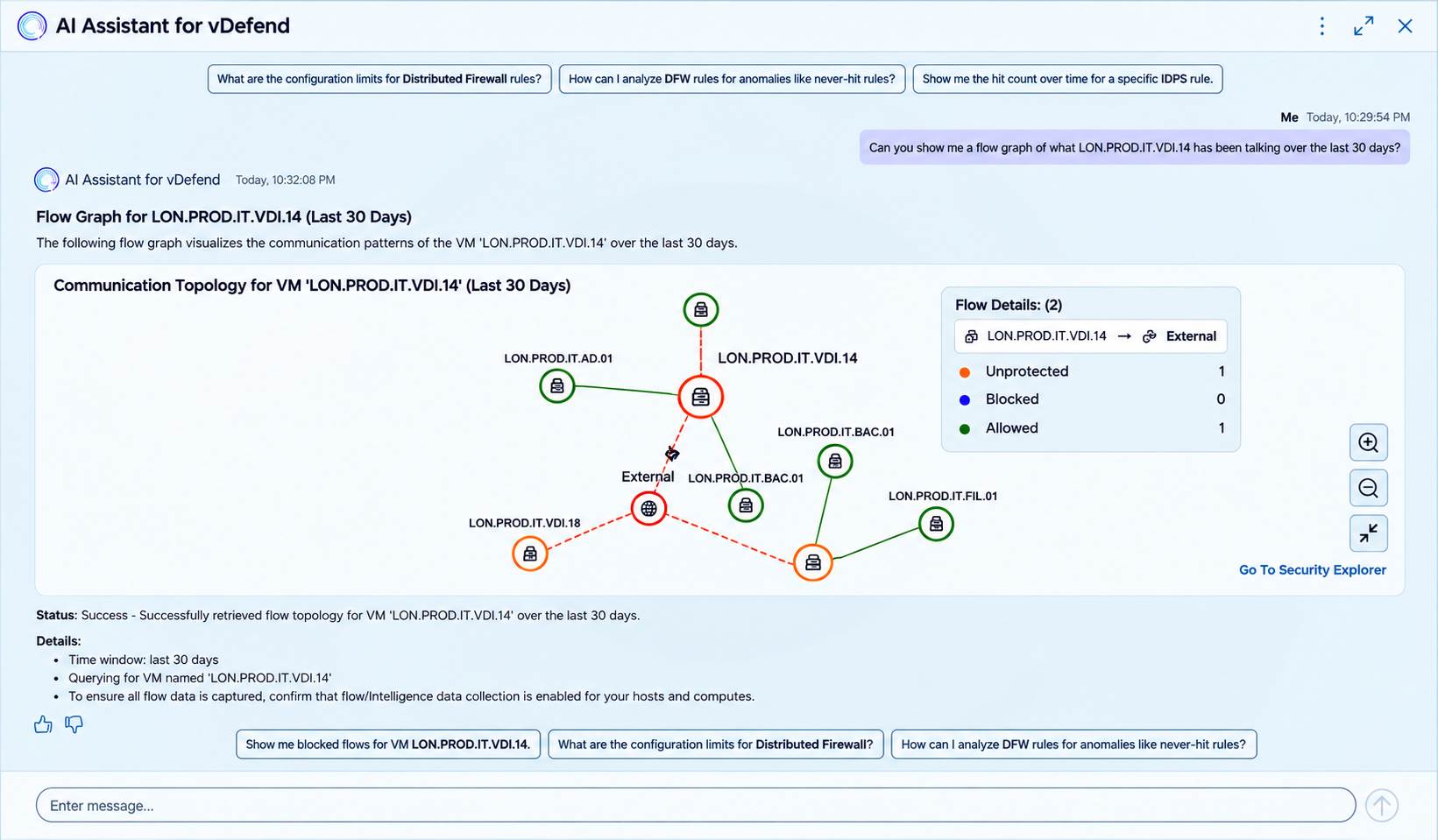
The AI Assistant renders a dynamic flow visualizer mapping active connections from LON.PROD.IT.VDI.14 and evaluates effective DFW rules to confirm exact drop/allow reasons.
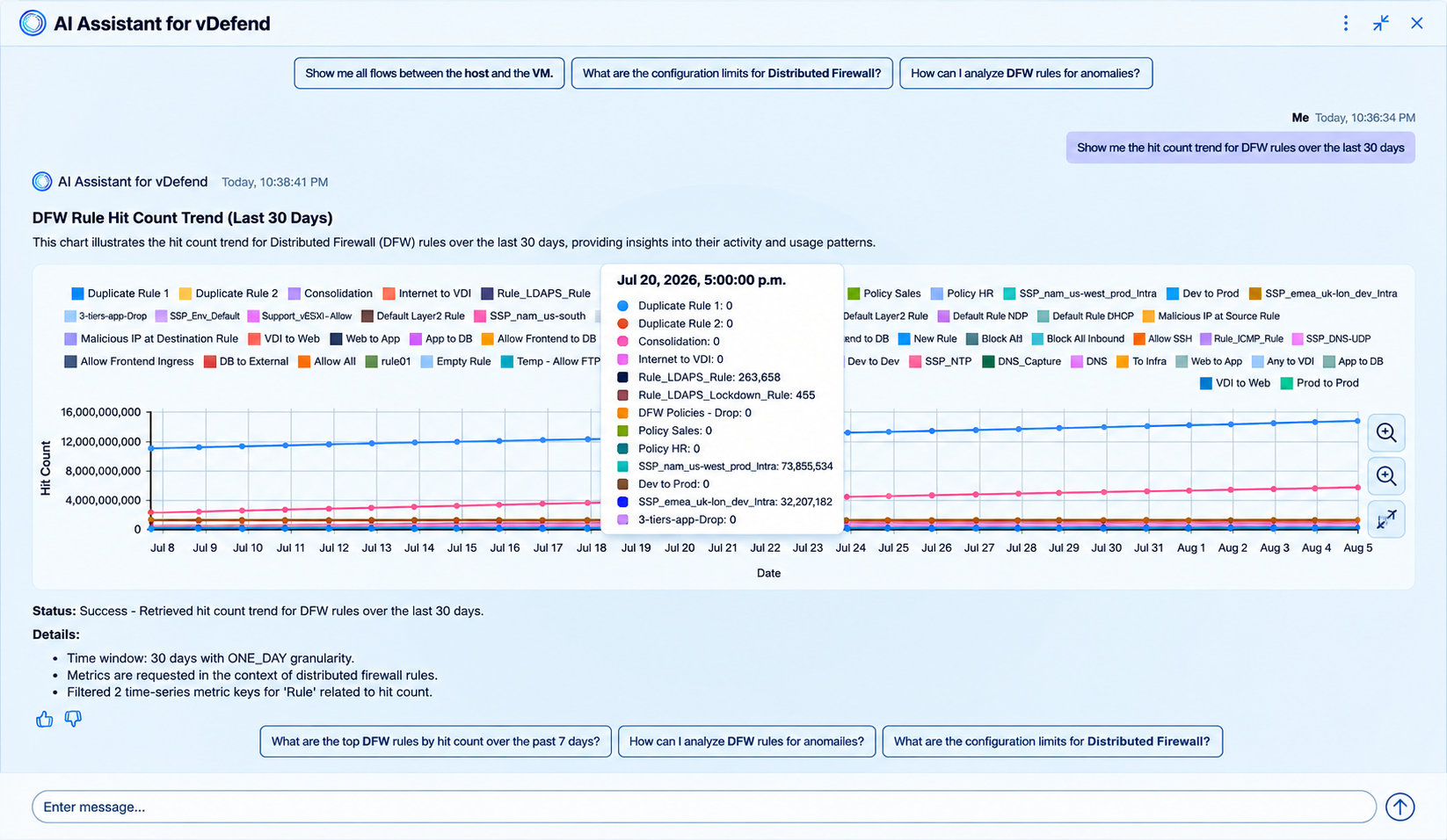
Security administrators can also use AI Assistant for reviewing and optimizing their firewall rules. For example, they can generate reports on rule-hit count trends over a 30-day timeline to highlight stale or shadow rules.
-
Prompt: “Show me the hit count trend for DFW rules over the last 30 days.”
For organizations planning to use vDefend APIs to build automation scripts for firewall configuration tasks, or to create their own custom monitoring dashboards for firewall operational health, the AI Assistant for vDefend can speed up the process of finding the right APIs for the task based on the specified automation goals.
As an example, a developer who wants to build a custom dashboard can prompt the AI Assistant directly from the active UI dashboard:
-
Prompt: “I want to build a similar dashboard as top 5 hit rules, what APIs were used on this page?”
The AI Assistant inspects the active UI context and outputs exact REST API endpoints, request paths, parameters, and JSON response bodies for vDefend and SSP APIs, ready to paste into Ansible or Python automation playbooks.
Using AI Assistant for vDefend for Threat Defense
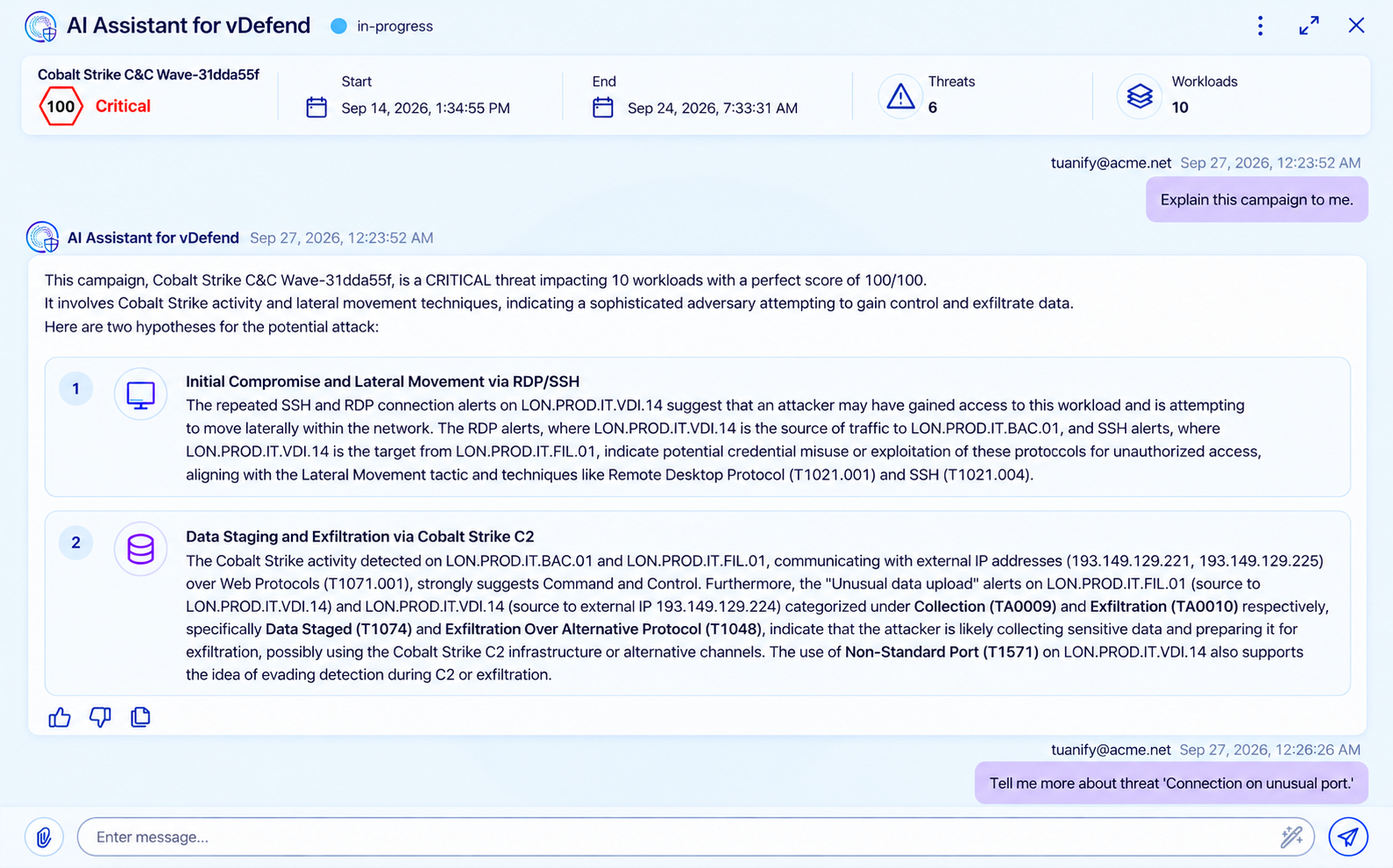
In addition to firewall operations and troubleshooting, AI Assistant for vDefend can also enable Security Operations Center (SOC) analysts to correlate complex detection signals and investigate multi-context threat campaigns through a unified, GenAI-assisted interface.
By transforming technical detection data—such as Data Exfiltration or ransomware signatures—into plain-English explanations, the assistant allows virtualization, network security, and SOC teams to rapidly grasp the scope, attack chain, and impact of active threats across workloads.
-
Prompt: “Explain this campaign to me.”
Beyond plain-language explainability, AI Assistant for vDefend – Threat Defense streamlines incident response through automated remediation workflows and a collaborative user experience. When security events are confirmed as true positives, the AI Assistant recommends tailored mitigation strategies—ranging from targeted interventions to comprehensive network isolation—while ensuring security experts retain final oversight before policies are enforced. With features such as chat exports, prompt recommendations, and multi-user workflow management, the assistant democratizes threat hunting and accelerates defense posture without requiring complex point-product integrations.
Conclusion
AI Assistant for vDefend empowers security teams with Generative AI assistance to optimize lateral security operations. Get started with AI Assistant for vDefend to realize the following benefits for simplifying zero trust security and accelerating threat defense:
- Improves user experience – interact in simple natural language for firewall troubleshooting
- Enhances operational visibility – instant access to detailed operational insights
- Reduces incident response time – threat explainability and proactive identification of threat remediation actions
By integrating intelligent capability natively within the platform, it streamlines day-to-day firewall troubleshooting and accelerates threat investigations and remediations.
Learn More
-
- Video: AI Assistant for VMware vDefend – Firewall Demo
- AI HOL Lab: Hands-on Lab HOL-2770-05- AI Assistant for vDefend
- All HOL: vDefend and Avi Update Labs
- Blog: VMware vDefend Advances Multi-Layer Lateral Security, Deployment Automation and Performance for the Frontier AI Era
- Techdoc: Broadcom Technical Documentation: AI Assistant for VMware vDefend
Special thanks to Stijn Vanveerdeghem for his support and contribution.