
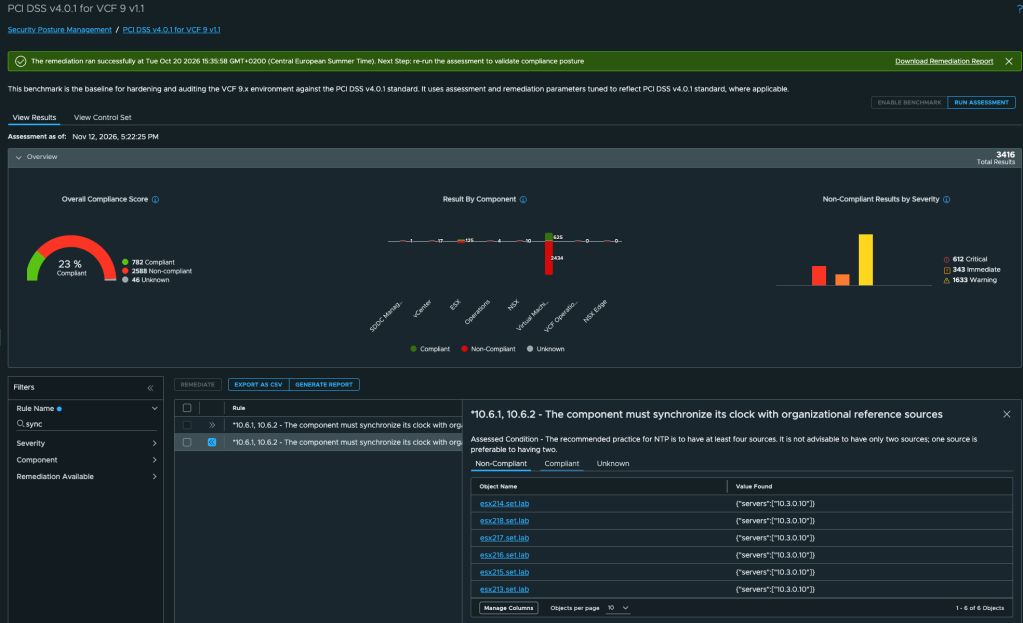
VMware Cloud Foundation (VCF) Operations checks my lab against its compliance rules and shows me what has drifted. That’s fine in the UI, but I wanted to do the same from a script: pick one setting, check it, fix it, check again. In VCF 9.1 that work is done by Salt, and Salt comes with an API, the VMware Salt for VCF Components API. This post is what I worked out while using it to fix NTP on six ESX hosts. Some of it is in the docs. Some of it I had to dig out of the job history.
By the end you’ll have:
- A bearer token for the API
- A few read-only calls to look around (minions, Salt environments, files, and jobs)
- An NTP spec for ESX, drafted with a community generator and pushed to the Salt file server
- An assessment and a remediation run against the ESX hosts behind a vCenter
Where this API fits
The configuration compliance side of VCF, Security Posture Management (SPM) in VCF Operations, is powered by Salt. When VCF Operations assesses your environment, it doesn’t log in to vCenter or NSX itself. It sends Salt jobs to a RaaS server and Salt minions running on the VCF components perform assessment and remediation. The Salt for VCF Components API is the API of that RaaS server, so whatever SPM does, you can do yourself.
A few things that helped me get a picture of it:
- RaaS runs as pods in the VSP Kubernetes cluster, in the
salt-raasnamespace. You reach it through the fleet LCM FQDN at/raas/rpc. The docs write this ashttps://<vcfms-hostname>/raas/rpc; in my lab it isfleetlcm.gpu.set.lab. - Minions run on the components themselves: vCenter, the NSX Managers, SDDC Manager, the VCF Operations nodes, and the cloud proxy, plus one minion pod inside VSP.
- ESX hosts have no minions. The vCenter minion checks and fixes them through vCenter. That decides how you target everything later.
- The compliance content lives in a Salt environment called
vcfsecops, not in the usualbase. - The nightly assessment is a
state.applyof a state calledops_assess_u, with a pillar that specifies which objects to check and the desired values. You can read those jobs using the API, and that was the most useful thing I found.
Authentication
There are three hops: an API token from VCF Operations, an exchange at the VCF instance’s Identity Broker (vIDB) for a bearer token, and then providing that bearer token on every RaaS call.
1. Create an API client in VCF Operations
Prerequisite: VCF SSO must be enabled and configured before you can generate an API token.
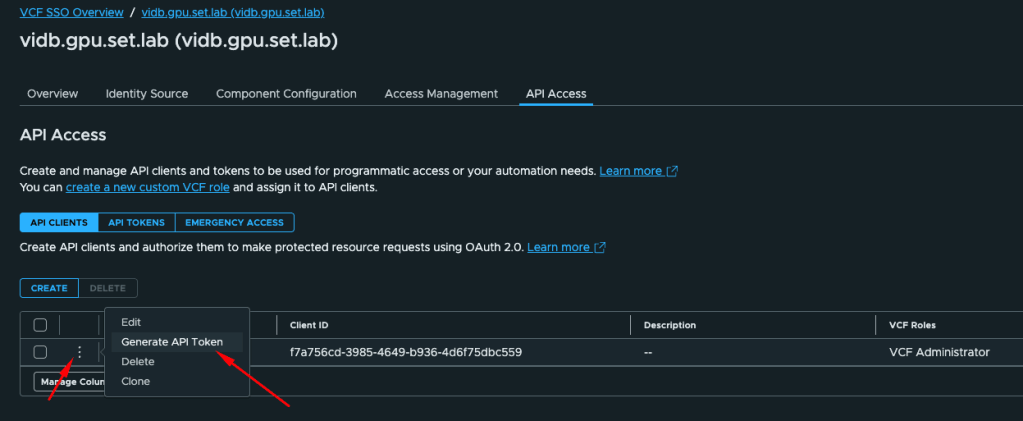
In VCF Operations go to Manage > Fleet Management > Identity and Access > Identity Broker > API Access. Create an API client with the Config Admin role (VCF Administrator includes it by default), then generate a token in the UI and copy it. It starts with vidb_. Treat it like a password.
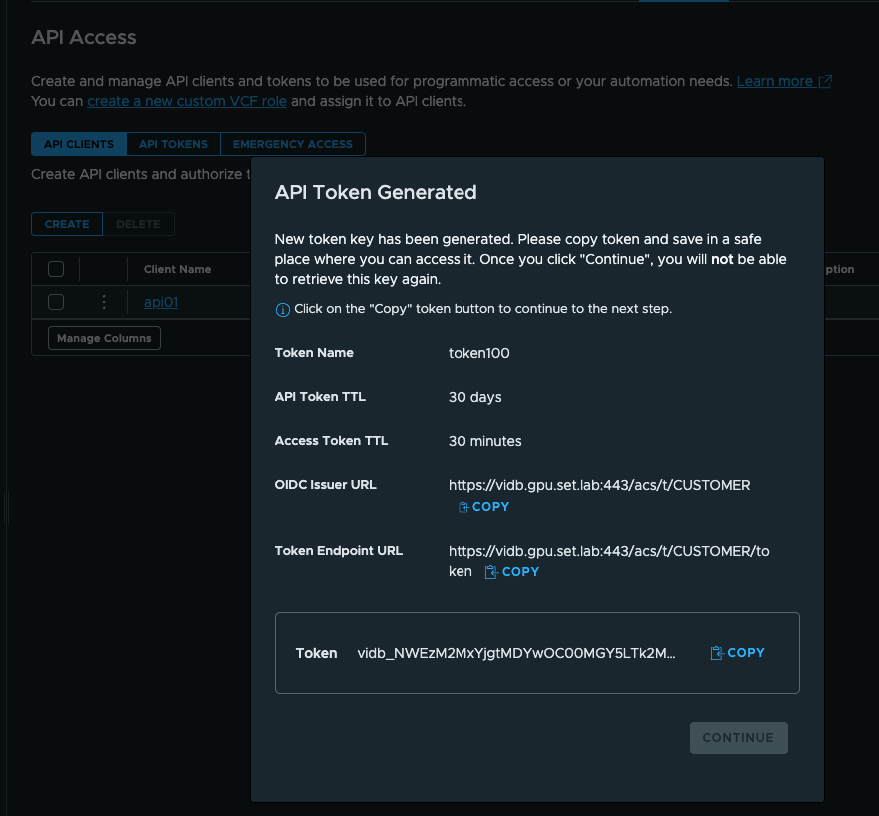
2. Exchange it for a bearer token
The vIDB token endpoint takes the API token with a custom grant type and hands back an OAuth access token:
|
1 2 3 4 5 6 7 8 9 |
export VIDB=vidb.gpu.set.lab export RAAS=fleetlcm.gpu.set.lab export VIDB_API_TOKEN='vidb_...' TOKEN=$(curl -sk -X POST "https://$VIDB/acs/t/CUSTOMER/token" \ -H 'Accept: application/json;charset=UTF-8' \ -H 'Content-Type: application/x-www-form-urlencoded' \ --data grant_type=urn:custom:vcf:params:oauth:grant-type:api-token \ --data-urlencode "api_token=$VIDB_API_TOKEN" | jq -r .access_token) |
CUSTOMER in the path is the tenant, and it worked as-is for me. The access token is short-lived, so when calls start failing on auth, run the exchange again. I use -k only because my lab runs on self-signed certificates.
3. Call RaaS
Every call is a POST to /raas/rpc with a JSON body that names a resource, a method, and its keyword arguments. A small shell helper saves a lot of typing:
|
1 2 3 4 5 6 7 |
raas() { curl -sk -X POST "https://$RAAS/raas/rpc" \ -H "Authorization: Bearer $TOKEN" \ -H "Content-Type: application/json" \ -H "Accept: application/json" \ -d "$1" } |
Pass it a JSON string, or @file.json to send a file. The response always has the same envelope:
|
1 |
{ "riq": 216948794121888, "ret": { "...": "..." }, "error": null, "warnings": [] } |
ret holds the result and error tells you what went wrong. These are the error codes I ran into:
| Code | Message | What it meant for me |
|---|---|---|
| 3001 | RPC func ‘<resource>.<method>’ was not found | The method doesn’t exist on your build. The “latest” docs can be ahead of what you run. |
| 3004 | Request validation failure (the detail lists the bad fields) | The method exists, you’re just missing arguments. Handy for checking a method without changing anything. |
| 5000 | Internal Error | Something broke on the server. Read the RaaS pod logs. |
For a 5000, or when calls just hang, the RaaS logs tell you what happened. I ran these on a VSP node:
|
1 2 |
kubectl -n salt-raas get pods kubectl -n salt-raas logs -f {raas-pod} --tail=100 |
I also keep all of these calls in a VS Code REST Client file, which is nicer for clicking through responses. The token request gets a name, and the other requests reuse its result:
|
1 2 3 4 5 6 7 8 9 |
### Get bearer token # @name gettoken POST https://{{vidbFqdn}}/acs/t/CUSTOMER/token Content-Type: application/x-www-form-urlencoded grant_type=urn:custom:vcf:params:oauth:grant-type:api-token&api_token={{vidbApiToken}} ### @token = {{gettoken.response.body.access_token}} |
The whole REST Client file is in the GitHub repo for this post:
https://github.com/denysaleksandrov/vfc-salt-api-test
Looking around
Before changing anything, I want to know what’s connected, which files are on the Salt side, and what has been running. All of the calls in this section are read-only.
Which minions are present
Presence shows which minions are connected, with the minion ID next to the host name:
|
1 2 3 4 5 6 7 8 9 10 11 12 13 |
raas '{"resource":"minions","method":"get_minion_presence","kwarg":{"status":"present"}}' \ | jq -r '.ret.results[] | [.host, .minion, .status] | @tsv' salt-minion-55cd4df7db-w84lj ed35318e-0da5-43a1-95bb-a692eaaf1272 present nsx03 00c4b75e-97bb-4e39-928c-5c55190ae3cd present ops02 3e539c47-06b9-4527-97f0-746053059bb6 present ops01 e2e0da68-5036-410e-b01d-cd5ece515828 present vc01 349eea8d-e7c8-47f6-b2ea-a197ea245562 present collector 97805429-66a3-474e-bdc6-08b28def8a70 present sddcm e6b92638-46a8-4bc2-a6b2-e8ad19defbf3 present nsx04 a94ac790-0d99-4d0f-a251-85b76496b9a5 present ops03 9d93bcf7-fc2f-4a97-970e-24c04a675b66 present nsx02 b85d6a5f-b0ba-464f-b3c4-680fa00e8702 present |
ret.get_minions lists the minion IDs grouped by Salt master:
|
1 2 3 4 5 6 7 8 9 10 11 12 13 14 15 16 |
raas '{"resource":"ret","method":"get_minions"}' | jq .ret { "salt-master-5d1353b8-aa1a-463d-b00c-eeb680f93b0e": [ "a94ac790-0d99-4d0f-a251-85b76496b9a5", "9d93bcf7-fc2f-4a97-970e-24c04a675b66", "b85d6a5f-b0ba-464f-b3c4-680fa00e8702", "ed35318e-0da5-43a1-95bb-a692eaaf1272", "00c4b75e-97bb-4e39-928c-5c55190ae3cd", "3e539c47-06b9-4527-97f0-746053059bb6", "e2e0da68-5036-410e-b01d-cd5ece515828", "349eea8d-e7c8-47f6-b2ea-a197ea245562", "97805429-66a3-474e-bdc6-08b28def8a70", "e6b92638-46a8-4bc2-a6b2-e8ad19defbf3" ] } |
minions.get_minion_details returns the grains of every minion when you call it without arguments. Two grains matter most here: fqdn, and vcfops_resource_kind, which says what the component is:
|
1 2 3 4 5 6 7 8 9 10 11 12 13 |
raas '{"resource":"minions","method":"get_minion_details","kwarg":{}}' \ | jq -r '.ret.results[] | [.id, .grains.vcfops_resource_kind, .grains.fqdn] | @tsv' 00c4b75e-97bb-4e39-928c-5c55190ae3cd nsxm nsx03.gpu.set.lab 349eea8d-e7c8-47f6-b2ea-a197ea245562 vcenter vc01.gpu.set.lab 3e539c47-06b9-4527-97f0-746053059bb6 ops ops02.gpu.set.lab 97805429-66a3-474e-bdc6-08b28def8a70 cloud-proxy collector.gpu.set.lab 9d93bcf7-fc2f-4a97-970e-24c04a675b66 ops ops03.gpu.set.lab a94ac790-0d99-4d0f-a251-85b76496b9a5 nsxm nsx04.gpu.set.lab b85d6a5f-b0ba-464f-b3c4-680fa00e8702 nsxm nsx02.gpu.set.lab e2e0da68-5036-410e-b01d-cd5ece515828 ops ops01.gpu.set.lab e6b92638-46a8-4bc2-a6b2-e8ad19defbf3 sddcm sddcm.gpu.set.lab ed35318e-0da5-43a1-95bb-a692eaaf1272 vmsp salt-minion-55cd4df7db-w84lj |
You can also filter on a grain, and list the values a grain has across all minions:
|
1 2 3 4 5 6 |
raas '{"resource":"minions","method":"get_minion_details", "kwarg":{"grains":{"vcfops_resource_kind":"vcenter"}}}' \ | jq -r '.ret.results[] | [.id, .grains.fqdn] | @tsv' raas '{"resource":"minions","method":"get_minion_grain_values", "kwarg":{"key":"vcfops_resource_kind"}}' | jq -c .ret |
In my lab the kinds are vcenter, nsxm, ops, sddcm, cloud-proxy and vmsp. No ESX hosts, as expected.
Salt environments and files
|
1 |
raas '{"resource":"fs","method":"get_envs"}' | jq .ret |
On my system that returns ["vcfsecops"]. To list the files in it:
|
1 2 3 4 5 6 7 8 9 10 11 12 13 14 15 16 |
raas '{"resource":"fs","method":"get_env","kwarg":{"saltenv":"vcfsecops"}}' \ | jq -r '.ret[] | [.path, .content_type] | @tsv' /_utils/nsxt_edge.py text/plain /_utils/esxi.py text/plain /ops_assess_u.sls application/x-yaml /ops_remed_u.sls application/x-yaml /_utils/cp.py text/plain /_utils/vro.py text/plain /_utils/vra.py text/plain /_utils/hcx.py text/plain /_utils/vcenter.py text/plain /_utils/sddc_manager.py text/plain /_utils/nsxt_manager.py text/plain /_utils/avi.py text/plain /_utils/ls.py text/plain /_states/ops.py text/plain |
You’ll see ops_assess_u.sls, ops_remed_u.sls, _states/ops.py and a set of _utils/*.py files, one per product. To read a file use fs.get_file. The contents come back base64-encoded unless the file was stored as text/plain:
|
1 2 3 |
raas '{"resource":"fs","method":"get_file", "kwarg":{"saltenv":"vcfsecops","path":"/ops_assess_u.sls"}}' \ | jq -r .ret.contents | base64 -d |
That’s the state VCF Operations applies for its assessments, and it’s worth reading:
|
1 2 3 4 5 6 7 8 9 10 11 12 13 14 15 16 17 18 |
{% set saltenv="vcfsecops" %} {% do salt["saltutil.sync_all"](saltenv=saltenv, refresh=True) %} install_config_modules: ops.pkg_install: - saltenv: {{saltenv}} {% set minion_id = grains['id'] %} {% set ids = pillar['object_id'][minion_id] %} {% set object_type = pillar.get("object_type") %} {% set target_control_config = pillar.get("desired_spec") %} compliance_{{object_type}}: vmware_compliance_control.check_control: - control_config: {{ target_control_config | tojson | safe }} - product: {{ object_type }} {% if object_type in ["esxi", "vm", "nsxt_edge"] %} - ids: {{ ids }} {% endif %} - require: - install_config_modules |
It syncs the custom modules from vcfsecops, installs the config-modules package where a product needs one, and then calls vmware_compliance_control.check_control.
Everything comes from the pillar: object_type, object_id and desired_spec. For ESX, VMs and NSX Edges it also passes ids, the list of objects to check. On my build ops_remed_u.sls is the same file. Whether it only assesses or also fixes comes down to Salt’s test flag, as you’ll see below.
Jobs
There are a few ways to look at jobs, and they show different things. job.get_jobs lists saved job definitions. Mine is empty, because VCF Operations doesn’t save its jobs there:
|
1 |
raas '{"resource":"job","method":"get_jobs","kwarg":{}}' jq .ret |
The job history lives under ret.get_jids gives the recent job IDs with the function and the user, and get_jid gives the per-minion return of one job:
|
1 2 3 4 5 6 7 8 9 10 11 12 13 |
raas '{"resource":"ret","method":"get_jids","kwarg":{"limit":"50"}}' \ | jq -r '.ret | to_entries[] | [.key, .value.fun, .value.user] | @tsv' 20261112154759893040 state.apply master_salt-master-5d1353b8-aa1a-463d-b00c-eeb680f93b0e 20261112154759878819 state.apply master_salt-master-5d1353b8-aa1a-463d-b00c-eeb680f93b0e 20261112154759864913 state.apply master_salt-master-5d1353b8-aa1a-463d-b00c-eeb680f93b0e 20261112154759849769 state.apply master_salt-master-5d1353b8-aa1a-463d-b00c-eeb680f93b0e 20261112154759830857 state.apply master_salt-master-5d1353b8-aa1a-463d-b00c-eeb680f93b0e 20261112154759815920 state.apply master_salt-master-5d1353b8-aa1a-463d-b00c-eeb680f93b0e 20261112154759797240 state.apply master_salt-master-5d1353b8-aa1a-463d-b00c-eeb680f93b0e 20261112154732417375 saltutil.refresh_grains master_salt-master-5d1353b8-aa1a-463d-b00c-eeb680f93b0e 20261112153232155513 saltutil.refresh_grains master_salt-master-5d1353b8-aa1a-463d-b00c-eeb680f93b0e … |
Pick a JID from that list to see what each minion returned:
|
1 |
raas '{"resource":"ret","method":"get_jid","kwarg":{"jid":"20261112010353733411"}}' | jq . |
Then there’s ret.get_returns, which is the one I’d point anyone to first. Filter on state.apply and every result includes fun_args, which is the exact pillar VCF Operations sent: object type, object IDs and the full desired spec.
|
1 2 3 4 5 6 7 8 |
raas '{"resource":"ret","method":"get_returns","kwarg":{"fun":"state.apply","limit":50}}' \ | jq -c '.ret.results[] | {jid, type: .fun_args[1].pillar.object_type?, ids: .fun_args[1].pillar.object_id?}' {"jid":"20261112154759893040","type":"vrops","ids": { "3e539c47-06b9-4527-97f0-746053059bb6":["3e539c47-06b9-4527-97f0-746053059bb6"], "9d93bcf7-fc2f-4a97-970e-24c04a675b66":["9d93bcf7-fc2f-4a97-970e-24c04a675b66"], "e2e0da68-5036-410e-b01d-cd5ece515828":["e2e0da68-5036-410e-b01d-cd5ece515828"]}} |
Whenever I wasn’t sure what a call should look like, I found the job VCF Operations ran for the same object type and copied it.
Finding the IDs you need
Two kinds of ID go into every compliance call for ESX: the vCenter minion ID and one or more ESX host IDs. I got both wrong at least once, so here’s where they come from.
The vCenter minion ID
Minion IDs are UUIDs, not host names. In my lab, the vCenter minion ID is the same value as its vcfops_resource_id grain. The quickest way to find it is the grain filter from the previous section, which gives one line per vCenter:
|
1 |
349eea8d-e7c8-47f6-b2ea-a197ea245562 vc01.gpu.set.lab |
It’s used in two places:
- as the target of the job:
"tgt": {"*": {"tgt": "L@<vcenter-minion-id>", "tgt_type": "compound"}}, - as the key of the pillar’s
object_idmap, with the ESX hosts as its value.
Because object_id is a map, one call can cover several vCenters: one key per vCenter minion, each with its own list of hosts. The state looks up its own minion ID in that map, so every minion you target needs a key there.
ESX host IDs
This is where I lost the most time. My first guess was the managed object ID from the vCenter URL, host-25 for esx214. The assessment came back with an overall COMPLIANT and I was pleased for about a minute, until I looked at the per-host result:
|
1 2 3 4 |
"host-25": { "errors": ["Host 'host-25' is not managed by this vCenter."], "status": "SKIPPED" } |
For ESX, the IDs are the host names as vCenter and VCF Operations know them. In my lab those are the FQDNs, esx213.set.lab to esx218.set.lab. VMs are different again: for them VCF Operations sends managed object IDs like vm-31. The quickest way to get the host list is, once more, a job VCF Operations already ran:
|
1 2 3 4 5 6 7 8 9 10 11 12 |
raas '{"resource":"ret","method":"get_returns","kwarg":{"fun":"state.apply","limit":50}}' \ | jq -c '[.ret.results[] | select(.fun_args[1].pillar.object_type? == "esxi")] | max_by(.fun_args[1].pillar.desired_spec.compliance_config.esxi | length) | .fun_args[1].pillar.object_id' {"349eea8d-e7c8-47f6-b2ea-a197ea245562":[ "esx213.set.lab", "esx214.set.lab", "esx215.set.lab", "esx216.set.lab", "esx217.set.lab", "esx218.set.lab"]} |
(The max_by picks the job with the most settings in its spec, so it’s one of VCF Operations’ runs and not one of your own test runs.)
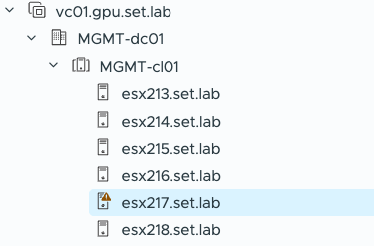
Also note that a skipped host doesn’t fail the run. Always read the per-host status, not only the summary.
What VCF Operations sends per object type
Here’s what I found in the job history for each object type, in case you want to go beyond ESX. The grain kind and the object type don’t always use the same name.
| object_type | Grain kind | Key in object_id | IDs in the list |
|---|---|---|---|
| esxi | (no minion) | vCenter minion | ESX host names (FQDNs) |
| vm | (no minion) | vCenter minion | VM managed object IDs (vm-NNN) |
| vcenter | vcenter | vCenter minion | the vCenter minion ID |
| nsxt_manager | nsxm | each NSX Manager minion | that minion’s ID |
| sddc_manager | sddcm | SDDC Manager minion | that minion’s ID |
| vrops | ops | each VCF Operations node minion | that minion’s ID |
| cp | cloud-proxy | cloud proxy minion | that minion’s ID |
| vmsp | vmsp | VSP salt-minion pod | that minion’s ID |
| vcfa | (no minion) | VSP salt-minion pod | a UUID (I assume the VCF Automation instance) |
Drafting the NTP spec
For the desired values I used the Salt for VCF Component State & Jinja File Generator from Salt for VCF github page. You pick a component, pick configuration IDs from a list and fill in the values, and it gives you a Salt state file and a Jinja file with the settings. It saved me a lot of digging, mostly because it lists every configuration ID per component with its title and a sensible starting value.
For ESX, NTP is three configuration IDs:
- 147: ESX host must configure NTP time synchronization.
- 148: The ESX host must configure NTP Service startup policy.
- 149: Start NTP service on the ESX host.
I started with 147 alone and two NTP servers.
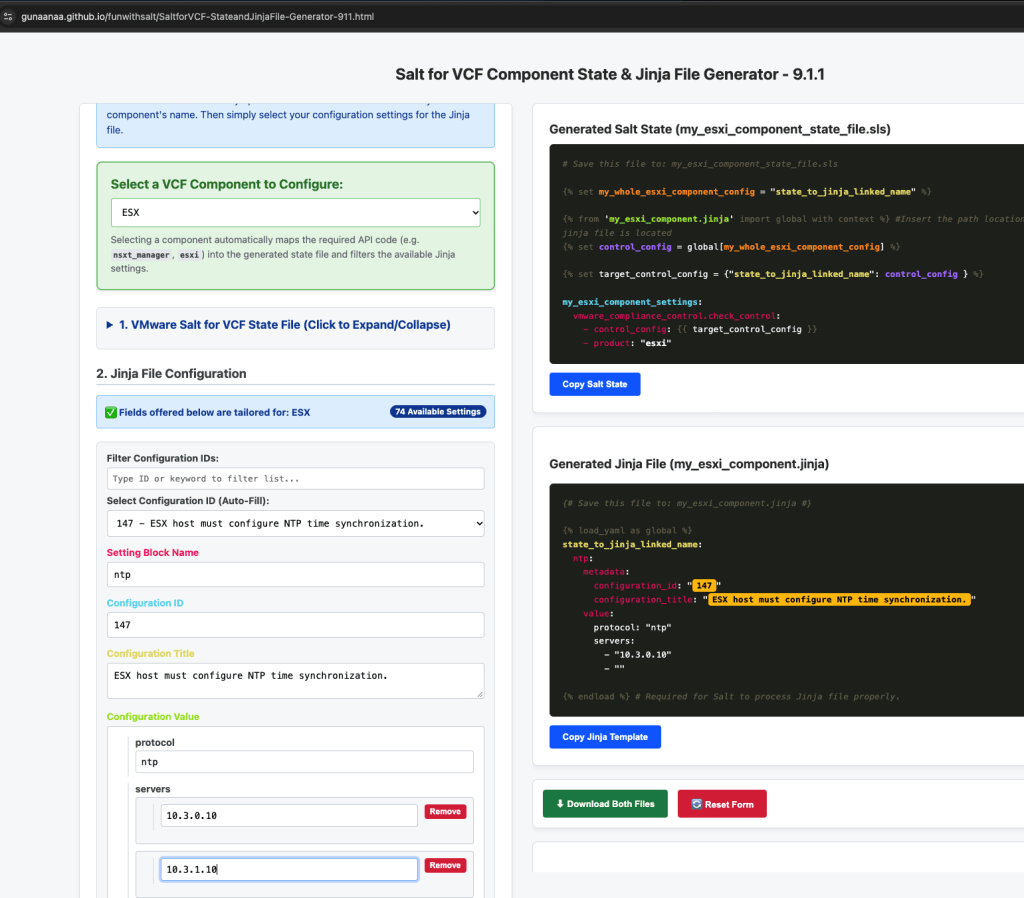
Before pushing, I changed two names, so the spec matches what the compliance module expects. It is also the shape VCF Operations sends:
- The top-level key. The generator uses
state_to_jinja_linked_nameas the link between the state and the Jinja file.check_controlwantscompliance_configthere, with the product (esxi) one level below it. With any other name the run ends with Desired spec is empty or not in correct format. - The setting name. The module has its own names for settings, and the one for 147 is
ntp_config. The easiest place to find them is a VCF Operations assessment job:
|
1 2 3 4 5 6 7 |
raas '{"resource":"ret","method":"get_returns","kwarg":{"fun":"state.apply","limit":50}}' \ | jq -r '[.ret.results[] | select(.fun_args[1].pillar.object_type? == "esxi")] | max_by(.fun_args[1].pillar.desired_spec.compliance_config.esxi | length) | .fun_args[1].pillar.desired_spec.compliance_config.esxi | to_entries[] | [.value.metadata.configuration_id, .key, (.value.value | tojson)] | @tsv' |
For NTP, that gives these names. The values are the ones I want:
| Config ID | Setting name | Value |
|---|---|---|
| 147 | ntp_config | {“protocol”: “ntp”, “servers”: [“10.3.0.10”, “10.3.1.10”]} |
| 148 | ntp_service_startup_policy | {“service_policy”: “on”} |
| 149 | ntp_service_config | {“service_running”: true} |
protocol is required for ntp_config. If you leave it out, the host reports a validation error. The generator already fills it in.
Here are the two files I ended up with. The Jinja file holds the spec:
|
1 2 3 4 5 6 7 8 9 10 11 12 13 14 15 |
{# Save this file to: esx_component.jinja #} {% load_yaml as global %} compliance_config: esxi: ntp_config: metadata: configuration_id: "147" configuration_title: "ESX host must configure NTP time synchronization." value: protocol: "ntp" servers: - "10.3.0.10" - "10.3.1.10" {% endload %} {# Required for Salt to process Jinja file properly. #} |
The state file loads it and passes it to the compliance check:
|
1 2 3 4 5 6 7 8 9 10 11 |
{% set esx_component_config = "compliance_config" %} {% from 'esx_component.jinja' import global with context %} #Insert the path location where your jinja file is located {% set control_config = global[esx_component_config] %} {% set target_control_config = {"compliance_config": control_config } %} esx_component_settings: vmware_compliance_control.check_control: - control_config: {{ target_control_config }} - product: "esxi" |
Push the files
Files go to the Salt file server with fs.save_file. The docs say text files can be sent as plain text, but my build base64-decodes whatever arrives in contents. A plain-text upload got me a 5000 and a binascii.Error in the RaaS log. So I base64-encode everything:
|
1 2 3 4 5 6 7 8 9 10 11 12 13 14 15 |
push() { # push {local file} {path in vcfsecops} raas "$(jq -nc --arg p "$2" --arg c "$(base64 < "$1" | tr -d '\n')" \ '{resource:"fs", method:"save_file", kwarg:{saltenv:"vcfsecops", path:$p, contents:$c}}')" } push esx_component.jinja /esx_component.jinja push esx_ntp.sls /esx_ntp.sls raas '{"resource":"fs","method":"get_env","kwarg":{"saltenv":"vcfsecops"}}' \ | jq -r '.ret[] | [.path, .content_type] | @tsv' … /esx_component.jinja /esx_ntp.sls |
Assess
For the actual run, I went back to the built-in states, ops_assess_u and ops_remed_u, and passed my spec through the pillar, the same way VCF Operations does. The generated state doesn’t pass ids, which ESX needs. The Jinja file is still where I keep the spec; yq turns its YAML into the JSON for the pillar:
|
1 2 3 4 5 6 7 8 9 10 11 12 13 14 15 16 17 18 19 20 |
VC_MINION=349eea8d-e7c8-47f6-b2ea-a197ea245562 ESX_HOSTS='["esx213.set.lab","esx214.set.lab","esx215.set.lab", "esx216.set.lab","esx217.set.lab","esx218.set.lab"]' # the YAML inside the Jinja file, minus the Jinja lines, is the desired spec SPEC=$(sed '/^{[%#]/d' esx_component.jinja | yq -o=json -I=0 '.') jq -n --arg vc "$VC_MINION" --argjson hosts "$ESX_HOSTS" --argjson spec "$SPEC" ' { resource: "cmd", method: "route_cmd", kwarg: { cmd: "local", fun: "state.apply", arg: { arg: ["ops_assess_u"], kwarg: { saltenv: "vcfsecops", test: true, queue: true, pillar: { object_type: "esxi", object_id: { ($vc): $hosts }, desired_spec: $spec } } }, tgt: { "*": { tgt: ("L@" + $vc), tgt_type: "compound" } } } }' | tee esx_ntp_assess.json |
If you’d rather not use jq, this is the request it builds (host list shortened):
|
1 2 3 4 5 6 7 8 9 10 11 12 13 14 15 16 17 18 19 20 21 22 23 24 25 26 27 28 29 30 31 32 33 34 35 36 |
{ "resource": "cmd", "method": "route_cmd", "kwarg": { "cmd": "local", "fun": "state.apply", "arg": { "arg": ["ops_assess_u"], "kwarg": { "saltenv": "vcfsecops", "test": true, "queue": true, "pillar": { "object_type": "esxi", "object_id": { "349eea8d-e7c8-47f6-b2ea-a197ea245562": ["esx213.set.lab", "esx214.set.lab", "..."] }, "desired_spec": { "compliance_config": { "esxi": { "ntp_config": { "value": { "protocol": "ntp", "servers": ["10.3.0.10", "10.3.1.10"] }, "metadata": { "configuration_id": "147", "configuration_title": "ESX host must configure NTP time synchronization." } } } } } } } }, "tgt": { "*": { "tgt": "L@349eea8d-e7c8-47f6-b2ea-a197ea245562", "tgt_type": "compound" } } } } |
A few things in there:
test: trueis Salt’s dry run, socheck_controlonly reports.queue: truequeues the run if another state run is already going on the minion, which can happen while VCF Operations is doing its own.object_idmaps the vCenter minion to its ESX hosts, andtgtsends the job to that same minion.
Send it, wait a little, and fetch the return:
|
1 2 3 |
JID=$(raas @esx_ntp_assess.json | jq -r .ret) sleep 10 raas '{"resource":"ret","method":"get_jid","kwarg":{"jid":"'"$JID"'"}}' | tee assess_result.json |
The return is long. These two filters give the per-host status and the NTP details:
|
1 2 3 4 5 6 |
jq '.ret[].return[] | select(.__id__=="compliance_esxi") | .changes | del(.metadata_grains) | map_values(.status)' assess_result.json jq '.ret[].return[] | select(.__id__=="compliance_esxi") | .changes | del(.metadata_grains) | map_values(.host_changes.compliance_config.esxi.ntp_config)' assess_result.json |
All six came back NON_COMPLIANT, and for esx214 the second filter showed exactly what I expected, one server configured and two wanted:
|
1 2 3 4 5 6 7 8 9 10 11 12 13 14 |
{ "esx213.set.lab": "NON_COMPLIANT", "esx214.set.lab": "NON_COMPLIANT", "esx215.set.lab": "NON_COMPLIANT", "esx216.set.lab": "NON_COMPLIANT", "esx217.set.lab": "NON_COMPLIANT", "esx218.set.lab": "NON_COMPLIANT" } … "esx214.set.lab": { "status": "NON_COMPLIANT", "current": { "servers": ["10.3.0.10"] }, "desired": { "servers": ["10.3.0.10", "10.3.1.10"] } } |
The state itself reports result: null, which is Salt’s way of saying “this would change” in test mode.
Remediate
Remediation is the same request with ops_remed_u and without test. Run the assessment first and read it, because this one changes your hosts.
|
1 2 3 4 5 6 |
jq '.kwarg.arg.arg = ["ops_remed_u"] | del(.kwarg.arg.kwarg.test)' \ esx_ntp_assess.json | tee esx_ntp_remediate.json JID=$(raas @esx_ntp_remediate.json | jq -r .ret) sleep 10 raas '{"resource":"ret","method":"get_jid","kwarg":{"jid":"'"$JID"'"}}' | tee remediate_result.json |
The same two filters, run on remediate_result.json, show SUCCESS for all six hosts and the server list before and after:
|
1 2 3 4 5 6 7 8 9 10 11 12 13 14 |
{ "esx213.set.lab": "SUCCESS", "esx214.set.lab": "SUCCESS", "esx215.set.lab": "SUCCESS", "esx216.set.lab": "SUCCESS", "esx217.set.lab": "SUCCESS", "esx218.set.lab": "SUCCESS" } … "esx214.set.lab": { "new": { "servers": ["10.3.0.10", "10.3.1.10"] }, "old": { "servers": ["10.3.0.10"] }, "status": "SUCCESS" } |
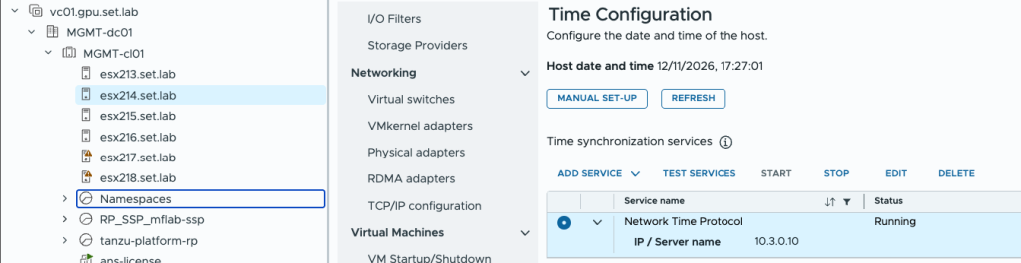
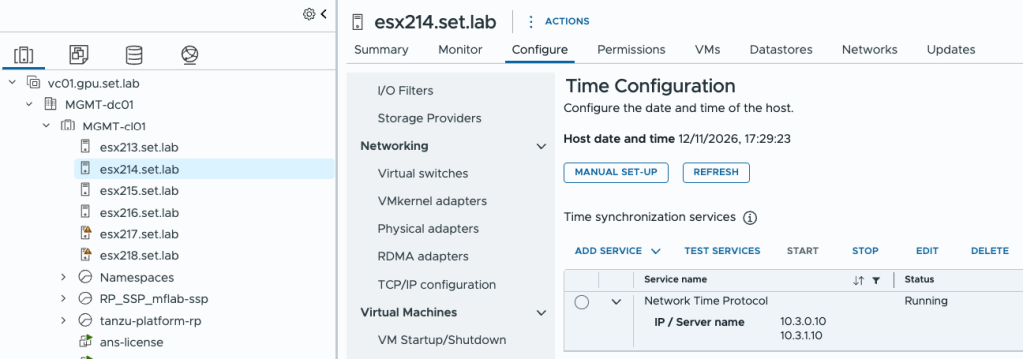
In vCenter, esx214 now lists both servers and the NTP service is running.
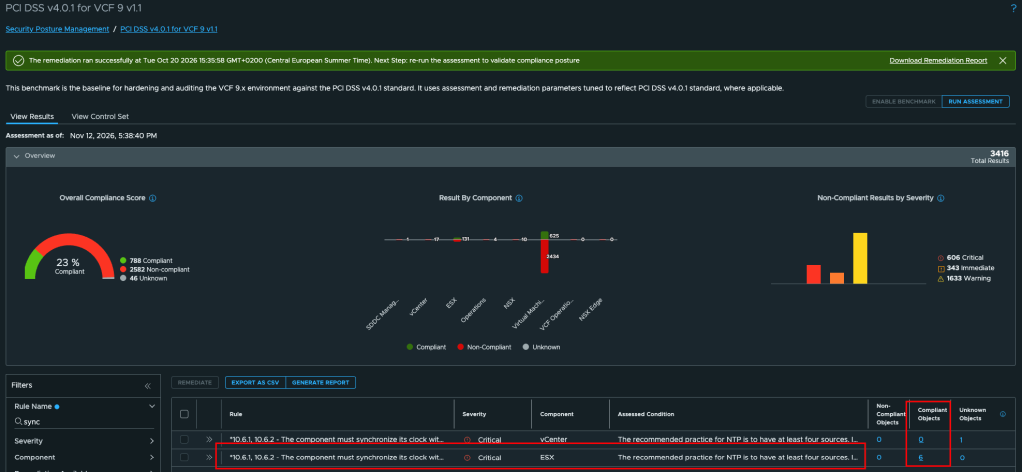
Finally, run the assessment again. Every host should come back COMPLIANT for ntp_config.
Things that tripped me up
- A skipped host still gives an overall
COMPLIANT. Read the per-host status. - ESX IDs are host names (FQDNs in my lab), not
host-NNN. VM IDs, on the other hand, arevm-NNN. - The files live in
vcfsecops. Passsaltenvtostate.apply,or Salt looks inbase. - On my build,
fs.save_filewanted base64 for.jinjaand.slsfiles. - Setting names are fixed by the module (
ntp_config, notntp). Copy them from a VCF Operations job. - The API docs follow the latest release. On my build,
tgt.get_tgts,test.pingandstats.get_statsreturn 3001. The upload and run snippet on the generator page usesfs.write_fileandjob.run, while my build hasfs.save_fileandcmd.route_cmd. Check what yours has; a 3004 means the method is there. - Grain kinds and object types use different names (
nsxmandnsxt_manager,opsandvrops). - When something returns 5000, the RaaS pod log has the real error.
What’s next
Next I’ll add 148 and 149 to the same spec, so the NTP service is set to start with the host and is running, and then work through the other ESX settings that come back non-compliant.
Because object_id is a map, the same request will cover more than one vCenter once there’s a second one in the lab.
References
- Security Posture Management, VCF 9.1 documentation on Broadcom TechDocs
- From Open Source to Enterprise: Understanding the VMware Salt API Evolution
- VMware Salt for VCF Components API on the Broadcom Developer Portal, in particular the minions, fs, cmd, ret, job and tgt interfaces
- Salt for VCF Component State & Jinja File Generator (9.1.1)
- REST Client for VS Code
- GitHub repo for this post: https://github.com/denysaleksandrov/vfc-salt-api-test
Discover more from VMware Cloud Foundation (VCF) Blog
Subscribe to get the latest posts sent to your email.