
Why VMware Memory Tiering is not just swapping to NVMe
Memory is one of the most expensive resources in the data center, and workloads keep asking for more of it. We pack more VMs onto each host to get the most out of the hardware investment, but DRAM has a ceiling, both physical and financial. When memory runs short, the question comes up. Is Memory Tiering just swapping to NVMe?
We get this question a lot. Swapping is the boat is sinking. Memory Tiering is let’s steer away from that iceberg so we don’t sink. One is a desperate scramble after the fact. The other is a deliberate course correction before you hit trouble.
What swapping actually does
Swapping has been around for a long time. When a host runs out of memory and needs to reclaim some fast, the hypervisor picks pages and writes them out to disk to make room. It is a last resort, the equivalent of bailing water over the side because the hull has already been breached. The goal is correctness, keeping the system running when memory is exhausted.
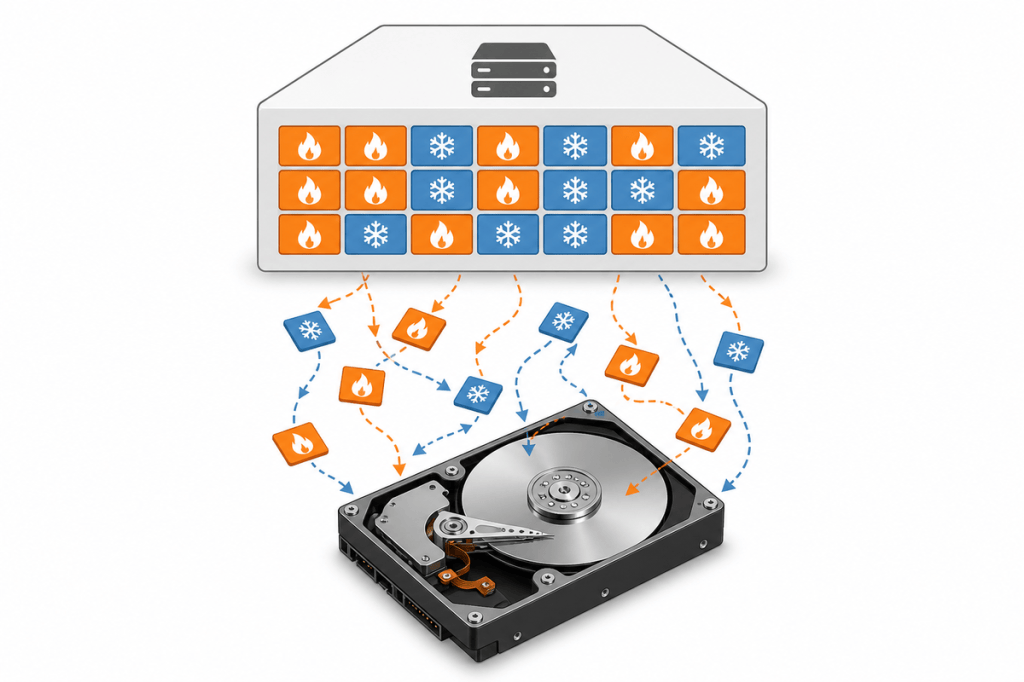
The catch is that swapping does not care which pages it moves. A hot page that your application needs in the next millisecond can get swapped out right alongside a cold page that nobody has touched since boot. When that hot page is needed again, it has to be read back from disk, and performance takes a hit. You are bailing blindly, throwing important cargo overboard along with the ballast.
How Memory Tiering works differently
Broadcom, through its portfolio of VMware products, introduced Memory Tiering in VMware Cloud Foundation to extend host memory using NVMe (Non-Volatile Memory Express) devices alongside traditional DRAM (dynamic random access memory). The result is a single logical memory space that VMs consume without knowing or caring which tier their pages live on, transparent to your applications.
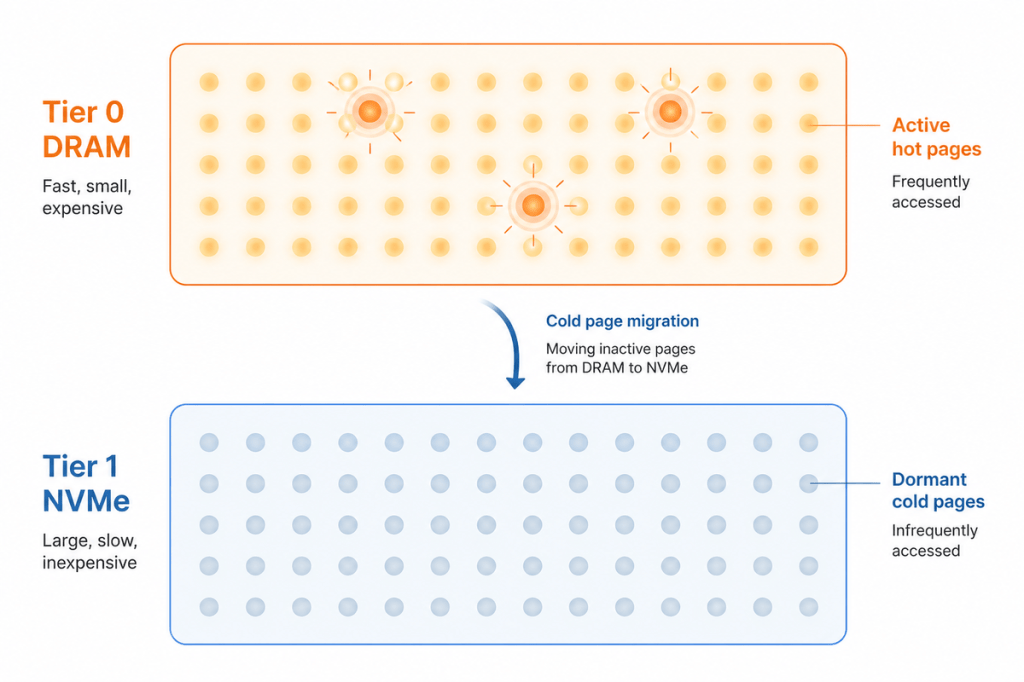
Memory Tiering does not wait for a crisis. It runs continuously in the background, scanning VM memory pages in batches and classifying them as hot or cold using two signals. Recency tells us how recently a page was accessed. Frequency tells us how often it gets accessed. Hot pages stay in Tier 0, which is DRAM. Cold pages migrate to Tier 1, which is NVMe.
This is the core difference. Swap uses a simplistic random selection of pages. Memory Tiering uses sophisticated page aging techniques that classify pages by recency and frequency before deciding where they belong. Only cold pages move to NVMe, and hot pages stay in DRAM, with a small CPU footprint of roughly an eighth of a core on smaller hosts. Swap can touch any memory pages, including kernel memory under extreme conditions, but Memory Tiering only applies to VM memory pages, so the hypervisor itself always runs on fast DRAM.
Memory Tiering starts considering page movement when a threshold is reached. That threshold is not a fixed number. It is computed based on several conditions, including the current memory state, which in turn depends on minFree. minFree is not the amount of free memory on the host at a given moment. It is a computed target the VMkernel maintains as a safety buffer, derived from a sliding scale based on host memory size. The configuration of your hosts, the workloads running on them, and other variables all feed into where that line gets drawn. You might wonder why it waits for a threshold at all if it is supposed to be proactive. We want to keep most pages in DRAM as long as we can, because DRAM is where performance lives. The threshold is not a crisis point. It is spotting the iceberg on the horizon and adjusting course early, while there is still plenty of open water. The system is not fighting for resources. It is making a planned decision about page placement while there is still headroom.
From that point on, the tiering algorithm monitors page activity across both tiers and moves pages between DRAM and NVMe as workloads change. It moves cold pages to NVMe. Not hot pages, the way swap does. The pages your applications actually need stay right where they belong, in fast DRAM.
A practical example
Say you have a host with 1 TB of DRAM and 1 TB of NVMe configured for Memory Tiering. One of the VMs on it is a database server with a 512 GB memory allocation. The database has an active working set of about 200 GB that it accesses constantly. The remaining 312 GB holds cached data and rarely accessed buffers.
Without Memory Tiering, all 512 GB sits in DRAM, and you are paying for expensive memory that is mostly idle. With Memory Tiering, the hypervisor identifies the 200 GB working set as hot and keeps it in DRAM. The 312 GB of cold cache pages gradually migrates to NVMe. Your database still performs well because the pages it actually needs are in fast DRAM.
Now imagine the same scenario with swapping instead. The host hits memory pressure, and the hypervisor starts moving random pages to disk. Some might be part of the active working set, so the database stalls waiting for disk reads. You waited until the hull was taking on water, and now you are bailing out the good cargo along with the bad.
What this means in practice
This is where looking into your workload patterns pays off. Memory Tiering performs well when your active memory fits within your DRAM capacity. The default configuration uses a 1-to-1 DRAM-to-NVMe ratio, up to a maximum of 4 TB of NVMe tiering capacity. If your workloads have a lot of cold memory, which many do, you can extend your effective memory capacity significantly.
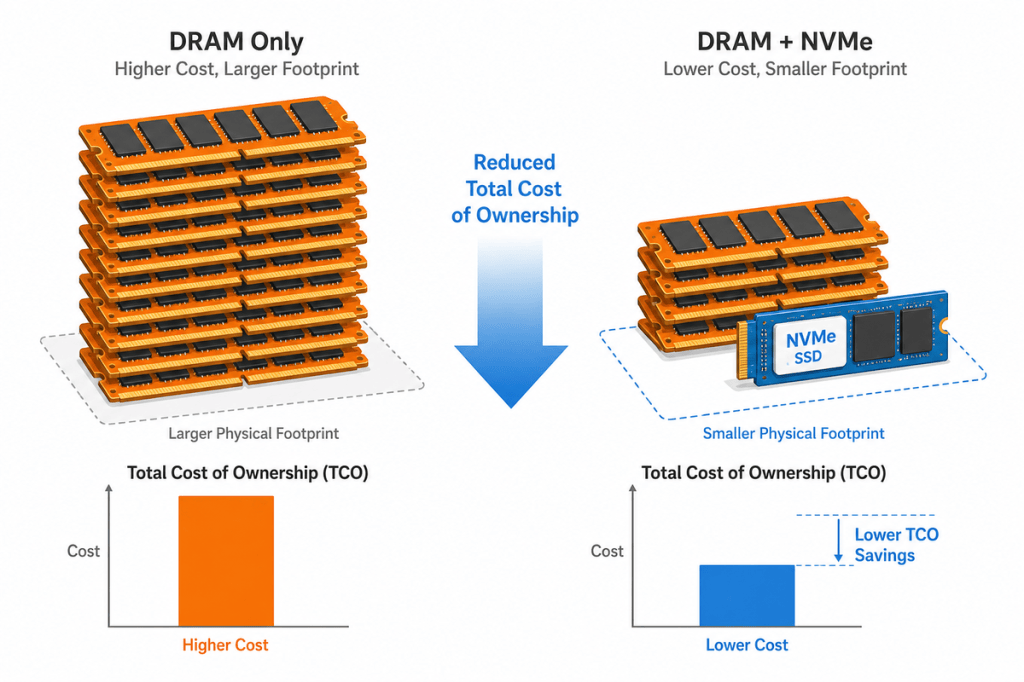
By placing cold pages on NVMe instead of buying more DRAM, you lower your total cost of ownership (TCO) per VM without sacrificing performance for the workloads that matter. You also get more consolidation, which means fewer hosts to power, cool, and manage. That translates to headroom for growth without a proportional jump in hardware spend.
The bottom line
If you have been thinking of Memory Tiering as just fancy swapping, give it a closer look. Pair it with the right NVMe drives and a sensible sizing strategy, and you get memory capacity and performance without choosing between them. Check out the Memory Tiering documentation for VMware Cloud Foundation to see how to configure it on your hosts, and start small with a 1-to-1 ratio to see the difference for yourself. The iceberg is a lot easier to avoid when you can see it coming.
Discover more from VMware Cloud Foundation (VCF) Blog
Subscribe to get the latest posts sent to your email.