
A Feature You Can’t Ignore
Memory Tiering is one of those capabilities that changes how you think about infrastructure. It lets you extend system memory using fast NVMe SSDs, so you can run larger workloads and consolidate more virtual machines without constantly buying more DRAM. The value is real. You get better resource utilization, lower costs, and the ability to scale your memory footprint on demand. When paired with the right drives, it delivers consistent, low-latency performance that feels like having more memory than you actually paid for.
Memory Tiering is a feature you can’t ignore, but getting the full benefit comes down to one important choice: selecting the correct drive. Here is why that choice matters.
Performance vs Endurance
Imagine you are provisioning a new server or designing a Memory Tiering architecture. You look at the spec sheets for two enterprise NVMe SSDs from the same manufacturer. Both are in the exact same “performance class.” They boast the same sequential read speeds of 7,000 MB/s and peak random write IOPS pushing the 1 million mark. The only difference? One is labeled Read-Intensive (RI) and the other is Mixed-Use (MU).
It’s tempting to assume that if they have the same controller and the same peak numbers on the box, they will perform the same way during your stress tests. After all, endurance ratings are just about how long the drive lasts before it dies, right?
Wrong. Run a sustained performance test on both, and the results will look completely different. Endurance classes dictate far more than just lifespan.
RI vs MU at a Glance
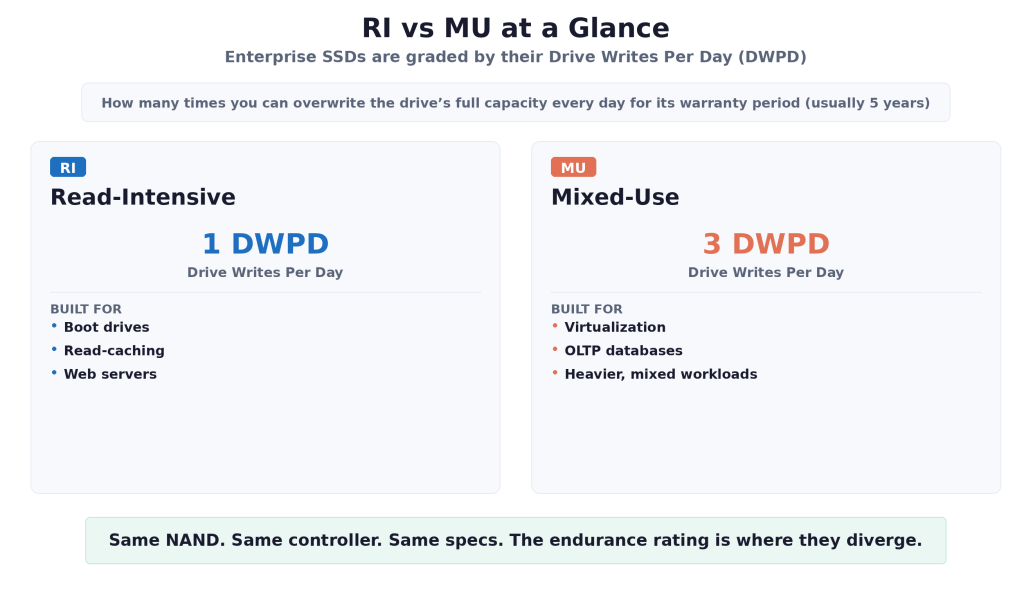
Enterprise SSDs are graded by their Drive Writes Per Day (DWPD), which is how many times you can overwrite the drive’s entire capacity every day for its warranty period, usually 5 years.
- Read-Intensive (RI) is typically rated for 1 DWPD or less. It is built for boot drives, read-caching, and web servers.
- Mixed-Use (MU) is typically rated for 3 DWPD. It is built for virtualization, OLTP databases, and heavier, mixed workloads.
Burst vs Steady State
Pull a brand- new RI drive and an MU drive out of the box and run a short benchmark, and they will likely post the same impressive numbers. This is because they are in a Fresh Out of Box (FOB) state, where every NAND flash block is empty and the controller just slams data in as fast as the PCIe interface allows. But this is a sprint, and enterprise storage is a marathon.
Proper testing pushes a drive into Steady State, the point where the drive is completely full. Once full, an SSD cannot simply overwrite old data. It must read a block into memory, erase the physical flash block, and write the new data back. This is called Garbage Collection. It is in this steady state that the RI drive hits a wall, while the MU drive keeps jogging along.
The Secret Weapon, Over-Provisioning
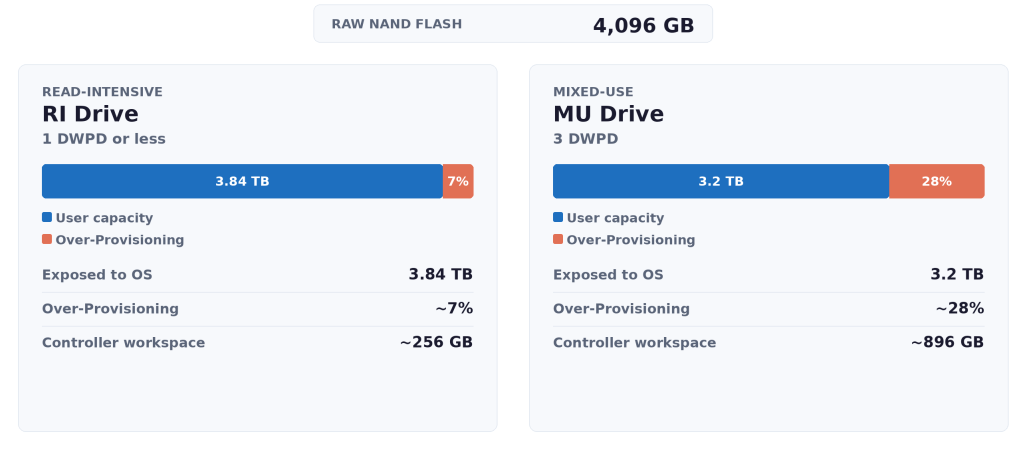
The reason comes down to Over-Provisioning (OP). Manufacturers hide a percentage of the raw NAND flash from the operating system to give the controller room to perform Garbage Collection efficiently. The larger that workspace, the faster it can shuffle data around without pausing incoming writes from the host.
- Read-Intensive (RI) drives typically feature about 7% Over-Provisioning.
- Mixed-Use (MU) drives typically feature about 28% Over-Provisioning.
Even if both drives have the same 4,096 GB of raw NAND, the RI drive exposes around 3.84 TB to the OS, leaving a tiny workspace. The MU drive exposes only 3.2 TB, dedicating a massive chunk entirely to background maintenance. That extra workspace is what keeps the MU drive running smoothly under pressure.
Why Memory Tiering Loves MU Drives
This is where the drive choice becomes important. Memory Tiering is a write-heavy, highly random workload. The system continuously moves small 4KB memory pages between DRAM and NVMe in the background. It is a smart, efficient way to stretch your memory budget, but it does keep the drives busy.
If you choose an RI drive for Memory Tiering based only on its peak burst specs, those specs won’t reflect how the drive behaves under sustained, steady write activity. An RI drive, with limited over-provisioning, has less background workspace and will need Garbage Collection more frequently. The effect is more noticeable here than in standard file storage because every page movement is latency-sensitive.
The MU drive’s 28% OP is the right fit. It provides the generous background workspace needed to maintain consistent, ultra-low latency writes without stalling the host system. Pair Memory Tiering with Enterprise Mixed Use drives, and you get the full benefit of the feature.
The Performance Cliff
To be clear, any sustained, write-heavy workload can push an RI drive to its limits, not just Memory Tiering. When an RI drive faces continuous 4K random writes for an extended period, its controller can run into a wall. With only about 7% over-provisioning to work with, it has to frequently pause the host’s incoming writes to perform read-modify-write cycles and free up space. Its IOPS can drop off sharply, often falling to a fraction of its advertised speed, and its tail latency climbs.
The MU drive experiences a drop too, but thanks to its 28% OP, the controller has a vast workspace to execute Garbage Collection in the background without interrupting the host as often. Its performance dips from the FOB peak but settles at a steady, consistent, and significantly higher baseline. That translates to predictable performance, which is exactly what Memory Tiering needs.
But What If I Only Use a Third of the RI Drive?
The logic goes something like this. If an RI drive is 1 DWPD and an MU drive is 3 DWPD, then leaving two-thirds of the RI drive unwritten should give you the same effective write endurance as an MU drive. On top of that, all that empty space acts as extra over-provisioning, so Garbage Collection should have plenty of room to work with. Problem solved, right?
It is true that it does solve two real problems. Lifespan endurance is no longer a concern, and the steady-state performance cliff mostly goes away. But an RI drive is still not a true MU drive. The difference is baked into the firmware and controller. MU firmware is tuned for write-heavy workloads, prioritizing write queues to keep tail latency low, while RI firmware prioritizes reads. The controller’s internal cache is partitioned differently too, with MU drives allocating more high-speed SRAM to staging writes. Under heavy write pressure, the RI drive’s tail latency spikes higher even when Garbage Collection is not the bottleneck. For Memory Tiering, the MU drive still delivers more consistent microsecond latency because its controller and cache are purposefully engineered for that exact I/O profile.
As for cost, buying a larger RI drive and only using a third of it means paying for capacity you will never touch, so the price gap shrinks considerably. MU drives are still the recommended drives for Memory Tiering, and the small premium is an investment in predictable performance.
The Bottom Line
Memory Tiering is a powerful feature that can make a huge difference in your data center, and your budget as well. It gives you the capacity to do more with less DRAM, and when paired with the right drives, it delivers consistent, low-latency performance you can rely on. Selecting the correct drive makes a big difference in how well Memory Tiering performs under sustained workloads. You want drives with enough over-provisioning to handle the write-heavy, random nature of memory page movement without stalling. That means Mixed-Use (MU) drives rated for 3 DWPD.
So how do you find the right drive? The most thorough approach is to check the Broadcom Compatibility Guide. Look for drives with a performance class F or G and an endurance class D. These are the drives designed and validated for the kind of sustained write workload that Memory Tiering generates.

If you want a quick shortcut, there is an easy way to spot MU drives at a glance by looking at the drive size. MU drives typically come in capacities that are multiples of 800 GB, such as 800 GB, 1.6 TB, 3.2 TB, and so on. If you see a drive sized along that pattern, it is most likely a 3 DWPD MU drive with the 28% over-provisioning that Memory Tiering needs.
Pair Memory Tiering with the right MU drives, and you get the full benefit. Consistent performance, smarter resource consumption, and infrastructure that does more with less.
Happy Tiering!
Discover more from VMware Cloud Foundation (VCF) Blog
Subscribe to get the latest posts sent to your email.