
Learn how to deploy NVIDIA Run:ai on VMware Cloud Foundation and unlock GPU-aware scheduling, multi-team workload orchestration, and inference serving, all on the private AI platform you already operate.
Adding GPU-Aware Workload Orchestration to Your Private AI Platform
Enterprises adopting AI on-premises keep hitting the same problem. They already have a private cloud that runs their applications well, and they have requirements from their data-science teams to use GPUs that data-science teams are competing for. What they often lack is a way to share those scarce accelerators across many users, teams, jobs, and inference services, with quotas, fairness, and governance, without bolting on a separate stack the platform team has never operated.
VMware Cloud Foundation (VCF) addresses these concerns. With VMware Private AI Foundation with NVIDIA, VCF turns a GPU-enabled workload domain into a self-service AI platform. GPU-ready VMware vSphere Kubernetes Service (VKS) clusters provisioned from VMware Cloud Foundation Automation catalog, each coming up with the NVIDIA GPU Operator installed, licensed drivers loaded, and NVIDIA Data Center GPU Manager (DCGM) metrics to be consumed. And VCF Private AI Services, adds the turnkey building blocks for generative AI: a Model Gallery for model governance, a Model Runtime with an API gateway for inference, Data Indexing and Retrieval with a vector database for RAG, an Agent Builder, and built-in GPU monitoring.
For organizations that also need additional fine-grained GPU scheduling across many concurrent teams and workloads, fractional GPUs, per-department quotas, over-quota borrowing, fair-share, and preemption, NVIDIA Run:ai complements those capabilities. Because Run:ai is part of NVIDIA AI Enterprise, which VMware Private AI Foundation with NVIDIA customers already use, adding it to the platform is a deployment exercise rather than a new procurement.
Our new technical guide, “Deploying NVIDIA Run:ai on VMware Cloud Foundation“, walks that deployment end to end, with the actual commands to get started with Run:ai for VCF users.
Where Run:ai Fits in VMware Private AI Foundation with NVIDIA
NVIDIA Run:ai runs on top of VMware Private AI Foundation with NVIDIA, the platform that provisions GPU-ready VKS clusters and includes VCF Private AI Services. Run:ai and VCF Private AI Services address adjacent problems.
Through VCF Private AI Services, VMware Private AI Foundation with NVIDIA gives application and MLOps teams an opinionated, turnkey path to deliver generative AI: model serving behind an API gateway, retrieval-augmented generation with an integrated vector database, and agent orchestration, all included in the VCF subscription and managed through the VCF Automation UI.
NVIDIA Run:ai gives platform teams a GPU scheduling and workload-orchestration control plane for shared infrastructure: departments, projects, quotas, fractional-GPU sharing, fair-share, preemption, and first-class workspaces, training jobs, and inference services for the data-science teams that consume the GPU pool directly.
Customers can run them side by side: VCF Private AI Services for fast, governed AI application delivery, and Run:ai when many teams need to share a finite GPU pool against strict quotas and utilization targets. Both are consumed through the same VMware Private AI Foundation with NVIDIA platform on VCF that the operations team already runs.
The Stack: Three Layers, One Platform Team
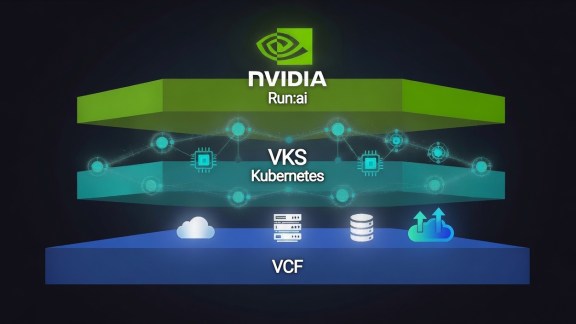
The reference architecture is a clean three-layer stack, and nothing at the bottom is AI-specific.
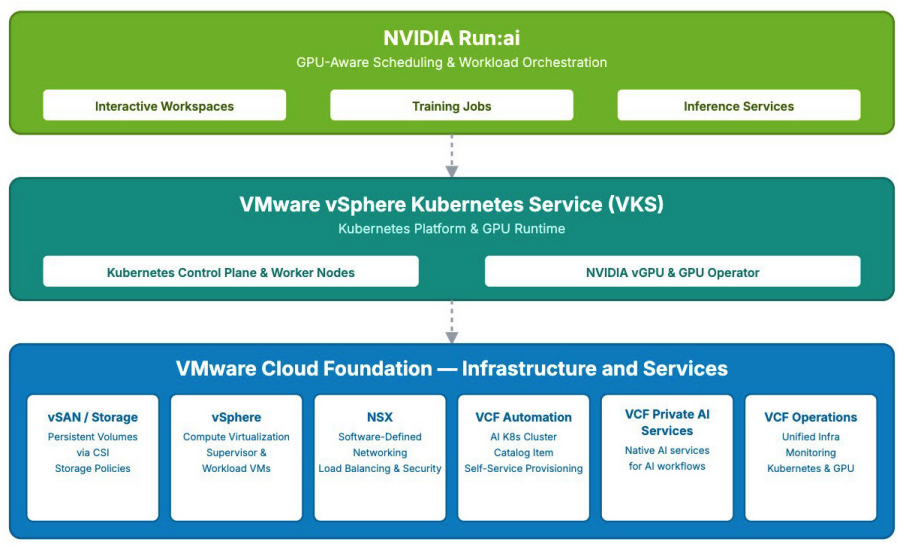
VMware Cloud Foundation sits at the foundation: vSphere for compute, vSAN for storage, NSX for networking, managed through VCF Operations. It is the same VCF that hosts the customer’s other workloads, run by the same team.
VKS is the Kubernetes runtime that ships natively with VCF. Clusters are provisioned directly from vSphere through the Supervisor, with no separate distribution, no external control plane, and no extra licensing. VMware Private AI Foundation with NVIDIA exposes GPU-ready VKS clusters as self-service catalog items through VCF Automation. Requesting an AI Kubernetes Cluster yields a cluster that comes up with the GPU Operator installed, drivers loaded, the device plugin advertising GPUs, and DCGM metrics already flowing.
NVIDIA Run:ai sits on top: the control plane, cluster component, Knative Serving for inference, and the researcher-facing workloads. This is the layer that adds users, projects, quotas, fairness, and inference autoscaling on top of Kubernetes.
The operational story: infrastructure teams define the catalog items and governance once, and data-science teams self-serve from there.
From Catalog to Control Plane
The guide documents every step with real commands: provisioning the VKS clusters from the VCF Automation catalog, verifying the NVIDIA GPU Operator, installing the HAProxy ingress controller and TLS material (on VCF, NSX already implements the LoadBalancer contract, so MetalLB is not needed), installing the Run:ai self-hosted control plane and cluster component via the JFrog Helm charts, and standing up Knative Serving with Kourier behind HAProxy for stable inference endpoints.
It also documents both supported topologies under one tenancy: a cluster hosting the control plane alongside its own GPU workloads, and a second cluster running only the cluster component on different hardware. One control plane drives both, so projects, departments, RBAC, and dashboards are configured once. Start with whatever fits today, add VKS clusters as new hardware arrives, mix GPU generations across clusters.
Proving It Works: Real Workloads
Rather than a hello-world pod, the guide exercises the workload types data-science teams actually run, each with the runai CLI and explicit verification:
- Fractional-GPU sharing: two workloads each request 0.5 of a GPU and land on the same physical device, confirmed by matching GPU UUIDs.
- Over-quota and fair-share scheduling: two departments borrow idle capacity up to their limits, with the scheduler reclaiming through fair-share arbitration and preemption.
- Inference serving: a small model served through vLLM on Knative, with a stable OpenAI-style HTTPS endpoint.
- An interactive JupyterLab workspace on a GPU.
- A real MNIST training job in the NVIDIA PyTorch container, reporting >98% test accuracy.
Every test includes the expected CLI output, so operators know what success looks like.
Multi-Tenancy through VCF
Within a single VKS cluster, Run:ai segments tenants through departments, projects, and namespaces, each team with its own quota and RBAC scope, while the scheduler bin-packs across every GPU. When stronger isolation is required, the answer on VCF is to provision separate VKS clusters: each a fully independent Kubernetes control plane on its own worker VMs, with NSX providing network isolation. It is the VCF-native equivalent of the virtual-cluster pattern on bare-metal Kubernetes, except the abstraction already exists at the infrastructure layer, delivered through self-service catalog requests rather than a Kubernetes-in-Kubernetes layer the platform team has to operate.
Why This Matters
For VCF customers, this is a consolidation story. VCF already gives them a single platform for AI and non-AI workloads, and VMware Private AI Foundation with NVIDIA, including VCF Private AI Services, already turns it into a self-service AI platform. NVIDIA Run:ai is deployed on the same platform: it runs on the VKS clusters they already provision, consumes the GPUs the GPU Operator already manages, and is included in the NVIDIA AI Enterprise entitlement they already hold. No new hardware silo, no separate Kubernetes distribution, and no additional procurement, just GPU-aware scheduling for the teams that need it, on the infrastructure they already operate.
Read the full technical guide https://www.vmware.com/docs/vmw-private-ai-nvidia-run-ai-technical-paper. for the complete, command-by-command deployment procedure, functional test suite, and monitoring setup.
Acknowledgments: Thanks to Yuankun Fu, Ramesh Radhakrishnan, Fabiano Teixeira, and to NVIDIA, for their help throughout the writing of this white paper.
Discover more from VMware Cloud Foundation (VCF) Blog
Subscribe to get the latest posts sent to your email.