
Introduction
The new Container Service in VMware Cloud Foundation (VCF) offers an easy-to-start on-ramp to Kubernetes (K8s) consumption for your business, without requiring Kubernetes expertise. We have heard from many organizations that sometimes they “just want to run a container,” or they can’t hire the talent they would like to run workloads on Kubernetes, or they’re just starting their application modernization journey – taking those old .Net Framework apps, refactoring onto .Net Core, and beginning to containerize.
Typically when you want to run simple container apps, the workflow has been:
- Set up a host OS
- Install and configure a container runtime
- Configure registry authentication
- Pull and run the container image
That is to say nothing of the lifecycle management, OS patching, runtime upgrades, security hardening, etc. required to operate such a system over time.
Whatever the reason, we have heard loud and clear that customers want a simple, managed experience that allows them to get the benefits of Kubernetes, without the toil or internal expertise. As such we’ve built the new Container Service into VCF Automation (and the Local Consumption Interface if you don’t have VCF Automation) to get you up and running with pre-built containers easily. Let’s take a look at how it works, what it does, and how you might use it today!
Demo
Technical Overview
The VCF Container Service is an easy-to-use wrapper around our Supervisor cluster’s concept of vSphere Pods. vSphere Pods allow you to run containers as VMs for a number of reasons; whether you require a hard kernel boundary between containers, you don’t want the overhead of having dedicated K8s control planes, or you just don’t want to manage and lifecycle K8s clusters.
This wrapper exposes almost everything you can expect to do with a container workload on K8s, we will even make intelligent decisions based on the workload specifications you put into the Container Service whether that application should run as a K8s Deployment or StatefulSet for example.
Deploying a container was never this easy!
Getting started is simple; just give the Container Service an OCI-compliant image and it will run it for you. You can get as complex as you wish: defining what Zones the workload should be deployed into, what resources are required for the workload to ensure efficient scheduling as well as how many replicas you would like for that workload. We’ll even take care of authenticating to your OCI registry for you. What you get at the end is an endpoint you can access with your application up and running.
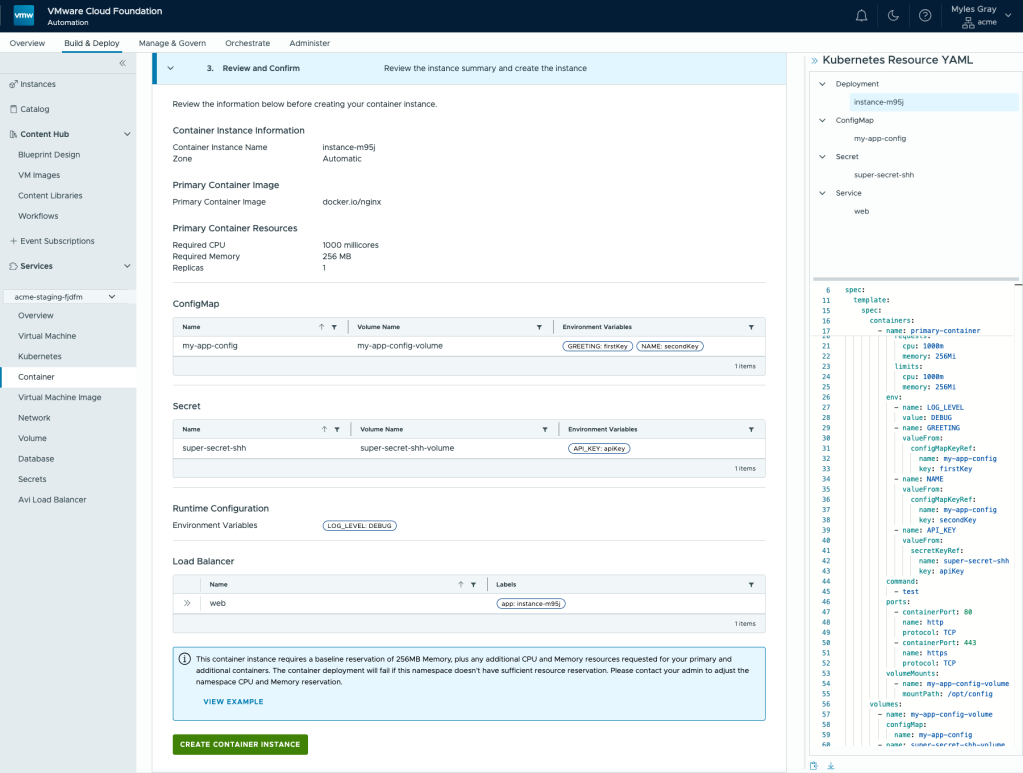
You’ll also note in the screenshot below that any configurations made via the UI will automatically be rendered into valid K8s YAML on the right hand side, which can be downloaded or copied and added to any other system you may have for repeatable deployments. This follows with any of the other services inside the VCF UI, like Virtual Machines or Kubernetes clusters.
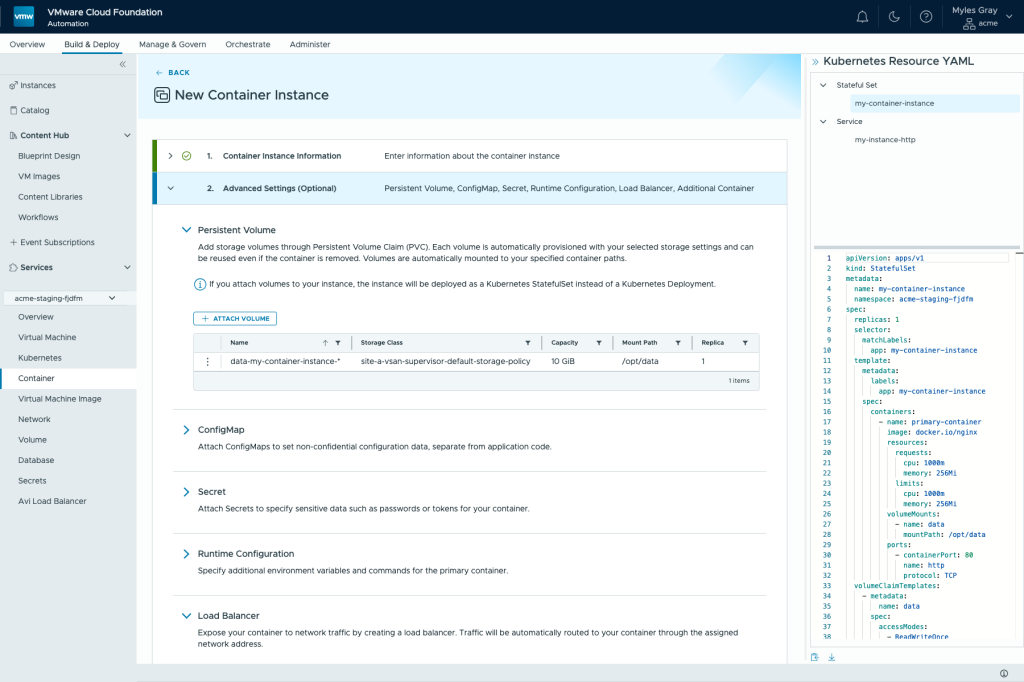
All you need to get started is:
- A name for your container
- A container image url (e.g:
ghcr.io/nginxinc/nginx-unprivileged) - CPU and memory requests set (we set some defaults for you)
Everything else below is optional and for more specific use-cases.
Advanced Settings
If you have more particular requirements about how your application should run, that’s no problem at all; the Container Service isn’t a one-trick pony. We have made sure that almost everything you would require for a container workload is exposed through the Container Service: from storage, load balancing, config and secret management, runtime configuration like environment variables, even all the way to sidecar containers for more advanced use cases.
Storage
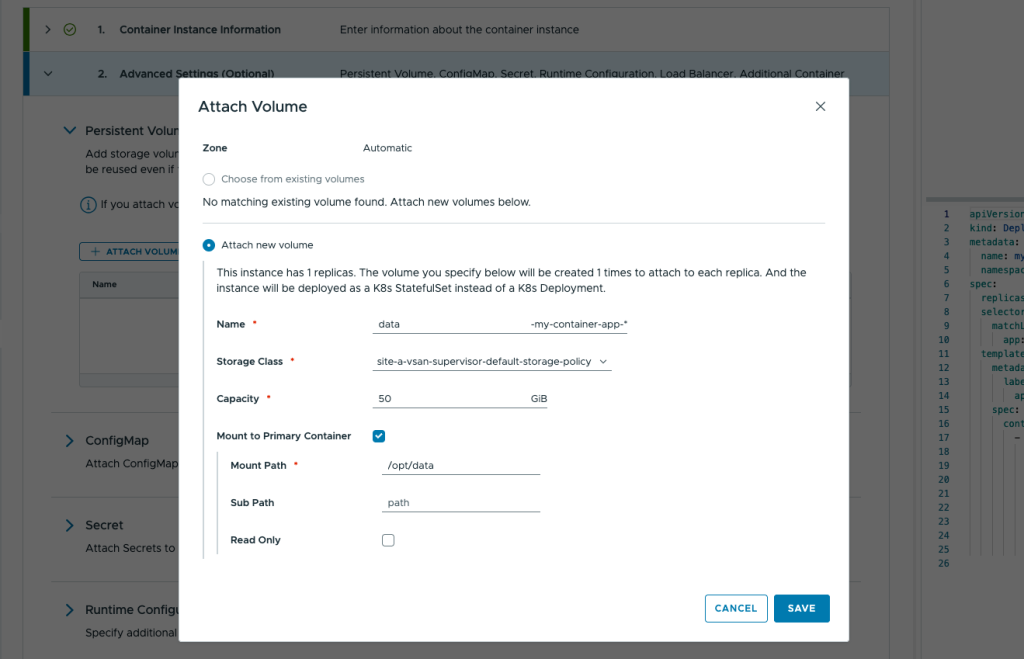
Most (useful) applications end up storing state somewhere. That is not to say that there aren’t useful applications that don’t, but almost every application is at least operating on data if it isn’t storing it. To that end, one of the fundamental capabilities we wanted to expose in an easy-to-understand way is PersistentVolumes. Generally in K8s PersistentVolumes may act differently than users expect, depending on their reclaimPolicy, the default case being to delete the volume.
Given our customer’s expectations we wanted to make sure that the default was sane and erred on the side of caution, so when you delete a workload we will retain those volumes to allow you to re-mount into another workload later. You can, of course, still delete those volumes to reap back space should you want to. We also make it easy to identify and re-mount multiple volumes across a number of instances.
Let’s take the example of a StatefulSet with 2 replicas. If we delete that StatefulSet the volumes are retained and subsequently, if a user creates another Container Service instance with 2 replicas and PersistentVolumes, we will offer the user a choice: create new, or re-mount the existing volumes? Likewise with scale-down operations, volumes are retained and re-mounted in the event of scale-up.
Load Balancing
The next major component of any app is how it is exposed to the network, other applications, and/or users. In K8s this is done using Service and Ingress/Gateway types, the most common of which for workload exposure is LoadBalancer. With the Container Service we allow the user to create a LoadBalancer, choose the protocol (TCP/UDP) as well as the exposed Port and the internal container Port if you are doing port translations. This Service will then be spanned across all replicas of that Container Service instance, providing availability and redundancy should an instance or underlying node fail.
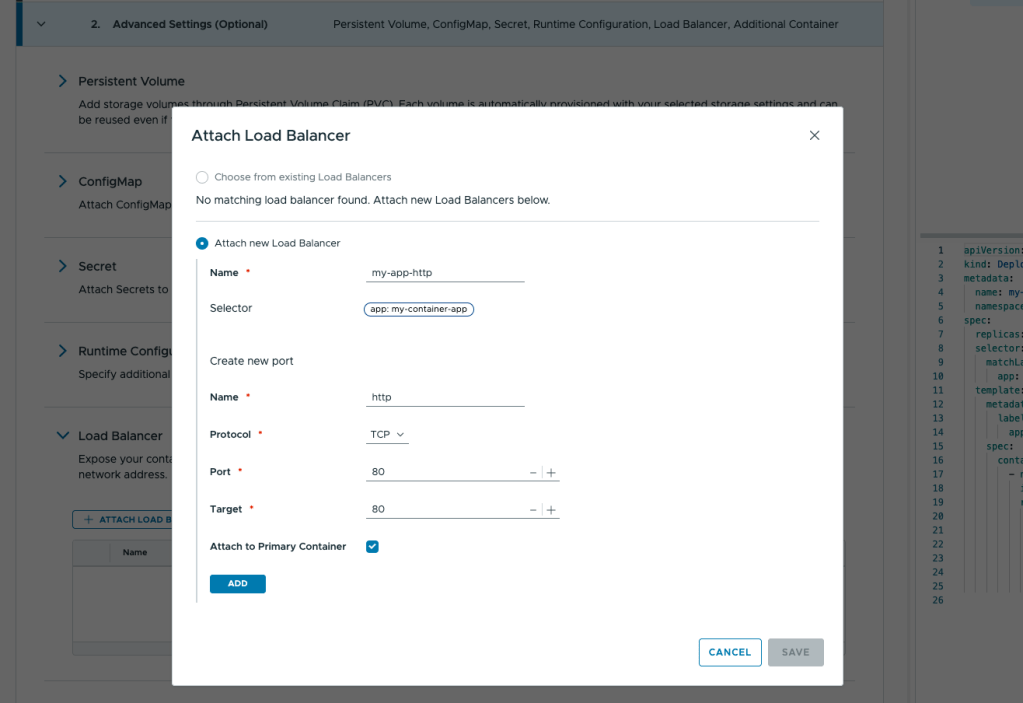
Configuration
Most containers take arguments and configurations in a variety of different manners. A common pattern is the use of config files which obviously is completely variable and different per-application. To that end, we have exposed the ability to create and mount ConfigMap objects into the container, but in a very granular way.
You can choose from a list of the existing ConfigMaps in the environment or create a new one. When creating a new one you simply supply the config file as text through the UI and then choose how it is to be mounted – as a Volume or as Environment Variables.
Additionally, when you inject as Environment Variables, we give you more flexibility by allowing you to choose to inject all keys in the config file, or specific keys, as well as how you would like those mapped into the container.
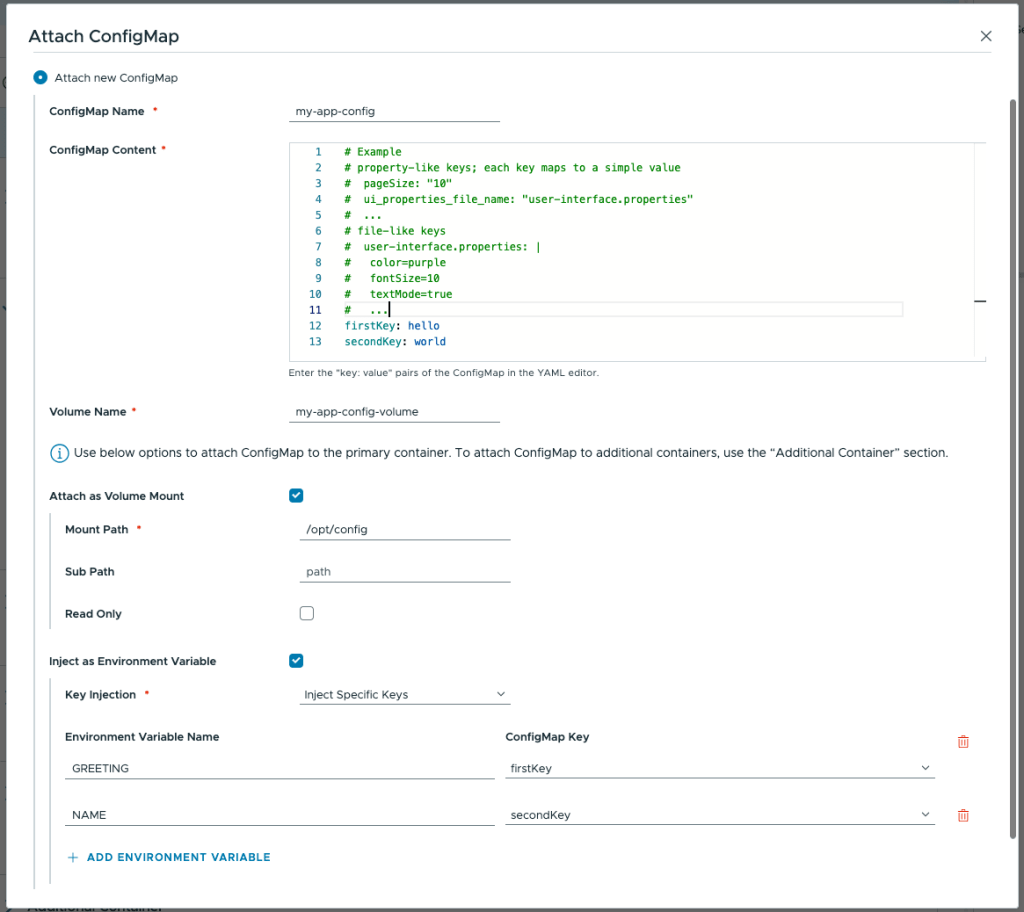
Secrets
Secrets like API keys, tokens, passwords, etc. are core to many applications, and just like ConfigMap objects, are exposed in largely the same way to the container, either as a Volume or as Environment Variables, with the latter being the most common pattern as it’s never “on disk” in the container. The difference between the ConfigMap and this section being that these are stored as Kubernetes Secret objects under the hood.
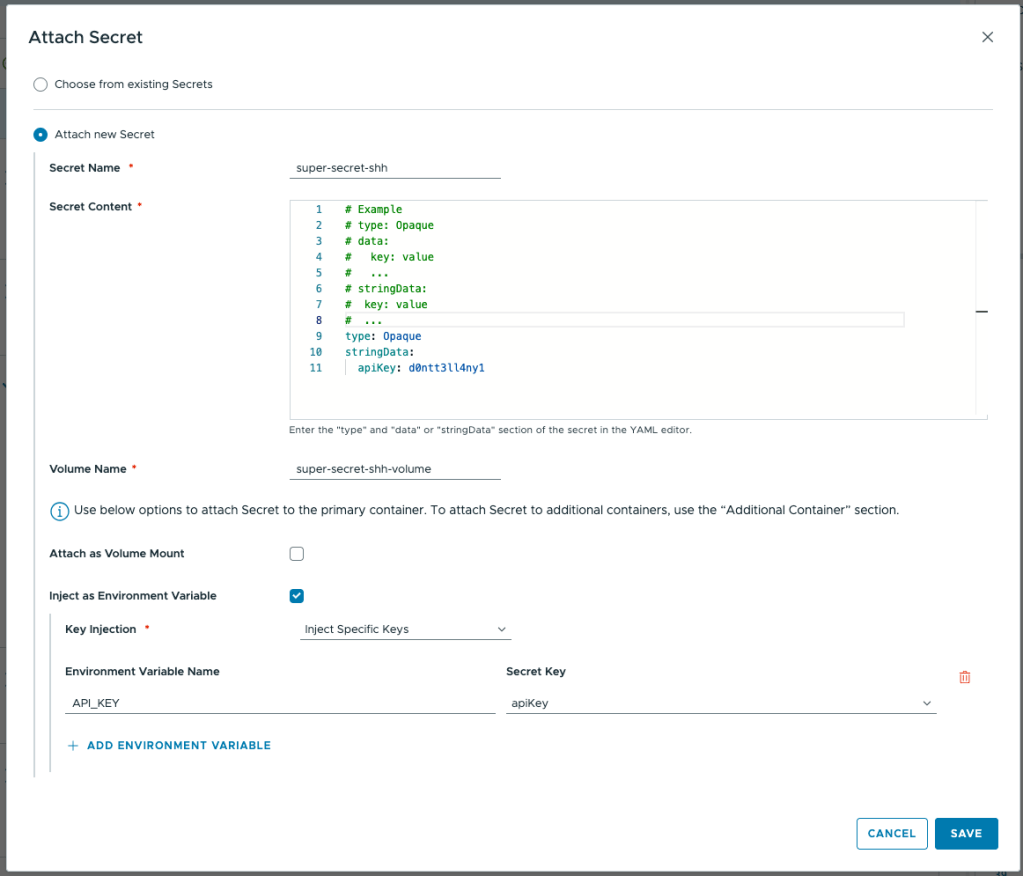
Runtime Configuration
This section houses any options related to how the container should run for that particular instance. For example: let’s say you want to increase the logging level or verbosity of this instance, but don’t want that to affect other containers using the same ConfigMap from above. You can add Environment Variables like a common LOG_LEVEL and set it to the desired level to have the application react to that.
Additionally, if your container or app requires some instruction on what command to run when it starts, or what arguments should be passed into the application at start time, you can add them here to the Command and Arguments section, following the example.
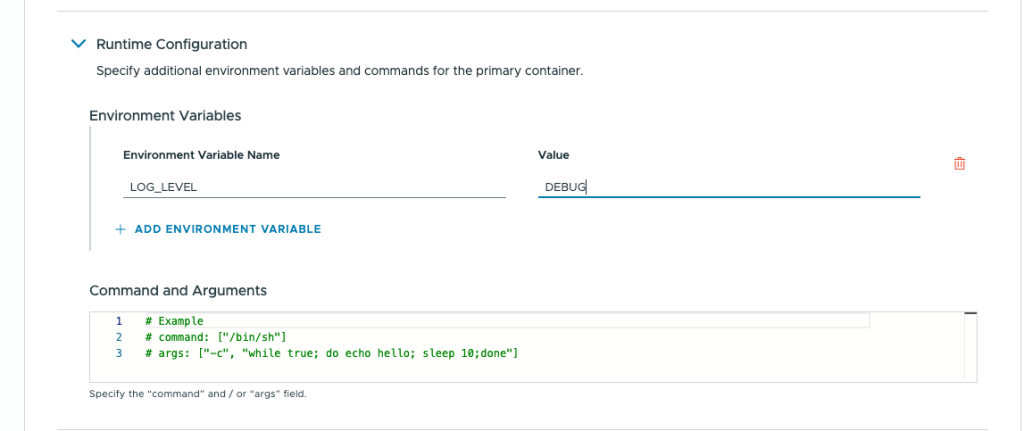
Throughout the UI for Container Service, you will note that we do in-line linting of the commands and config you add in, to ensure that it is valid and that all the required arguments are in place, helping your users have a good experience and avoiding log diving to debug why containers haven’t deployed.

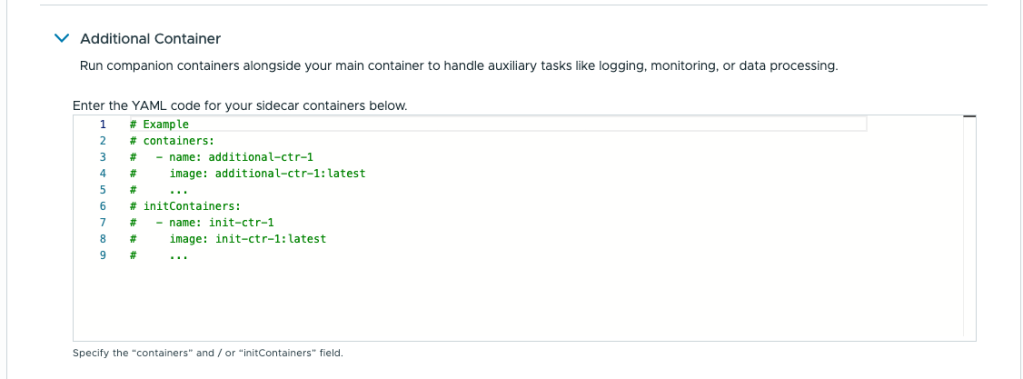
Additional Containers
A much more advanced option is the use of Sidecar Containers, containers that run alongside your primary workload in the same Kubernetes Pod. That means they share some technical characteristics under the hood (like network namespace) that allow them to access information from each other. As such, a common example use case for sidecars is for scraping logs, or metrics, adding a container to a service mesh, etc.
InitContainers are another example use case for a sidecar. Let’s say you have an application stack that includes a database, you may want (on first start) for a script to run that populates the blank database with a schema so the application can use it when it starts up. InitContainers have the handy ability of being sequential (in that they block the main container from starting until they succeed), helping ensure, for example, that your database is live before the main container starts.
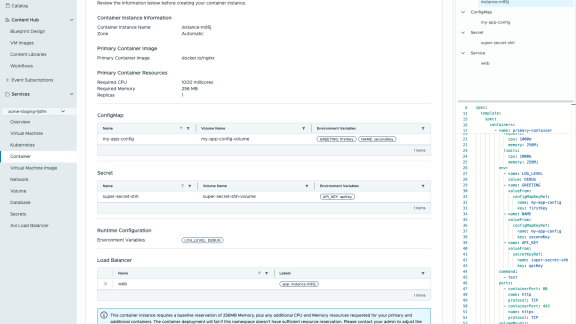
At the end, you get a nice overview of your entire container’s configuration you built out, and the ability to download the manifest that defines it before you roll it out.
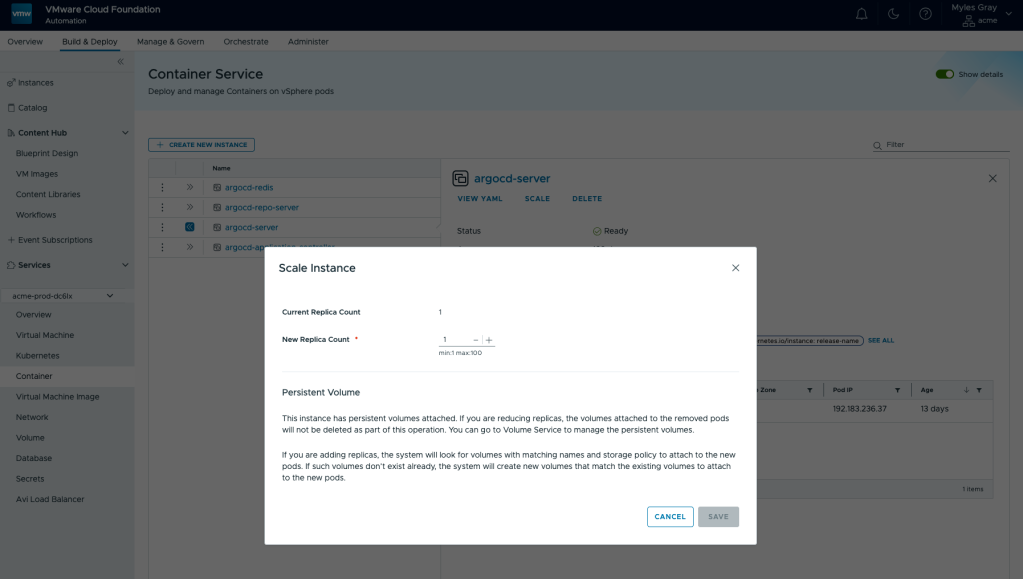
Scaling Workloads
Of course, once your application is rolled out you are free to scale it out (or in) using the same interface as we have been using for the instantiation of the application all along. As always, with very descriptive helper text so you’re sure what the platform is going to do when you use these options.
Conclusion
If you want to get going with the new Container Service in VCF, try out VCF 9.1 available from the Broadcom Support site. Technical documentation available here.
Discover more from VMware Cloud Foundation (VCF) Blog
Subscribe to get the latest posts sent to your email.