Today’s developer expects friction-free access to infrastructure. In the public cloud, if a developer needs a Kubernetes cluster, a virtual machine, or a database, they simply press a button or an API call and the resources are ready in minutes.
But what happens when data sovereignty, compliance, or cost predictability dictates that these workloads run on-premises?
Historically, on-prem infrastructure meant submitting IT tickets and waiting days or weeks for provisioning. This delay often creates a major bottleneck for time to market. Frustrated by the queue, developers sometimes spin up their own “shadow IT” databases on unmanaged VMs just to move faster. The result? A massive headache of database sprawl, configuration drift, lack of governance, and significant security risks.
Today, platform engineering on VMware Cloud Foundation (VCF) has changed the game. By leveraging the VCF private cloud platform, organizations can bridge the gap between IT operations and development teams. VCF delivers a true “platform-to-data” self-service experience equivalent to public cloud, giving developers the speed they crave and platform engineers the centralized fleet management they require.
Bridging the Gap: The Cloud Equivalents
To understand the power of VCF as a private cloud platform, it helps to map its capabilities to the public cloud services developers already know. If you are familiar with how to build on AWS, the on-prem VCF equivalents will look like this:
- Amazon EC2 -> VCF VM Service: Allows developers to deploy and manage traditional VMs declaratively alongside their containers.
- Amazon EKS -> VCF VKS (vSphere Kubernetes Service): Provides self-service, conformant Kubernetes clusters natively on VCF.
- Amazon RDS ->VCF DSM (Data Services Manager): Offers an on-demand Database-as-a-Service (DBaaS) fleet management tool.
By combining these three pillars, platform teams can offer a comprehensive, API-driven catalog of services directly from their own data centers.
The Platform Engineer’s Workflow: Setting the Guardrails
The magic of this architecture lies in the persona-based governance. As a system administrator or platform engineer, you define the “guardrails” and maintain control, while the developer consumes the resources within those boundaries.
Here is how the workflow operates.
1. Creating the boundary
The infrastructure admin creates a vSphere namespace in VCF. This namespace acts as the tenancy boundary, binding compute, memory, and storage limits to a specific project or development team.
2. Defining the infrastructure and policy
On this namespace, the platform engineer defines the rules of engagement:
- Compute and resources: Defining cluster sizes, resource pools, and VM classes (T-shirt sizing like small, medium, or large) to ensure developers don’t over-consume resources
- Storage and networking: Setting specific storage policies (like vSAN or NFS) and mapping workloads to the correct VLANs and VPC subnets
- Data services in DSM: Enabling specific database engines and versions that have been vetted by the DBA team
The Developer Experience: Self-Service Deployment
Once the admin has set the policies, the platform engineering can deploy these services and from there the developer experience is seamless. The platform engineer hands access over to the development team via a secure API token. From this moment on, they are entirely self-sufficient.
No more waiting for tickets to be cleared. Using standard Kubernetes tooling (like kubectl), the DSM portal or API, or their own Terraform pipelines, developers can:
- Spin up a new Kubernetes cluster (VKS) to test their microservices.
- Select a database engine like PostgreSQL, MySQL, or Microsoft SQL Server (coming in 9.1).
Crucially, these self-provisioned resources automatically comply with corporate backup, networking, and security policies established by the admin.
Automation and Infrastructure-as-Code Integration
This entire environment setup can be automated using Infrastructure as Code (IaC). The platform team can consume these namespaces and service configurations via multiple options based on the preference of the teams. It could be deployed through Kubernetes CRDs, a Terraform manifest, or an enterprise blueprint that can conclude comprehensive set of resources like a VKS cluster with a set of VMs, data services from DSM, and even ArgoCD to push apps to the VKS clusters all within one set of API calls.
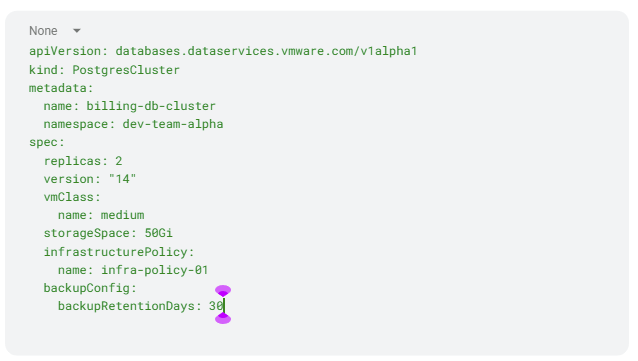
Here is an example of a CRD to deploy a database in the namespace declaratively to show how simple it is. This CRD can be used as part of a GitOps operation:
Beyond Dev: Day 2 Operations
Perhaps one of the most significant advantages of this platform approach, specifically with Data Services Manager, is that it doesn’t stop at the initial “push button” deployment. It automates critical Day 2 operations once the application needs to hit production. Operations that typically drain DBA resources are now done in a simple click of declarative parameter change in a CRD:
- High availability: Automated cluster deployments for immediate resilience
- Scalability: The ability to easily add read replicas as application demand grows
- Data protection: Automated backups and point-in-time recovery (PITR) built right in
- Governance: Centralized visibility for the platform team to monitor usage and eliminate database sprawl across all workload domains
- Post-sale support for OSS databases: DSM offers commercial-grade features and support which are not available with free open-source databases such as PostgreSQL or MySQL.
Conclusion
Creating a self-service catalog from platform to data doesn’t require moving everything to public cloud. By utilizing VCF, VKS, and DSM, organizations get the agility of the public cloud with the security and control of their own private infrastructure.
With these features, platform engineers transform from IT gatekeepers into enablers – providing developers with the API endpoints, Kubernetes clusters, and managed databases they need to build software faster, more securely, and be ready for production.
Discover more from VMware Cloud Foundation (VCF) Blog
Subscribe to get the latest posts sent to your email.