
While VMware vSphere environments have long relied on folders and resource pools for organization, the introduction of VMware Cloud Foundation (VCF), and specifically VCF 9 has established Namespace as the new fundamental building block. However, as many architects discover, a namespace in VCF is not a single entity; it is a layered construct that spans from the physical ESX host up to the application’s runtime environment.
To successfully scale modern applications, you must understand the three critical layers: the VCF Automation Project, the vSphere Namespace, and the VKS Namespace.
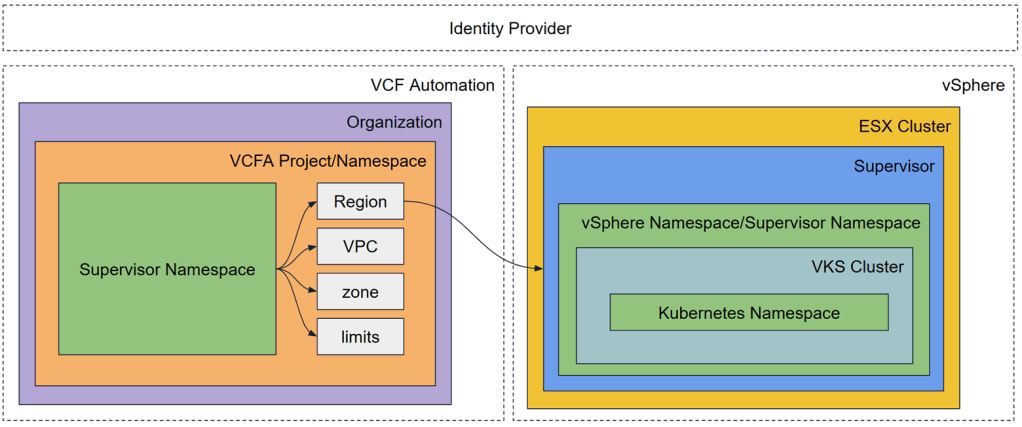
Layer 1: The VCF Automation Project (the Governance Layer)
At the top of the stack sits VCF Automation. In this layer, the “Namespace” is abstracted into a Project.
VCF Automation serves as the primary tenancy boundary. While vCenter allows you to create namespaces directly, VCF Automation adds the necessary “guardrails” for an enterprise environment.
- The Abstraction of Regions: VCF Automation uses Regions to hide the underlying complexity of the SDDC. A Region maps to a Supervisor Cluster, but to the developer, it is simply a location where resources live.
- The Project as a Container: A Project in VCF Automation is where you tie together users (via SSO), cloud zones, and shared resources. When you entitle a Project to a specific “Namespace Class,” you are defining exactly what kind of footprint a developer can claim.
- The Multi-Tenancy Engine: VCF Automation handles the mapping of Organizations to specific Supervisors. This ensures that a “Production” project and a “Development” project stay logically and physically separated, even if they are managed through the same global interface.
Layer 2: The vSphere Namespace (The Resource Boundary)
Once a Project is defined in VCF Automation, it provisions a vSphere Namespace (also known as a Supervisor Namespace) on the Supervisor Cluster. This is the “connective tissue” of VCF.
VKS Supervisor is essentially a specialized Kubernetes cluster running on ESXi. The vSphere Namespace is a management construct, not a place where you deploy your application code directly.
Key characteristics include the following.
- Uniformity of Creation: Whether you create a namespace via the vCenter UI, a specialized API call, or through VCF Automation, the result is identical. It is a record in the Supervisor’s etcd database.
- Resource Quotas: This is where the VI Admin sets the limits. You define exactly how many GHz of CPU, GB of RAM, and Terabytes of Storage (via VM Storage Policies) this namespace can consume.
- The API Control Plane: The Supervisor Namespace houses the controllers that watch for requests. When a user requests a new Kubernetes cluster, the controllers in this namespace hear that request and begin the process of provisioning VMs and networking.
- Network Isolation: This layer is where NSX-T or VPC configurations are applied. Each namespace can have its own isolated network segment, ensuring that “East-West” traffic is contained.
Layer 3: The VKS Namespace (the Workload Layer)
The final layer is the VKS Cluster. Once the Supervisor Namespace is ready, developers use it to spin up their own dedicated Kubernetes clusters.
Inside these VKS Clusters, we find the “standard” Kubernetes Namespaces that developers are familiar with (e.g., default, production, monitoring).
- Standard Kubernetes Operations: These namespaces are used for Pods, Services, and Deployments. They follow upstream Kubernetes logic and are generally invisible to the vSphere Admin.
- Lifecycle Management: When a VKS cluster is provisioned, the Supervisor acts as the API control plane. It uses Custom Resource Definitions (CRDs) to track the state of these clusters. If a worker node fails, the Supervisor detects the discrepancy in the etcd database and automatically provisions a replacement VM.
- Separation of Concerns: The developer manages their apps inside the VKS Guest Namespace, while the Infrastructure Admin manages the capacity of the vSphere Namespace that supports it.
Operational Reality: Putting it All Together
One of the biggest hurdles in managing this stack is User Management and Persistence.
Our discussions clarified that while vCenter and VCF Automation may share an Identity Provider (like Active Directory or LDAP), they operate at different levels. Cloud Admins typically operate at the VCF Automation/vCenter level with broad permissions. However, for developers, the trend is moving toward “Service Accounts” or granular, project-based credentials. This prevents a “Global Admin” from accidentally impacting a specific project’s namespace.
The Architecture Advantage: Why Structure (and Deletion) Matters
A critical takeaway from the VCF architecture is the impact of deletion. Because VCF Automation abstracts the infrastructure, deleting and recreating a VCF Automation instance requires reconfiguring your Regions and Projects from scratch. The underlying vSphere Namespaces and VKS clusters might still exist on the ESX hosts, but the “linkage” that allows for self-service automation would be severed.
Why do the layers matter? By separating the Automation Project, the vSphere Namespace, and the VKS Namespace, VCF provides the following benefits:
- Admins get total visibility and control over physical resource consumption and security hardening.
- DevOps teams get the self-service speed they require, spinning up Kubernetes clusters in minutes without tickets.
- The business gets a reliable, scalable platform that bridges the gap between legacy VMs and modern containers.
To illustrate how these namespaces function in a real-world scenario, let’s look at a typical customer engagement using the Namespace layers, where a customer needs a production environment that is isolated from development, with specific compliance guardrails and high-performance storage.
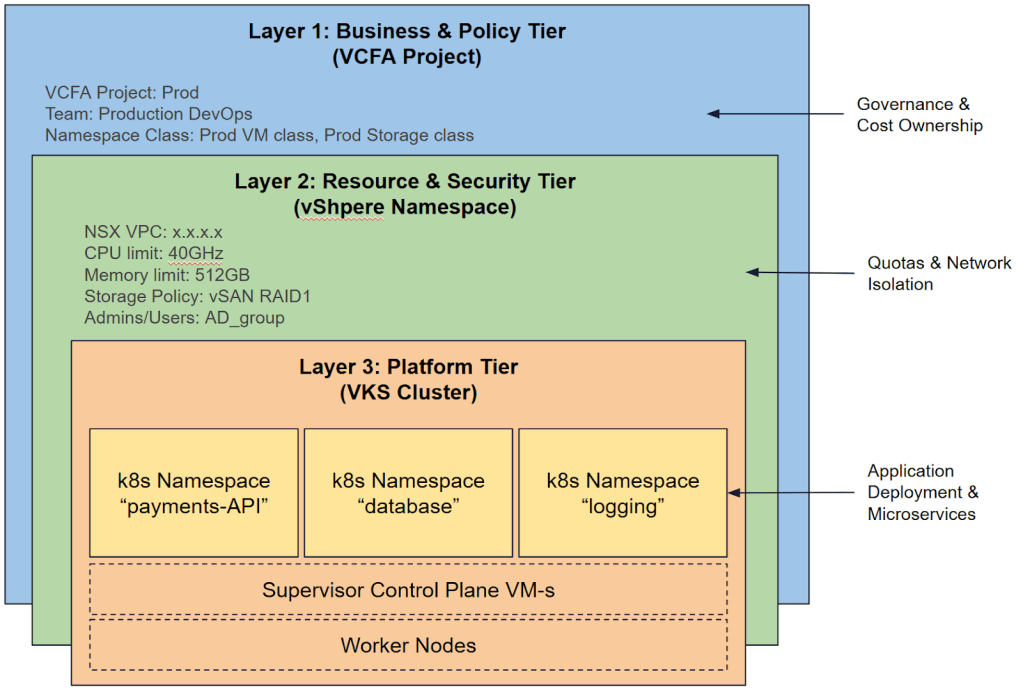
Step 1: The Governance Layer – Business and Policy Tier (VCF Automation)
Cloud Admin creates two Projects in VCF Automation: Dev and Prod. Dev allows for “best effort” storage and small VM sizes. The Prod class mandates “RAID-1 Mirroring” and “X-Large” VM sizes.We have defined the Business Boundary. Developers log into the VCF Automation Portal and see only their specific project.
Step 2: The Infrastructure Layer – Resource and Security Tier (vSphere Namespace)
A developer from the Prod project created Namespace – VCF Automation talks to the Supervisor and automatically provisions a vSphere Namespace. Quota is applied – limited to 512GB RAM and 2TB vSAN storage. Also NSX VPC is automatically carved out with a dedicated CIDR block from the IP Space. Only the Production DevOps AD group is added as “Owners.”
We have a Resource Boundary. The infrastructure is ready, but no code is running yet.
Step 3: The Workload Layer – Platform Tier (VKS Cluster)
DevOps Engineer uses kubectl to deploy a VKS Cluster into that vSphere Namespace for their microservices.The Supervisor provisions three Control Plane VMs and five Worker VMs. This is the Operational Boundary.
Step 4: The Application Layer (Kubernetes Namespace)
The Developer logs into the new VKS cluster and creates standard Kubernetes namespaces for the app components. They run kubectl to create namespaces
This is the Application Boundary.
Understanding these layers is the first step toward a successful VCF deployment. Whether you are troubleshooting a failed cluster or designing a multi-region disaster recovery plan, always ask: “Which namespace layer am I looking at?”
Operationalizing the Design: How VCF Professional Services Assists
Navigating these layers requires more than just technical knowledge; it requires a strategic design that aligns with your business goals. VCF Professional Services accelerates this transition by architecting a scalable namespace strategy tailored to specific enterprise requirements. We provide deep expertise in defining standardized namespaces and guardrails within VCF Automation, helping ensure that resource limits, storage policies, and networking are perfectly aligned with the business needs.
Beyond initial deployment, Professional Services integrates these constructs into CI/CD pipelines, establishing “Day 2” operational frameworks, ultimately empowering developers with true self-service agility without compromising administrative control or security.
Discover more from VMware Cloud Foundation (VCF) Blog
Subscribe to get the latest posts sent to your email.