The container ecosystem solved software distribution decades ago: build an image, push it to a registry, pull it anywhere. In contrast, AI model management remains fragmented. Models live on shared drives, cloud buckets, or are integrated directly into container images. However, what if we could treat AI models the same way we treat container images?
This post walks through the technical underpinnings that make this possible: what Open Container Initiative (OCI) artifacts are, how AI models are packaged into them, and how Harbor evolved to become a model registry. Then, we’ll share a complete end-to-end workflow from pulling a model from Hugging Face, converting it for CPU inference with llama.cpp, pushing it to Harbor using different packaging tools, and deploying it on a Kubernetes cluster with KServe and vLLM.
THE PROBLEM: WHY AI MODELS NEED A REGISTRY
A trained AI model is, at its core, a collection of files: weight tensors serialized in formats like SafeTensors or GGUF, a tokenizer configuration, and metadata describing the architecture and training process. Today, distributing these files typically involves:
- Downloading from Hugging Face Hub or a similar model zoo
- Copying weights into a shared filesystem (NFS or S3)
- Baking model weights directly into a Docker image alongside the inference server
However, incorporating weights into container images conflates the model lifecycle with the inference server lifecycle. A 7B parameter model can be 14GB+, and you don’t want to rebuild and re-push a multi-gigabyte image every time you update your serving code.
Consequently, what organizations need is a system that provides:
- Versioned, immutable storage for model artifacts
- Role-based access control and audit trails
- Vulnerability scanning of the serving environment
- Replication across geographies and environments
- Integration with existing CI/CD and Kubernetes tooling
Container registries already provide all of this for container images. The key insight is that the OCI specification was designed to be extensible enough to store any type of artifact including AI models.
OCI ARTIFACTS: THE FOUNDATION
What Is an OCI Artifact?
Tthe Open Container Initiative (OCI) defines three specifications: the Image Spec, the Distribution Spec, and the Runtime Spec. Importantly, while the Image Spec was originally designed for container images, its structure is deliberately generic.
An OCI image is described by a manifest, which is a JSON document containing:
- A config descriptor: Metadata about the artifact
- An array of layer descriptors: Pointers to the actual content blobs (tarballs, in the case of container images)
- An artifactType field: Identifies what kind of artifact this is
- Annotations: Arbitrary key-value metadata
The critical design decision is that the layer blobs are content-addressed (referenced by their SHA-256 digest) and the mediaType field on each descriptor tells the registry and clients how to interpret the content. In fact, nothing in the specification requires that layers contain filesystem tarballs, they can contain anything.
This extensibility is what makes OCI artifacts possible. A Helm chart, a WASM module, a signature, an SBOM, or an AI model can all be stored in an OCI-compliant registry, alongside container images, using the same distribution infrastructure.
For example, an OCI manifest for an AI model might look like this:
|
1 2 3 4 5 6 7 8 9 10 11 12 13 14 15 16 17 18 19 20 21 22 23 24 25 26 27 28 29 30 31 32 33 34 35 |
{ "schemaVersion": 2, "mediaType": "application/vnd.oci.image.manifest.v1+json", "artifactType": "application/vnd.cnai.model", "config": { "mediaType": "application/vnd.cnai.model.config.v1+json", "digest": "sha256:abc123...", "size": 512 }, "layers": [ { "mediaType": "application/vnd.cnai.model.layer.v1.gguf", "digest": "sha256:def456...", "size": 670000000, "annotations": { "org.opencontainers.image.title": "tinyllama-1.1b-chat-q4_k_m.gguf" } }, { "mediaType": "application/vnd.cnai.model.layer.v1.json", "digest": "sha256:ghi789...", "size": 1024, "annotations": { "org.opencontainers.image.title": "tokenizer_config.json" } } ], "annotations": { "org.cnai.model.name": "tinyllama-1.1b-chat", "org.cnai.model.architecture": "transformer", "org.cnai.model.family": "llama", "org.cnai.model.format": "gguf", "org.cnai.model.param.size": "1.1B" } } |
Each model file becomes a layer, identified by its content digest. The annotations carry structured metadata about the model such as architecture, parameter count and format, enabling registries to provide rich search and display capabilities.
The CNAI Model Spec
In addition, the Cloud Native AI (CNAI) community is developing a model specification that builds on OCI’s extensibility. It defines standardized annotation keys for model metadata:
- org.cnai.model.name – Human-readable model name
- org.cnai.model.architecture – Model architecture (e.g., transformer, cnn)
- org.cnai.model.family – Base model family (e.g., llama, phi-3, mistral)
- org.cnai.model.format – Serialization format (e.g., safetensors, gguf, onnx)
- org.cnai.model.param.size – Parameter count (e.g., 1.1B, 7B, 70B)
This specification is still evolving, but it provides a foundation for registries like Harbor to display model-specific metadata in a meaningful way.
Tools for Packaging Models as OCI Artifacts
One of the strengths of the OCI ecosystem is that multiple tools can produce and consume OCI-compliant artifacts. Furthermore, Harbor is agnostic to which tool you use because it is OCI-compliant. It stores and serves standard OCI artifacts regardless of how they were packaged. Here are the two primary approaches.
OCI Registry As Storage (ORAS)
ORAS is the low-level, general-purpose CLI for pushing arbitrary files as OCI artifacts. It gives you full control over media types, artifact types, and annotations. ORAS constructs a valid OCI manifest, uploads file content as layers, and pushes everything to any OCI-compliant registry.
Key capabilities:
- Custom artifact types (–artifact-type)
- Custom media types per layer (file:mediaType syntax)
- Config files with custom media types (–config)
- Annotations (–annotation)
- Authentication against private registries (oras login)
ORAS is ideal when you need fine-grained control over the OCI manifest structure or when integrating into custom CI/CD pipelines.
KitOps
KitOps is a CNCF sandbox project that takes a higher-level, declarative approach. You define a Kitfile which is a YAML manifest describing your model, datasets, code, and metadata, and the “kit” CLI packages everything into a ModelKit, which is an OCI-compliant artifact. KitOps is purpose-built for AI/ML workflows and understands the structure of ML projects.
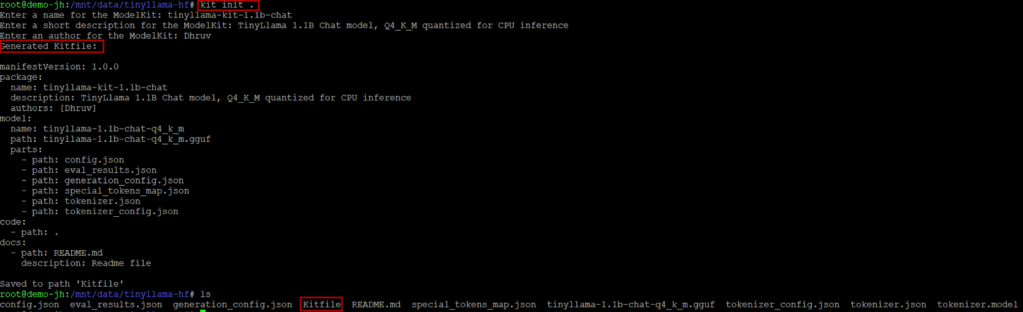
You can auto-generate a Kitfile from a model directory using “kit init”, which scans the directory, identifies model files, configs, and documentation, and produces a ready-to-use manifest. You can also write or edit the Kitfile by hand for full control.
Key capabilities:
- Declarative YAML-based packaging
- Bundles model, datasets, code, and documentation together
- OCI-compliant output compatible with any OCI registry
- Kubernetes init container integration for deployment
- Unpack command for pulling and extracting model components
KitOps is ideal for teams that want a structured, reproducible way to package entire ML projects.
HOW HARBOR EVOLVED TO SUPPORT AI MODELS
Harbor’s OCI Foundation
Harbor is a CNCF-graduated project that originated out of VMware (now part of Broadcom) and is the standard open source container registry for cloud-native environments. It has always been OCI-compliant, meaning it can store and distribute any artifact that conforms to the OCI Distribution Specification.
In particular, Harbor’s core capabilities that transfer directly to model management include:
- Multi-tenancy: Projects act as namespaces, isolating models by team, environment, or use case
- RBAC: Fine-grained access control for who can push, pull, or administer model artifacts
- Replication: Policy-based replication between Harbor instances, or from upstream OCI-Compliant registries
- Retention policies: Automated cleanup of old model versions based on configurable rules
- Audit logging: Complete trail of who pushed, pulled, or modified model artifacts
- Garbage collection: Reclaim storage from unreferenced model layers
- Quota management: Control storage consumption per project
- Signature verification: Cosign and Notary integration for verifying model provenance
The AI Model Journey
Harbor’s journey toward AI model support has been a deliberate, community-driven effort.
Initially, the effort grew out of a practical challenge faced by Harbor’s community partners: distributing ML models separately from inference servers. Bundling multi-gigabyte model weights inside Docker images made container builds slow, images enormous, and the model and server lifecycles unnecessarily coupled.
The approach that emerged was to store model weights as standalone OCI artifacts, decoupled from the inference server image. This allows:
- Independent versioning of models and servers
- Efficient storage through content-addressable layer deduplication
- Faster pulls, only changed model layers need to be downloaded
Subsequently, in Harbor v2.13, integration with the Cloud Native AI (CNAI) project brought first-class model registry capabilities:
- A dedicated UI for browsing model artifacts, showing metadata like architecture, parameter size, format, and a file list
- Support for model-specific annotations in the CNAI model spec format
- P2P preheat for large model distribution across edge locations
The Architecture
The high-level flow is:
- Build and Push: AI models are wrapped in OCI format using any of the tools described above (ORAS or KitOps) and pushed to Harbor. The manifest includes model-specific annotations, and each model file (weights, tokenizer config, etc.) becomes an OCI layer.
- Pull and Consume: Downstream systems pull models from Harbor using standard OCI tooling. On Kubernetes, models can be pulled via init containers with the ORAS CLI, mounted as OCI images through KServe’s Modelcars feature, or (starting with Kubernetes 1.31) via the native Image Volume feature. Locally, llama.cpp or any compatible runtime can load the pulled model files directly.
Because Harbor speaks the OCI Distribution Specification, it doesn’t care which tool was used to package the artifact. ORAS and KitOps all produce standards-compliant OCI artifacts that Harbor stores, replicates, scans, and serves identically.
END-TO-END EXAMPLE: DOWNLOAD, CONVERT, PACKAGE, AND PUSH
This section walks through a complete workflow for model development:
- Download a pre-trained LLM from Hugging Face (regular model files, not OCI format)
- Convert it to GGUF format using llama.cpp for efficient CPU inference
- Package the model as an OCI artifact and push it to Harbor (demonstrated with two tools: ORAS, KitOps)
We will use TinyLlama (1.1B parameters), a compact LLM built on the Llama 2 architecture. TinyLlama is part of the widely recognized Llama family, is Apache 2.0 licensed, and produces a GGUF file of approximately 670 MB at Q4_K_M quantization, small enough to run on any modern CPU and fast to push and pull through a registry.
We are using a ready-made model from Hugging Face here to keep the focus on the OCI packaging and Harbor workflow. The exact same packaging and push steps apply whether you are working with a model you have fine-tuned yourself, a model trained from scratch, or a pre-trained model downloaded as-is.
Prerequisites
- A Harbor instance (v2.13+) with a project created (e.g., “ml-models”)
- Python 3.9+ with pip
- Git (to clone llama.cpp for GGUF conversion)
- At least one of: ORAS CLI or KitOps CLI installed
- 4+ GB free disk space
Step 1: Download the Model from Hugging Face
To begin with, models on Hugging Face are stored using Git LFS, not in OCI format. When you download a model, you get plain files: SafeTensors weight files, JSON configuration files, and a tokenizer. These are the raw files that need to be repackaged into OCI format for Harbor.
Install the Hugging Face Hub CLI:

Download the TinyLlama model:
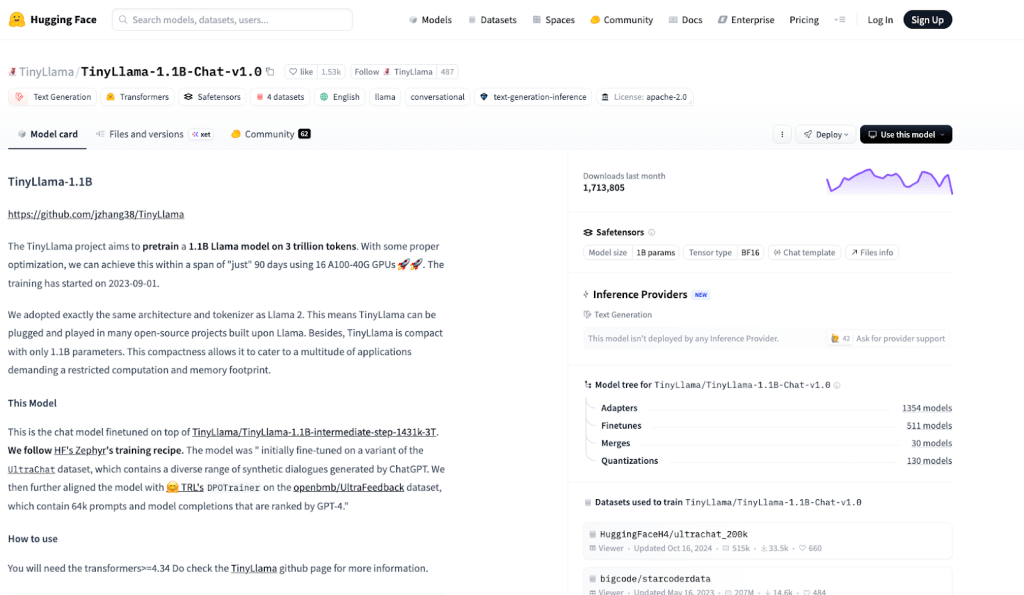
This downloads the model into the ./tinyllama-hf/ directory:

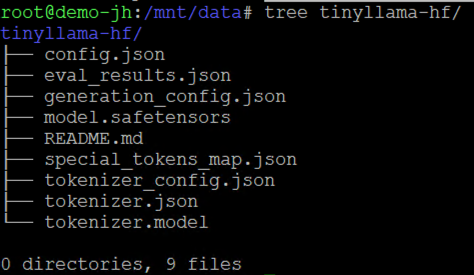
These are standard Hugging Face model files: SafeTensors weights, a model config, and tokenizer files. At this point, the model is just a directory of files on your local disk.
Step 2: Convert to GGUF Format with llama.cpp
Llama.cpp is a highly optimized C/C++ library designed specifically to run Large Language Models (LLMs) with maximum efficiency on CPUs. Before llama.cpp, running an LLM usually required a high-end GPU with a lot of VRAM. Llama.cpp allows us to use CPUs to run these models. In this demo, we will be deploying the model backed by CPU, hence we will make use of llama.cpp.
Created by the llama.cpp team, GGUF (GPT-Generated Unified Format) is a binary format designed for fast model loading and efficient CPU inference. Converting from SafeTensors to GGUF applies quantization, which reduces the model size and memory footprint while preserving most of the model’s quality.
Hence in order to improve the performance of the model on CPUs, we will convert the model from Safetensor format to GGUF.
Note: While we are using a Hugging Face model stored in tensorSafe format, GGUF format models are also available directly, in which case this quantization step can be skipped entirely.
Clone llama.cpp and install its Python dependencies:
First, convert the Hugging Face SafeTensors model to GGUF format. We choose the outtype as f16 (16-bit float) precision as f16 (half-precision) is what most hugging face models are stored as and preserves almost all of the original smarts of the model. Other options available are f32 (Max precision but huge file size), vf16, q8_0, auto and tq2_0.
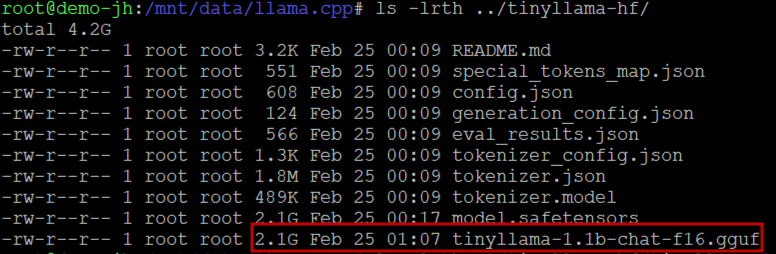
As you can see, the GGUF file is of the same size (2.1 GB) as the SadeTensors file. Once the model is available in GGUF format, we quantize the f16 GGUF to Q4_K_M using the llama-quantize tool to shrink the model weights and reduce the file size:
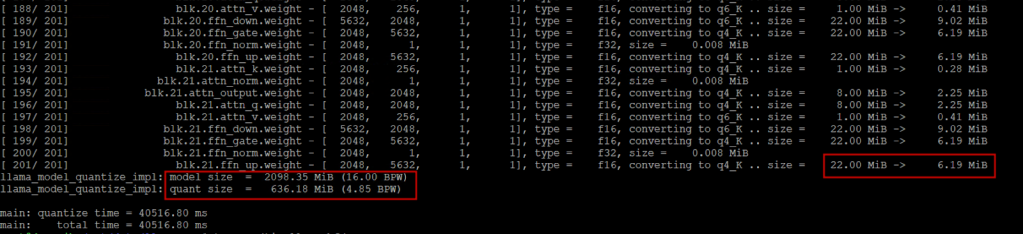
As you can see from the screenshot, each model weight size is reduced through the quantization process and our initial 2.1 GB SafeTensors file has been converted into ~636 MB GGUF file. You can delete the intermediate f16 file afterward.
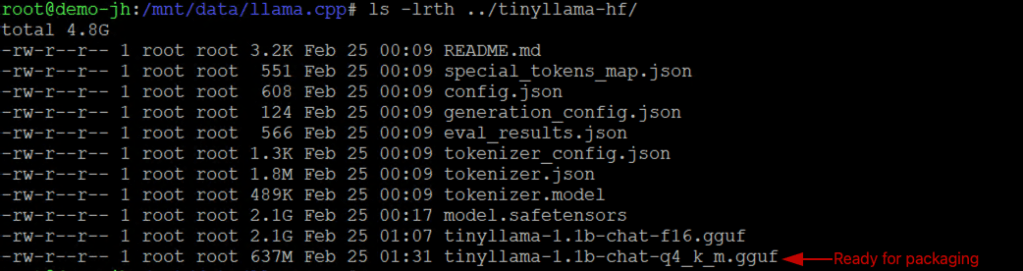
After conversion, the directory contains both the original Hugging Face files and the GGUF file:
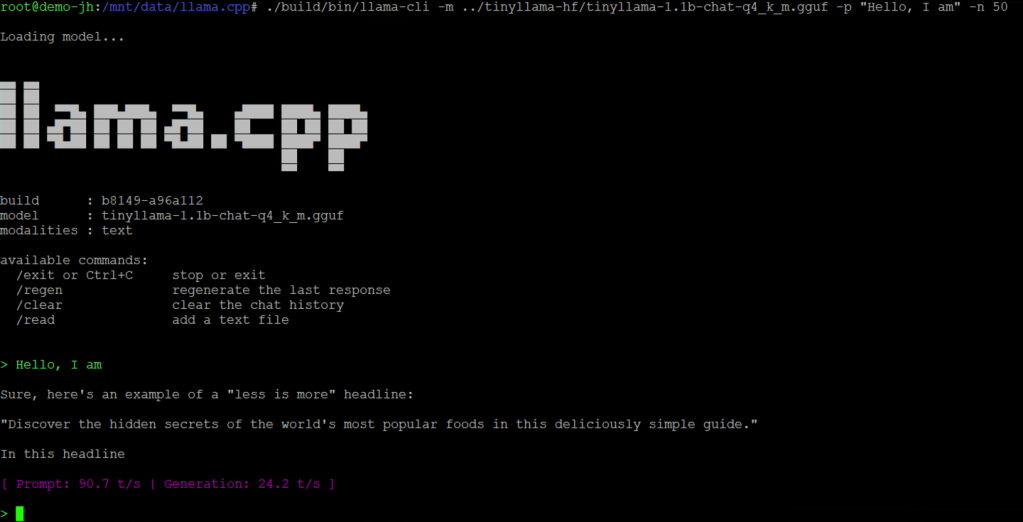
You can verify the GGUF file works by running it locally with llama.cpp:
Step 3: Package and Push the Model to Harbor
Next, we take the model files and package them as OCI artifacts for Harbor. Here we demonstrate two packaging approaches. Each produces a valid OCI artifact that Harbor stores and serves identically. Choose the approach that best fits your team’s workflow.
Option A: Using ORAS
ORAS gives you the most control over the OCI manifest structure. Install ORAS CLI using the official installation documentation.
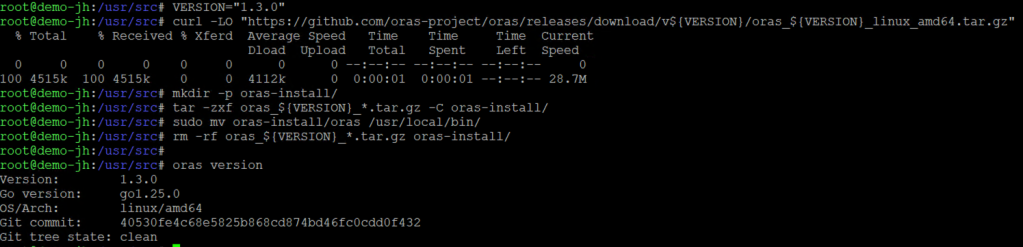
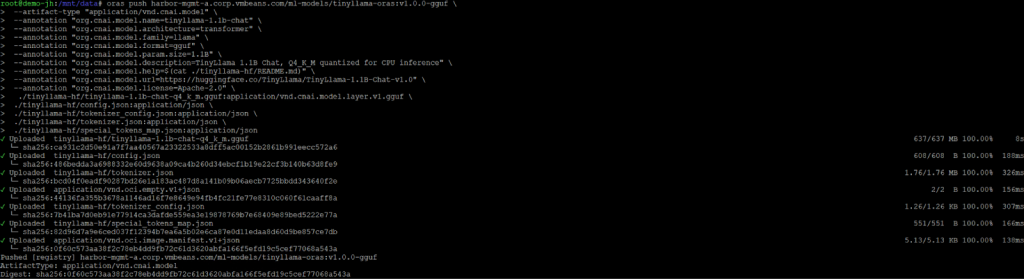
Authenticate with Harbor, then push the model files with metadata annotations:
Breaking this down:
- harbor.example.com/ml-models/tinyllama:v1.0.0-gguf: The full artifact reference: registry/project/repository:tag
- –artifact-type: Declares this as a CNAI model artifact, not a container image
- –annotation: Attaches model metadata following the CNAI model spec convention
- Each file is listed with an explicit media type (file:mediaType), so registries and clients know how to interpret each layer
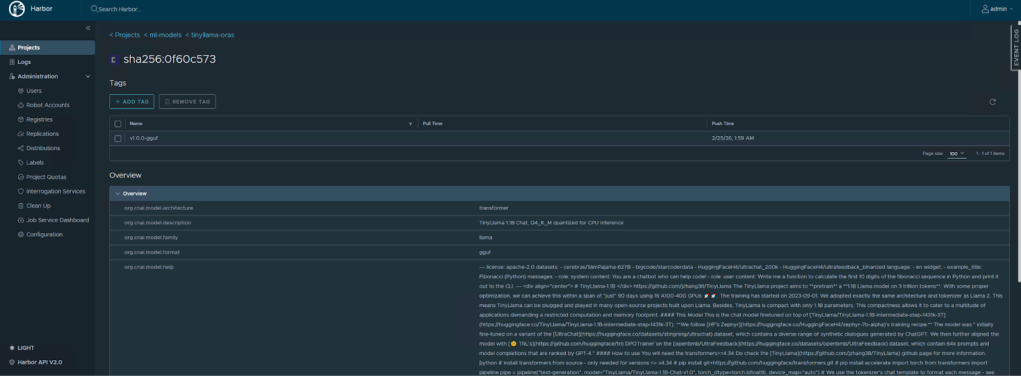
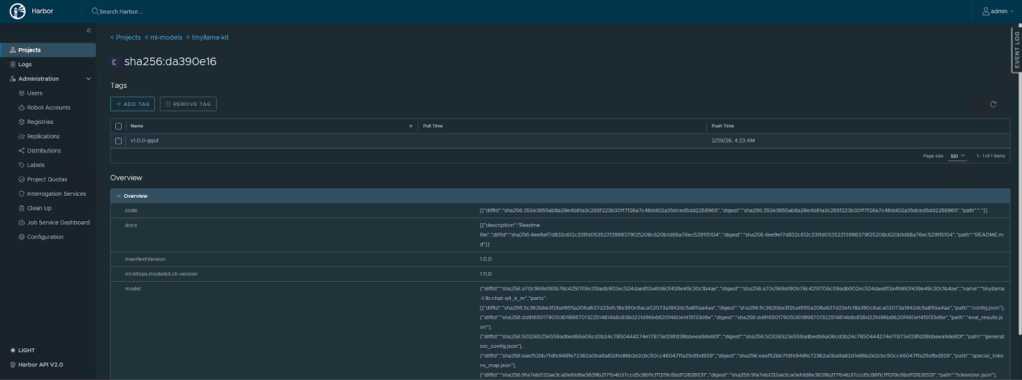
We can see the model reflected in the Harbor UI as an OCI artifact:
Option B: Using KitOps
KitOps takes a declarative approach. Create a Kitfile in your project directory by using the kit init command to automatically generate the file for the model:
Note: Before running “kit init”, clean up the directory by removing files you don’t want to package. The auto-scanner will include everything, and if you leave the original SafeTensors weights (~2.2 GB) and the intermediate f16 GGUF (~2.2 GB) alongside your quantized GGUF (~670 MB), the resulting artifact will be ~4.7 GB instead of ~670 MB.
Then pack and push:
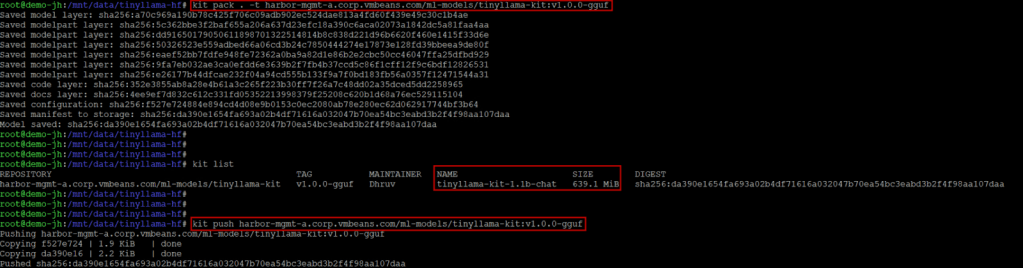
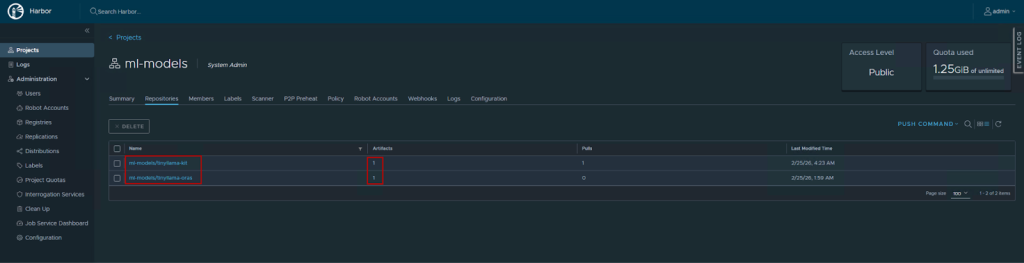
We can verify the same in Harbor UI:
Verifying in Harbor
Regardless of which tool you used, navigate to your Harbor UI. Under the “ml-models” project, you will see the “tinyllama” repository with the v1.0.0-gguf tag. Harbor’s model artifact view will display the annotations (architecture, parameter size, format) and list the individual files in the artifact.
MODEL LIFECYCLE OPERATIONS IN HARBOR
Once your model is in Harbor, you gain access to the full suite of registry operations:
- Versioning: Push new versions with new tags (v1.1.0, v2.0.0). Previous versions remain immutable and pullable. This applies regardless of which tool (ORAS, KitOps) was used to push. Harbor versions OCI artifacts the same way it versions container images.
- Replication: Configure replication rules to automatically sync models between Harbor instances, useful for promoting models from a staging registry to production, or distributing models to edge locations.
- Retention policies: Automatically clean up old model versions based on rules (e.g., keep the last 5 versions, delete artifacts older than 90 days).
- Access control: Use Harbor’s RBAC to control who can push models (data scientists, CI pipelines) versus who can pull them (deployment systems, specific teams).
- Audit logging: Every push, pull, and administrative action is logged, providing the traceability that compliance and governance teams require.
CONCLUSION
In summary, the container ecosystem spent years building robust infrastructure for packaging, distributing, and deploying software artifacts. The OCI specification’s extensibility means that AI models can now leverage that same infrastructure with the same security, governance, and operational maturity.
Harbor, as a CNCF-graduated registry, is particularly well-positioned for this role. Its multi-tenancy, RBAC, replication, and scanning capabilities address the security and compliance requirements that enterprise AI deployments demand. And because models are stored as standard OCI artifacts, the entire ecosystem of OCI-compatible tools—ORAS, KitOps, and more—work interchangeably.
Follow our Harbor blog series:
- Blog 1 – Harbor: Your Enterprise-Ready Container Registry for a Modern Private Cloud
- Blog 2 – Reducing Harbor Deployment Complexity on Kubernetes
- Blog 3 – Making Harbor Production-Ready: Essential Considerations for Deployment
- Blog 4 – Integrating VMware Data Services Manager with Harbor for a Production-Ready Registry
- Blog 5 – Using Harbor as a Proxy Cache for Cloud-Based Registries
- Blog 6 – Securing Your Software Supply Chain with Harbor
- Blog 7 – Implementing Cross-Region Replication with Harbor in VMware Cloud Foundation
Discover more from VMware Cloud Foundation (VCF) Blog
Subscribe to get the latest posts sent to your email.