
Kubernetes upgrades are often presented as straightforward, linear progressions: move from one version to the next, validate, and repeat. This approach—commonly called the Sequential In-Place Upgrade—is proven, conservative, and widely adopted.
However, in modern enterprise platforms, upgrades span much more than just the Kubernetes version number. They involve a complex interplay of:
- A management plane (Supervisor / platform services)
- Platform layers (VMware Kubernetes Service – VKS)
- Workload clusters
- Applications with varying levels of resilience and state
Understanding both the technical requirements and the organizational realities is critical to helping teams choose the right upgrade model and avoid costly surprises.
Option 1: Sequential In-Place Upgrade
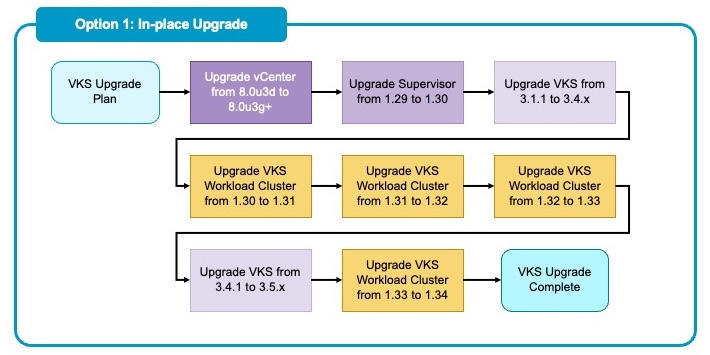
The in-place model upgrades existing components layer by layer, modifying the running infrastructure.
Typical Flow
- Supervisor Cluster: 1.29 → 1.30
- VKS Service: Updated to support newer Kubernetes versions (e.g., v3.1 → v3.5)
- Workload Clusters: 1.30 → 1.31 → 1.32 → 1.33
Why Teams Like It
- Reuses existing infrastructure: No need for massive spare capacity.
- Familiar operational pattern: It aligns with standard patching workflows.
- Lower footprint: Maintains a lean resource utilization profile during the process.
The Operational Reality
When multiple version hops are required, timelines are usually governed by maintenance windows and change management processes, not engineering effort. If corporate governance allows only one production upgrade per month, a four-hop workload upgrade becomes a four-month minimum engagement—often longer when factoring in validation and remediation.
Each hop introduces:
- A separate change record.
- Independent testing cycles.
- A new rollback plan.
- A new opportunity for failure.
Application Considerations (Often the Deciding Factor)
Not all applications handle rolling restarts equally. Sequential in-place upgrades assume applications can tolerate node drains, control-plane restarts, CNI/CSI component upgrades, and certificate rotations without downtime.
Common challenges include:
- Stateful workloads lacking proper PodDisruptionBudgets (PDBs).
- Legacy applications with long startup times or manual initialization steps.
- Hard-coded API dependencies on deprecated Kubernetes features.
When applications are not fully rolling-safe, every single version hop becomes a high-risk event. Even if the platform upgrade is supported by Broadcom, the application layer may force slower pacing, extended freeze windows, or manual intervention.
Option 2: Parallel / Blue-Green Upgrade
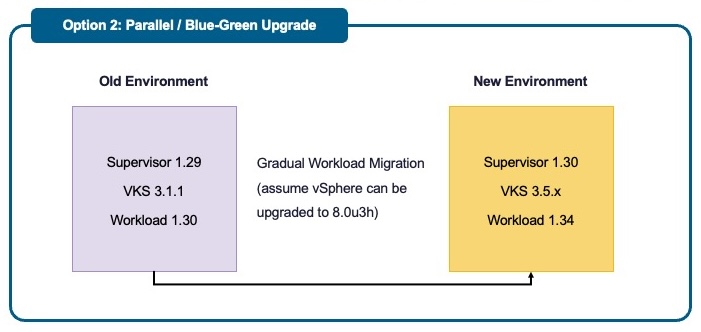
Parallel (Blue-Green) upgrades involve creating a new environment (Green) at the target version alongside the existing one (Blue), migrating traffic, and then decommissioning the old environment.
High-Level Approach
- Deploy new Supervisor and VKS at target versions.
- Create new workload clusters at the target Kubernetes version.
- Migrate applications gradually via CI/CD.
- Decommission the old environment.
Why Teams Choose This
- Compresses calendar time: Moves from version A to Z in one motion.
- Avoids chained hops: Eliminates the risk of intermediate version bugs.
- Simplifies rollback: Reverting is a matter of shifting traffic back to the “Blue” cluster.
- Stabilizes production: The “Blue” environment remains untouched while “Green” is validated.
Prerequisites for Success: The “Must-Haves”
While Blue-Green offers significant speed and safety advantages, it is not “free.” It requires a higher level of architectural maturity. To execute this successfully, the following requirements must be met:
1. Advanced Traffic Management (Load Balancer)
You cannot rely on simple DNS round-robin. You require a capable Load Balancer (LB) to handle traffic switching between the Blue and Green clusters. This allows you to granularly shift traffic (e.g., 5%, then 50%, then 100%) and instantly cut over or roll back if issues are detected.
2. Elastic Scalability (Auto-Scalers)
When you shift traffic to the new Green cluster, the load will spike almost instantly. Manual scaling is too slow.
- Horizontal Pod Autoscaler (HPA): To rapidly increase pod counts based on CPU/Memory/Custom metrics.
- Cluster Autoscaler: To provision underlying worker nodes dynamically as the HPA schedules more pods.
3. Robust CI/CD Tooling
Manual deployment in a Blue-Green scenario is cumbersome and error-prone. You need a modern Continuous Delivery toolchain (e.g., ArgoCD, Flux, Harness) to target the new cluster endpoints and synchronize configurations. Attempting to manually kubectl apply manifests across two dynamic environments is a recipe for configuration drift and outage.
4. A Strategy for Stateful Applications
Stateless apps are easy to move; stateful apps are the challenge. You must plan for data gravity:
- Replication: Does the app support active-active database replication?
- Backup/Restore: Will you use tools like Velero to migrate Persistent Volumes (PVs)?
- Downtime: Will you require a brief maintenance window to detach storage from Blue and attach to Green?
Decision Checklist
Use this checklist to select the right model for your organization.
Platform and Scale
- Do you need to jump more than two minor Kubernetes versions?
- Do you manage a large fleet of clusters where sequential upgrades would take years?
- If yes → Lean Blue-Green
Application Readiness
- Are all critical apps tolerant of rolling restarts?
- Do apps have well-defined PDBs and health probes?
- Are deprecated APIs already remediated?
- If no → Lean Blue-Green (Isolates the risk)
Operations and Governance
- Are maintenance windows infrequent?
- Is the change approval process heavy?
- If yes → Lean Blue-Green (Fewer change windows)
Infrastructure Constraints
- Is extra capacity temporarily available?
- Can cloud or hardware expansion be approved?
- If no → Sequential may be preferable
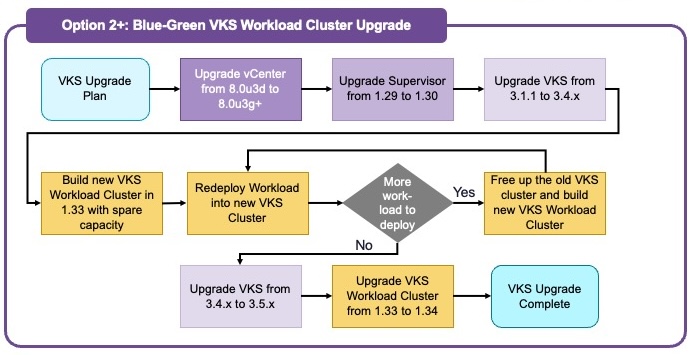
Case Study Note: For the specific customer in our recent engagement, we recommended a hybrid model. Due to limited spare capacity and a Supervisor shared across multiple VKS workload clusters, we could not do a full Blue-Green. However, we utilized the principles of Blue-Green for their VKS workload clusters.
How VMware Professional Services Accelerates the Upgrade
Navigating these decisions can be daunting. This is where VMware Professional Services (PS) steps in to bridge the gap between platform capabilities and customer realities. We don’t just “run the upgrade script”—we ensure the upgrade aligns with business goals.
1. Assessment and Dependency Mapping
Before touching a single cluster, PS architects perform a deep-dive assessment of the current estate. Beyond simply identifying deprecated APIs, we rigorously validate component upgrade version interoperability—helping ensure that vCenter, Supervisor, and VKS versions are fully aligned against the official compatibility matrix. We also evaluate Multi-Cluster Management capability, determining if the existing management plane supports the target VCF infrastructure or if a special approval (RPQ) process is required to maintain supportability. Finally, we analyze capacity for Blue-Green maneuvers and map application dependencies to ensure no critical integrations break during the transition.
2. Strategy Selection and Roadmap Design
We help customers navigate the “Sequential vs. Blue-Green” decision matrix. By evaluating the specific constraints—such as hardware availability, load balancer capabilities, and team maturity—we design a custom upgrade roadmap that minimizes risk.
3. Automation and Tooling
Manual upgrades are slow and risky. VMware PS brings established automation assets to the table. Whether it is scripting the sequential upgrade of VKS Supervisors or setting up the CI/CD pipelines required for a Blue-Green traffic shift, we help build the “machinery” that makes the upgrade repeatable.
4. Operational Enablement
The goal isn’t just to upgrade, but to leave the team capable of managing the new version. We work shoulder-to-shoulder with customer teams, transferring knowledge on new VKS features, updating runbooks for the new version, and ensuring that Day 2 operations are ready from the moment the upgrade completes.
Summary
Sequential in-place upgrades remain an excellent choice for small, low-risk version jumps and environments with highly resilient applications. However, for multi-version journeys, strict interdependencies, or large fleets, a parallel / Blue-Green strategy often delivers faster time-to-target and simpler rollback mechanisms, —provided the necessary load balancing and automation scaffolding is in place.
The most successful upgrade programs start by acknowledging one simple truth: Kubernetes upgrades are not just technical exercises—they are organizational change programs.
By leveraging VCF Professional Services to assess readiness and design the right strategy, organizations can transform a high-stress “upgrade project” into a predictable, routine lifecycle operation.
If you’re looking to take advantage of Kubernetes on VCF and want to leverage the experience and expertise of our Professional Services team, reach out to your Broadcom Account Director. We can discuss the specific technical requirements of your environment and how our team can support your objectives.
Discover more from VMware Cloud Foundation (VCF) Blog
Subscribe to get the latest posts sent to your email.