

Converging your VMware vSphere environment into VMware Cloud Foundation (VCF) is a strategic move that shifts your infrastructure from a collection of managed silos to a unified private cloud.
Depending on your current environment, there are two primary paths.
Path 1: Convert your vSphere environment into a new VCF fleet using the VCF Installer. This approach is typically used if there is no VCF instance deployed already, but there are existing VMware Cloud Foundation Operations, VMware vCenter, and VMware NSX instances in the environment. These existing components are used to instantiate the VCF management domain, deploying any components which are missing.
Path 2: Import your vSphere environment into an existing VCF fleet using VCF Operations. This approach is used when you already have a VCF instance deployed and want to manage a vSphere instance centrally as an additional VI workload domain in VCF. This will also deploy any missing components, such as NSX, if they have not been instantiated yet while the vSphere instance is being imported.
The exact steps you need to take depend on the version of vSphere and/or VCF that is being used in the environment. Here are the typical processes VCF Professional Services uses to convert or import vSphere to VCF.
Path 1: Converting a vSphere instance
This is the typical starting point for many vSphere customers who do not want to do a fresh deployment of VCF 9.0, where there is no existing VCF instance already deployed in the environment. This allows for the existing components in the environment to be used as starting blocks for a VCF management domain.
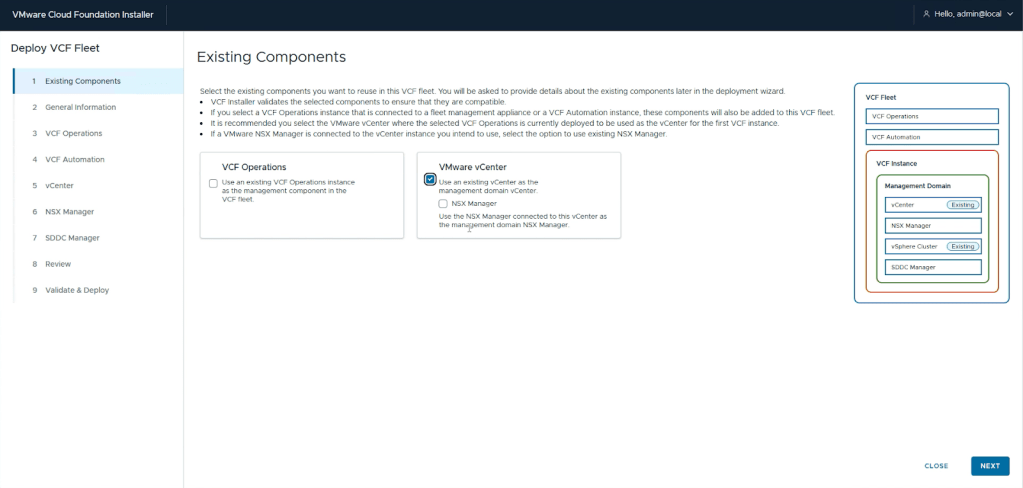
Step 1: Assess, Check Prerequisites, and Remediate Core Components
The first step is to assess and validate the environment. There are many prerequisites and minimum component versions. This includes looking at the following:
- Check deployed components and their versions. Depending on the deployed versions of vSphere, NSX, and VCF Operations, interim steps might need to be performed in advance. For example, if you are converting to VCF 9.0.0, NSX is not supported; however if you are using VCF 9.0.2, it is supported.
- Validate that the storage, network, and compute configurations are supported. Configuration options such as Enhanced Linked Mode (ELM) or the Distributed Virtual Switch configuration have to be remediated prior to a conversion being allowed. For example, you must remove ELM or upgrade the version of the switch to a supported version.
- Pick one of the supported scenarios. The steps vary based on the components and their versions.
Step 2: Perform Upgrades to Appliances and ESX Hosts
There is a specific order for performing these upgrades before the vSphere environment can be converted into a VCF instance. Remember that, depending on the upgrade path, not all of the following steps may be required. Let’s walk through the typical process when all components are already deployed.
- Patch VMware Aria Suite Lifecycle. If deployed, Aria Suite Lifecycle must be patched to at least version 8.18 Patch 2 or later prior to being allowed to do a conversion.
- Upgrade VMware Aria Suite Operations. If deployed, Aria Operations must be upgraded to VCF Operations 9.x.
- (Optional) Upgrade VMware Aria Automation. If deployed, Aria Automation should be imported to VCF Operations and upgraded to version 9.x. Note that this can be done as a separate workstream as Aria Automation can have complex custom workflows that require additional time to test and remediate.
- Upgrade vCenter. If you are converting to VCF 9.0.0, or VCF 9.0.1 with no attached NSX instance, vCenter must be upgraded to 9.0 or later. If you are converting to VCF 9.0.1 and have NSX attached, your vCenter must be version 8.0 U1a or later, with NSX version 4.1.0.2 or later.
- Upgrade VMware ESX hosts. If you are converting to VCF 9.0.0, ESX hosts must be upgraded to version 9 prior to the conversion process. If you are converting to VCF 9.0.1, ESX hosts may be on version 8.0 update 1a or later.
Once these steps are completed, you can convert vSphere to VCF.
Step 3: Convert vSphere to VCF
When all of the components are on the appropriate versions, the conversion process can begin.
- Deploy the VCF installer appliance. Since there is no VCF instance deployed, the first step is to deploy the VCF installer appliance so that it can be used to convert the environment.
- Download the VCF binaries. Once deployed the binaries must be downloaded for the version of VCF that will be deployed. This can take significant time on slower connections.
- Run the VCF installation wizard. During the installation, you will need to specify the existing components to be used for the converged deployment. For any components that need to be deployed, such as VMware SDDC Manager or NSX, you need to provide deployment details and the components will be added to the environment during the conversion process.
Here is an example of the changed workflow:
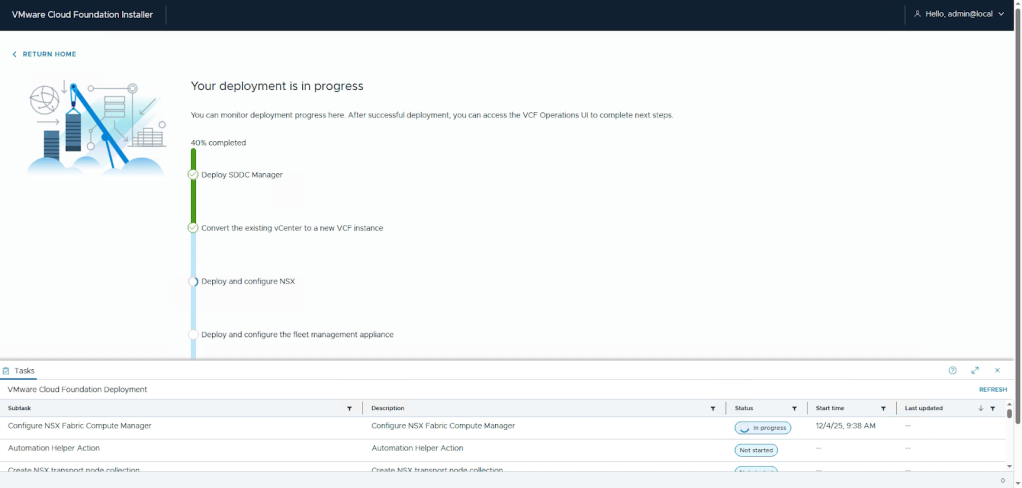
When the conversion process completes, administrators can take advantage of VCF features such as lifecycle management and certificate management.
Path 2: Importing a vSphere instance into a VCF Fleet
Where there is already a VCF instance deployed, an existing vSphere instance can be imported and managed as a VI workload domain right from the VCF Operations console.
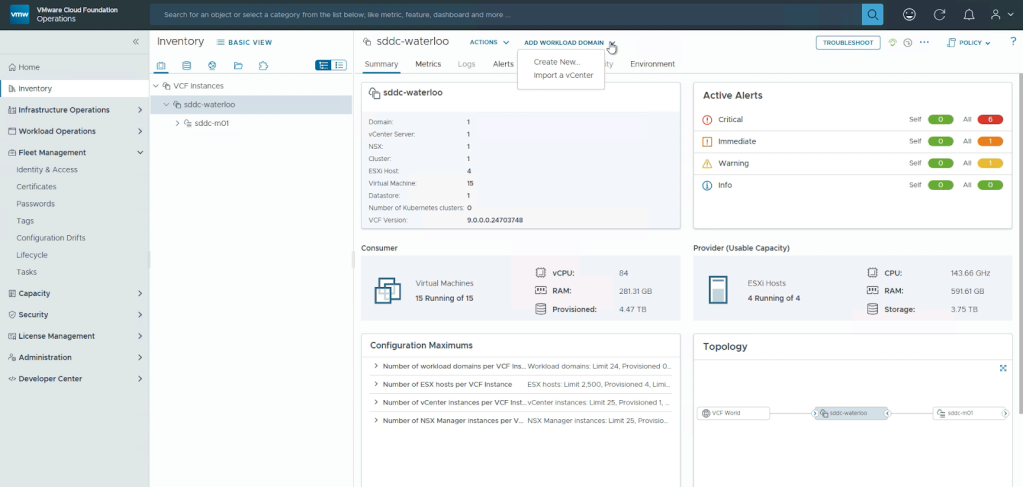
This allows for existing environments to be imported to the existing fleet for a unified view of the environment. If NSX is not in the environment, it will be deployed as a part of the process.
Step 1: Assess, Check Prerequisites, and Remediate Core Components
The first step for the import process is to assess and validate the environment. There are many prerequisites and minimum component versions. Note that the requirements to import are slightly different than the requirements to convert; however, the general details remain the same. This includes looking at the following:
- Check deployed components and their versions. Depending on the deployed versions of vSphere, NSX, and VCF Operations, there could be interim steps that need to be performed in advance.
- Validate that the storage, network, and compute configurations are supported. Configuration options such as Enhanced Linked Mode (ELM) or the Distributed Virtual Switch configuration have to be remediated prior to a convergence being allowed. For example, you must remove ELM or upgrade the version of the switch to a supported version.
Step 2: Remediate Any Errors
As a part of the import process, there is a comprehensive validation of component configurations. You may need to make configuration changes to support the import as a VCF workload domain.
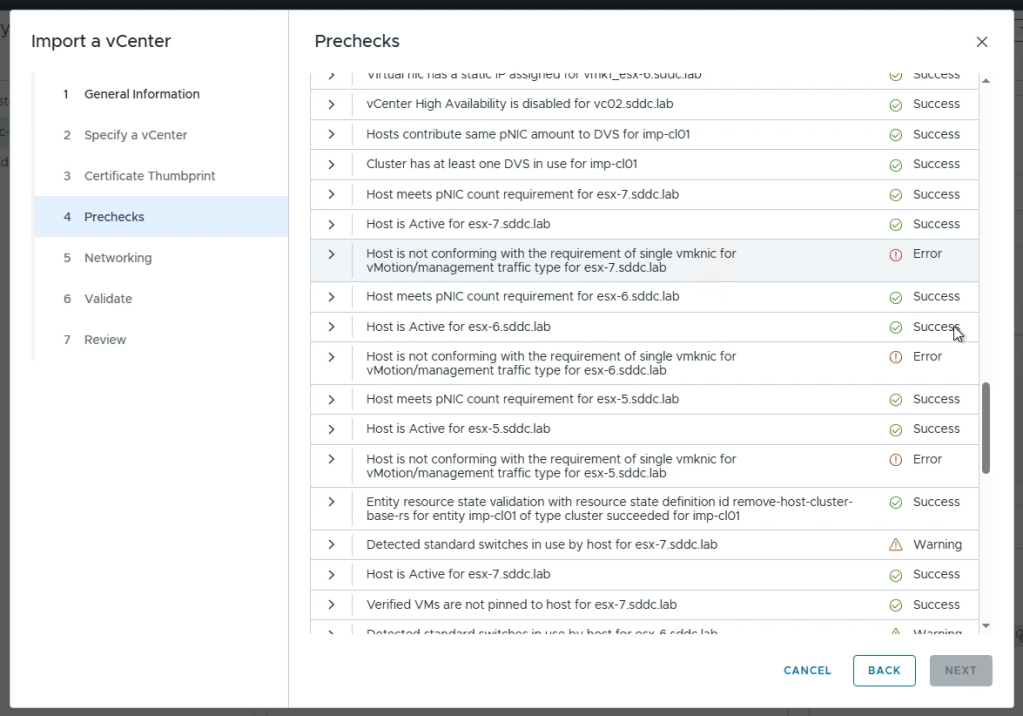
The validations check everything from required hardware and network configurations, switch versions, to default settings that are needed to be set to match the VCF recommended configurations. Review this list and remediate any errors.
Step 3: Import vSphere to VCF
Once the validation passes the import process can begin. The vCenter will be added as a workload domain under the chosen VCF instance. This process also includes deploying the NSX configuration if it is not already in the environment.
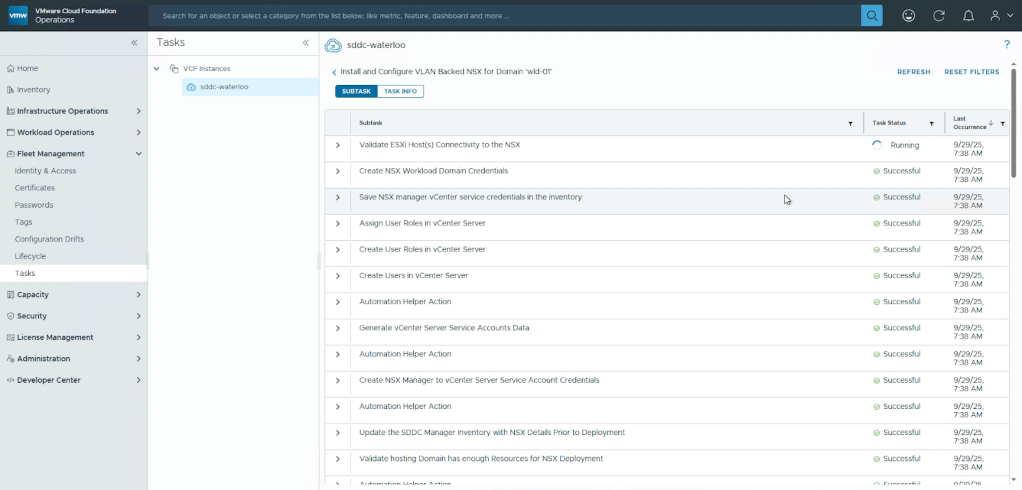
When complete, the environment will be added as a workload domain and fully managed as if it were deployed from VCF as a brand-new environment.
Need Help?
Converging your vSphere environment to VCF 9.0 requires careful planning and execution to minimize disruptions. If you need assistance, VCF Professional Services can help. Contact your account director for more information.
Discover more from VMware Cloud Foundation (VCF) Blog
Subscribe to get the latest posts sent to your email.