
In a former life, I successfully automated ESX rollouts, livestock-style in what we’d call a “vSphere only” environment.
The project was to automate the process of ESX bare-metal host provisioning: storage zoning, bare metal installation, ESX configuration, vCenter import, post-vCenter configuration, iPAM/CMDB and monitoring registration, and so on.
Upon project completion, we could provision an ESX host into any cluster in 18 minutes, and ESX host decommission and re-provision took 30 minutes.
It was a powerful ESX-host-as-livestock approach:
- No need to do upgrades; every major update/upgrade was a new installation.
- No need to troubleshoot. Just roll out a new ESX host and decom the faulty one so you can troubleshoot it risk-free or delegate it to others, limiting the need for lengthy on-call events.
- Capacity planning became more flexible because we could pull any host from any lesser-utilized cluster and, within minutes, place it into a higher-utilized cluster. This saved tens of thousands of dollars every quarter since we didn’t have to plan for peak utilization.
The project took months of iteration and no less than five platforms to get it all up and running.
Why did it take so long, and why was it so complex?
Because I had to learn and debug all five different platforms to get it all working; I had to make sure all five platforms worked together through my infrastructure pipeline. This is what we might call DIY automation; outside of REST APIs, I wasn’t really given an easy way to automate anything. I was mostly on my own.
Let’s talk about a better way.
The Challenge of DIY Automation: “The Frankenstein Approach”
With the pipeline required, as above, here is a simplified list of the major stops along the way:
- Offline management configuration
- Firmware updates
- ESX installation
- iPAM/DNS registration
- ESX configuration and reboots
- Register ESX into vCenter
- Add license to ESX
- vCenter feature configuration
- Upstream storage configuration
- Upstream network configuration
- Register ESX with monitoring
How many different APIs (not API calls) are involved here? I count at least six: ESX -> vCenter -> iPAM/DNS -> storage -> network -> monitoring. That is a lot of moving parts.
If you’re a naked vSphere shop, building this pipeline could take weeks.
Why? Because you are running a traditional data center (I call them “frankensteined” data centers) where you have a hodge-podge of disparate products that don’t talk to each other.
Furthermore, the person creating this automation may need to reach out to various gatekept silos to make this work (can you say “firewall rules” anyone?).
Leveraging VCF to Automate This Process
What would that look like with VMware Cloud Foundation (VCF)? Well, instead of the monstrosity that is a frankensteined data center, everything is software-defined and role-based access controlled.
No more silos, and the API is unified. The advantage you have is that now you literally have far fewer steps and hoops to jump through to automate your ESX provisioning and life cycle.
Instead of five platforms, you have one or two. In fact, maybe you don’t need to code this out and this automation is provided in the UI, as you will see later.
Engineers and leaders alike usually take software-defined data centers (SDDCs) for granted. If you have access to the APIs across the board, or there are fewer to call, your automation pipelines are faster to build and easier to maintain.
What Does an SDDC Look Like?
Frankensteined infrastructure automation means iterating across disparate technologies, platforms, and silos, so it all becomes not just a technology barrier, but a human one.
This is what C-suite would call a “barrier to execution.”
I get it, engineering and figuring things out and stitching everything together can be fun; platform engineers in particular love a good challenge (I was in that camp once upon a time). But that “fun” and challenge are at the literal cost of the business because you are relying on labor instead of leveraging a solution like VCF with automation included.
What VCF offers is the best of both worlds: UI-driven automation is available, but if you want a “zero touch” approach, then the VCF API is there for you:
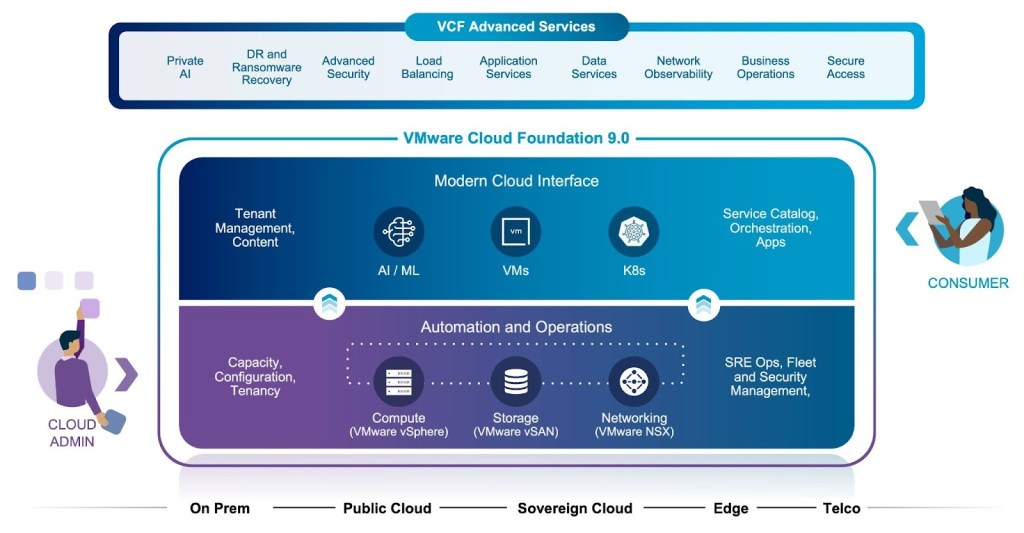
Note that compute, storage, and networking are all included as one unified entity. This doesn’t necessarily mean that traditional VI admins have to own all of it; I have seen network engineers use their transferable skills to become adept at NSX, and so on.
But what it really means is that, instead of having to gain access across silos (sometimes the answer is “no”), VCF removes these barriers to execution since it’s all part of the same unified API and all components are integrated.
I have a few customers who are still stuck in automating through silos, and, as I mentioned earlier, that takes weeks. It’s frustrating to watch because in the last section here you will see that we already provide that automation, push-button style.
Real-World Examples of VCF Infrastructure Automation
Here’s an example of SDDC being easy.
If you use vSAN, cluster automation is fully automated. The networking is provided by NSX, so all you need to do is specify a few usual parameters and off you go:
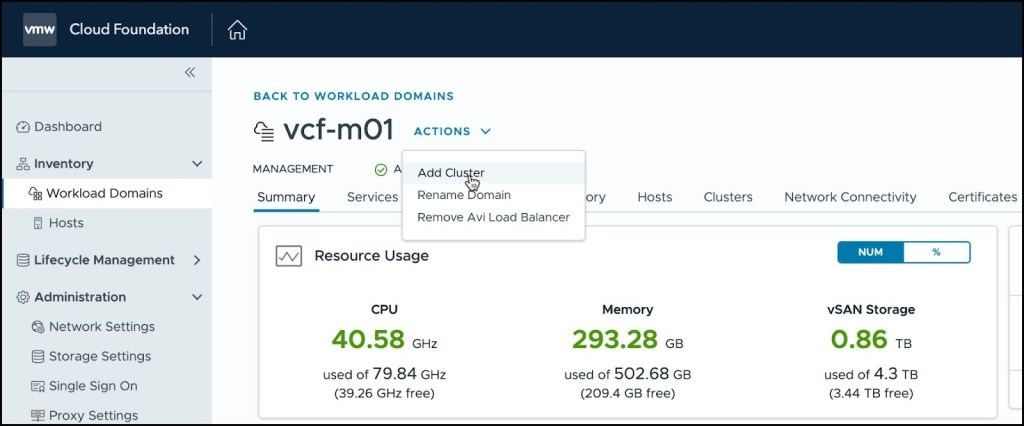
If you want to just push a button to add/commission a host – well, if you’re running vSAN, it’s very simple:
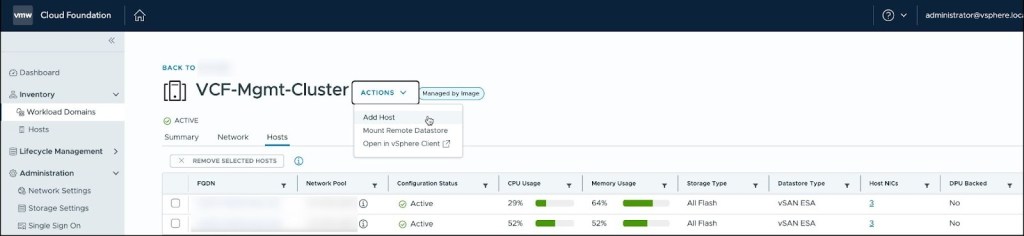
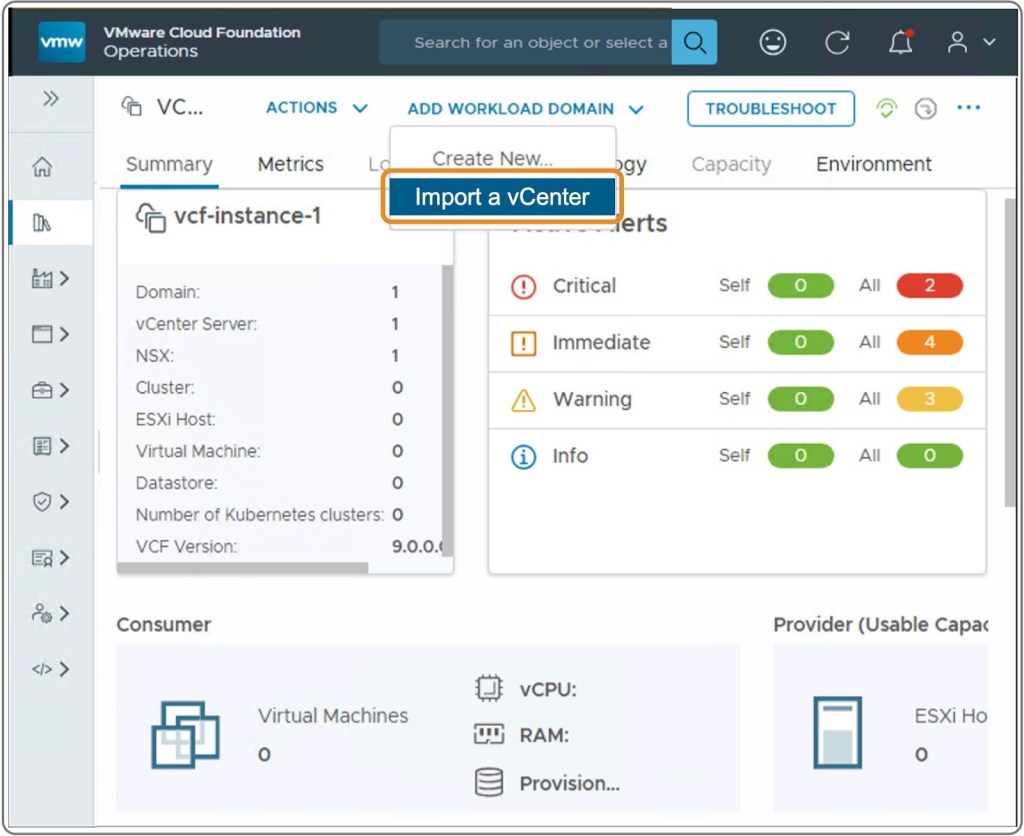
If you are not using vSAN, you’ll need to import the cluster. Yes, we make that part easy, but up until that point, it’s all DIY, as above. I recommend thinking over the automation included with the full stack of VCF.
Stay Tuned for Part 2: Leveraging the VCF API for Infrastructure Automation
I recommend you look at full-stack VCF because the automation is built-in and UI driven. This is how modern data centers are provisioned in the private cloud and how things should be done in data centers everywhere.
I realize it’s fun to code, but sometimes, not having to code some infrastructure tasks allows engineers to move on to bigger and better things that you do have to code.
Either way, in Part 2, we’ll take a look at a few examples of coding and leveraging the VCF API.
Discover more from VMware Cloud Foundation (VCF) Blog
Subscribe to get the latest posts sent to your email.