
In modern hybrid and private clouds, operational data pours in from everywhere — backup systems, storage arrays, SaaS platforms, and edge devices. But integrating those data sources into one cohesive monitoring platform can be a challenge.
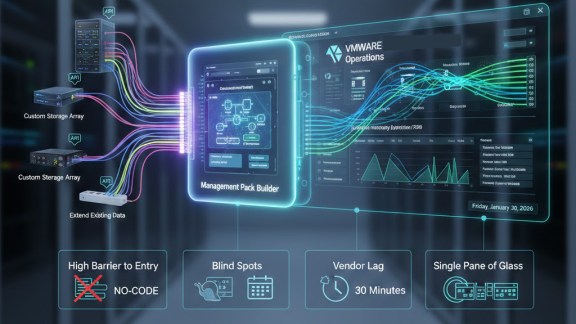
That’s where the Management Pack Builder (MPB) for VMware Cloud Foundation (VCF) comes in. MPB is a no-code tool that empowers operations teams to bring external data into VCF’s analytics and monitoring engine, without writing a single line of code.

What Is the Management Pack Builder (MPB)?
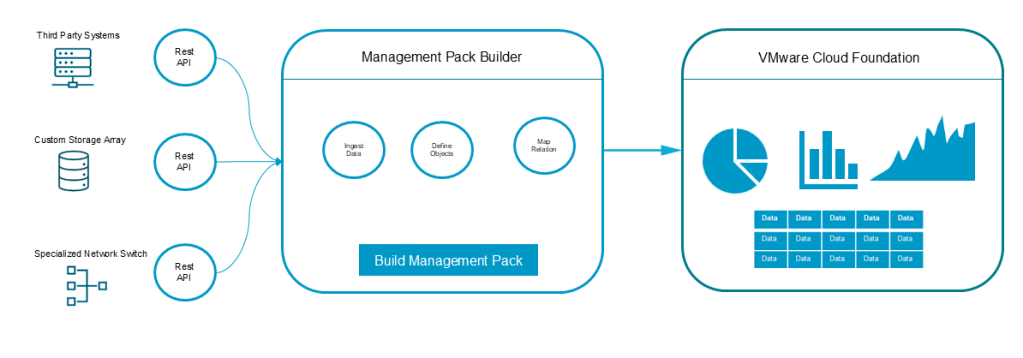
MPB is a feature in VMware Cloud Foundation that allows you to create custom management packs — or adapters — to import external telemetry into VCF.
It enables you to:
- Connect to REST APIs.
- Define custom objects (hosts, clusters, backup jobs, appliances).
- Map metrics and properties so they appear directly in VCF dashboards, alerts, and analytics.
- Package everything as reusable management packs for deployment across your fleet.
Think of MPB as a translator, turning raw API data into meaningful metrics and objects that VMware Cloud Foundation can understand and act on.
The Challenges MPB Solves
- Filling Gaps in Monitoring Coverage: Many third-party or homegrown systems lack native management packs. MPB bridges that gap, letting you import telemetry into the same operational environment used for VCF.
- Reducing Integration Complexity: Traditional integrations require long development cycles and maintenance. MPB’s no-code approach simplifies that process, helping teams move faster and focus on insights rather than integration code.
- Reducing Data Silos: By consolidating telemetry from disparate tools, MPB gives you a unified operational view — making it easier to correlate events, troubleshoot faster, and reduce mean time to repair (MTTR).
- Scaling with Repeatability: Once built, management packs can be packaged and redeployed consistently across multiple environments to help ensure standardized observability and reduce configuration drift.
- Handling Non-Standard APIs: Not all APIs follow vendor standards. MPB’s flexible request/response mapping supports unique or custom formats, giving you control over how data is collected and visualized.
Key Benefits of Using MPB
- Faster Time to Insight: Import new telemetry sources in hours, not weeks.
- Unified Operations: Centralize infrastructure and service monitoring under one pane of glass.
- Lower Integration Costs: Avoid custom coding and leverage VMware’s supported builder.
- Custom, Domain-Specific Metrics: Model meaningful objects (like Backup Job or Replication Pair).
- Reusable Packaging: Easily export and import management packs across multiple sites.
A Typical MPB Workflow
Here’s what creating a custom management pack looks like in practice:
- Identify the data source and required telemetry (API endpoints, fields, authentication).
- Define an object model — types, identifiers, and relationships.
- Configure collection settings like request schedules and credentials.
- Map JSON or XML response fields to metrics and properties in VCF.
- Test data collection and validate objects inside VCF Operations.
- Package and deploy your management pack across environments.
Example: Creating a Backup Job Management Pack
Let’s say one of your backup appliances exposes job data — status, duration, and data size — through REST API.
Using MPB, you can:
- Connect to that API and poll for data hourly.
- Define a Backup Job object type with metrics like Status, Duration, and BytesProcessed.
- Map those fields so they display as metrics in VCF dashboards.
- Create alerts for failed jobs or unusually long durations.
- Package and distribute the management pack to other VCF instances.
Result: A unified view of infrastructure and backup health — no separate consoles required.
Best Practices for Success
- Start Small: Begin with one metric (e.g., job success rate) before expanding.
- Use Consistent Identifiers: Avoid duplicate objects by designing stable IDs.
- Optimize Polling: Set sensible collection intervals to avoid performance impact.
- Leverage the Community: Tap into VMware blogs and community posts for sample templates and inspiration.
How MPB Fits into VMware Cloud Foundation
VMware Cloud Foundation aims to deliver consistent lifecycle, operations, and observability across private and hybrid cloud environments.
The Management Pack Builder extends that mission by ensuring no system is left unmonitored. Whether your data lives in VMware, third-party appliances, or SaaS services, MPB makes your observability platform complete — giving you end-to-end visibility and control.
Final Thoughts
If your organization needs to integrate third-party or custom telemetry into VMware Cloud Foundation quickly and reliably, the Management Pack Builder is your solution.
With MPB, you can:
- Extend observability beyond VMware-native systems
- Reduce integration time and cost
- Unify operations across your hybrid cloud
Bring every system into view — and unlock the full potential of your VMware Cloud Foundation observability stack.
For more information, be sure to check out my video series on the Management Pack here.
Discover more from VMware Cloud Foundation (VCF) Blog
Subscribe to get the latest posts sent to your email.