
AppArmor support in Kubernetes is easy to configure and easy to get wrong quietly. A pod can be scheduled, come up Running, and report Ready: True while the profile you thought was attached either isn’t loaded, isn’t the one you expect, or is enforcing something different from what you intended. The only way to be sure is to test it end to end: confirm the profile is actually attached, prove the denial happens, and confirm you can see that denial in an audit trail. This guide is primarily written for VMware vSphere Kubernetes Service (VKS) platform and security admins who need to prove AppArmor enforcement across their clusters.
This post walks through verifying AppArmor profiles across their lifecycle on a VKS cluster. The core strength of VKS is the AppArmorProfile Custom Resource, which allows platform teams to declaratively manage and distribute custom AppArmor policies across all worker nodes. We will walk through checking enforcement for the default RuntimeDefault profile, using manually loaded profiles for rapid development and testing, leveraging the AppArmorProfile CR for cluster-wide production deployment, and tracking down where audit logs are stored.
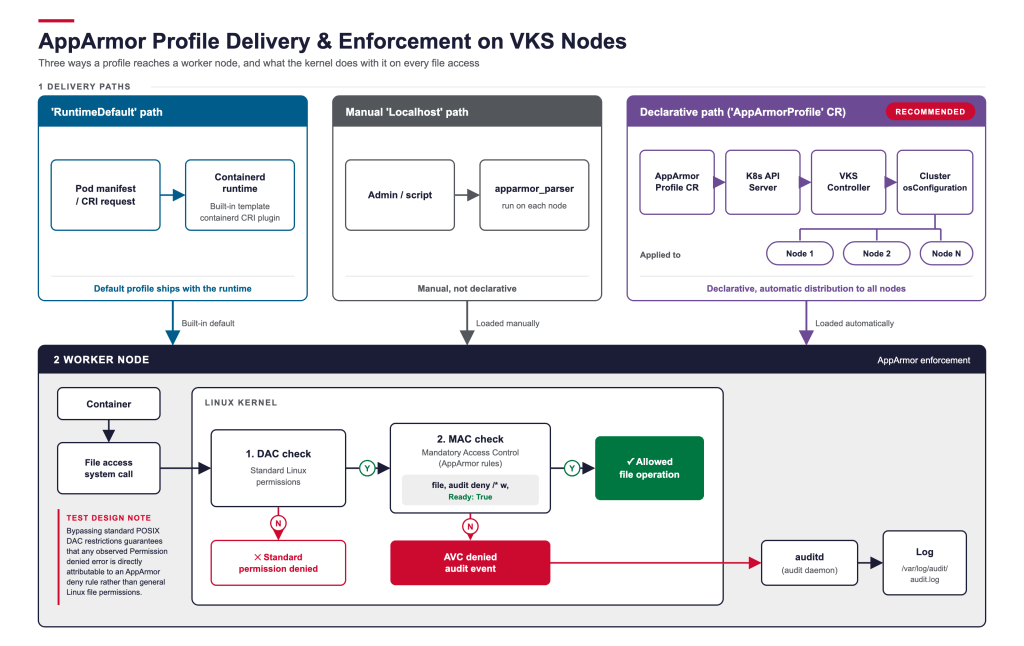
The three ways a profile gets onto a node
Before testing anything, it’s worth being clear about which delivery path you’re actually exercising, because each one fails differently.
RuntimeDefault: The pod’ssecurityContext.appArmorProfile.typeisRuntimeDefault. The container runtime (containerd, for VKS) generates a profile from a built-in template, and at container-create time loads it under a runtime-owned name (cri-containerd.apparmor.dfor containerd’s CRI plugin). You never see profile content in your own manifests; the rules come from the runtime’s default template.Localhostwith a manually loaded profile: The profile is authored as a.conffile (or heredoc) and loaded onto a specific node withapparmor_parserdirectly. The pod references it by name viasecurityContext.appArmorProfile.localhostProfile. This is the fast path for iterating on a profile while you’re writing it, but it’s node-local and not managed declaratively; it won’t survive a node rebuild and it doesn’t roll out to the rest of the pool.- [Recommended]
Localhostdelivered through anAppArmorProfileCR: The profile is defined as a custom resource in Kubernetes and distributed automatically to every worker node in the cluster. It is delivered by the VKS controller combined with cluster configuration settings (osConfiguration.securityContext.appArmor.profiles). Use this production-ready path to declaratively enforce a uniform, persistent security baseline across all nodes without manual per-node setup.
The rest of this post tests each of these and closes the loop with audit-log verification.
A prerequisite: Pod Security Standards decide whether your test is even meaningful
Before testing a Localhost profile, check what Pod Security Standard (PSS) level is enforced on the namespace:
|
1 2 |
kubectl get ns example -o jsonpath='{.metadata.labels.pod-security.kubernetes.io/enforce}' |
A Permission denied result alone does not prove AppArmor caused the denial. On Linux, file access is evaluated by Discretionary Access Control (DAC) permission bits before Mandatory Access Control (MAC) like AppArmor is ever queried. If DAC denies the operation first, such as when Pod Security Standards (PSS) force the container to run as a non-root user without file write permissions, access is blocked at DAC layer and AppArmor is never invoked.
To ensure your test results are meaningful, execute test pods in a namespace configured with pod-security.kubernetes.io/enforce: privileged. Bypassing standard PSS DAC restrictions guarantees that any observed Permission denied error is directly attributable to an AppArmor deny rule rather than general Linux file permissions.
Step 1: Confirm RuntimeDefault enforcement
Containerd’s default AppArmor template (contrib/apparmor/template.go) is what gets rendered and loaded when a pod requests RuntimeDefault. It’s deliberately permissive for normal container operation, denying only a specific set of sensitive paths and operations.
Before you begin testing the template, consider the following:
- The bare
file,network,andcapabilitylines grant broad access. The profile’s job is narrowing specific dangerous corners, not locking the container down generally. Don’t expect aRuntimeDefaultcontainer to fail on ordinary file writes; it’s not that kind of profile. - None of the
denyrules carry theauditkeyword. As covered in Step 4 below, that has a direct effect on whether you’ll see a log entry when one of these rules fires. - Containerd (like Docker before it) applies its default AppArmor profile to any container that doesn’t explicitly request
Unconfined. - Separately,
Unconfinedis one of the three valid values forsecurityContext.appArmorProfile.typein the Kubernetes API (alongsideRuntimeDefaultandLocalhost), but it is not in the Baseline Pod Security Standard’s allowed-values list for that field (onlyUndefined/nil,RuntimeDefault, andLocalhostare permitted there), and the Restricted policy inherits that same restriction from Baseline. - Put those two facts together: in any namespace enforcing
baselineorrestricted, a pod that specifies noappArmorProfileat all is still guaranteed to end up confined by containerd’sRuntimeDefaultprofile, sinceUnconfinedis blocked by admission and the runtime applies its own default whenever nothing else is specified. Keep this in mind when you’re trying to figure out why a workload with an apparently emptysecurityContextis still hitting AppArmor denials.
To verify enforcement, confirm the profile is actually attached, then try one of the specifically denied operations from inside the pod:
|
1 2 3 4 5 6 |
kubectl exec -it example-pod -- cat /proc/1/attr/current # expect: cri-containerd.apparmor.d (enforce) kubectl exec -it example-pod -- sh -c 'mount --bind /tmp /mnt' # expect: Permission denied (blocked by `deny mount,`) |
A Permission denied here confirms the profile is loaded and enforced. It does not mean you’ll see an audit record for it. That’s a separate question, addressed in Step 4.
Step 2: Confirm a custom profile delivered via the AppArmorProfile CR
While manually loading profiles is ideal for rapid development and testing on a single node, using the AppArmorProfile CR path is the standard approach for production for a workload that needs something narrower than the default (for example, denying all writes rather than a specific path list). It enables declarative, lifecycle-managed distribution across all VKS nodes in a cluster, ensuring consistent enforcement and seamless persistence through node upgrades and replacements.
The Cluster object’s topology variables then reference the profile by name so the controller knows to load it on every node in the pool. Add the following cluster variable inside Cluster object:
|
1 2 3 4 5 6 7 8 |
variables: - name: osConfiguration value: securityContext: appArmor: profiles: - name: k8s-apparmor-example-deny-write |
And a pod requests it by name via securityContext.appArmorProfile:
|
1 2 3 4 5 |
securityContext: appArmorProfile: type: Localhost localhostProfile: k8s-apparmor-example-deny-write |
The important consistency check here: the CR’s metadata.name, the profile name inside spec.content, the name listed under osConfiguration.securityContext.appArmor.profiles, and the pod’s localhostProfile all have to match exactly. If any one of them is a different name (for instance, if you have an AppArmorProfile CR named k8s-node-hardened-profile sitting in the cluster with unrelated content, while the spec.content and pod both reference k8s-apparmor-example-deny-write), the declarative path is not actually delivering the profile your pod thinks it’s using. That mismatch is easy to miss because everything still “works,” just not through the mechanism you assumed.
Verify attachment and enforcement the same way as before:
|
1 2 3 4 5 6 |
kubectl exec -it example-pod -- cat /proc/1/attr/current # expect: k8s-apparmor-example-deny-write (enforce) kubectl exec -it example-pod -- touch /abcd # expect: touch: cannot touch '/abcd': Permission denied |
Confirming reads still succeed (ls /etc) is a useful sanity check too. It proves the profile is a targeted deny-write, not a broken profile failing closed on everything.
Step 3: Merging a locally-tested profile back into the CR
The fastest iteration loop for profile authoring is local: load a draft profile directly on a node with apparmor_parser and point a test pod at it, without going through the CR/controller reconciliation cycle at all.
This is deliberately fast and disposable (i.e. does not persist restarts): apparmor_parser -q loads straight into the node’s kernel policy, no CR, no reconciliation, no rollout to the rest of the pool. It’s the right tool while you’re iterating on rule syntax and want a tight feedback loop.
Once the profile behaves the way you want (denies the right things, doesn’t over-deny, logs what you need it to), the merge step is mechanical: copy the exact spec.content block you validated locally into the AppArmorProfile CR’s spec.content field, keep the profile name identical, and apply it. From that point the VKS controller owns distribution: new nodes joining the pool pick it up automatically, and a manually-loaded, node-local copy is no longer the only thing standing between your workload and an unenforced profile after a node rebuild.
A couple of things to check when doing this merge:
apparmor_parserreplace failures don’t always surface loudly. Asudo apparmor_parser -qrun against a profile name that’s already loaded can fail withprofile can not be replaced(error=-17) if something about the load conflicts, and-qsuppresses the console output that would normally tell you. Checksudo aa-status | grep <profile-name>afterward to confirm the profile that’s actually resident in the kernel is the one you just tried to load, not a stale version.- Confirm process-to-profile attachment, not just profile existence.
aa-statuslists both loaded profiles and which running processes are confined by each:
|
1 2 |
sudo aa-status | grep -A2 example-profile-name |
Seeing your target processes (e.g. bash, sleep, the container’s entrypoint) listed under the profile name is the real confirmation that the CR-delivered profile made it all the way from declaration to enforcement.
Step 4: Finding the audit log (and why it’s easy to look in the wrong place)
This is the step that trips people up. Enforcement and audit logging are two different code paths in AppArmor, and a deny rule without the audit keyword is silent by design: the action gets blocked, but no DENIED record gets generated for that explicit rule match. That’s true both for the containerd default template’s deny rules (Step 1) and for a hand-written profile unless you explicitly add audit:
|
1 2 3 |
deny /** w, # blocks the write, does not log it audit deny /** w, # blocks the write AND logs it |
Adding audit and reloading the profile is the first fix if you need denials to show up in a log at all. For a workload that needs something narrower than the default (for example, denying all writes rather than a specific path list), you can specify the AppArmor profile explicitly in the pod specification as follows:
Example pod.yaml:
|
1 2 3 4 5 6 7 8 9 10 11 12 13 14 15 16 17 18 |
apiVersion: v1 kind: Pod metadata: name: hello-apparmor spec: nodeName: wl-antrea-node-pool-1-5vnqv-wmw4q-b9q84 securityContext: appArmorProfile: type: Localhost localhostProfile: k8s-apparmor-example-audit-deny-write containers: - name: hello image: 'localhost:5000/example-pod-image:example-image-tag' command: - 'sh' - '-c' - 'echo Hello AppArmor! && sleep 1h' |
The second, less obvious issue is where that log entry ends up, and it depends on whether auditd is running on the node:
- Before
auditdstarts (or if it’s never running), the kernel prints audit records (type=1400,apparmor="...") to the kernel ring buffer as a fallback, visible viadmesgorjournalctl -k. - Once
auditdclaims the audit netlink socket, the kernel stops mirroring those records to the ring buffer. From that point on,dmesgandjournalctl -kwill show nothing for new AppArmor events, even whileauditdis actively logging every one of them to its own store.
This means a debugging session that starts with dmesg | grep apparmor and finds nothing that can look exactly like “audit logging isn’t working,” when the actual state is “audit logging is working correctly, you’re checking the wrong sink.” The fix is to query auditd directly:
|
1 2 3 4 |
sudo ausearch -m apparmor -ts recent # or sudo grep -i apparmor /var/log/audit/audit.log |
A confirmed denial for touch /abcd looks like this:
type=AVC msg=audit(...): apparmor="DENIED" operation="mknod" profile="k8s-apparmor-example-audit-deny-write" name="/abcd" pid=... comm="touch" requested_mask="c" denied_mask="c" fsuid=0 ouid=0
Note the operation="mknod" and requested_mask="c": c is a kernel-internal permission bit used for file-creation operations, and unlike r, w, a, m, l, and k, it isn’t a letter you can write directly in profile rule syntax (there’s no audit deny /** c, you can author). That means this record can show up even though the profile only explicitly names w in its rule, the create check is evaluated separately from write internally. The precise mechanics can vary by kernel/AppArmor version, so treat the log record itself as the source of truth over any assumption about which rule “should” have fired.
Putting it Together: A Verification Checklist
For any AppArmor profile on a VKS node, before calling enforcement confirmed:
- Confirm the namespace’s PSS enforce level. If it’s
baselineorrestricted, a “denied” result from your test could be DAC (non-root, dropped capabilities) rejecting the action before it ever reaches AppArmor. Test in aprivileged-enforced namespace to make sure any denial you observe is actually attributable to the MAC layer. kubectl exec ... -- cat /proc/1/attr/current: Profile name matches what you expect, and it says(enforce), not(complain).sudo aa-status | grep -A2 <profile-name>: The container’s processes are actually listed under that profile on the node.- Attempt the specific denied operation from inside the container, and confirm the expected
Permission denied(or equivalent) at the shell. - Attempt an operation that should still be allowed (a read, for a deny-write profile), to rule out an overbroad profile that fails closed on everything.
- If you need an audit trail: confirm the relevant rule uses
audit deny, then checkausearch -m apparmor -ts recentor/var/log/audit/audit.logdirectly, notdmesg/journalctl -k, sinceauditdwill have claimed those records once it’s running. - If the profile is meant to be declaratively managed: confirm the
AppArmorProfileCR name, its embedded profile name, theClusterspec’sosConfiguration.securityContext.appArmor.profilesentry, and the pod’slocalhostProfileall reference the exact same name. A mismatch here is invisible until you go looking for it specifically.
Why this matters for security-sensitive customers
For teams running regulated or hardened workloads, the payoff of the AppArmorProfile CR path is that MAC enforcement stops being a per-node artifact and becomes a versioned Kubernetes object: it can live in Git, goes through the same review and admission path as any other manifest, and is reconciled onto nodes rather than hand-loaded. That closes the exact gap this post opened with, a profile that only exists because someone ran apparmor_parser on one node can be invisible to audit, doesn’t survive that node being replaced, and drifts silently from the rest of the pool.
Declaring the profile once and letting node rollout carry it forward means new and replaced nodes join the cluster already enforcing the intended profile, with no manual re-load step and no window where a fresh node is running Unconfined by accident. Combined with the verification loop above: confirm attachment → confirm the denial → confirm the audit trail, teams get a MAC control they can prove is enforced fleet-wide, not just on the one node they happened to test.
Resources
-
To learn more about VKS visit us at: vmware.com/vks
-
Get firsthand experience with VKS using the Hands-On Lab: https://labs.hol.vmware.com/HOL/catalog/lab/27680
Discover more from VMware Cloud Foundation (VCF) Blog
Subscribe to get the latest posts sent to your email.