
For years, the Kubernetes Dashboard project provided a web UI to manage and monitor a Kubernetes cluster and applications. This made it easy for platform engineers to troubleshoot issues. However, the Kubernetes project officially deprecated and archived the Kubernetes Dashboard in early 2026. Since then, the focus has shifted to Headlamp as the recommended alternative.
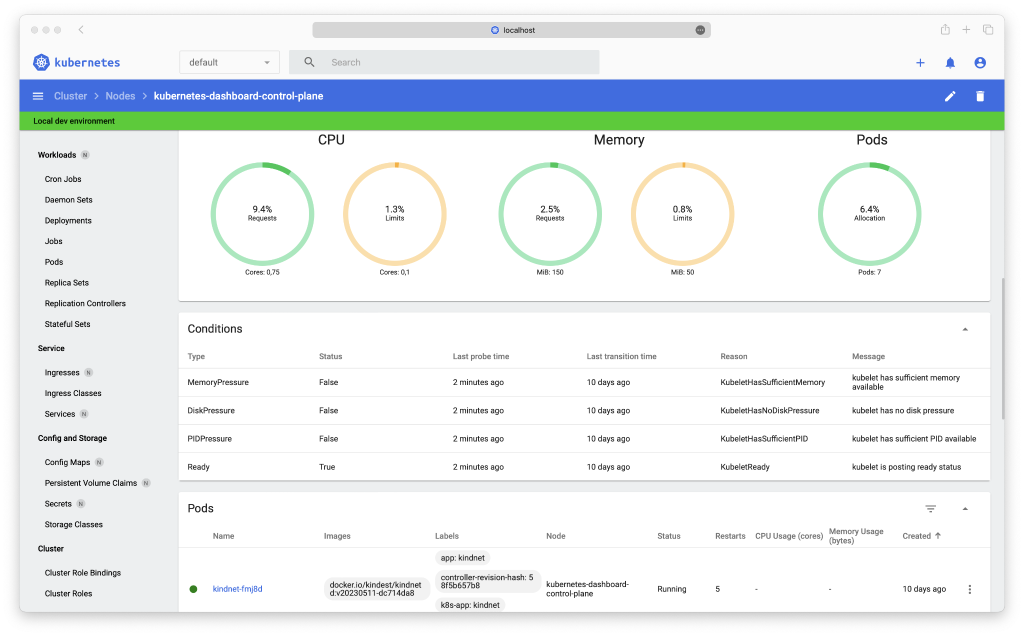
Kubernetes Dashboard (deprecated)
Teams running VMware vSphere Kubernetes Service (VKS) on VMware Cloud Foundation (VCF) have strong monitoring options. In fact, VCF Operations already provides the capability to monitor VKS cluster health alongside the broader virtualization estate. Specifically, it gives platform administrators a single pane of glass across VMs and Kubernetes clusters. For instance, they can monitor node utilization, capacity planning, cost visibility, and macro-level health.
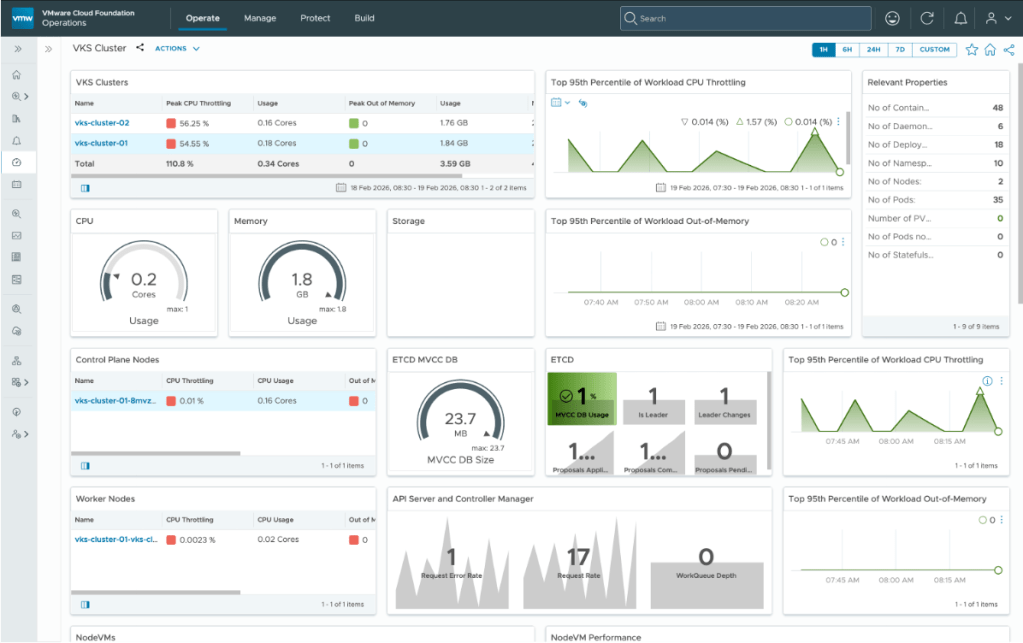
VKS monitoring in VCF Operations
Overall, VCF Operations excels at this platform-wide operational view. However, platform engineers and Site Reliability Engineers (SREs) often need to focus on one specific cluster. In particular, they need deeper application details to manage and troubleshoot applications. For example, day-to-day workflow requires moment-to-moment interaction with specific workloads like viewing live container logs, investigating a crash-looping pod, executing into a shell, or adjusting a ConfigMap on the fly.
This is where Headlamp comes in. Headlamp provides a governed, RBAC-aware UI for the Kubernetes cluster and applications running on it.
Infrastructure administrators rely on VCF Operations to ensure the platform is healthy and optimized, while platform engineers use Headlamp as an in-cluster tool that respects their Kubernetes permissions and eliminates the need to view the entire infrastructure estate. In other words, the two tools are complementary by design.
Introduction to Headlamp: a Kubernetes UI built for extensibility
Headlamp is a CNCF Sandbox project that provides an open-source, extensible Kubernetes web UI. It combines the resource visibility you expect from any dashboard, such as workload status, logs, and exec access. It also includes a plugin architecture that lets platform teams add purpose-built views.
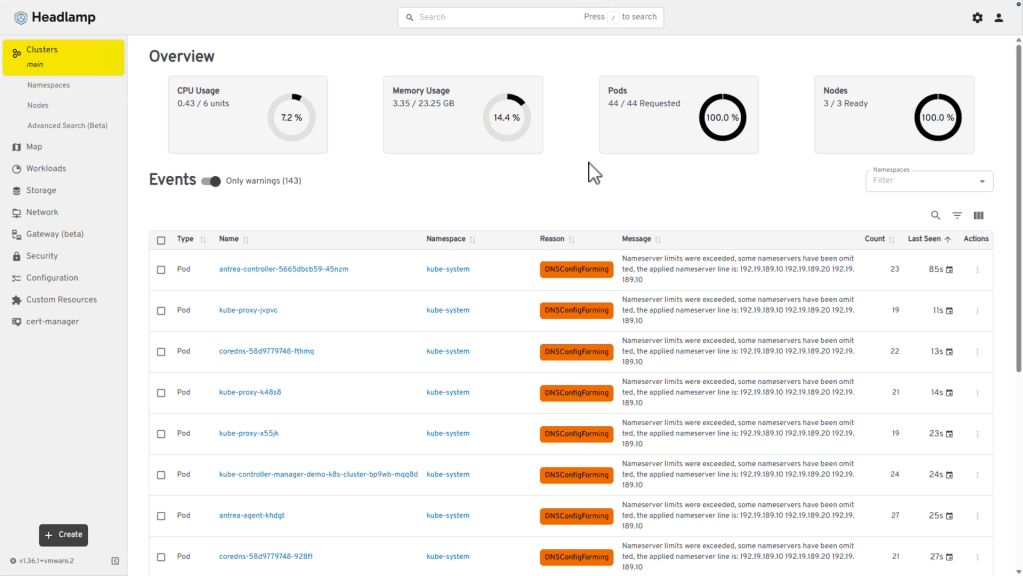
Headlamp UI
What problems does Headlamp solve?
The Kubernetes project has now deprecated and archived the Kubernetes Dashboard. Teams that relied on it for day-to-day visibility need an actively maintained replacement built for modern cluster scale. Kubectl works well for operators comfortable with complex queries, but it hits a wall when broader platform engineer adoption is needed. Headlamp addresses three concrete pain points for Kubernetes environments.
To begin with, it gives platform engineers read-write access through a governed, role-aware interface. As a result, the UI controls surface based on the authenticated user’s permissions. Thus, teams can safely open cluster access to platform engineers without risking accidental destructive operations.
Furthermore, it replaces the context-switching burden of jumping between terminals, dashboards, and documentation tabs. For instance, Headlamp bundles a log viewer, an in-browser shell, a YAML editor with inline documentation, and a resource map into a single application.
Finally, it provides a stable surface for extending operational workflows through plugins. Rather than building a separate internal tool every time a new capability is needed, such as cert-manager certificate health, the Headlamp plugin system lets teams embed those views directly into the existing UI.
The value of Headlamp VKS add-on for platform teams
VMware vSphere Kubernetes Service on VCF 9.1 delivers CNCF-certified Kubernetes clusters provisioned through Cluster API, backed by vSphere High Availability (HA) and Distributed Resource Scheduler (DRS), and managed through a declarative add-on framework. That infrastructure foundation gives platform teams a reliable, enterprise-grade substrate. Headlamp complements it by providing the human interface layer on top of that substrate.
Headlamp has been introduced as an Ecosystem Tier Add-On in VKS 3.7. Release notes for VKS 3.7 can be found here.
Plugin extensibility within the VCF ecosystem
The VKS Add-on framework already extends the base Kubernetes feature set with validated, lifecycle-managed software components. Headlamp is classified as an Ecosystem Tier package which means Broadcom supports the lifecycle management of the add-on (thus reducing the operational burden of keeping Headlamp updated compared to managing it as a standalone open-source project) while leveraging the expert-led power of the global community for runtime support.
The Headlamp add-on released with VKS 3.7 supports automatic plugin installation in Headlamp for cert-manager and prometheus if the cert-manager or prometheus add-ons are installed on the VKS cluster. Even if you install these add-ons after you install Headlamp, the add-on controller continuously checks for the installation of these add-ons and is able to install the plugin in Headlamp.
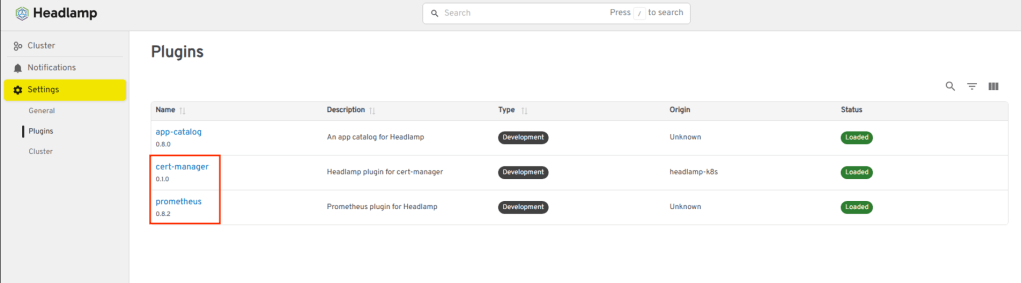
Headlamp Plugins
Deploying Headlamp as an add-on in VKS
Let’s walk through a complete deployment together, from prerequisites to a working UI endpoint.
Prerequisites
Before proceeding, ensure the following conditions are met in your environment.
- VKS 3.7 enabled on the Supervisor
- Cert-Manager add-on installed on the VKS cluster
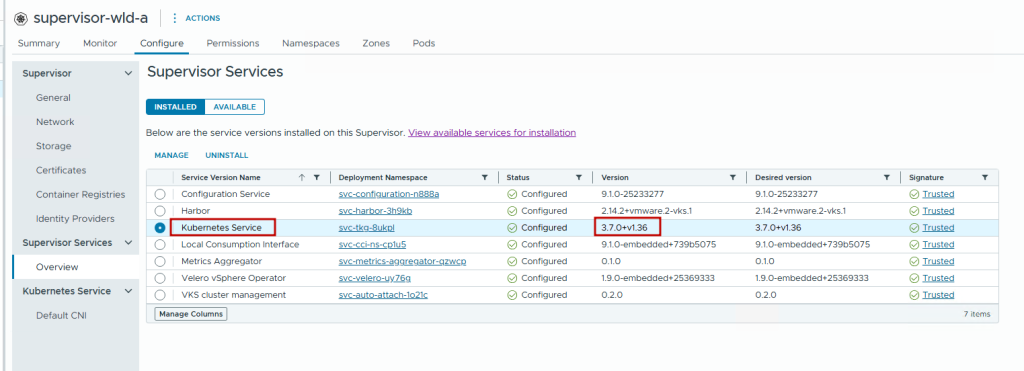
Supervisor enabled with VKS 3.7
Deployment Steps
For this demonstration, we’ve already created a test namespace in VCF Automation and deployed a VKS 3.7 (Kubernetes 1.36) cluster in VCF 9.1.
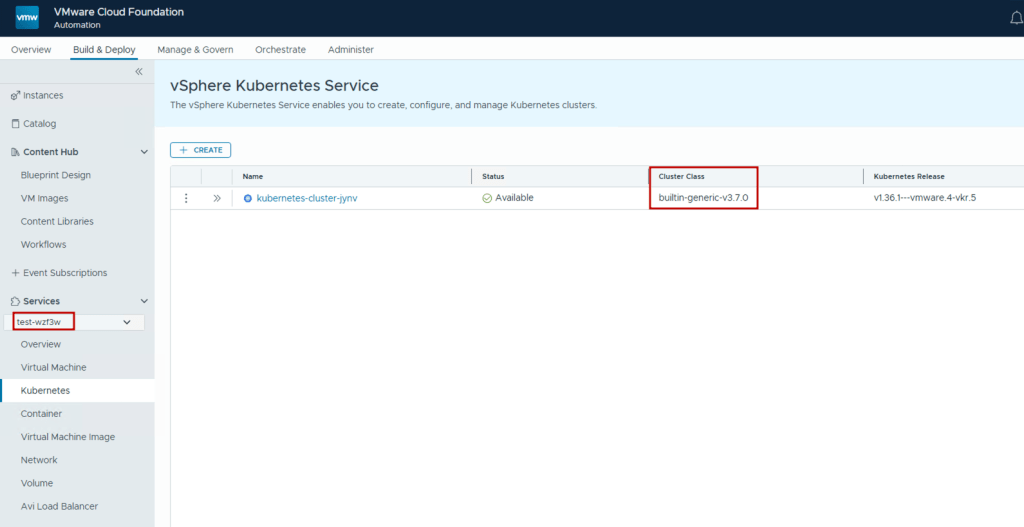
VKS 3.7 cluster in VCF Automation
You need this setup to follow along and use the VKS Cluster Management tab in VCF Automation for add-on management that we will showcase in this blog. However, if the VKS cluster is created outside a VCF Automation namespace (for example, using Local Consumption Interface (LCI) in VMware vCenter), then you can follow the steps outlined in the VCF documentation to achieve the same through CLI commands.
- Log in to the VCF Automation Organization portal and click on Manage & Govern > Kubernetes Management > Clusters and click on the VKS cluster.
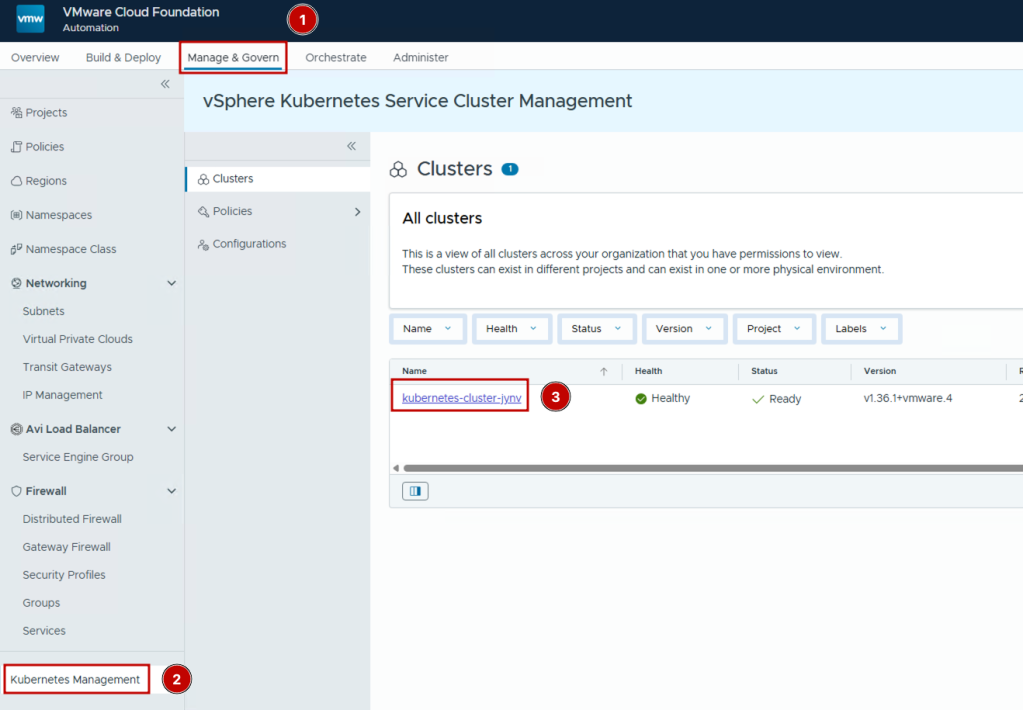
VKS Cluster Management
- Then, navigate to the Add-ons tab > Repositories and you should see the VKS 3.7 add-on repository available once you enable VKS 3.7 on Supervisor.
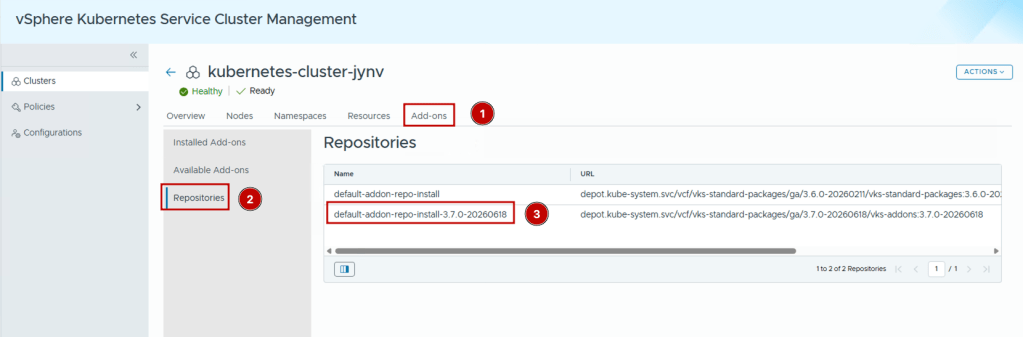
VKS Add-on repository
- Then, navigate to Available Add-ons and look for the Headlamp add-on.
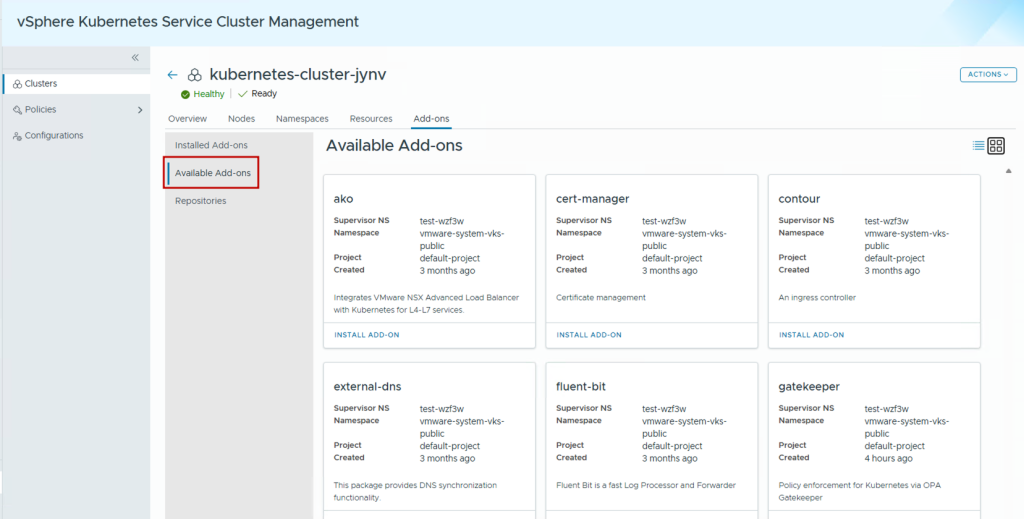
Available Add-on list
- Click on Install Add-On.
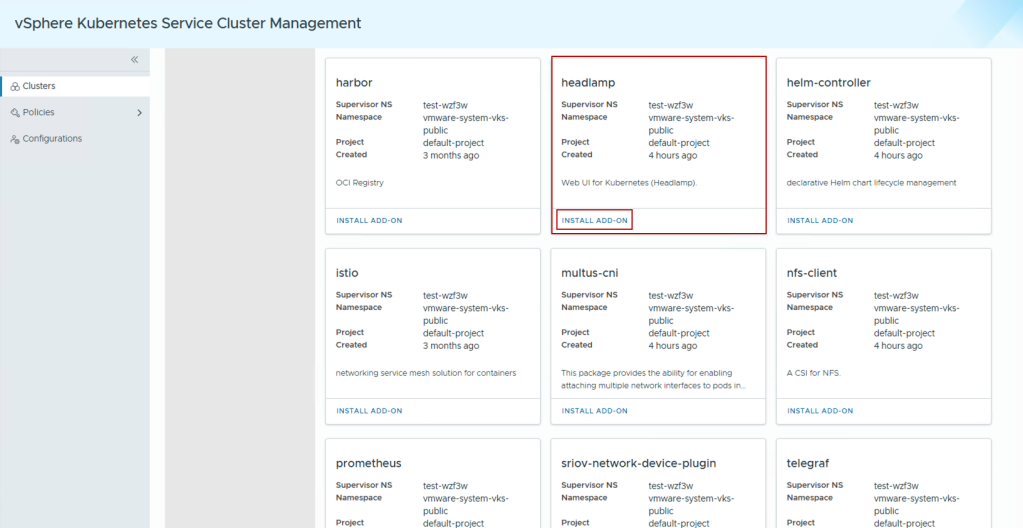
Headlamp Add-On deployment
- Then, provide a name for the package, select the version you want to deploy, and click on Install Add-On.
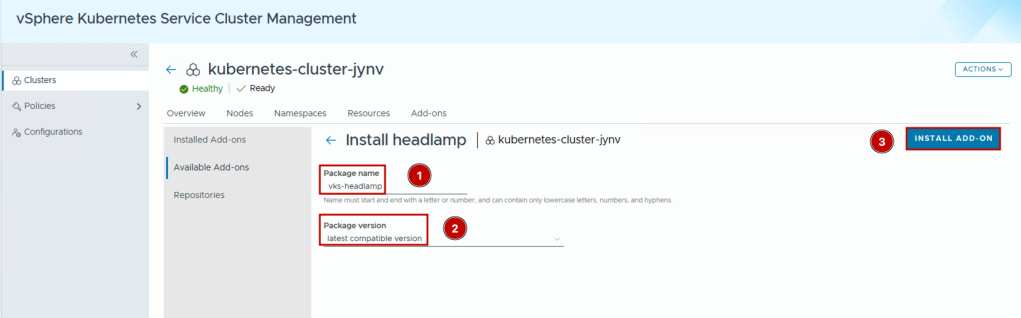
Headlamp Add-On installation
The add-on installs fairly quickly.
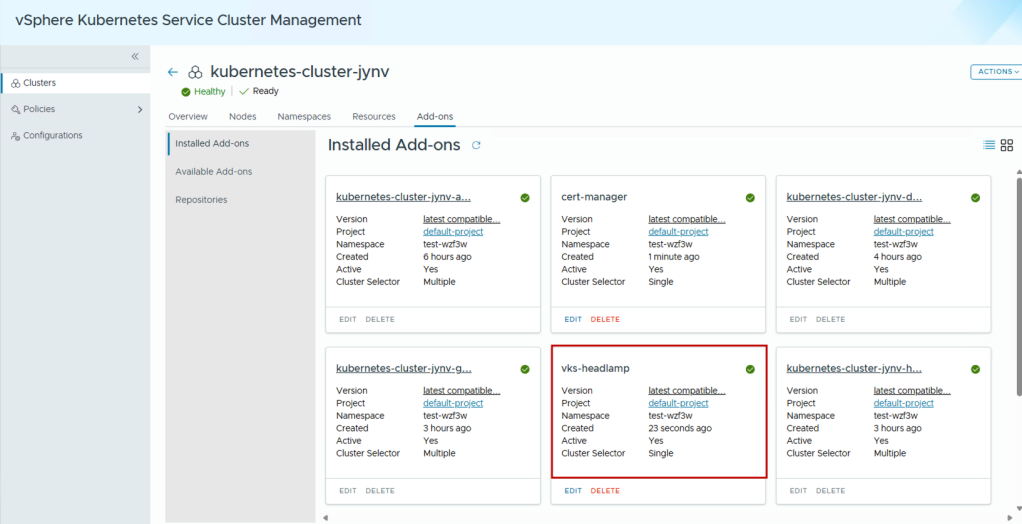
Headlamp Add-On verification
Retrieving the external IP address
Once the add-on is installed, we need to get the external IP address assigned to headlamp to access its UI. One option is to navigate to Build & Deploy > test namespace > Network > Services and search for headlamp in the filter tab. The service gets annotated with a label “run.tanzu.vmware.com/service.name: headlamp” that makes it easy to find.
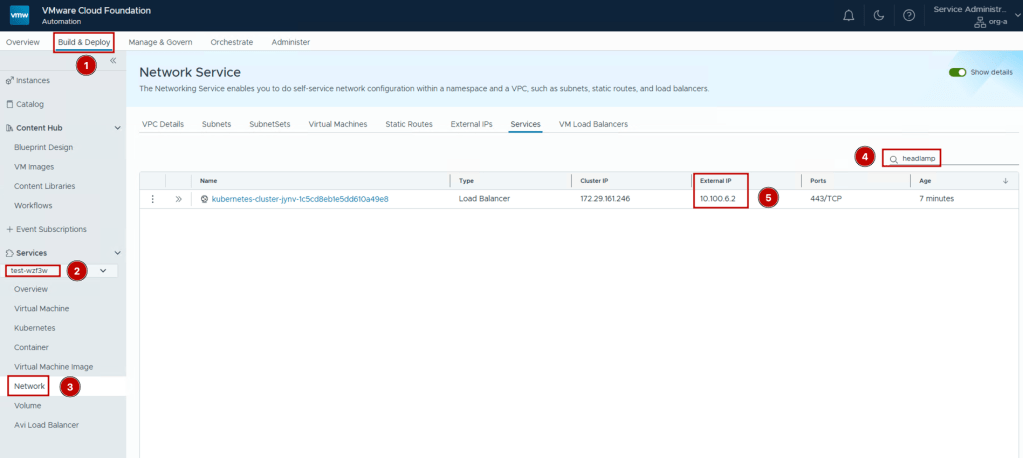
Headlamp verification – External IP
The other option to get the external IP is to use the kubectl command to get the IP from the VKS cluster by using the command:

Headlamp verification – kubectl output
Accessing the Headlamp UI
Once we have the external IP, we can access its UI via a web browser. Headlamp also supports OIDC integration, meaning users can integrate their existing Identity Providers with Headlamp to provide RBAC with Headlamp using their existing systems.
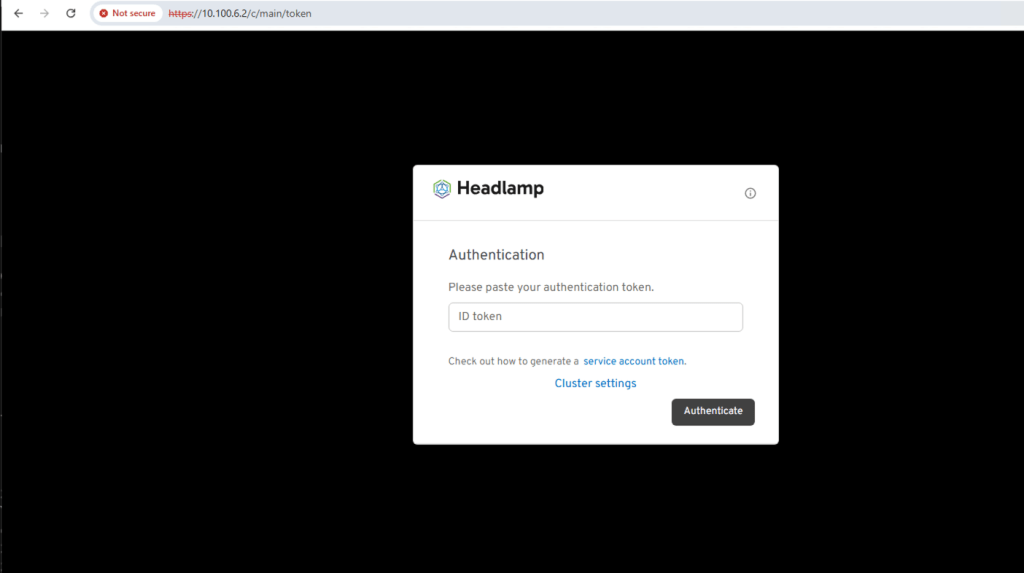
Headlamp Authentication UI
Generating an authentication token
Now, we need to generate an authentication token to access the VKS cluster. This ensures RBAC is maintained and the correct level of permissions are available on the cluster within headlamp as the end-user has access to. To generate the auth token, we go back to the CLI with VKS cluster access and create a ClusterRoleBinding and generate a token (the best practice is to generate a RoleBinding or ClusterRoleBinding with the least privilege required to perform the set of actions required. In this example, we use the cluster-admin role to showcase the extent of what is visible in the headlamp UI):

Headlamp auth token generation
Verifying cluster access
Once you take this auth token and paste it in the Headlamp UI, you will be able to access the VKS cluster details:
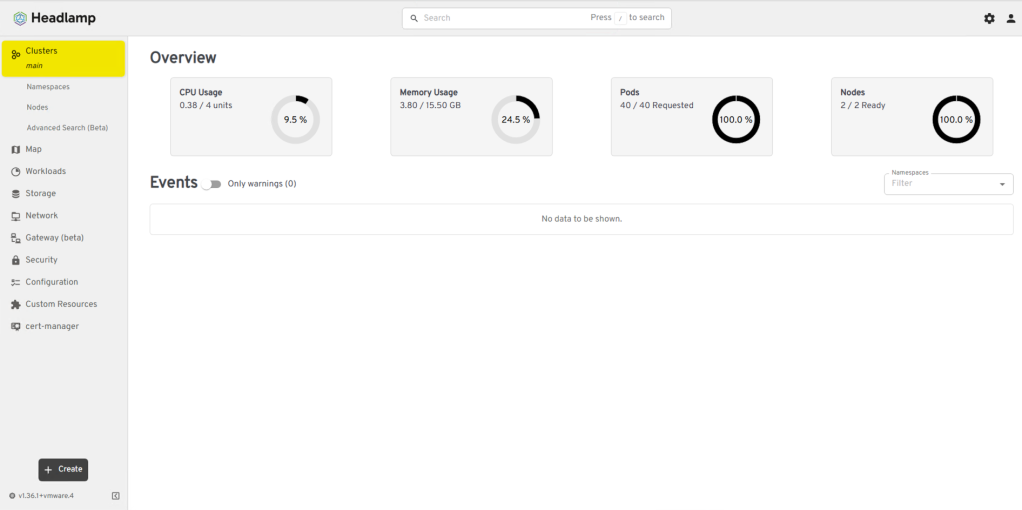
Headlamp UI with cluster details
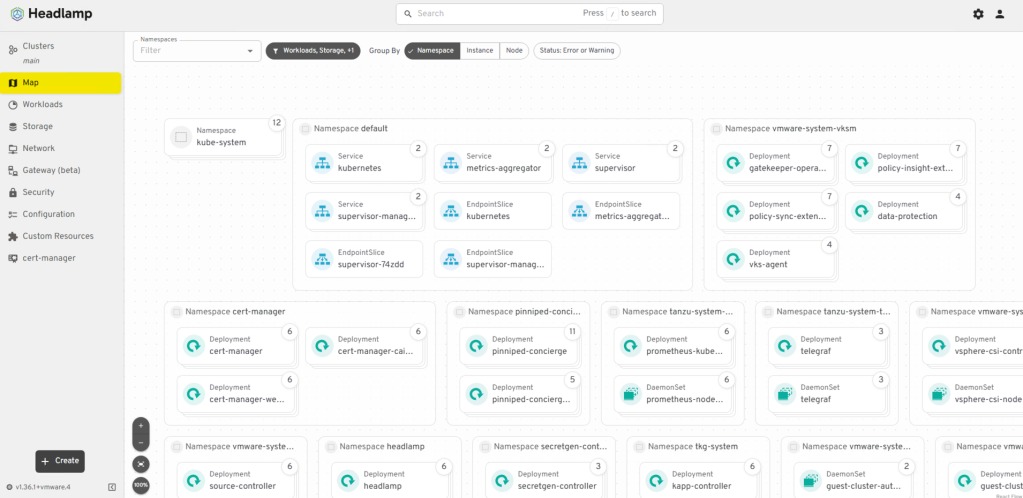
Headlamp UI – Map view
Now an SRE or platform engineer has access to this specific VKS cluster and can manage the cluster and the applications deployed in it using the Headlamp UI.
Summary
In summary, the Headlamp add-on is straightforward and very quick to install and integrates with OIDC identity providers already present in most VCF environments.
If your VKS environment is running on VKS 3.7 and Headlamp is not yet part of your add-on stack, the deployment guide above gives you everything needed to stand up a production-grade instance today.
Discover more from VMware Cloud Foundation (VCF) Blog
Subscribe to get the latest posts sent to your email.