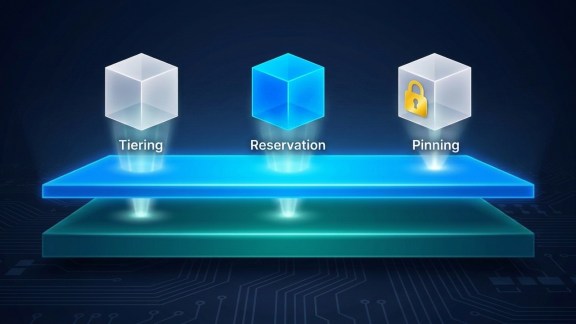

If you’ve been working with VMware vSphere in a memory-tiered environment, you’ve probably run into two concepts that sound similar but behave very differently in practice, VM Memory Reservation and Memory Tier-Disabled VMs. What each one means, how they interact, and why the combination matters for your infrastructure planning are exactly what we’re going to cover here.
Memory Reservation and Where Memory Actually Comes From
Let’s start with a simple question: when your VM says it needs 32 GB of memory, does it actually get 32 GB? Not necessarily, unless you’ve set a reservation.
VM Memory Reservation is the amount of memory that is guaranteed to a VM. Think of it as a promise from the host: “No matter what else is running, I will always have this much memory set aside for you.” Without a reservation, a VM’s memory can be reclaimed by the host under memory pressure.
In vSphere, there are two distinct controls for this, and keeping them straight matters a lot in a Memory Tiering environment.
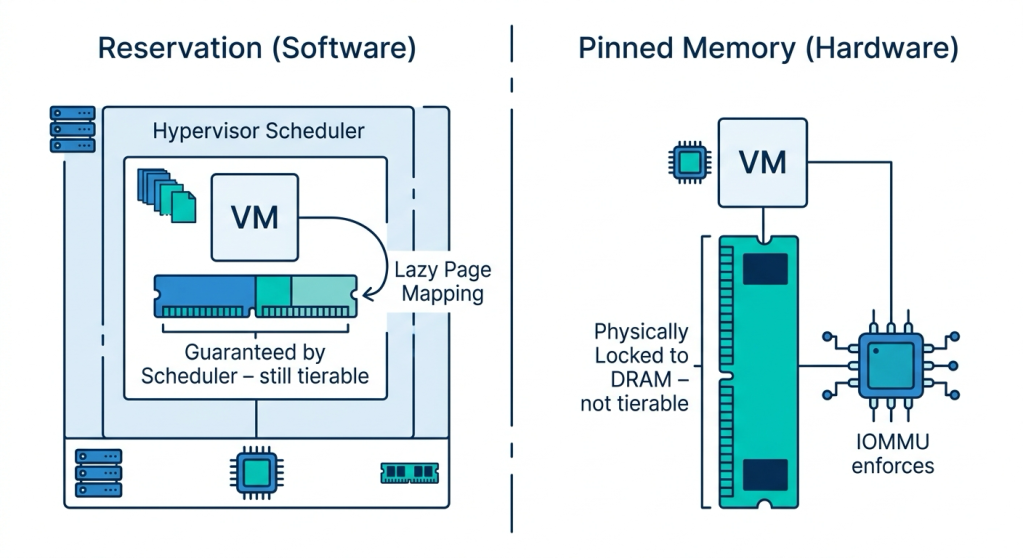
The reservation number field lets you set a guaranteed amount, up to the full size of the VM. Set it to 64 GB for a 64 GB VM and the scheduler guarantees that memory is always available. But those reserved pages can still be satisfied from either DRAM or Non-Volatile Memory Express (NVMe). Memory Tiering is still in play. This is a software-level guarantee enforced by the vSphere memory scheduler. Actual pages aren’t necessarily allocated until the guest OS and applications access them.
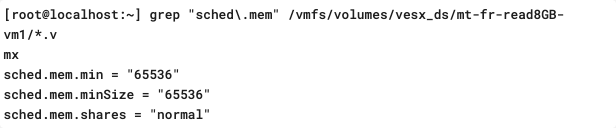
The “Reserve all guest memory (All locked)” checkbox is a fundamentally different setting. This is not just close to pinning behavior, it is pinning. When you check this box, the physical pages are locked in place in the host’s memory with established hardware page table mappings at VM power-on. Those pages are allocated upfront, locked to DRAM, and cannot be moved, reclaimed, swapped, migrated, or tiered by any component of the system. The hardware enforces this, not the scheduler.
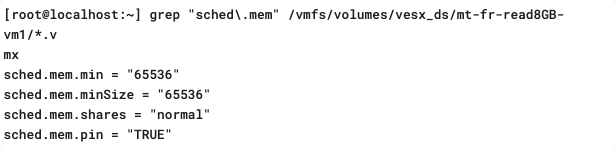
In contrast, here is what the vmx options will look like when I set the option to “Reserve all guest memory (All Locked).” Notice the new parameter sched.mem.pin = “TRUE.”
Here’s the clearest way to think about it: the reservation number is a promise to the scheduler, while “All locked” is a contract with the hardware.
VM Memory Reservation | Pinned Memory (HW Mapping) | |
| What it guarantees | Capacity is held by the scheduler | Physical pages are locked in place |
| Who enforces it | vSphere memory scheduler | Hardware (IOMMU / page tables) |
| Can pages move? | Potentially (balloon, swap) unless “All locked” is checked | No, that’s the whole point |
| When pages are mapped | Lazily (on access) for reservation number; upfront at power-on for “All locked” | Immediately, at the time of pinning |
| Typical use cases | Production VMs, latency-sensitive VMs | Passthrough devices, RDMA, VMs with DirectPath I/O |
| Interaction with tiering | Reserved memory can still be on NVMe tier | Pinned memory must be in DRAM (not pageable) |
Recap
- Reservation number = guaranteed capacity, still capable of using Memory Tiering.
- “All locked” checkbox = pinned memory, DRAM only.
These are two separate controls, and understanding the difference matters a lot when planning a Memory Tiered environment.
What Is a Memory Tier-Disabled VM?
A tier-disabled VM is a VM that has been pulled out of the tiering model entirely. When Memory Tiering is disabled for a VM, all its memory, whether reserved or not, must come exclusively from DRAM and is susceptible to swapping, ballooning, or compression. No NVMe. DRAM only.
This matters because DRAM is a scarce resource in a memory-tiered host. That’s the reason you deployed tiering in the first place, to extend beyond the limits of DRAM. When a VM opts out, it places a harder constraint on the host’s most limited pool.
How Does a VM End Up Tier-Disabled?
There are two paths to this.
- Implicitly (vSphere does it automatically)
vSphere will automatically disable Memory Tiering for a VM when:
- The VM uses a passthrough device (like a Graphics Processing Unit (GPU) or Network Interface Card (NIC) configured with DirectPath I/O)
- The VM is configured as Latency Sensitivity = High
- The VM is a Fault Tolerant (FT) VM
These scenarios have characteristics, direct hardware access, extreme latency requirements, or memory mirroring that make Memory Tiering incompatible or unsafe. This isn’t a bug; it’s the right behavior. But it does mean these VMs are effectively claiming DRAM-only resources without you necessarily doing anything.
- Explicitly (You Decide)
Customers can also disable Memory Tiering for a specific VM using an advanced VM configuration property. This gives you fine-grained control when a workload shouldn’t be touching the NVMe tier. Keep in mind that without a full reservation, ballooning, compression, and swapping can occur. More on how to mitigate that below.
The Critical Recommendation: Tier-Disabled VMs Should Always Be Fully Reserved
If you have a tier-disabled VM, you should strongly consider setting “Reserve all guest memory (All locked)” or reserving the full memory amount for that VM.
Here’s why: In a memory-tiered cluster, DRAM is intentionally kept scarce. When a tier-disabled VM says “I only want DRAM,” it’s already putting pressure on that resource. Now imagine it doesn’t have a full reservation. vSphere sees unreserved memory pages and, under host memory pressure, may start swapping those pages out to a swap file on storage. That will result in a significant performance decrease, and it’s entirely avoidable.
By checking “Reserve all guest memory,” you’re telling the host to hold all of it in DRAM, always. Yes, it consumes your DRAM budget, but it protects the VM from swapping and keeps performance predictable. If this VM is important enough to be tier-disabled, it’s important enough to be fully reserved.
It’s also worth understanding why customers typically disable Memory Tiering on specific VMs in the first place. In most cases, the intent is to run a focused test, a controlled way to check how a particular workload performs with dedicated DRAM before making broader architectural decisions. That’s a completely valid approach.
What you do want to keep in mind is what happens to your overall tiering ratios as you start disabling and reserving VMs. The default Memory Tiering ratio is 1:1, meaning equal amounts of DRAM and NVMe available to the tiered pool. When you pull VMs out of that pool and lock their memory to DRAM, you draw down the DRAM side without touching the NVMe side. The ratio shifts, and the remaining tiered VMs have less DRAM to work with.
Let’s make that concrete. Say you have a host with 512 GB DRAM and 512 GB NVMe, running four VMs at 256 GB each. That’s a balanced 1:1 ratio. Now you disable and fully reserve one of those VMs. That VM claims 256 GB of DRAM exclusively, leaving only 256 GB of DRAM for the remaining three VMs with Memory Tiering enabled against the full 512 GB of NVMe. Your effective ratio shifts from 1:1 to 1:2. Depending on the memory activity of those tiered VMs, that skew can create real pressure. Go in with eyes open about the downstream effect on your DRAM budget and keep active memory under 50% of total physical memory as a best practice.
Putting It All Together
The following scenarios help make this concrete.
Scenario A: Tier-Enabled VM with Full Reservation (reservation number set to max)
All 32 GB are reserved via the reservation number field. vSphere guarantees all memory is available. It can still come from DRAM or NVMe, and Memory Tiering is still in play.
Scenario B: Tier-Enabled VM with “Reserve all guest memory (All locked)” checked
Checking “All locked” pins the memory to DRAM at the hardware level. The VM is no longer participating in Memory Tiering for that memory footprint, even though tiering was never explicitly disabled. This consumes your DRAM budget fully and is the right choice when you need guaranteed, low-latency DRAM access for every page.
Scenario C: Tier-Disabled VM with No Reservation
This is the risky one. All memory must come from DRAM, but nothing is guaranteed. Under host memory pressure, vSphere may swap this VM’s pages to disk. Avoid this configuration.
Scenario D: Tier-Disabled VM with Full Reservation (Recommended)
All memory must come from DRAM, and all memory is guaranteed. This is the safe, recommended configuration for any VM that has had tiering disabled, whether implicitly or explicitly. You’re consuming DRAM budget, but your VM is protected.
Scenario E: VM with Passthrough Device (Implicit Tier Disable + Pinning)
vSphere disables tiering automatically. The pages used by the passthrough device get pinned by the IOMMU at the hardware level. Setting “All locked” is strongly recommended to cover the non-pinned portion of the VM’s memory footprint as well.
Final Thoughts
Memory reservation and Memory Tiering are two separate but deeply connected concepts. The reservation number tells vSphere how much to guarantee; tier status tells vSphere where that memory can come from; and pinned memory directly maps VM memory to physical DRAM and removes it from tiering entirely. Getting these three controls right is what separates a well-tuned Memory Tiered environment from one that creates unexpected pressure or performance surprises.
For most workloads, the default (tier-enabled with appropriate reservations) is exactly right. For VMs that need tiering disabled, pair that decision with a full memory reservation. It’s an easy setting to overlook and an expensive one to ignore when your host is under pressure.
Discover more from VMware Cloud Foundation (VCF) Blog
Subscribe to get the latest posts sent to your email.