

Modern cyber threats are no longer isolated attacks on applications; they target infrastructure itself. Advanced persistent threats, ransomware, and supply chain attacks aim directly at the foundational layers where your workloads run. Securing the foundation is not optional; it is the prerequisite for running secure, resilient private cloud infrastructure in an era where cyberattacks that once relied on manual hacking have turned into AI-driven, self-evolving campaigns.
As enterprise AI deployments scale, security architecture has become a strategic priority. Securing trusted interactions across people, data, and AI systems requires a deliberate approach to infrastructure security, and a unified, private cloud platform approach provides a significant advantage from an architectural control, data sovereignty, and regulatory compliance perspective.
VMware Cloud Foundation (VCF) provides the validated, integrity-assured infrastructure foundation that you depend on to protect sensitive data and maintain business continuity in the face of sophisticated threats. Rather than relying on implicit trust, VCF establishes continuous verification of the system, providing deep platform visibility and real-time integrity monitoring. VCF’s hardened, software-defined infrastructure with built-in security controls gives enterprises the resilience to stay ahead of threats that leverage AI to move faster and adapt continuously.
Platform Security in VCF 9.1
Every new release of VCF comes with improvements and enhancements to the platform’s security capabilities. VCF 9.1 delivers the latest platform security features to support production AI deployments. It secures AI workloads, proprietary models, and sensitive data by integrating security across the entire infrastructure stack, from the hypervisor up to the application layer.
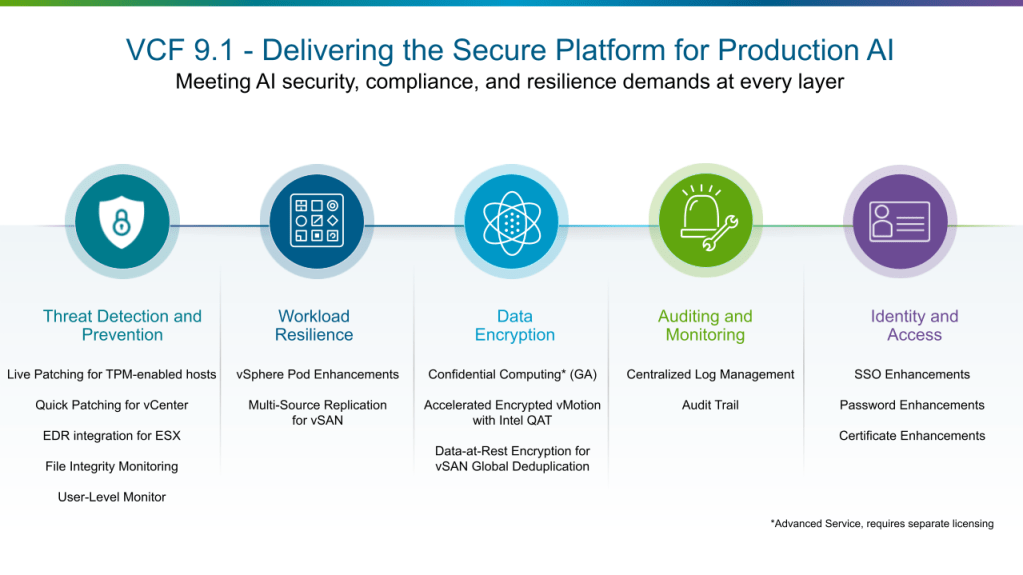
The key platform security features delivered in VCF 9.1 span five categories. Threat Detection and Prevention hardens the hypervisor and accelerates patching with zero disruption. Workload Resilience keeps applications running and recoverable through hardware isolation and cross-platform replication. Data Encryption protects data in use, in motion, and at rest across the stack. Auditing and Monitoring delivers unified log management and a centralized audit trail for rapid forensic analysis. Identity and Access enforces Zero Trust through fleet-level SSO, password, and certificate controls. Together, these pillars provide the defense in depth that private cloud and production AI deployments demand against more capable, more adaptive, and increasingly automated adversaries.
Threat Detection and Prevention
VCF 9.1 continues to add new capabilities in the areas of proactive alerting and intelligent analysis and verification of integrity and configuration of your infrastructure for improved threat detection and prevention. In this release, the VCF patching capabilities have been further expanded.
Live Patching for TPM-enabled hosts
With VCF 9.1, live patching in vSphere continues to mature, allowing security updates to be applied to clusters without migrating workloads off target hosts or requiring hosts to enter full maintenance mode. The release also closes a gap if you had enabled TPM on your ESX hosts, which previously prevented those hosts from participating in the live patching workflow. Zero-downtime live patching highly benefits business-critical applications such as AI inference services and agentic AI applications that require continuous availability to meet SLAs.
Quick Patching for vCenter
Quick Patch allows VMware vCenter to receive security patches without taking the appliance offline. Applying a vCenter update now takes approximately 5 minutes with no workload disruption, compared to a conventional patch that requires roughly 20 minutes of downtime and up to 40 minutes of total operation time. Reducing the operational cost of patching vCenter removes a friction point that often delays updates to one of the most critical management components in the infrastructure.
With the Live Patching and Quick Patching capabilities, VCF 9.1 furthers your ability to apply security fixes at a greater scale and speed, without stack-wide upgrades or workload disruption.
EDR integration for ESX
ESX hosts can now run EDR agents from security partners directly on the hypervisor. The EDR agent runs inside an isolated container on the host, separated from the core system to avoid interfering with normal operations. It monitors events such as processes starting and stopping, and network connections being made, and reports them back to the security vendor’s management platform. Support for EDR is available in ESX 9.1 and requires EDR vendors to provide compatible agents. Organizations interested in implementing these capabilities should consult with their EDR vendor regarding agent availability.
File Integrity Monitoring
VCF 9.1 adds a File Integrity Monitoring (FIM) capability, aligned with NIST and PCI DSS requirements, which detects changes by malware or malicious actors to static files or binaries installed by vCenter. FIM is turned on by default and runs every four hours to detect malicious or unintentional changes or corruption to the installed files. VCF admins can get a FIM report using the API or stream FIM logs to VCF Operations for Logs by using the syslog service.
User-Level Monitor
User-Level Monitor (ULM) ships in VCF 9.1 as the default monitor for all virtual machines. ULM completely reimplements ESX’s virtual machine monitor (VMM), which has managed VM execution on physical hardware since 1998. Previously, the VMM ran with highest OS privilege, meaning any vulnerability could compromise the entire host, and all VMs. ULM moves the monitor to lower-privilege user-mode, containing the impact of potential exploits. The redesigned kernel interface treats all inputs as untrusted; the address space excludes host secrets and other VMs’ memory; and the simpler architecture significantly reduces attack surface and hypervisor complexity.
Workload Resilience
vSphere Pod Enhancements
One of the ways VCF provides container workload isolation is through vSphere Pods, which run containers directly inside ESX-managed VMs, pairing the speed and density of containers with the hardware isolation of a hypervisor. PodVMs (vSphere Pods) are used to run one or more container instances without requiring a Kubernetes cluster to be deployed. vSphere Pods are leveraged to provide Supervisor services, and they are exposed via the new Container Service UI.
vSphere Pods use the Container Runtime Executive (CRX) to provide a lightweight, high-performance environment that boots in seconds. This makes them ideal for high-security workloads where you need strict kernel isolation between applications, or for resource-intensive microservices that need the sophisticated scheduling and predictive DRS capabilities of ESX.
As the number of Supervisor services increases, PodVM memory overhead can become a bottleneck. With PodVM memory optimization, internal testing shows memory overhead reduced by approximately 75% compared to a standard VM, through boot image sharing across PodVM instances on the same host. Additionally, internal testing also demonstrates that PodVMs boot up to 70% faster than a typical VM.
The new Container Service enables deployment of individual containers without managing full Kubernetes clusters. Using isolated runtimes within vSphere Pods, it lets you run individual containers without setting up or managing a full Kubernetes cluster.
This release also adds real-time STDOUT/STDERR streaming from all containers in a PodVM to your external syslog servers. This applies only to vSphere Pods, not VMware vSphere Kubernetes Service (VKS) guest cluster workloads.
Multi-Source Replication for vSAN clusters
vSAN in VCF 9.0 introduced vSAN-to-vSAN replication, enabling protection of VMs from one vSAN cluster to another. This release extends it further. You can now replicate or protect VMs from any source, such as a VMFS or NFS datastore, to a vSAN target. This provides greater flexibility in protecting existing VCF environments that may include a mix of storage platforms. You can protect all VMs in your environment through a single replication target and workflow, regardless of which storage platform they currently use, with policy-based snapshots and replication across the board.
The replication capabilities are available through VMware Site Recovery Manager (SRM) or the VMware Advanced Cyber Compliance solution.
Data Encryption
VCF 9.1 adds and extends encryption capabilities across the stack, including enhancements to data-at-rest, data-in-motion, and confidential compute workloads.
Confidential Computing, now Generally Available
Confidential Computing runs sensitive workloads inside hardware-encrypted memory regions that remain inaccessible even to the hypervisor, protecting data in use on shared private cloud infrastructure. VCF has supported earlier generations of the technology for several years; VCF 9.1 matures support for the current-generation implementations, Intel TDX and AMD SEV-SNP, moving them to general availability. One practical improvement is the re-enablement of Quick Boot on hosts that have Confidential Computing active: previously, hosts using Intel TDX or AMD SEV-SNP could not take advantage of Quick Boot, the feature that allows ESX to restart without a full hardware initialization cycle and thereby reduces maintenance windows.
Additionally, VCF Operations now automatically profiles your ESX hosts and identifies which hosts are capable of running confidential VMs and containers. This removes the guesswork for architects when they deploy sensitive workloads on protected hardware. Operators can also view if Confidential Computing has been enabled on an eligible host.
Confidential Computing in VCF is available through the VMware Advanced Cyber Compliance solution.
Accelerated Encrypted vMotion with Intel QuickAssist Technology (QAT)
vMotion can be a resource-intensive process, and this demand increases when encryption is enabled. As workloads become larger and the frequency of vMotion operations rises, the consumption of resources for this task grows significantly. Offloading the encryption function to hardware consumes fewer critical resources, which then can be used by other applications, thereby saving costs.
QAT is enabled by default on supported hardware, resulting in a smoother user experience and lifecycle management.
Data-at-Rest Encryption for vSAN Global Deduplication
Paired with the general availability of vSAN Global Deduplication in vSAN for VCF 9.1, vSAN clusters using global deduplication now support vSAN Data-at-Rest Encryption. You can enable Data-at-Rest Encryption on a per-cluster basis while running vSAN Global Deduplication on the same cluster, without tradeoffs between the two. Deduplication runs as a post-processing background activity and is compatible with data-at-rest encryption; enabling encryption does not affect deduplication ratios.
Auditing and Monitoring
Centralized Log Management
VCF 9.1 improves log management capabilities by fully integrating the standalone UI capabilities of VCF Operations for Logs within VCF Operations, giving VCF admins and operators a single interface for all log management tasks. This includes integration of log processing rules, log administration, log public APIs, global settings related to log cluster management, and log analysis page enhancements.
The standalone UI is no longer required, as all capabilities are now integrated within VCF Operations.
Audit Trail
Log statement and audit record formats have now been standardized across VCF components.
The new Audit Trail in VCF Operations takes this further by providing a centralized, time-sliced view of user activity across all components (including VKS), simplifying forensic parsing and key event identification and minimizing audit time. When firewall rules are changed or login attempts fail, operators can trace the entire event chain across the stack.
Identity and Access
VCF 9.1 extends the unified SSO, password, and certificate management capabilities introduced in the previous release, with broader component coverage, fleet-level controls, and new vault and CA integrations.
Identity Broker Enhancements
The VCF Identity Broker (VIDB) includes extended configuration options and deployment enhancements. The VIDB brokers the SSO connection between VCF components and an externally managed Identity Provider (IDP) or Directory Service. The Identity Broker is now installed at the time VCF is deployed or upgraded and no longer needs to be separately downloaded as a prerequisite for configuring single sign-on.
The Identity Broker can be configured in embedded mode or appliance mode from VCF Operations or the API. Deploying the Identity Broker as a three-node cluster provides higher performance, scalability, and high availability and is recommended for production deployments. Identity Broker nodes can now be deployed outside of the management cluster.
VCF 9.x also provides a scripted workflow for organizations that have upgraded from VCF 5.x to migrate users and groups non-disruptively from VMware Identity Manager (VIDM) to the Identity Broker. The upgrade process deploys the Identity Broker. The script is run after the upgrade is completed. The Identity Broker can then be integrated with your chosen Identity Provider; existing users and groups are not impacted.
Password Management Enhancements
VCF Operations 9.1 expands password management with fleet-level policy controls, vault integration, and coverage for additional components.
You can now configure unified password policies across VCF components and run password compliance checks and remediation. Once created, these policies can be assigned at a VCF fleet level or to VCF components. Additionally, administrators can manage passwords for VCF Operations workload mobility (formerly known as HCX) and Avi load balancers deployed or upgraded to VCF 9.1.
Break-glass account passwords are no longer stored, removing a common driver of password remediation workflows. Additionally, new APIs for Enterprise Password Vault integration support third-party tools such as CyberArk. Enterprise Password Vaults managed via the API will require a plugin for VCF.
Certificate Management Enhancements
VCF 9.1 adds fleet-level CA configuration, expanded Microsoft CA and OpenSSL support, and bulk certificate operations. A Certificate Authority (CA) is now configured at a VCF fleet level rather than per-instance, which means certificate management can be performed at a fleet level.
Support for Microsoft CAs and OpenSSL has been expanded to cover both VCF instance and VCF management components. The prior release supported Microsoft CA and OpenSSL for VCF instance components (vCenter, NSX, and ESX), while management components could be configured only using Microsoft CAs.
The VCF Operations UI now allows operators to perform bulk certificate operations. Certificate signing requests, certificate renewals, and certificate import operations can all be performed in bulk, reducing time and further streamlining certificate management operations. The VCF Operations API can be used for third-party integration and automation of certificate management for all VCF components.
Additional Reading
This overview covers key VCF 9.1 platform security features. Watch this space for more blogs, where we’ll dive into details on all of the new and enhanced security features.
VCF 9.1 contains the latest advancements of the VMware virtualization technology. It combines Zero Trust security and resilience across every layer: vSphere, NSX, vSAN, VMware vSphere Kubernetes Service, VCF Private AI Services, VCF Operations, and VCF Automation, helping organizations secure and protect private cloud infrastructure against advanced, AI-accelerated threats.
For a technical deep-dive on this topic, check out “What’s New in Platform Security in VCF 9.1” on YouTube.
For more information, please reach out to your account team. We also maintain security hardening, compliance, and feature-specific Q&A in our GitHub repository: https://brcm.tech/vcf-security
Discover more from VMware Cloud Foundation (VCF) Blog
Subscribe to get the latest posts sent to your email.