
Navigating the Passthrough Maze: Why Enhanced DirectPath Wins
If you take a quick look through the vCenter UI, you’ll encounter a wide array of passthrough technologies: Fixed DirectPath (formerly just DirectPath or PCI Passthrough), Dynamic DirectPath, and Enhanced DirectPath. It can get confusing fast, not just regarding the technical differences, but how to best leverage them in your environment.
Historically, choosing a passthrough technology meant making a massive trade-off. You were fundamentally giving up core virtualization features in exchange for raw performance. It was a tough question of what you valued more: performance or manageability?
Because many core VMware vSphere features, including vMotion, Live Patch, and Suspend/Resume, were reserved for virtual devices, enabling a passthrough architecture created serious headaches for Day 2 operations. Maintenance windows meant downtime and limited workload residency.
However, as GPUs, AI accelerators, high-performance NICs, and crypto/compression accelerators have become standard in the modern data center, we realized you shouldn’t have to choose between performance and manageability. We needed passthrough performance while retaining core virtualization features, bridging the gap between raw hardware speed and the VMware Cloud Foundation (VCF) features you rely on every day.
In this blog, I’ll provide an overview of Enhanced DirectPath, compare it to existing passthrough models, and highlight why it’s the bridge between hardware performance and flexibility.
Enhanced DirectPath Overview
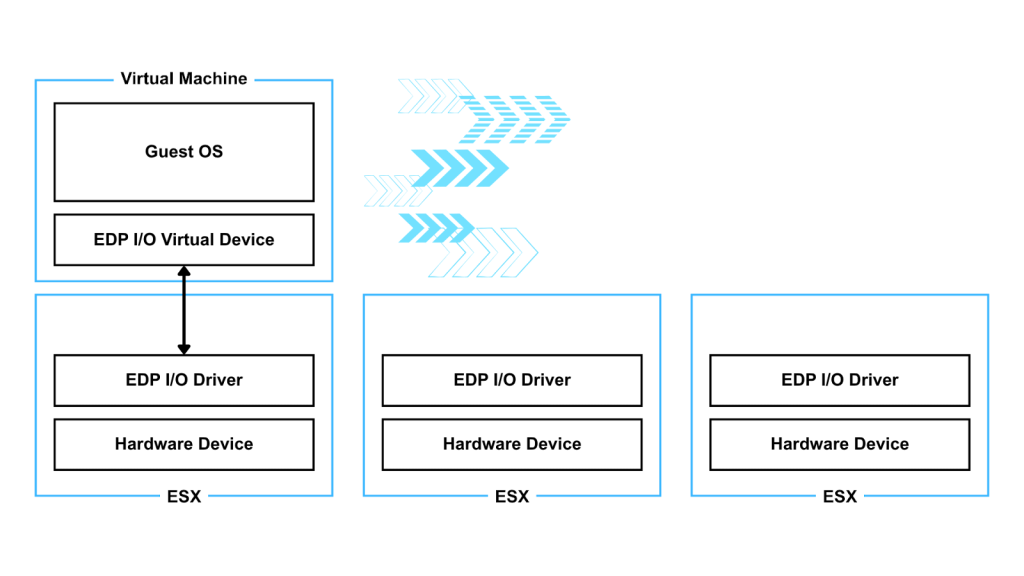
Introduced in vSphere 8, Enhanced DirectPath builds upon the DirectPath I/O framework by introducing a new API for hardware-backed virtual devices.
It provides near-native performance, but for the first time, it pairs them with essential vSphere features like vMotion, Live Patch, and Suspend/Resume. This isn’t just for one niche; multiple device classes can take advantage of it, including AI accelerators, high-performance NICs, FPGAs, and GPUs.
Comparing Passthrough Technologies
Fixed DirectPath (PCI Passthrough)
Fixed DirectPath exposes a physical device directly to the Guest OS, supporting the passthrough of both Physical Functions (PFs) and Virtual Functions (VFs). While this delivers high-performance speeds, it introduces significant limitations.
When passing through an entire PF, the physical device cannot be shared and becomes tethered to a specific hardware address. Single-Root I/O Virtualization (SR-IOV) helps improve the sharing aspect by carving a physical device into multiple VFs. While this allows one card to serve multiple VMs, it inherits the same “Day 2” limitations: if the host needs maintenance, the VM has to go down, and you forfeit all key virtualization features like vMotion and Suspend/Resume.
With Fixed DirectPath the device is selected by explicitly configuring the VM to use a specific device with a fixed address on a specific host. If the VM needs to be started on a different host, the VM’s config needs to be edited to match the new location.
Dynamic DirectPath
Introduced in vSphere 7, Dynamic DirectPath evolved the model by solving the initial placement problem. Previously, there were no options for High Availability (HA) or Distributed Resource Scheduler (DRS) because hardware addresses were hard-coded.
Dynamic DirectPath abstracts the hardware layer, identifying devices by their attributes rather than a specific physical address. This allows DRS to look at the capabilities of a device rather than its physical slot. While this made initial deployment much easier, it still didn’t support vMotion.
This new device selection mechanism works equally well with PFs and VFs.
Overview of Technologies
To understand where Enhanced DirectPath fits, it helps to compare it with the other models available in VCF:
- Paravirtual Devices (VMXNET3/PVRDMA): These provide the deepest integration with vSphere features but introduce some abstraction overhead.
- Traditional Passthrough: Delivers near-bare-metal performance but lacks workload mobility.
- Enhanced DirectPath: Delivers direct hardware performance while preserving essential lifecycle and management operations.
| Category | Paravirtual | DirectPath Passthrough Technologies | |||
| Network Adapter | VMXNET3 | PVRDMA | Fixed DirectPath | Dynamic DirectPath | Enhanced DirectPath |
| Performance | Normal latency & Bandwidth | Better | Best | Best | Best |
| vMotion | Yes | Yes | No | No | Yes** |
| Suspend Resume | Yes | Yes | No | No | Yes** |
| Fast Suspend Resume VM Operations: (Hot Add CPU & Memory, Live Patch, Hot add devices, Storage vMotion) | Yes | Yes | No | No | Yes |
| RDMA Capability | No. TCP Only. | RoCE only | All supported protocols | All supported protocols | All supported protocols |
** Enhanced DirectPath provides a framework of features, and not all features may be available for all devices. Please consult the Broadcom Compatibility Guide (BCG) for more information.
Use Cases for Enhanced DirectPath
Those who are running latency-sensitive or accelerator-intensive workloads are familiar with the operational friction introduced by traditional passthrough:
- Dedicated hosts
- Carefully scheduled maintenance windows
- Limited workload mobility
- Reduced lifecycle flexibility
Enhanced DirectPath removes many of these constraints by retaining passthrough performance while preserving core virtualization operations.
It is best suited for workloads that require direct hardware interaction, including:
- Applications that require extremely low latency communication
- Workloads that depend on RDMA for performance or scaling
- GPU or accelerator intensive environments
- AI inference, HPC platforms
If your workload doesn’t require direct device access, stick with paravirtual devices like VMXNET3 for maximum feature richness. But if you need the speed of the hardware without the “maintenance tax,” Enhanced DirectPath is the path forward.
Supported Devices for Enhanced DirectPath
At this time, VCF supports the following GPUs and accelerator devices. We’re continuing to heavily invest in this area and excited to announce more devices in the very near future.
Referenced earlier, Enhanced DirectPath fundamentally is a framework and we work with our partners to bring features to VCF. Let’s break down all the features currently being offered.
| Feature | Intel Flex 140/170 | Intel Gaudi 3 | AMD MI210 | Intel QAT | Intel DLB |
| Disk-only Storage vMotion | ✅ | ❌ | ✅ | ✅ | ✅ |
| Disk-only Snapshots | ✅ | ❌ | ✅ | ✅ | ✅ |
| Disk Reconfig Operations | ✅ | ❌ | ✅ | ✅ | ✅ |
| Hot Remove Virtual Devices | ✅ | ❌ | ❌ | ✅ | ✅ |
| Hot Add Virtual Devices (e.g., Disk or CD-ROMs) | ✅ | ❌ | ✅ | ✅ | ✅ |
| Hot Add Virtual Devices (e.g., NICs, USB, Sound) | ✅ | ❌ | ❌ | ✅ | ❌ |
| Live Patch | ✅ | ❌ | ❌ | ✅ | ❌ |
| Hot Add Memory | ✅ | ❌ | ❌ | ✅ | ❌ |
| Hot Add/Remove vCPUs | ✅ | ❌ | ❌ | ✅ | ❌ |
| Storage vMotion | ✅ | ❌ | ❌ | ✅ | ❌ |
| Memory Snapshots | ✅ | ❌ | ✅ | ✅ | ❌ |
| Suspend/Resume | ✅ | ❌ | ❌ | ✅ | ❌ |
| vMotion | ✅ | ❌ | ❌ | ✅ | ❌ |
| Statistics Collection | ✅ | ✅ | ✅ | ✅ | ✅ |
(June 29, 2026): Updated to reflect accurate Hot Add Virtual device support for the AMD MI210 and Intel DLB feature set.
Final Thoughts
Enhanced DirectPath represents a major milestone. By bridging the gap between raw hardware speed and the VCF features you rely on every day, we are giving you the freedom to treat your most demanding workloads, from AI inference to high-speed apps, just like any other VM. You get the near-native throughput your applications require, while maintaining the “Day 2” automation and uptime your business demands.
In short, you no longer have to choose between operational agility and manageability. With VCF and Enhanced DirectPath, you get both.
Discover more from VMware Cloud Foundation (VCF) Blog
Subscribe to get the latest posts sent to your email.