In today’s cloud-native landscape, container images are the foundation of modern applications. But what happens when your primary data center goes offline? How do you ensure your containerized workloads remain accessible and deployable across geographically distributed VMware Cloud Foundation (VCF) instances?
Enter Harbor’s Cross-Region Replication — a powerful capability that every VCF administrator running vSphere Kubernetes Service (VKS) or containerized workloads should have in their operational toolkit.
Why Cross-Region Replication Matters for VCF Deployments
VMware Cloud Foundation delivers a private cloud platform that many organizations deploy across multiple regions for business continuity, compliance, and performance reasons. When you’re running containerized applications on vSphere Kubernetes Service (VKS) in VCF, Harbor serves as your private container registry, your single source of truth for container images, Helm charts, and OCI artifacts.
Consider these real-world VCF scenarios where Cross-Region Replication becomes essential:
- Multi-Site Active-Active Deployments: You’re running VCF workload domains (or instances) in both US-East and US-West regions to serve customers with low latency. Development teams push container images to the primary Harbor instance, but Kubernetes clusters in both regions need fast, local access to those images.
- Disaster Recovery Strategy: Your DR plan requires a secondary VCF instance in a different region. When disaster strikes, your VKS clusters need immediate access to the exact same container images to restore services, waiting to transfer multi-gigabyte images over the WAN isn’t an option.
- Compliance and Data Sovereignty: Regulatory requirements mandate that specific workloads run in designated geographic regions. Cross-region replication ensures each VCF instance maintains a complete, compliant copy of approved container images.
- Edge Computing with VCF: You’re deploying VCF to edge locations with intermittent connectivity. Pre-replicating container images ensures local availability even when the connection to the central data center is disrupted.
Without cross-region replication, you face increased Recovery Time Objective (RTO), potential compliance violations, degraded application performance, and complex manual image synchronization processes that don’t scale.
Understanding Harbor’s Replication Architecture
Harbor’s replication feature operates through a policy-driven approach. You define replication rules that specify:
- What to replicate (which projects, repositories, or specific image tags)
- Where to replicate (destination Harbor endpoints)
- When to replicate (manual, scheduled, or event-driven triggers)
The replication is push-based from the source Harbor instance to one or more destination instances. This architecture integrates seamlessly with VCF’s networking, supporting replication across VCF instances connected via VMware NSX Federation, stretched L2 networks, or standard routed connectivity.
Implementation Guide: Setting Up Cross-Region Replication
This guide walks through configuring replication between two Harbor instances deployed in separate VCF regions. We’ll call them Harbor-Primary (production region) and Harbor-DR (disaster recovery region).
Prerequisites
Before you begin, ensure:
- Both Harbor instances are deployed and accessible. Harbor can be deployed as:
- Supervisor Service: Harbor deployed as a native vSphere supervisor service, managed through the vSphere Client
- Stand-alone VM: Harbor installed on a dedicated VM, providing more deployment flexibility
- Network connectivity exists between VCF instances
- SSL certificates are properly configured (self-signed certificates require additional configuration)
- You have administrative credentials for both Harbor instances
- Sufficient storage capacity exists on the destination Harbor instance
Step 1: Establish the Replication Endpoint
The first step is configuring your primary Harbor instance to recognize the DR site as a valid replication target.
- Log into Harbor-Primary web interface
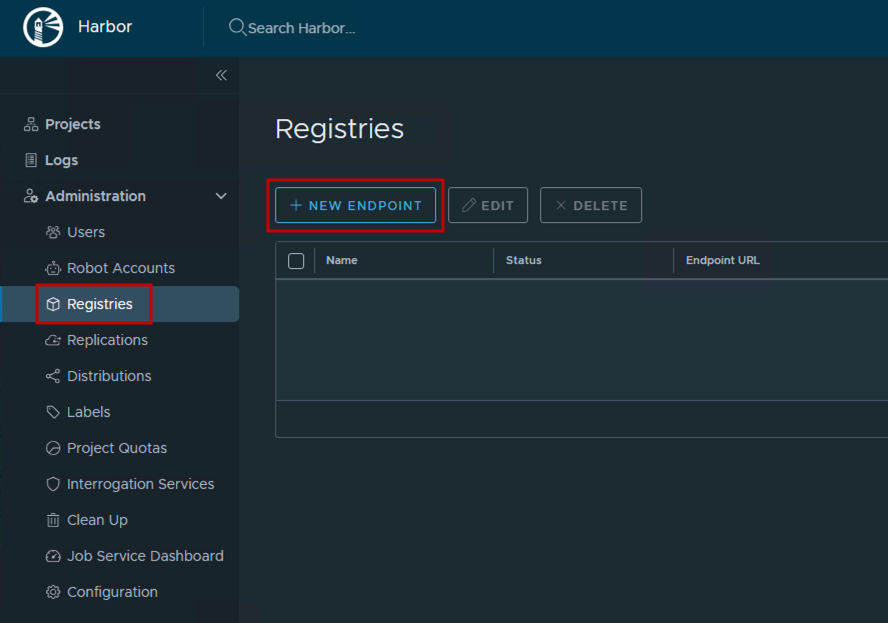
- Navigate to Administration → Registries
- Click + New Endpoint
- Configure the endpoint:
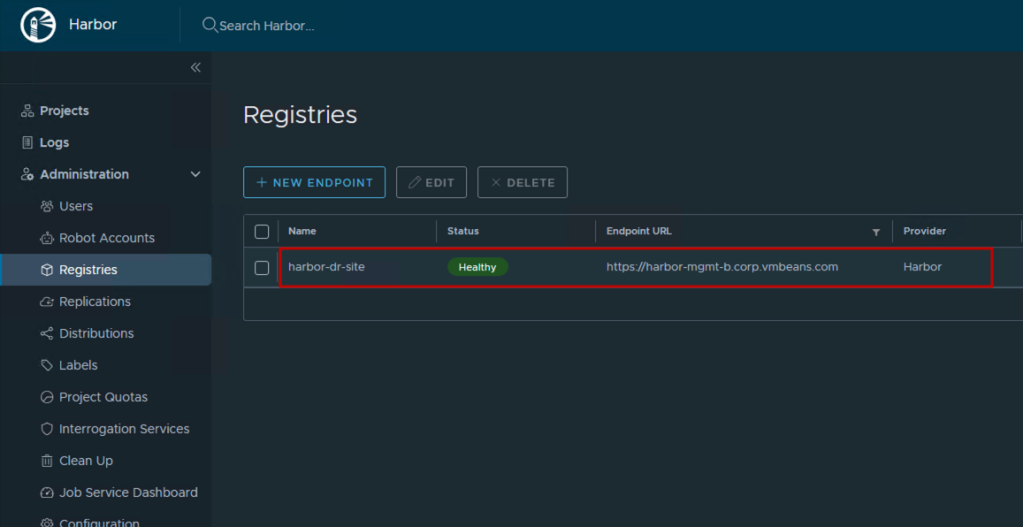
- Provider: Harbor
- Name:
harbor-dr-site(descriptive name for your team) - Endpoint URL:
https://harbor-dr.vcf.example.com(your DR Harbor FQDN) - Access ID: Username with push permissions on Harbor-DR (consider creating a dedicated robot account like
replication-service) - Access Secret: Password for the access ID
- Verify Remote Cert: Uncheck only if using self-signed certificates (not recommended for production)
- Click Test Connection to verify connectivity
- Success: Indicates network path is clear and authentication works
- Failure: Check firewall rules, DNS resolution, and credentials

- Click OK to save
Step 2: Create a Replication Rule
Now define what content should replicate and under what conditions.
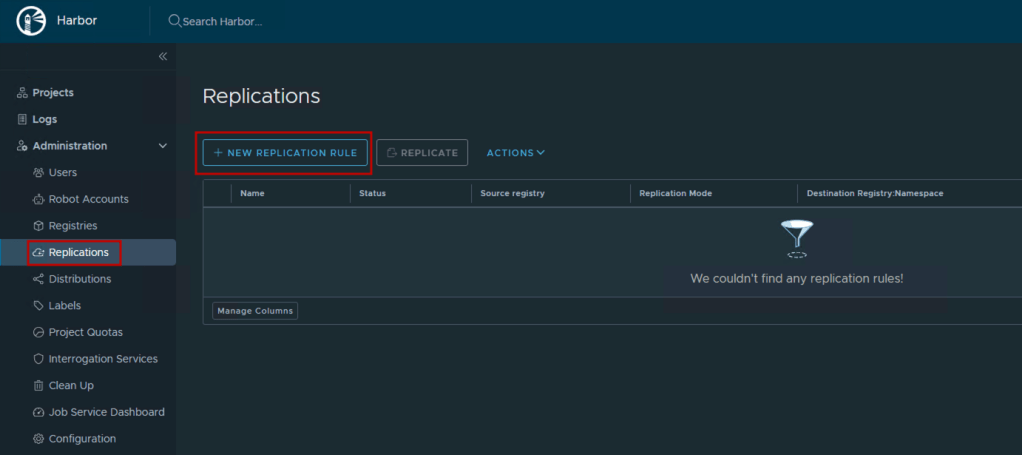
- Navigate to Replications in Harbor-Primary
- Click + New Replication Rule
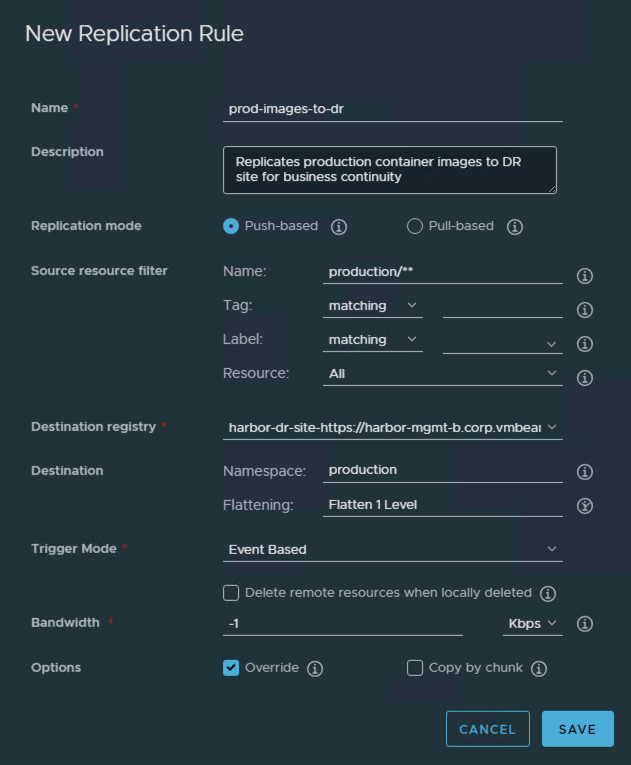
- Configure the rule:
- General Settings:
- Name:
prod-images-to-dr - Description:
Replicates production container images to DR site for business continuity - Replication mode: Push-based (Harbor-Primary initiates)
- Name:
- Source Resource Filter:
- Resource filter:
- Name:
production/**(replicates all repositories under the production project) - Tag:
*(all tags), or be selective with patterns likev*orrelease-* - Labels: Optionally filter by labels like
production-ready
- Name:
- Resource filter:
- Destination:
- Destination registry: Select
harbor-dr-site(the endpoint from Step 1) - Destination namespace:
production(creates matching project structure on DR site) - Flatten repositories: Leave at default
Flatten 1 Level- Note: Flattening reduces the nested repository structure when copying images. Assuming the nested repository structure is ‘a/b/c/d/img’ and destination namespace is ‘ns’, No Flatting results in ‘a/b/c/d/img’ > ‘ns/a/b/c/d/img’, Flatten 1 Level results in ‘a/b/c/d/img’ > ‘ns/b/c/d/img’. Since we are creating the same project name in this demo, we will keep it at default to ensure consistent repository structure on both sides. Similar options exist for Flatten 2 and 3 Levels as well.
- Destination registry: Select
- Trigger Mode:
- Manual: Replicate only when manually triggered (good for testing)
- Scheduled: Replicate on a cron schedule (e.g.,
0 2 * * *for 2 AM daily) - Event Based: Automatically replicate when new images are pushed (recommended for production)
- Advanced Settings:
- Bandwidth limiting: Configure if WAN bandwidth is constrained
- Override: Enable to overwrite existing images in the destination
- Delete remote resources: Enable to mirror deletions (use cautiously)
- Copy by Chunk: Specify whether to copy the blob by chunk.
For production environments, Event Based replication ensures your DR site is always synchronized within minutes of any image push.
4. Click Save
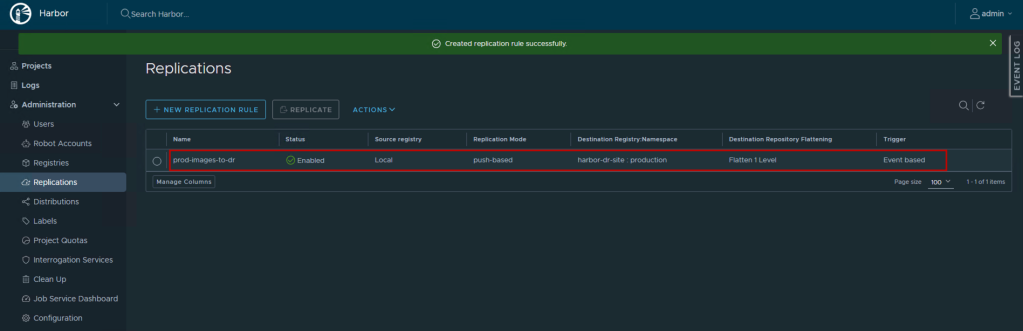
Step 3: Test and Validate Replication
For Manual/Scheduled Rules:
- Select your replication rule from the list
- Click Replicate to trigger an immediate replication
- Click on the rule name to view execution history
- Monitor the Tasks tab to see:
- Total items to replicate
- Progress percentage
- Success/failure status
- Error details if any
For Event-Based Rules:
- Push a test container image to the source project:
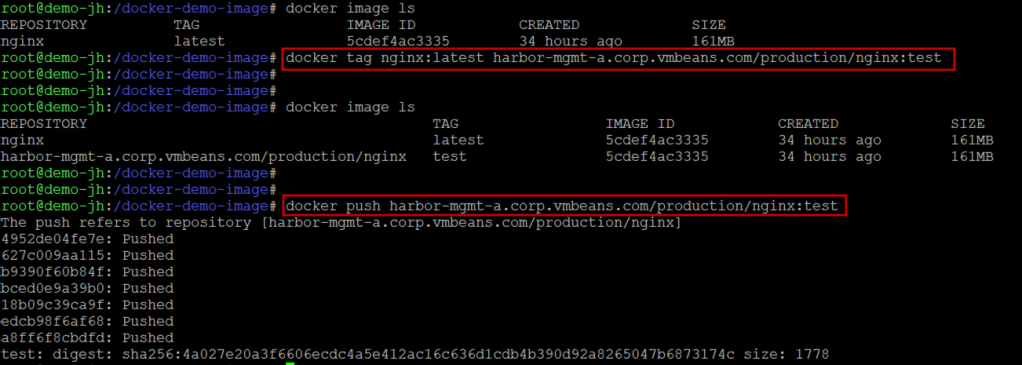
- Within seconds, check the Replications → Executions view
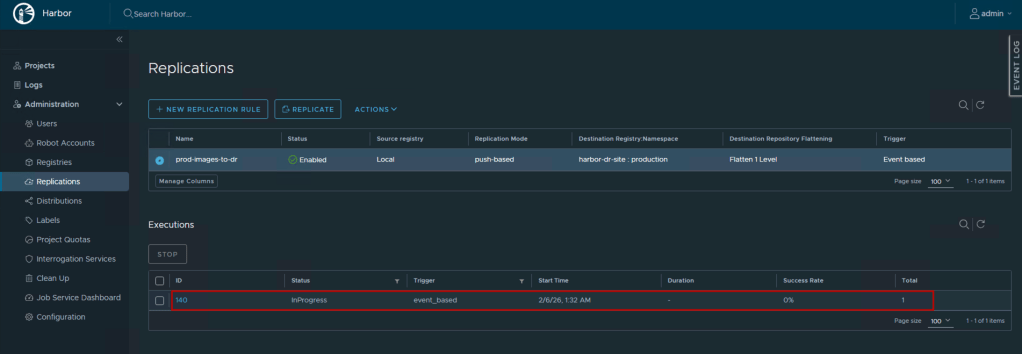
- You should see an automatic replication task triggered
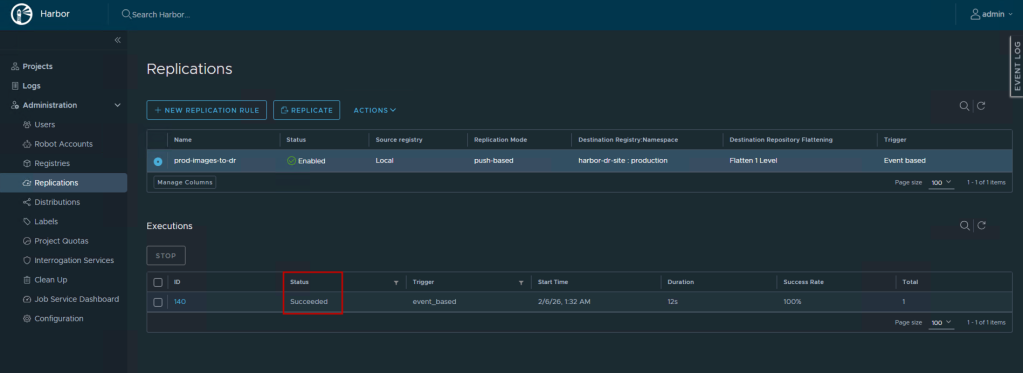
Verification on Destination:
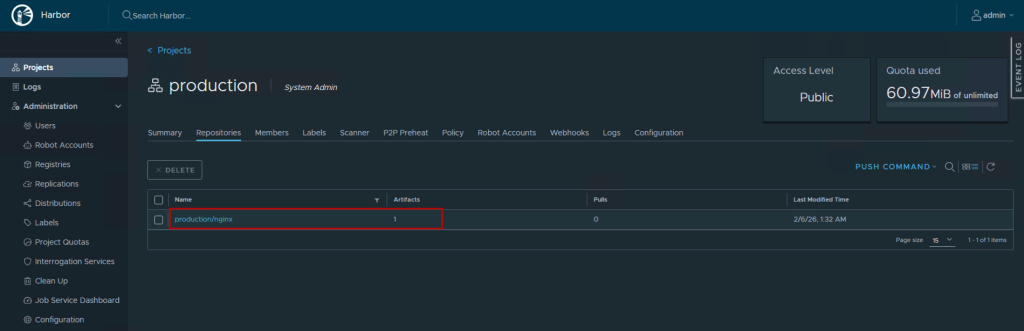
- Log into Harbor-DR web interface
- Navigate to Projects → production
- Verify the replicated repositories and tags appear
- Pull an image from Harbor-DR to confirm accessibility:

Step 4: Configure VKS Clusters to Use Local Harbor
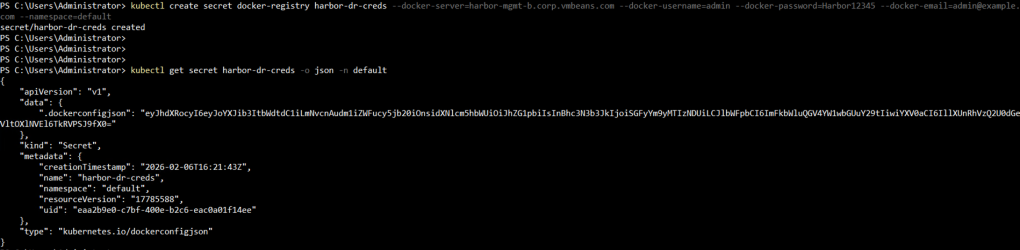
To realize the performance benefits of cross-region replication, configure your VKS clusters in each region to pull from their local Harbor instance. This requires creating a Kubernetes secret containing Harbor credentials.
The .dockerconfigjson secret contains authentication information for Harbor. The easiest way to create it is using kubectl:
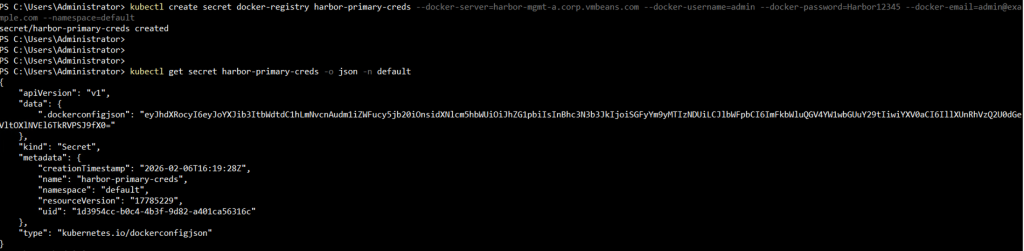
For DR Region (VCF-DR):
kubectl create secret docker-registry harbor-dr-creds \
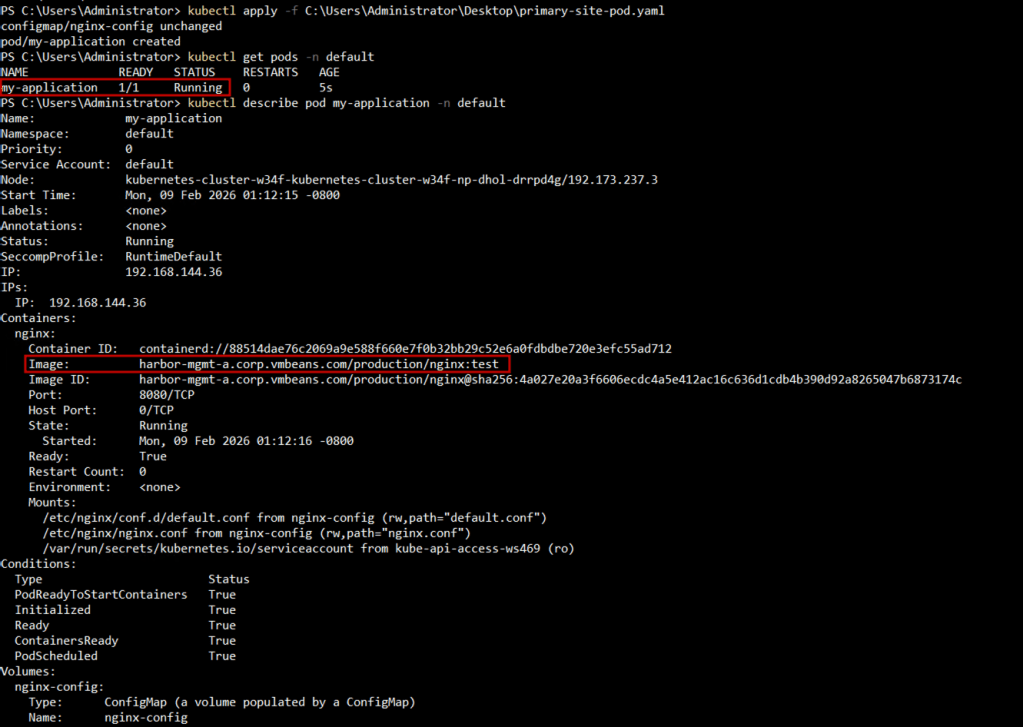
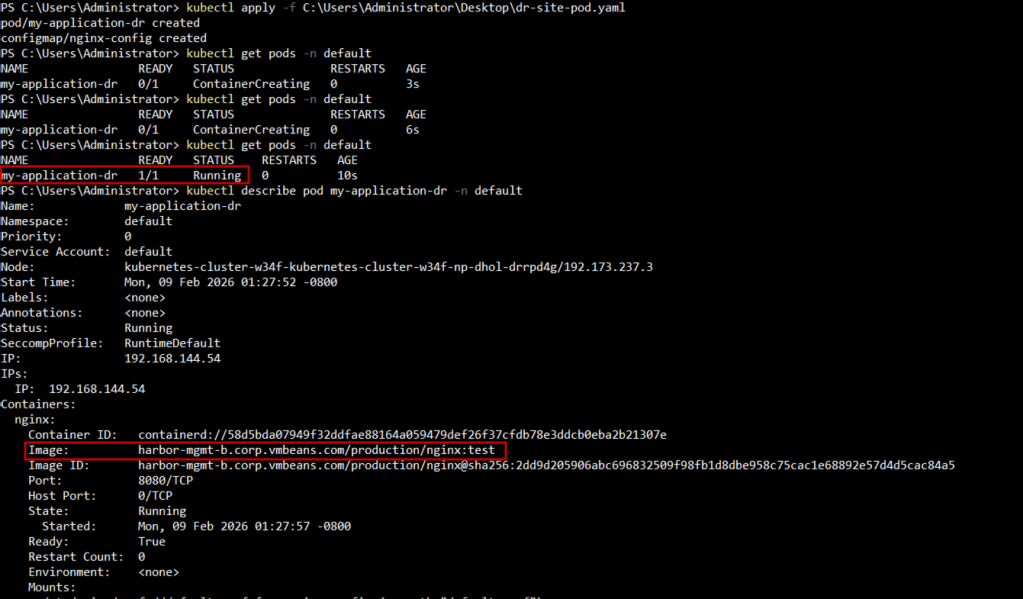
Reference the secret in your pod or deployment specification:
In Primary Region (VCF-Primary):
In DR Region (VCF-DR):
Best Practices for Harbor Replication
1. Use Event-Based Replication for Critical Workloads
Event-based replication ensures your DR site stays synchronized in near real-time, critical for achieving aggressive RTO/RPO targets.
2. Implement Role-Based Access Control (RBAC)
Create dedicated robot accounts for replication with least-privilege permissions. Don’t use admin credentials for automation.
3. Plan for Network Bandwidth
Replicating large container images across WAN links can be bandwidth-intensive. Consider:
- Replicating during off-peak hours for initial bulk sync
- Using bandwidth limiting features
- Implementing a tiered approach: critical images replicate immediately, non-critical on a schedule
4. Align with Backup Strategy
Cross-region replication complements but doesn’t replace backups. Continue backing up Harbor’s database and configuration using your standard backup procedures.
5. Test Failover Scenarios
Regularly test DR procedures:
- Simulate primary Harbor failure
- Verify VKS clusters can pull from Harbor-DR
- Ensure CI/CD pipelines can push to Harbor-DR if it becomes primary
- Document RTO/RPO metrics
6. Use Site-based DNS resolution
A good option when deploying multiple Harbor instances with replication is to provide the same FQDN to the Harbor instances and have each site-local DNS server resolve the same FQDN to the local Harbor instance IP. This allows developers to access the images that are closest to them, reducing image pull time while abstracting away the complexity of figuring out which registry is closest to them.
Advanced Scenarios
1. Bidirectional Replication for Active-Active VCF Deployments
Configure replication rules in both directions when both VCF sites actively serve production workloads. Be cautious of potential image tag conflicts. Establish clear naming conventions.
2. Selective Replication with Labels
Use Harbor’s label system to replicate only specific image subsets. For example, replicate only images labeled compliance-approved or production-ready to your DR site.
3. Multi-Destination Replication
A single Harbor instance can replicate to multiple destinations. Set up replication to both your DR site and an edge VCF deployment simultaneously.
Measuring Success
After implementing cross-region replication, track these metrics to validate effectiveness:
- Replication Lag: Time between image push to primary and availability on DR (target: < 5 minutes)
- Replication Success Rate: Percentage of successful replication jobs (target: > 99%)
- Image Pull Time: Compare pull times from local vs. remote registry (expect 3-10x improvement)
- Bandwidth Utilization: Ensure replication doesn’t saturate your inter-site links
Conclusion
Cross-Region Replication in Harbor allows scaling your container registry from a single-region solution into a resilient, geographically distributed architecture.
The combination of VMware Cloud Foundation with Harbor’s enterprise-grade registry capabilities and cross-region replication provides a solid foundation for running production containerized workloads at scale.
Follow our Harbor blog series:
- Blog 1 – Harbor: Your Enterprise-Ready Container Registry for a Modern Private Cloud
- Blog 2 – Reducing Harbor Deployment Complexity on Kubernetes
- Blog 3 – Making Harbor Production-Ready: Essential Considerations for Deployment
- Blog 4 – Integrating VMware Data Services Manager with Harbor for a Production-Ready Registry
- Blog 5 – Using Harbor as a Proxy Cache for Cloud-Based Registries
- Blog 6 – Securing Your Software Supply Chain with Harbor
Discover more from VMware Cloud Foundation (VCF) Blog
Subscribe to get the latest posts sent to your email.