
Updated: 02/05/2026
We are excited to announce that VMware Cloud on AWS now supports Bring Your Own Keys (BYOK) for VM encryption as part of the new version 1.26 release! This capability enables you to integrate your own KMIP-compliant Key Management System (KMS) directly with VMware Cloud on AWS, giving you complete ownership and control of the encryption keys that protect your workloads. This feature is available now for all SDDCs running version 1.26 and above.
What is BYOK for VM encryption?
BYOK for VM encryption allows you to use your own external, KMIP-compliant Key Management System to manage encryption keys for your virtual machines running on VMware Cloud on AWS. This means you hold and manage the keys that protect your workloads. This approach provides clear separation of concerns: your customer-managed keys protect your workload data, while the VMware Cloud on AWS control plane remains secured separately by AWS KMS, managed by Broadcom.
Some key benefits include
- Data Sovereignty: Retain total control over your encryption keys to meet regional and regulatory compliance requirements.
- Compliance-Ready: Designed to align with European data sovereignty standards, including the Italian National Cybersecurity Agency Level 2 certification.
- Workload Security: Encrypt VMs using a customer-managed key provider that integrates seamlessly with VMware Cloud on AWS.
- Key Lifecycle Control: Manage key rotation, lifecycle events, and recovery—all on your terms.
How Does It Work?
BYOK for VM encryption connects your external KMIP-compliant KMS with VMware Cloud on AWS through vSphere VM Encryption (VMcrypt). Your vCenter Server communicates with your external KMS over the KMIP protocol to request encryption keys when needed. These keys are used to encrypt virtual machine disks using VMcrypt. Your KMS generates, stores, and manages all encryption keys—giving you complete control over the key lifecycle. For detailed information about the encryption process flow, see How vSphere Virtual Machine Encryption Protects Your Environment.
The VMware Cloud on AWS control plane operates separately and remains encrypted using AWS KMS, managed by Broadcom. This separation helps ensure that your workload encryption remains independent and under your complete control.
Please review the VMware Cloud on AWS technical documentation for more information and details. Available with SDDC version 1.26 and above.
Getting Started in Four Steps
1. Prepare Your KMS (Key Management System)
Deploy a high-availability, KMIP-compliant KMS. It should be deployed with at least 99.9% availability.
2. Set Up Connectivity
Configure routing from your SDDC to the KMS.
- Ensure redundant network paths for resilience.
- Recommended: Use AWS Direct Connect to link VMware Transit Connect Gateway to your KMS.
- Open port 5696 for vCenter–KMS communication.
3. Register and Trust Your Key Provider
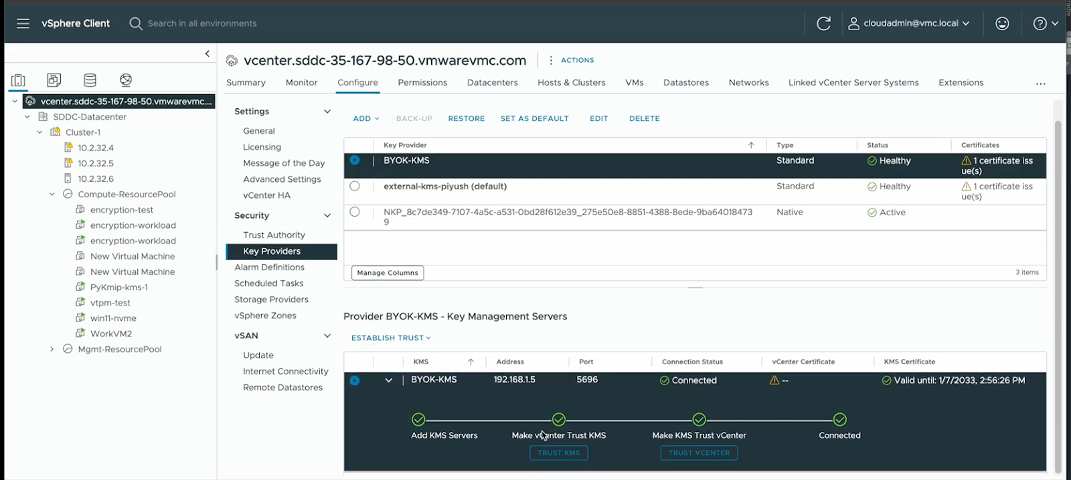
Add the KMS in vCenter and establish trust. For detailed steps and screenshots, please refer to Add Standard Key Provider using vCenter Client.
4. Encrypt Your Workloads
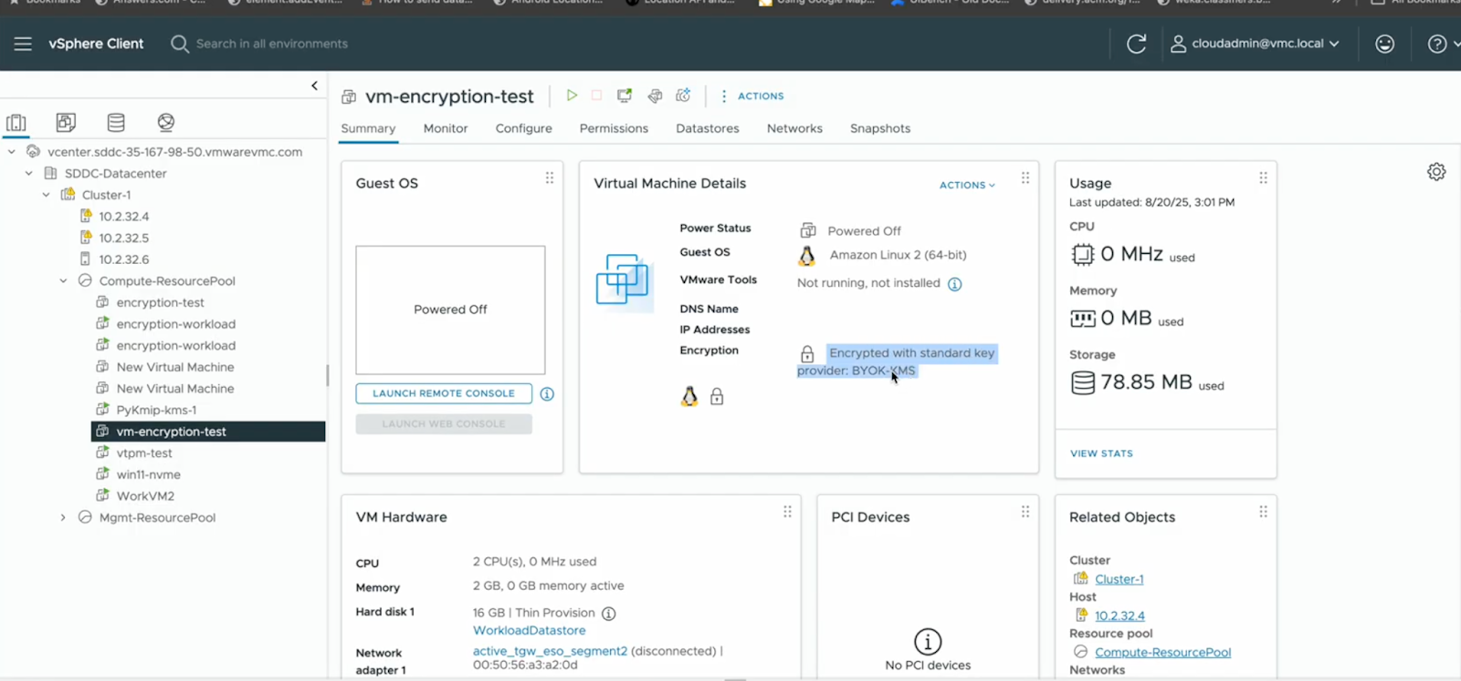
Use vCenter to encrypt VMs during creation or apply encryption to existing VMs.
- For step-by-step instructions, refer to:
Key Features and Capabilities
Encryption operations
- Shallow Recrypt: Replaces only the Key Encryption Key (KEK) and can be performed while VMs are powered on (except those with IDE controllers). Works with existing snapshots.
- Deep Recrypt: Replaces both Disk Encryption Key (DEK) and KEK. Requires VMs to be powered off and doesn’t support snapshots.
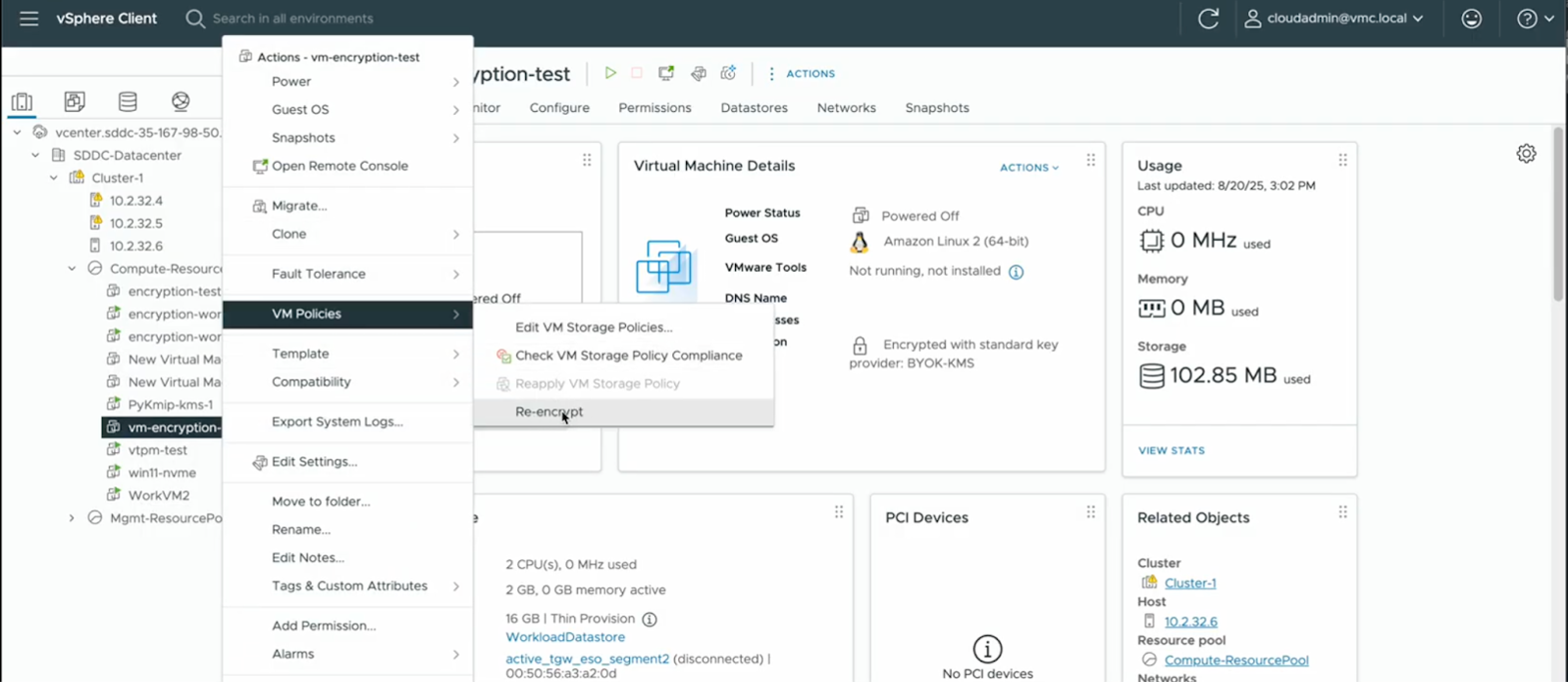
Learn more about Shallow and Deep Recrypt.
- Cloning support: Full clones inherit encryption state and can be re-encrypted. Linked clones inherit encryption but cannot be re-encrypted with different keys. Instant clones are supported across all key providers with immutable encryption keys. For more information, see Clone an Encrypted Virtual Machine.
Migration and disaster recovery
- HCX Bulk Migration: Now supports encrypted VM migration when the same Key Provider is configured on both source and destination vCenter servers. VMware Cloud on AWS SDDC must be 1.26 or later, and on-prem SDDC must be vSphere 80u2 or later.
- VLR Backup and Recovery: Supports encrypted VMs when the same Key Provider is available on the recovery vCenter server. VMware Cloud on AWS SDDC must be 1.26 or later, and on-prem SDDC must be vSphere 80u2 or later.
Important Considerations
When implementing BYOK for VM encryption, keep these critical factors in mind:
- KMS availability is essential: If your KMS becomes unavailable, running VMs continue to operate normally, but you cannot power on encrypted VMs, create new encrypted VMs, or perform certain maintenance operations until connectivity is restored. Design your KMS infrastructure with high availability and implement monitoring and alerting to ensure continuous operation.
- Key management responsibility: Lost or corrupted encryption keys render workloads unrecoverable. Implement secure backup procedures for your KMS, document recovery processes, and test your key recovery capabilities regularly.
- Performance impact: Encryption increases CPU overhead and may disable storage deduplication. Plan capacity accordingly.
- Dual encryption: Workloads using vSAN encryption will have dual protection when VMcrypt is enabled.
Frequently Asked Questions
Q: Who can encrypt or decrypt VMs?
A: Users with the Cloud Admin role and required cryptographic privileges.
Q: What happens if my KMS is unavailable?
A: Running VMs continue, but new encryption or maintenance operations are paused until connectivity is restored.
Q: Can I export encrypted VMs?
A: No. OVF export of encrypted VMs is not currently supported.
Q: Will VMs be dual-encrypted?
A: Yes. Workloads use vSAN encryption by default. Applying VMcrypt adds a second encryption layer with additional CPU overhead.
Learn More
- AWS Direct Connect with VMware Cloud on AWS
- Understanding vSAN Datastore Encryption vs. VMcrypt Encryption
- Virtual Machine Encryption Interoperability
- Virtual Machine Encryption Caveats
- Encryption Operations Overview
- Encryption Process Flow
- Prerequisites and Privileges for Encryption Tasks
- Virtual Machine Encryption Best Practices
Resources:
- Follow the VMware Cloud on AWS release notes for continuing updates.
- Read our latest VMware Cloud on AWS blogs.
Discover more from VMware Cloud Foundation (VCF) Blog
Subscribe to get the latest posts sent to your email.