Updated: 1/23/2026
The VMware Cloud on AWS SDDC version 1.26 release marks a significant milestone in VMC’s cloud infrastructure evolution, bringing together a modern storage architecture, enhanced compliance capabilities, and improved operational stability. This release focuses on what matters most to enterprise customers: maintaining secure, efficient, and reliable cloud environments while providing flexibility for modern workloads.
At the heart of the 1.26 release is the upgrade to vSphere 8.0 Update 3, a Long-Term Support (LTS) version that provides organizations with a stable foundation for their cloud infrastructure, with improved reliability and performance optimizations. See Correlating VMware Cloud on AWS SDDC Versions With Their vSphere Components for more details about the component version changes and the VMware Cloud on AWS Release Notes for additional details about the release. SDDC Version 1.26 is now the default build for all new SDDC deployments. Keep reading for more details about what’s new in this release.
Next-Generation Storage: vSAN Express Storage Architecture
With the VMware Cloud on AWS 1.26 release, the vSAN Express Storage Architecture (ESA) is now generally available for VMC SDDCs. vSAN ESA is supported only for i4i.metal host types on newly deployed single availability zone SDDCs and for new secondary i4i.metal clusters on existing SDDCs that have been upgraded to 1.26.
The introduction of vSAN ESA with SDDC version 1.26 represents a fundamental shift in how storage is managed within VMware Cloud on AWS. This next-generation architecture delivers higher performance and improved efficiency, enabling organizations to run more demanding workloads while optimizing resource utilization. ESA’s modern design is built to support the performance requirements of contemporary applications while simplifying storage management.
vSAN ESA is a single-tier Hyper-Converged Infrastructure (HCI) solution designed to optimally leverage NVMe storage devices, providing performance and compression improvements. New vSAN ESA features such as native snapshots lead to faster backups, and a storage pool architecture reduces fault domains and improves data availability. The vSAN ESA architecture supports RAID-5 storage policy starting from 3 hosts to give customers more storage capacity on smaller clusters compared to vSAN Original Storage Architecture (OSA).
vSAN ESA is available now for newly deployed single availability zone (non-stretched) SDDCs as primary and secondary clusters, and for new, non-stretched secondary clusters on existing SDDCs that have been upgraded to 1.26. vSAN ESA is only supported for i4i.metal hosts.
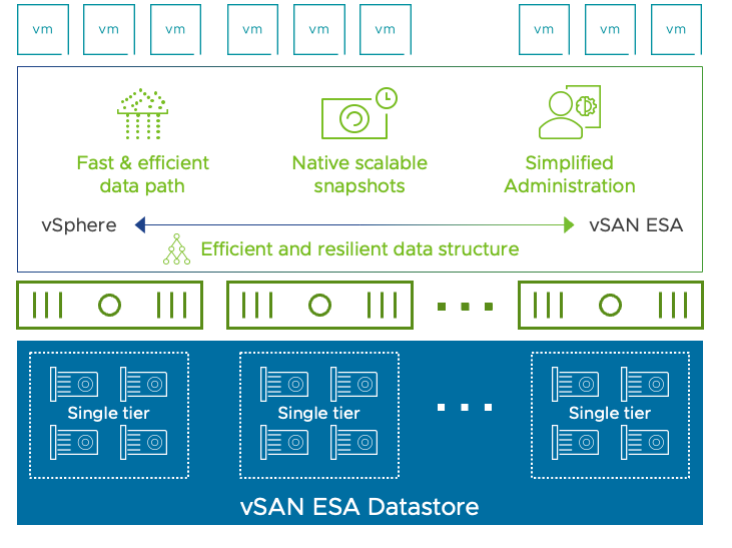
Some key architectural and functional improvements with vSAN ESA include:
- Optimized Write Path: ESA writes data directly to the storage pool, eliminating the cache-capacity tier staging process used in OSA. This results in lower latency and improved consistency for write operations.
- Enhanced RAID Capabilities: ESA supports RAID-5 (2+1) configurations on three-node clusters, enabling higher space efficiency without sacrificing resilience.
- Native Snapshot Technology: ESA introduces zDOM-based native snapshots, replacing OSA’s delta-disk (vsanSparse) snapshots. This eliminates long redo-log chains and ensures predictable I/O performance regardless of snapshot depth.
- Improved Space and CPU Efficiency: The single-tier architecture removes caching overhead, yielding higher usable capacity and reduced CPU load per I/O operation.
- Advanced Compression: Compression is performed per object and efficiently offloaded, providing better space savings compared to OSA’s per-disk-group compression mechanism.
- Optimized Encryption: Encryption operates at a higher (zDOM-based) layer, improving performance and space efficiency relative to OSA’s disk-group-level encryption.
- Expanded Scalability: The vSAN component limit per host increases from 9,000 to 27,000, supporting larger workloads and greater consolidation.
- Default Data Integrity Controls: ESA enables checksum verification by default with no option to disable it. Any OSA storage policies that disable checksum will be ignored in ESA.
vSAN ESA is now the standard storage architecture for all newly deployed, single availability zone (non-stretched) SDDC deployments with the i4i instance type. You can confirm ESA enablement when deploying a new SDDC in the VMC Console UI deployment workflow:

You can now also view the vSAN storage configuration from the cluster cards within your SDDC details from within the VMC Console UI:
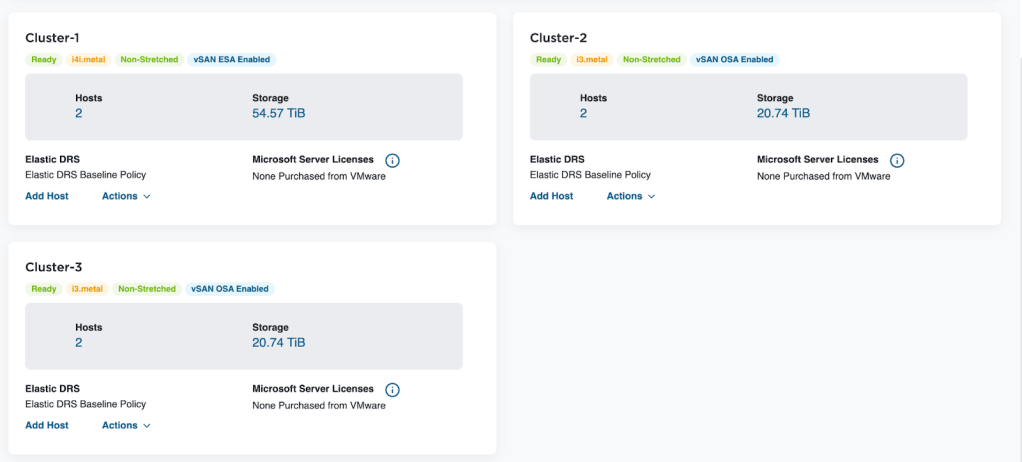
For a deep dive into vSAN ESA on VMC, see the updated vSAN ESA with VMware Cloud on AWS: Technical Deep Dive. To get started with vSAN ESA on VMC, please see the vSAN Express Storage Architecture (vSAN ESA) on VMware Cloud on AWS technical documentation.
Bring Your Own Keys (BYOK): VMC Now Includes VM Encryption
With SDDC version 1.26, VMware Cloud on AWS now supports customer-managed VM Encryption through an external KMIP-compliant Key Management Systems (KMS). This capability enables organizations to maintain full control over their encryption keys while leveraging cloud infrastructure, meeting sovereignty and compliance requirements.
The solution integrates external KMIP-compliant Key Management Systems (i.e. Standard Key Provider) with VMware Cloud on AWS through vSphere VM Encryption (VMcrypt). You can now use your own keys for workload VM encryption—while the VMC control plane continues to use AWS KMS (managed by Broadcom) for vSAN encryption. This separation gives enterprises greater control and helps meet regulatory requirements without changing how teams operate in vSphere. This feature is only available for SDDC version 1.26 and above.
Some key customer benefits include:
- Ownership and full control over cryptographic keys.
- Meets stricter compliance frameworks.
- No impact on platform operations.
- Clear separation of customer-encrypted workloads and VMC-managed control plane encryption.
Migration flexibility also receives a significant boost in this release:
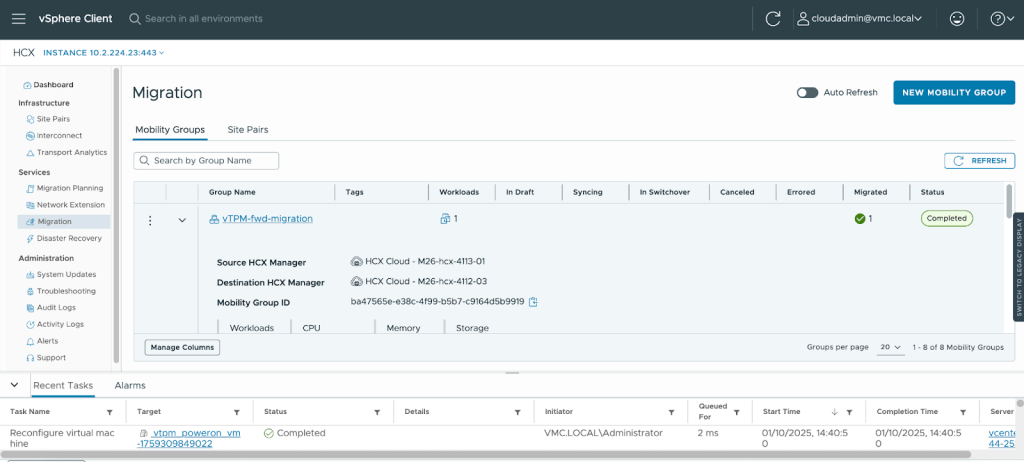
- HCX Bulk Migration Support for Encrypted VMs streamlines the process of moving encrypted virtual machines, making large-scale migrations more efficient while maintaining security. This capability is essential for organizations undertaking cloud transformation initiatives or consolidating data centers. For HCX bulk migration, customers would need to configure the same key provider for both source and destination SDDC.
- vTPM Mobility Support enables the import and export of native key providers, facilitating secure VM migration across environments. This feature ensures that security configurations remain intact during transitions, reducing complexity and potential security gaps.
The image below shows HCX Bulk Migration of vTPM VM from on-premises to a VMC SDDC:
To learn more about BYOK for VMware Cloud on AWS, please see the Bring Your Own Key for Virtual Machine Encryption technical documentation.
Expanded Hardware Capabilities: VM Hardware Version 21
The upgrade to VM Hardware Version 21 unlocks powerful new capabilities for virtual machines:
- 256 Disks per VM: Massive storage capacity through 64 disks across 4 vNVMe adapters.
- NVMe 1.3 Support: Enhanced performance for Windows 11 and Windows Server 2022 deployments.
- NVMe for Windows Server Failover Clustering (WSFC): High-performance shared storage for mission-critical clustered applications.
- Latest Guest OS Support: Compatibility with RHEL 10, Oracle Linux 10, Debian 13, and FreeBSD 15.
These enhancements enable organizations to run more demanding workloads and support modern operating systems without compromise.
VM Hardware Version Comparison: Version 21 vs Version 20
| Feature | VM Hardware Version 21 (Current with 1.26) | VM Hardware Version 20 (Previous) |
| Maximum Disks per VM | 256 disks (64 disks × 4 vNVMe adapters) | 60 disks (SCSI + NVMe combined) |
| NVMe Adapters per VM | 4 vNVMe adapters | 4 vNVMe adapters |
| NVMe Targets per Adapter | 64 targets (increased from 15) | 15 targets per adapter |
| SCSI Adapters per VM | 4 adapters | 4 adapters |
| SCSI Targets per Adapter | 15 targets | 15 targets |
| NVMe Version Support | NVMe 1.3 | NVMe 1.0e |
| NVMe for Windows 11/Server 2022 | Enhanced NVMe 1.3 support | NVMe 1.0e support |
| NVMe for WSFC | Supported with NVMe adapters | Not available |
| RHEL 10 Support | Compatible | Incompatible |
| Oracle Linux 10 Support | Compatible | Incompatible |
| Debian 13 Support | Compatible | Incompatible |
| FreeBSD 15 Support | Compatible | Incompatible |
Note that when upgrading from VM Hardware Version 20 to 21:
- VMs must be powered off during upgrade.
- VMware Tools should be updated to the latest version (12.5.4 recommended).
- Consider workload requirements before upgrading.
- Test first in a non-production environment.
Note: Upgrading the VM hardware version is a one-way process and cannot be easily reversed. Only upgrade if you require the new features available in Version 21.
Operational Excellence: VMware Tools 12.5.4
The updated VMware Tools 12.5.4 for VMC improves management capabilities across guest operating systems. This update improves driver compatibility, enhances VM performance, and provides better integration with the underlying VMC infrastructure.
What This Means for Your Organization
The VMware Cloud on AWS version 1.26 release represents Broadcom’s commitment to providing a compliant, performant, and flexible cloud platform. With updated components, a modern storage architecture, and enhanced encryption controls, VMware Cloud on AWS is now more capable than ever. With VMware Cloud on AWS, organizations can focus on innovation and business outcomes rather than infrastructure concerns, knowing their cloud environment is built on a secure and stable foundation.
As enterprises continue their cloud journey, releases like 1.26 demonstrate that the VMC platform continues to evolve to meet both current needs and future demands, making it an ideal choice for organizations seeking a robust, enterprise-grade cloud solution.
VMware Cloud on AWS version 1.26 is available today for new SDDC deployments. Existing SDDCs will be upgraded over time. If you are interested in upgrading early, please reach out to the VMC team.
Discover more from VMware Cloud Foundation (VCF) Blog
Subscribe to get the latest posts sent to your email.