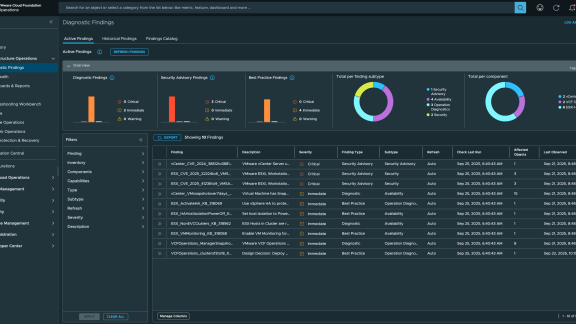

Diagnostics for VMware Cloud Foundation is a centralized platform that monitors the overall operational status of the VMware Cloud Foundation (VCF) software stack. It is a self-service platform that helps you analyze and troubleshoot the components of VMware Cloud Foundation, including vCenter, ESXi, vSAN, capabilities such as vSphere vMotion, snapshots, VM provisioning, and other issues including security advisories and certificates. As an Infrastructure admin, you can monitor the operational state of your environment using diagnostics findings.
Diagnostics findings, which were previously delivered through Skyline Advisor and Skyline Health Diagnostics, are available to VCF and vSphere Foundation customers in VCF Operations. Findings are prioritized by trending issues in Broadcom Technical Support, issues raised through post-escalation review, security vulnerabilities, issues raised from Broadcom engineering, and issues nominated by customers.
For the most recent release of VCF Operations, we released 154 new Diagnostics findings. Of these, there are 124 findings based on trending issues, two based on VMware Security Advisories, and 28 based on nominations. There are 59 health findings, which are equivalent to Skyline Advisor findings. Health findings are automatically checked against your environment every four hours. There are 94 log-based findings that are equivalent to Skyline Health Diagnostics findings. Log-based findings are manually initiated against your environment by choosing refresh against the configuration operations instances.
These new findings are in the VCF Operations 9.0.2 Release Notes.
VMware Technical Support Trending Issues
VMware Technical Support trending issues are Knowledge Based Articles that have solved many Cases and/or are viewed many times.
In KB 383273, ESX Host reported Metadata Corruption during an VCF Operations for Logs Query. Metadata Corruption may cause problems accessing certain files on a VMFS Datastore; you cannot modify or erase files, and attempting to read files may fail. This impact can cause VM or ESX host inaccessibility and even crashing of your ESX host. This finding is triggered by log messages being reported into the vmkernel.log file on an ESX host.
- ESX_MetadataCorruption_KB_318894
- ESXi Host has reported Metadata Corruption during Logs Query
- https://knowledge.broadcom.com/external/article/318894
- Critical
Security Vulnerabilities
In VMSA-2025-0016, Broadcom is informing customers of vCenter SMTP header injection vulnerability (CVE-2025-41250). A malicious actor with non-administrative privileges on vCenter who has permission to create scheduled tasks may be able to manipulate the notification emails sent for scheduled tasks. This vulnerability is addressed in vCenter Server, 9.0.1, 8.0 Update 3g, and 7.0 Update 3w.
- vCenter_CVE_2025_41250_VMSA_202516
- vCenter SMTP header injection vulnerability (CVE-2025-41250)
- https://support.broadcom.com/web/ecx/support-content-notification/-/external/content/SecurityAdvisories/0/36150
- Immediate
Findings Nominated
The Diagnostics team’s primary focus is customer satisfaction. We want to keep customers out of harm’s way, and we do this by providing you with findings we discover from the day-to-day business of Broadcom Technical Support. We also want to hear ideas of what you would like to see in Diagnostics for VMware Cloud Foundation. The following finding came from one of our customers:
In KB#398998, BFD tunnels on ESX hosts have had all or some of their tunnels go down. This causes VMs running on impacted hosts to have network connectivity issues. This issue occurs in environments where the nestdb agent on the host stops functioning due to log files consuming all available nestdb ramdisk. This is resolved in NSX 4.2.1.4 and 4.2.2.1.
- NSX_BFDTunnelsDown_KB_398998
- BFD tunnels are down on ESXi hosts and VM networking is impacted
- https://knowledge.broadcom.com/external/article/398998
- Critical
If you would like to nominate a finding for Diagnostics, please file a feature request for VCF. The following KB goes over these steps: Submit a VMware by Broadcom feature request
To review all the findings in Diagnostics for VMware Cloud Foundation, please review the Findings Catalog found in the Diagnostics Findings section of VCF Operations. To get the latest updates, please subscribe to the Diagnostics for VMware Cloud Foundation Findings KB. This KB is updated proceeding either an in-product update or management pack update of the Diagnostics findings.
Discover more from VMware Cloud Foundation (VCF) Blog
Subscribe to get the latest posts sent to your email.