Broadcom collaborated with Dell, Intel, NVIDIA, and SuperMicro to highlight the advantages of virtualization, delivering standout MLPerf Inference v5.1 results. VMware Cloud Foundation (VCF) 9.0 achieved performance on par with bare-metal environments across key AI benchmarks—including Speech-to-Text (Whisper), Text-to-Video (Stable Diffusion XL), LLMs (Llama 3.1-405B and Llama 2-70B), Graph Neural Networks (R-GAT), and Computer Vision (RetinaNet). These results were achieved across GPU and CPU solutions with NVIDIA’s virtualized 8x H200 GPUs, passthrough/DirectPath I/O 8x Blackwell GPUs, and Intel’s virtualized dual-socket Xeon 6787P processors.
Refer to the official MLCommons Inference 5.1 results for the raw comparison of relevant metrics. With these results, Broadcom once again demonstrates that VCF virtualized environments perform on par with bare metal, allowing customers to benefit from the increased Agility, Availability, and Flexibility that VCF provides while leveraging excellent performance.
VMware Private AI is an architectural approach that balances the business gains from AI with the privacy and compliance needs of the organization. Built on top of the industry-leading private cloud platform, VMware Cloud Foundation (VCF), this approach ensures privacy and control of their data, choice of open-source and commercial AI solutions, optimum cost, performance, and compliance. Broadcom aims to democratize AI and ignite business innovation for all organizations.
VMware Private AI enables enterprises to use a range of AI solutions for their environment—NVIDIA, AMD, Intel, open–source community repositories, and independent software vendors. With VMware Private AI enterprises can deploy confidently, knowing that Broadcom has built partnerships with the leading AI providers.
Broadcom brings the power of its partners Dell, Intel, NVIDIA, and SuperMicro to VCF to simplify management of AI accelerated data centers and enable efficient application development and execution for demanding AI/ML workloads.
We showcase three configurations in VCF: SuperMicro GPU SuperServer AS-4126GS-NBR-LCC with eight NVIDIA NVLinked NVIDIA HGX B200 GPUs in DirectPath I/O, Dell PowerEdge XE9680 with eight NVIDIA NVlinked NVIDIA HGX H200 GPUs in vGPU mode, and 1-node-2S-GNR_86C_ESXi_172VCPU-VM with INTEL(R) XEON(R) 6787P 86-core CPUs.
MLPerf Inference 5.1 Performance with VCF on SuperMicro server with eight NVIDIA HGX B200 GPUs
VCF supports both DirectPath I/O and NVIDIA Virtual GPU (vGPU) technologies to enable GPUs for AI and other GPU-based workloads. For a demonstration of AI performance with NVIDIA HGX B200 GPUs, we chose DirectPath I/O for our MLPerf Inference benchmarking.
We ran MLPerf Inference workloads on a SuperMicro SuperServer AS-4126GS-NBR-LCC with eight NVIDIA NVIDIA HGX B200 180GB HBM3e GPUs with VCF 9.0.0.
Table 1 shows the hardware configurations used to run the MLPerf Inference 5.1 workloads on the bare metal and virtualized systems. The benchmarks were optimized with NVIDIA TensorRT-LLM. TensorRT-LLM consists of the TensorRT deep learning compiler and includes optimized kernels, pre-and post-processing steps, and multi-GPU/multi-node communication primitives for groundbreaking performance on NVIDIA GPUs.
Table 1. Hardware and software for bare metal and virtualized MLPerf tests
| Bare Metal | Virtual | |
| System | SuperMicro GPU SuperServer SYS-422GA-NBRT-LCC | SuperMicro GPU SuperServer AS-4126GS-NBR-LCC |
| Processors | 2x Intel Xeon 6960P 72 Core | 2x AMD EPYC 9965 192 Core |
| Logical processors | 144 | 192 out of 384 (50%) allocated to the VM for inferencing (with CPU utilization under 10%) Therefore 192 available for other VMs/workloads with full isolation due to virtualization |
| GPUs | 8x NVIDIA Blackwell 180GB HBM3e GPUs | DirectPath I/O 8x NVIDIA Blackwell 180GB HBM3e GPUs |
| Accelerator Interconnect | 18x 5th Gen NVIDIA NVLinks, 14.4 TB/s aggregated bandwidth | 18x 5th Gen NVIDIA NVLinks, 14.4 TB/s aggregated bandwidth |
| Memory | 2.3 TB | Host Memory 3 TB 2.5 TB allocated for inferencing VM |
| Storage | 4x 15.36 TB NVMe SSD | 4x 13.97 TB NVMe SSD |
| OS | Ubuntu 24.04 | Ubuntu 24.04 VM on VCF/ESXi 9.0.0.0.24755229 |
| CUDA | 12.9 CUDA and Driver 575.57.08 | 12.8 CUDA and Driver 570.158.01 |
| TensorRT | TensorRT 10.11 | |
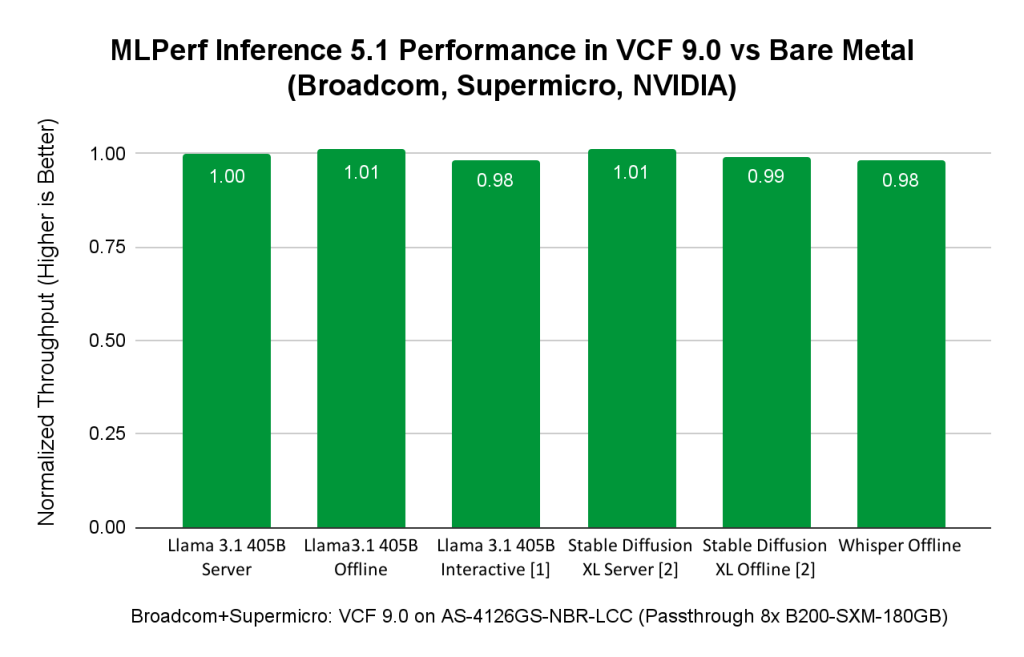
Figure 1: Performance comparison of virtualized vs. bare metal ML/AI workloads, featuring a SuperMicro SuperServer AS-4126GS-NBR-LCC
[1] Llama 3.1 405B Interactive scenario result is unverified by MLCommons Association. Broadcom & SuperMicro did not submit it as it was not required.
[2] Stable Diffusion XL results submitted by Broadcom & SuperMicro could not be compared with SuperMicro’s submission on the same hardware because Stable Diffusion benchmark results were not submitted by SuperMicro on a bare metal platform. Therefore the comparison is made to another submission using a comparable host with eight NVIDIA HGX B200-SXM-180GB.
Figure 1 shows that AI/ML Inference workloads from diverse domains of LLM (Llama 3.1 with 405 billion parameters, Speech2Text (Whisper from OpenAI), Text2Images (Stable Diffusion XL)) get on par bare metal performance in VCF. When AI/ML workloads are run in VCF, you get the data center management benefits of VCF while leveraging the on par bare metal performance.
MLPerf Inference 5.1 Performance with VCF on Dell server with eight NVIDIA H200 GPUs
Broadcom supports enterprise customers that have AI infrastructure from different hardware vendors. In this MLPerf Inference 5.1 submission round, we collaborated with NVIDIA and Dell to demonstrate VCF 9.0 as a great platform for AI, especially generative AI workloads. We chose the vGPU for our benchmarking to showcase another deployment option that customers can choose in VCF 9.0.
The vGPU feature integrated with VCF offers a number of benefits for deploying and managing AI infrastructure. First, VCF creates 2-GPU, 4-GPU, 8-GPU device groups using NVIDIA NVLink™ and NVSwitch. These device groups could be allocated to different VMs. This provides the flexibility in allocating GPU resources to the VM to best fit the workload requirements and increases GPU utilization. Second, vGPU allows multiple VMs to share GPU resources in the same host. vGPU enables multiple VMs to share GPU resources in the same host in which each VM is allocated a portion of GPU memory and/or GPU compute capacity specified by vGPU profile. It allows multiple smaller workloads to share a single GPU based on their memory and computation requirements. This helps increase system consolidation, maximize resource utilization, and save deployment costs of AI infrastructure. Third, vGPU provides a flexible way to manage datacenters with GPUs by supporting suspend/resume and VMware vMotion of VMs (note: vMotion is supported only when AI workloads do not use the Unified Virtual Memory GPU feature). Last, but not least, vGPU enables diverse GPU-based workloads (like AI, graphics, or other high performance computing workloads) to share the same physical GPUs where each workload can be deployed in a different guest operating system and can belong to different tenants in a multi-tenancy environment.
We ran MLPerf Inference 5.1 workloads on a Dell PowerEdge XE9680 with eight NVIDIA SXM H200 141 GB HBM3e GPUs with VCF 9.0.0. The VMs used in our tests were allocated only a fraction of the bare metal resources. Table 2 presents the hardware configurations used to run the MLPerf Inference 5.1 workloads on both bare metal and virtualized systems.
Table 2. Hardware and software for Dell PowerEdge XE9680
| Bare Metal | Virtual | |
| System | Dell PowerEdge XE9680 | |
| Processors | Intel(R) Xeon(R) Platinum 8568Y+ 96 cores | |
| Logical processors | 192 | 192 total 48 (25%) allocated to the VM for inferencing 144 available for other VMs/workloads with full isolation due to virtualization |
| GPU | 8x NVIDIA H200 141GB HBM3e | 8x virtualized NVIDIA H200-SXM-141GB (vGPU) |
| Accelerator Interconnect | 18x 4th Gen NVLink, 900GB/s | 18x 4th Gen NVLink, 900GB/s |
| Memory | 3 TB | Host Memory 3 TB 2 TB (67%) allocated for inferencing VM |
| Storage | 2 TB SSD, 5 TB CIFS | 2x 3.5TB SSD, 1x 7TB SSD |
| OS | Ubuntu 24.04 | Ubuntu 24.04 VM on VCF/ESXi 9.0.0.0.24755229 |
| CUDA | 12.8 and Driver 570.133 | 12.8 CUDA and Linux Driver 570.158.01 |
| TensorRT | TensorRT 10.11 | |
The MLPerf Inference 5.1 results presented in Table 3 show great performance for large language models (Llama 3.1 405B and Llama 2 70B) and image generation (SDXL – Stable Diffusion).
Table 3. MLPerf Inference 5.1 results using eight vGPUs in VCF 9.0 with Hardware Dell PowerEdge XE9680 with eight H200 GPUs
| Benchmarks | Throughputs |
| Llama 3.1 405B Server (tokens / sec) | 277 |
| Llama 3.1 405B Offline (tokens / sec) | 547 |
| Llama 2 70B Server (tokens / sec) | 33385 |
| Llama 2 70B Offline (tokens / sec) | 34301 |
| Llama 2 70B – High Accuracy – Server (tokens per sec) | 33371 |
| Llama 2 70B – High Accuracy – Offline (tokens per sec) | 34486 |
| SDXL Server (samples / sec) | 17.95 |
| SDXL Offline (samples / sec) | 18.64 |
In Figure 2 we compare our MLPerf Inference 5.1 results in VCF with Dell’s results in bare metal on the same Dell PowerEdge XE9680 with H200 GPUs. Both Broadcom’s and Dell’s results are publicly available on the MLCommon website. Because Dell submitted only Llama 2 70B results, Figure 2 includes MLPerf Inference 5.1 Performance in VCF 9.0 vs. bare metal for these workloads and shows that VCF and bare metal are only 1% or 2% different in performance.

Figure 2. Performance comparison of virtualized vs. bare metal ML/AI workloads on Dell XE9680 with eight H200 GPUs SXM 141 GB
MLPerf Inference 5.1 Performance in VCF with Intel Xeon 6 Processor
Intel and Broadcom collaborated to demonstrate the capabilities of VCF, empowering customers who use only Intel’s Xeon processor with built-in AMX acceleration for AI workloads. We ran MLPerf Inference 5.1 workloads including Llama 3.1 8B, DLRM-V2, R-GAT, Whisper, and RetinaNet, on the system presented in Table 4.
Table 4. Hardware and software for Intel systems
| Bare Metal | Virtual | |
| System | 1-node-2S-GNR_86C_BareMetal | 1-node-2S-GNR_86C_ESXi_172VCPU-VM |
| Processors | INTEL(R) XEON(R) 6787P 86 cores | INTEL(R) XEON(R) 6787P 86 cores |
| Logical processors | 172 | 172 vCPUs (43 vCPUs per NUMA node) |
| Memory | 1 TB (16x 64 GB DDR5 1286400 MT/s[8000 MT/s]) | 921 GB |
| Storage | 1x 1.7 TB SSD | 1x 1.7 TB SSD |
| OS | CentOS Stream 9 | CentOS Stream 9 |
| Other software stack | 6.6.0-gnr.bkc.6.6.31.1.45.x86_64 | 6.6.0-gnr.bkc.6.6.31.1.45.x86_64 VMware ESXi 9.0.0.0.24755229 |
AI workloads, particularly smaller models, can run efficiently on Intel Xeon CPUs with AMX acceleration using VCF, achieving near bare-metal performance while benefiting from VCF’s manageability and flexibility. This makes Intel Xeon CPUs processors a great starting point for organizations embarking on their AI journey, as they can leverage existing infrastructure.
The results of MLPerf Inference 5.1 using Intel Xeon Processors in VCF show on par bare metal performance. In cases where data centers do not have accelerators like GPUs available, or AI workloads are less computationally demanding, depending on the customers use cases, AI/ML workloads can be deployed on Intel Xeon Processors in VCF to benefit from virtualization while leveraging on-par bare metal performance, as shown in Figure 3.
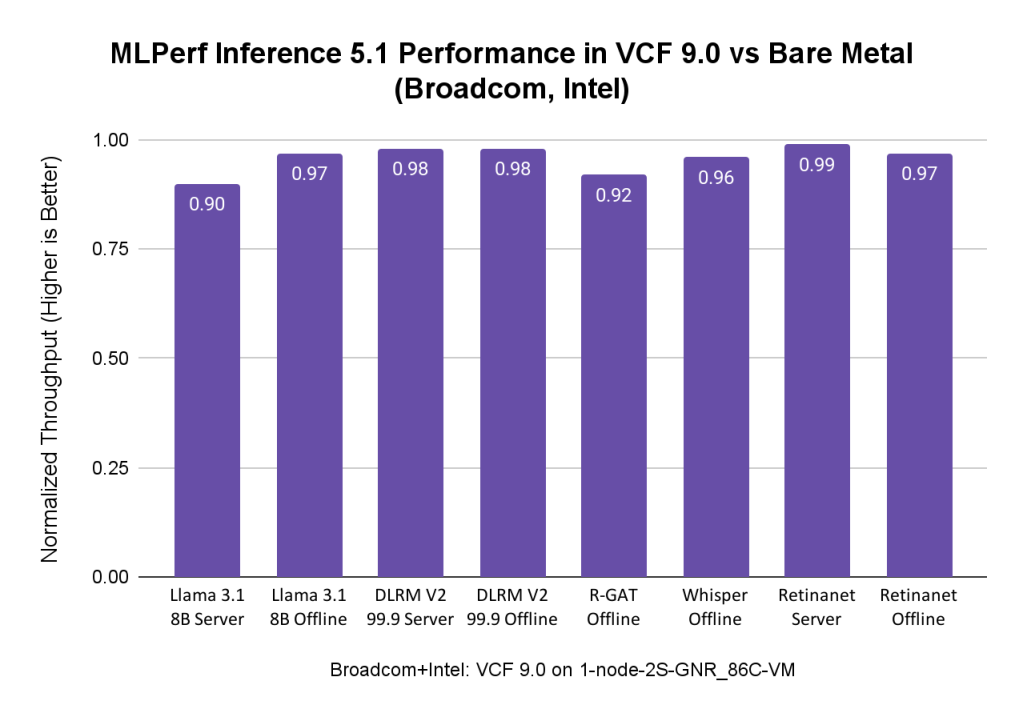
Figure 3. Performance comparison of virtualized vs. bare metal ML/AI workloads in VCF 9.0 in a system with Intel XEON(R) 6787P CPUs
MLPerf Inference Benchmarks
Each benchmark is defined by a Dataset and Quality Target. The following table summarizes the benchmarks in this version of the suite (the rules remain the official source of truth):
Table 5. The MLPerf Inference 5.1 benchmarks
| Area | Task | Model | Dataset | QSL Size |
| Language | LLM – Q&A | Llama 2 70B | OpenOrca | 24576 |
| Language | Summarization | Llama 3.1 8B | CNN Dailymail (v3.00, max_seq_len=2048) | 13368 |
| Language | Text Generation | Llama 3.1 405B | Subset of LongBench, LongDataCollections, Ruler, GovReport | 8313 |
| Vision | Object detection | RetinaNet | OpenImages (800×800) | 64 |
| Speech | Speech to text | Whisper | LibriSpeech | 1633 |
| Image | Image Generation | SDXL 1.0 | COCO-2014 | 5000 |
| R-GAT | Node Classification | R-GAT | IGBH | 788379 |
| Commerce | Recommendation | DLRM-DCNv2 | Criteo 4TB Multi-hot | 204800 |
| Commerce | Recommendation | DLRM | 1TB Click Logs | 204800 |
Source: https://mlcommons.org/benchmarks/inference-datacenter/
In an Offline scenario, the workload generator (LoadGen) sends all queries to the system under test (SUT) at the start of the run. In a Server scenario, LoadGen sends new queries to the system under test according to a Poisson distribution. This is shown in Table 6.
Table 6. The MLPerf Inference test scenarios
| Scenario | Query generation | Duration | Samples per query | Latency constraint | Tail latency | Performance metric |
| Server | LoadGen sends new queries to the SUT according to a Poisson distribution | 270,336 queries and 60 seconds | 1 | Benchmark-specific | 99% | Maximum Poisson throughput parameter supported |
| Offline | LoadGen sends all queries to the SUT at start | 1 query and 60 seconds | At least 24,576 | None | N/A | Measured throughput |
Source: MLPerf Inference: Datacenter Benchmark Suite Results, “Scenarios and Metrics”
Conclusion
VCF offers customers multiple flexible options for AI infrastructure deployment, supports multiple hardware vendors, and allows a variety of ways to enable AI workloads that use either GPUs or CPUs for computation.
When using GPUs, the virtualized configurations of VMs use a fraction of the CPU and memory resources in our benchmarking and deliver on par bare metal performance of MLPerf Inference 5.1 even at peak GPU utilization—that’s a key benefit of virtualization. This allows you to utilize the remaining CPU and memory resources on these systems to run other workloads with full isolation, reduce the cost of AI/ML infrastructure, and leverage the virtualization benefits of VCF for managing data centers.
The results of our benchmark testing indicate that VCF 9.0 falls within the Goldilocks Zone for AI/ML workloads with on-par performance with bare metal environments. VCF also makes it easy to manage and process workloads quickly using vGPUs, flexible NVLinks to connect devices, and virtualization technologies to use AI/ML infrastructure for graphics, training, and inference. Virtualization reduces the total cost of ownership (TCO) of an AI/ML infrastructure by enabling the sharing of expensive hardware resources among multiple tenants.
Ready to get started on your AI and ML journey? Check out these helpful resources:
- Complete this form to contact us!
- Read the VMware Private AI Foundation with NVIDIA solution brief.
- Learn more about VMware Private AI Foundation with NVIDIA.
Connect with us on Twitter at @VMwareVCF and on LinkedIn at VMware VCF.
Acknowledgments: We would especially like to thank Jia Dai (NVIDIA); Patrick Geary, Eddie Chao, Dexter Bermudez, and Steven Phan (SuperMicro); Frank Han, Thaddeus Rogers, Minesh Patel, and Manpreet Sokhi (Dell); Sajjid Reza, Mihir Rajesh Dattani, Manasa Kankanala, and Komala B Rangappa (Intel); and Juan Garcia-Rovetta (Broadcom) for their help and support in completing this work.
Discover more from VMware Cloud Foundation (VCF) Blog
Subscribe to get the latest posts sent to your email.