
Harbor is a widely adopted, open-source registry that secures artifacts with role-based access control, scans images for vulnerabilities, and ensures images are replicated and trusted. As a cloud-native registry, it is a critical component for any organization leveraging Kubernetes and containerization.
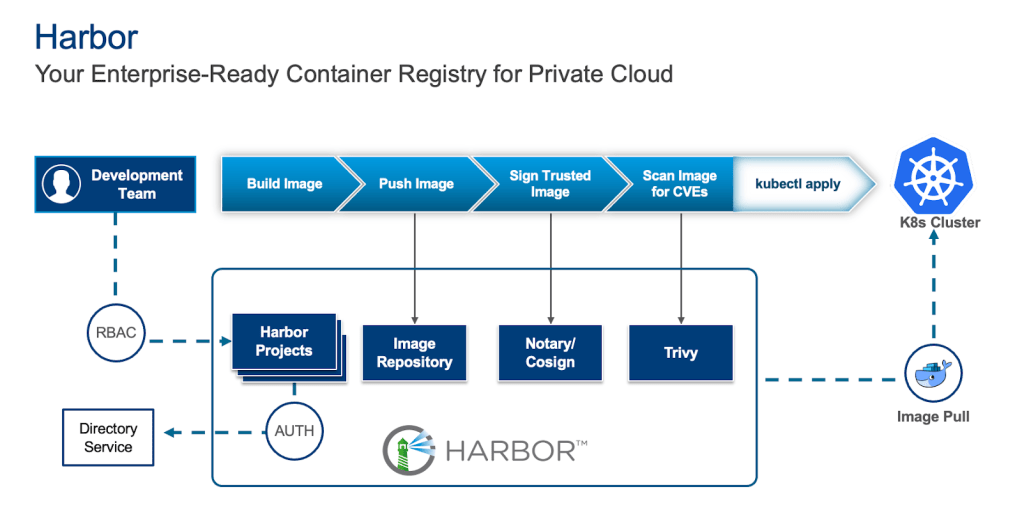
In our previous blog, we established that while Harbor includes a built-in PostgreSQL database, this setup is generally not recommended for production use. Deploying a resilient, highly available container registry requires separating the application and database lifecycle to ensure operational excellence.
Here are the key reasons why a dedicated, external database is critical for production Harbor deployments:
- Lack of High Availability (HA): The default internal PostgreSQL setup is typically a single instance, creating a single point of failure. A database pod failure means your entire Harbor instance becomes unavailable.
- Limited Scalability: An embedded database is not designed for independent scaling. Database performance bottlenecks that arise from growth can be difficult to address without disrupting Harbor itself.
- Complex Lifecycle Management: Managing critical database operations such as backups, point-in-time recovery, patching, and upgrades directly within an application’s Helm chart is significantly more complex and error-prone than with dedicated database solutions.
The Solution: Leveraging VMware Data Services Manager with Harbor
To address these challenges, we need a highly available PostgreSQL cluster. This is where VMware Data Services Manager (DSM) comes in.
VMware Cloud Foundation (VCF) is the private cloud platform that delivers on-premises security, resilience, and performance, providing the underlying infrastructure for modern private cloud environments, including the Kubernetes clusters where applications like Harbor are deployed.
VMware Data Services Manager (DSM) is the Database-as-a-Service, or DBaaS, solution for your VCF private cloud. It provides true self-service database provisioning for developers and DBAs, while providing governance for these essential workloads. DSM makes it simple to add high-availability, replication, and scale to Postgres databases, as well as automated lifecycle management and backups that support point-in-time recovery. This makes DSM an ideal choice for supporting mission critical applications like Harbor.
This guide details the integration process, showcasing how to provision and manage a PostgreSQL instance using VMware Data Services Manager to use as the persistent backend database for a Harbor container registry deployed via Helm on Kubernetes.
Prerequisites
Before proceeding, ensure you have the following in place:
- A running Kubernetes cluster: Harbor will be deployed here.
- VMware DSM: Used to provision and manage the PostgreSQL database instance. Follow the guide for installing and configuring DSM on VCF 9.0
- Helm: The package manager for Kubernetes.
- Network Connectivity: The Kubernetes cluster must be able to reach the PostgreSQL instance deployed by DSM. Ensure necessary networking and firewall rules are in place.
Step 1: Provisioning PostgreSQL with VMware DSM
VMware DSM simplifies the deployment and management of databases. Follow these steps to provision a highly available PostgreSQL instance:
- Access DSM: Log in to your VMware DSM console.
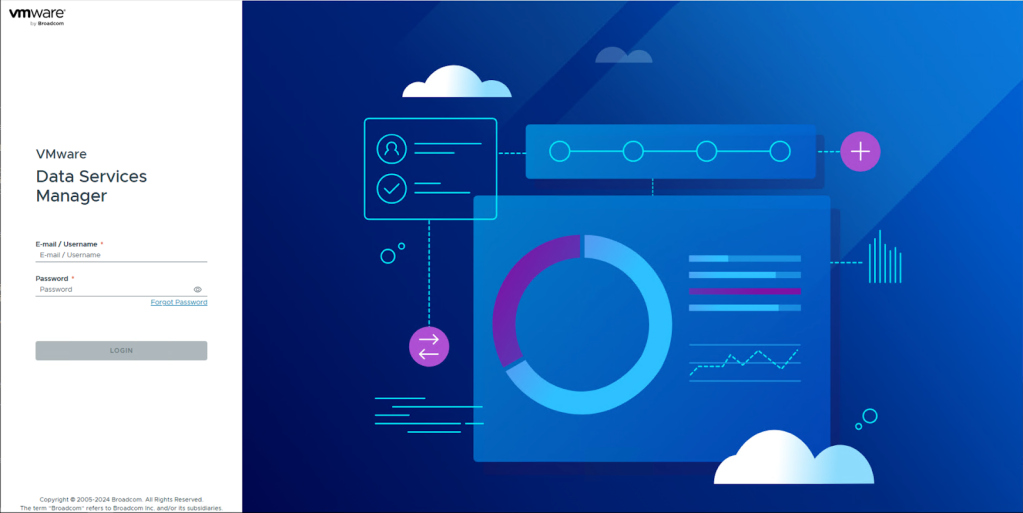
- Ensure the Postgres Versions are enabled: Verify that the desired PostgreSQL versions are enabled in DSM.
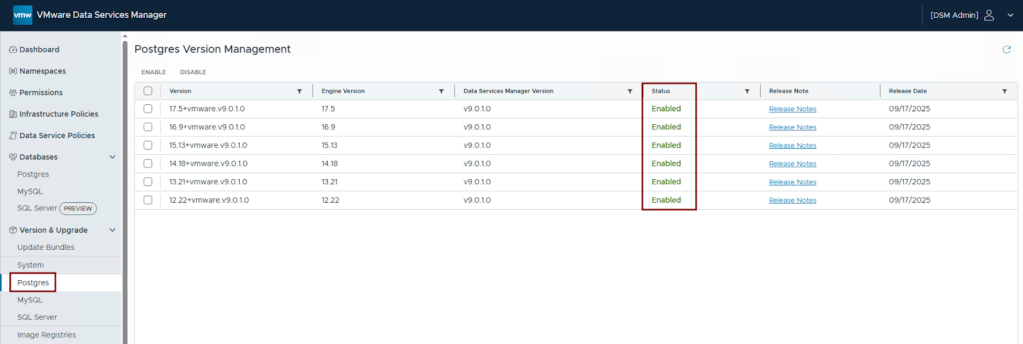
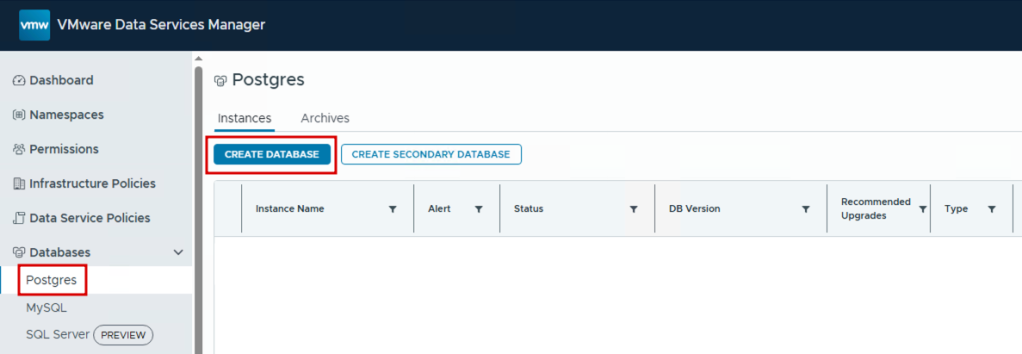
- Create a PostgreSQL Instance: Navigate to Databases > Postgres and click on Create Database.
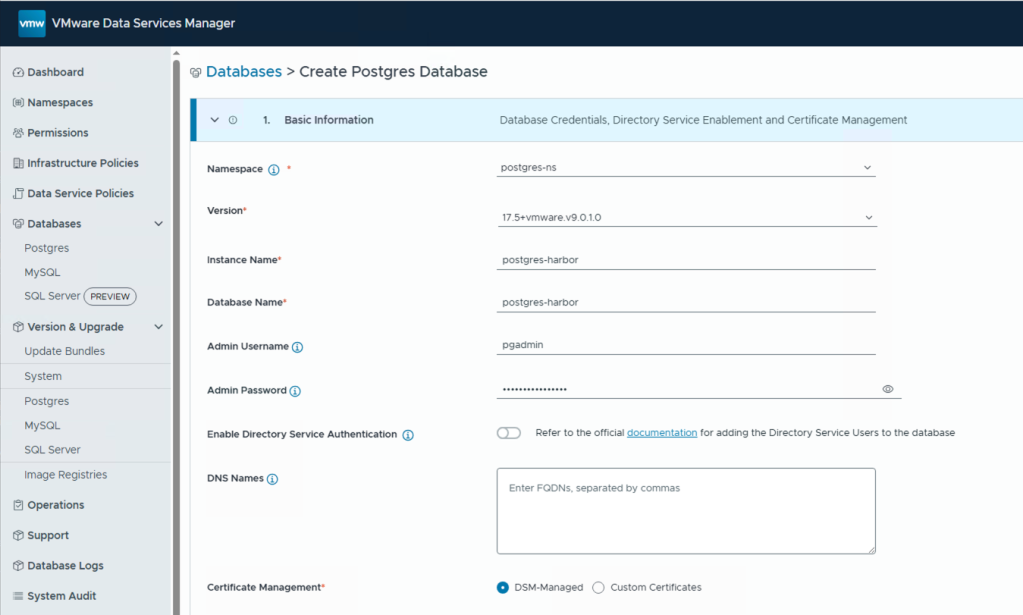
- Configure Basic Details: Fill in the Postgres database details:
- DSM Namespace
- PostgreSQL version
- Instance name
- Database name
- Postgres credentials (username and password)
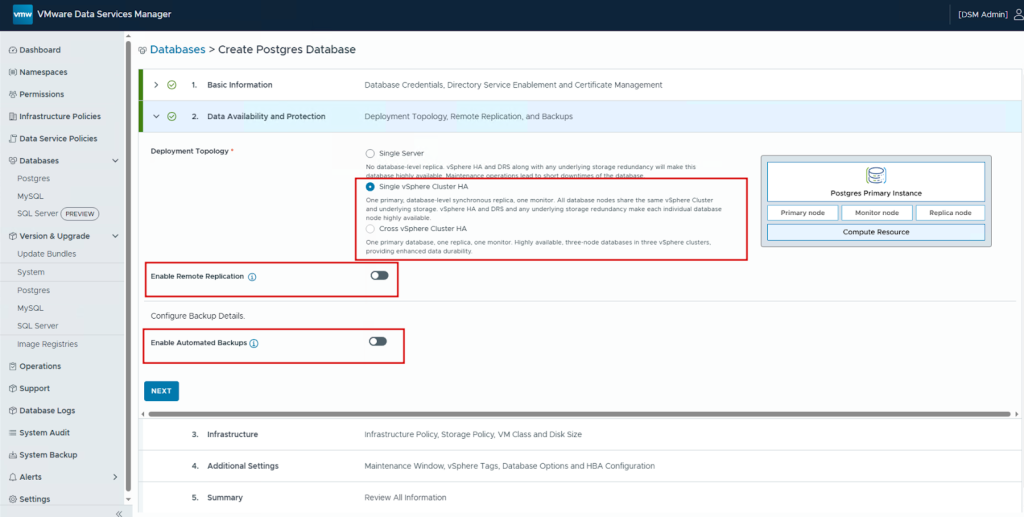
- Configure Data Availability and Protection: We select HA in a vSphere cluster. This provides us with a highly available database instance. Additionally, enable remote replication to another instance if desired (for disaster recovery) and backup scheduling (for data protection and compliance).
- Configure Infrastructure: Select the following:
- Infrastructure policy
- Storage policy
- VM class
- Disk size for the database
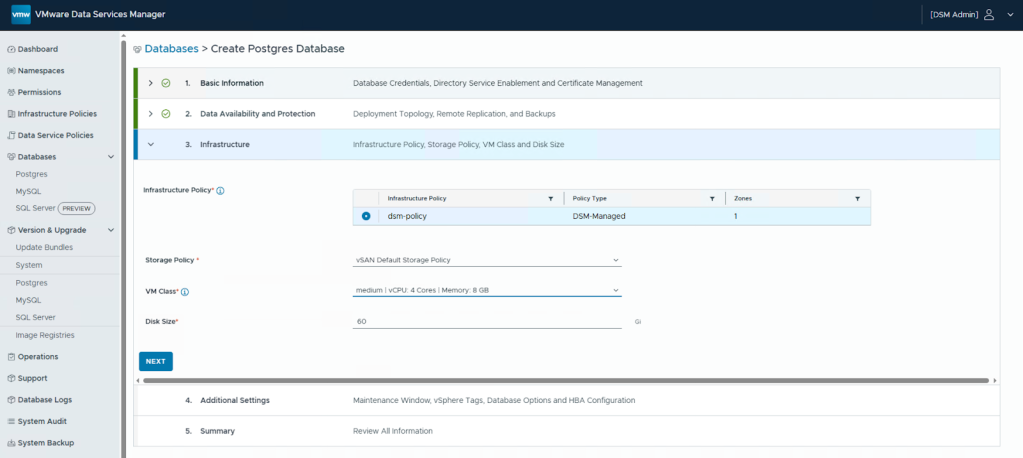
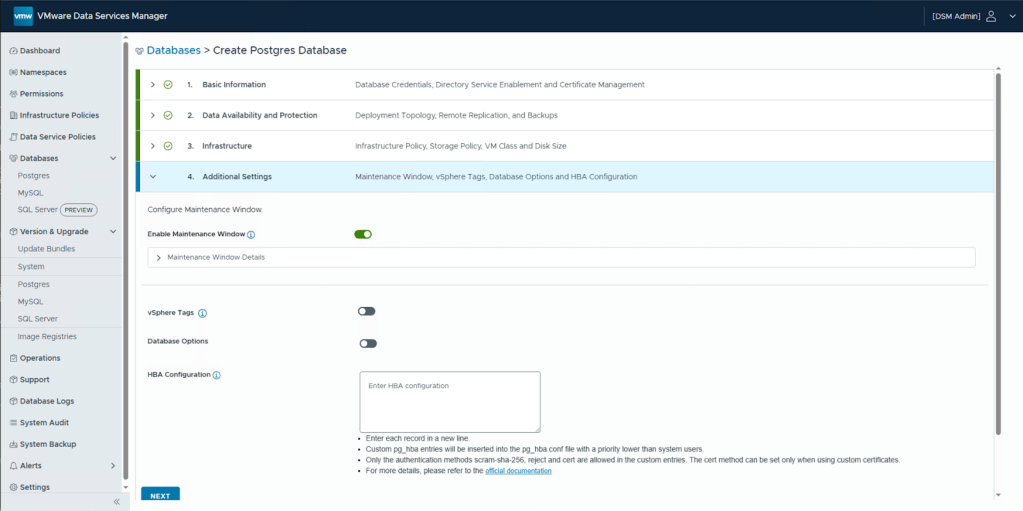
- Additional Settings: Enable any additional settings as needed for your environment.
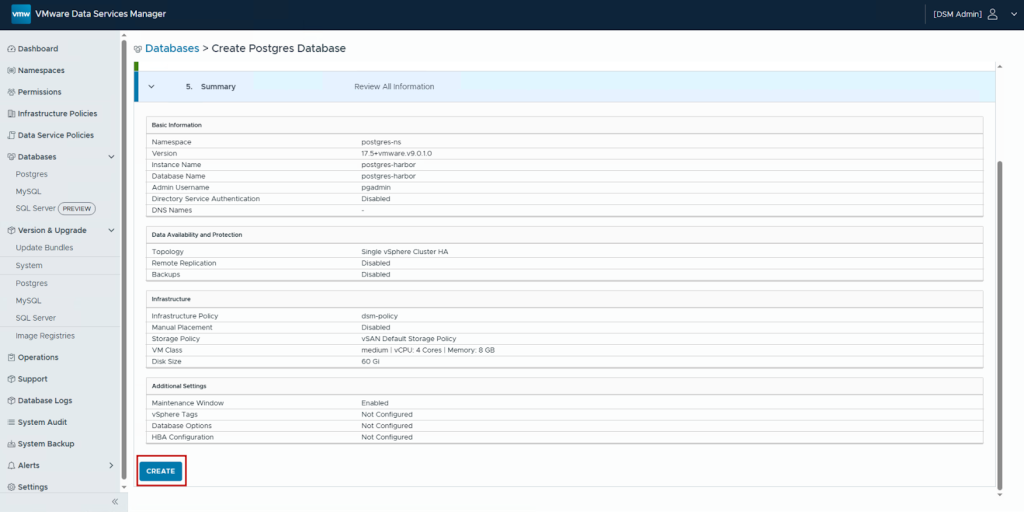
- Review and Create: Review the summary and Click Create.
- Confirm Database Availability: Once deployment completes, verify that the database is running successfully.
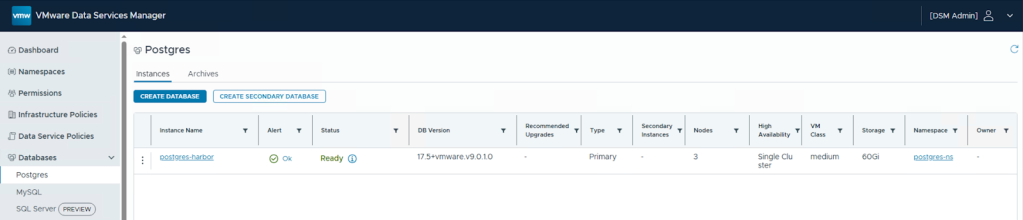
Navigate into the database details to obtain the connection information that will be used in the Harbor helm chart configuration.
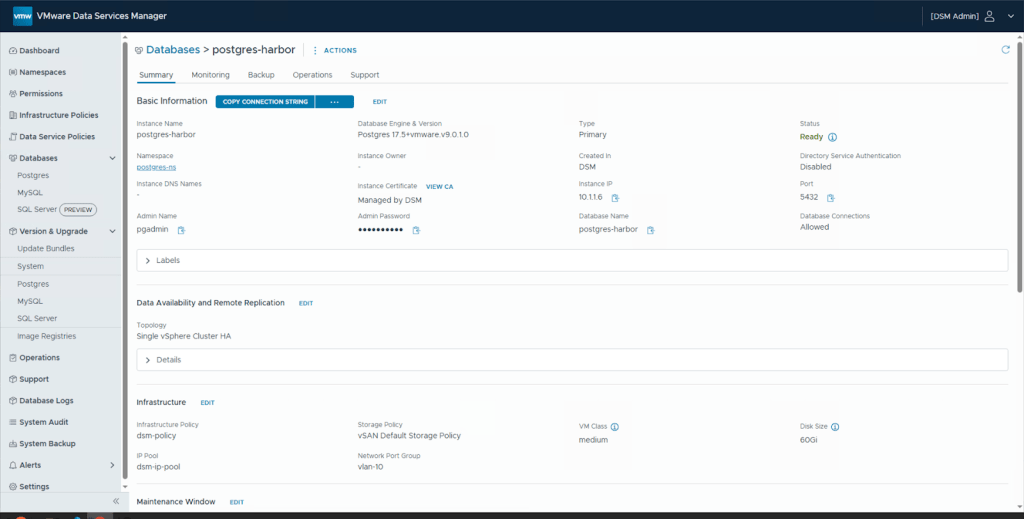
PostgreSQL Database Connection Details:
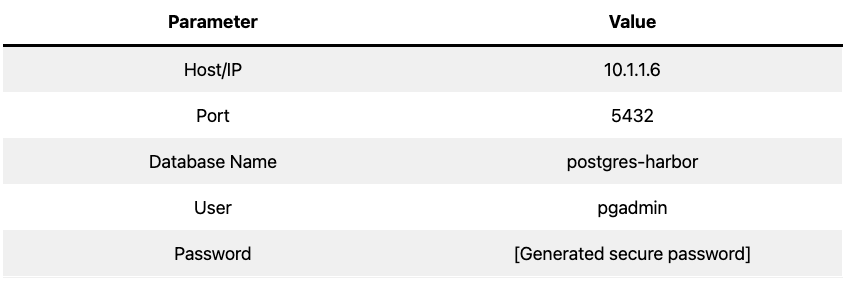
Step 2: Preparing the Harbor Helm Chart Configuration
Harbor requires specific configuration in its values.yaml file to connect to an external PostgreSQL database.
- Download the Harbor Helm Chart: Add the Harbor Helm repository and fetch the chart.
|
1 2 |
helm repo add harbor https://helm.goharbor.io helm fetch harbor/harbor --untar |
- Configure values.yaml: Open the
values.yamlfile within the un-tarred harbor directory. Locate the database configuration sections and make the following critical changes:- Set Database Type: Set
database.typetoexternal. This tells Harbor to use an external database. - Configure External PostgreSQL: Populate the details for the external database under the
database.externalsection using the information from Step 1.
- Set Database Type: Set
A snippet of the configured values.yaml should look like this:
|
1 2 3 4 5 6 7 8 9 10 |
# Disable the internal PostgreSQL container database: type: external external: host: "10.1.1.6" port: 5432 username: "pgadmin" password: "Harbor Database User Password" coreDatabase: "postgres-harbor" sslmode: disable # Adjust based on your DSM configuration |
Note: For production environments, consider enabling SSL/TLS connections by adjusting the sslmode parameter and configuring the appropriate certificates in DSM.
Step 3: Deploying Harbor on Kubernetes
With the values.yaml file updated, you can now deploy Harbor to your Kubernetes cluster.
- Perform the Helm Deployment: Run the Helm install command, referencing your modified configuration file.
|
1 |
helm install harbor harbor/harbor --namespace harbor --create-namespace -f values.yaml |
This command will:
- Create a new namespace called
harbor - Deploy Harbor using the external PostgreSQL configuration
- Install all Harbor components except the database pod
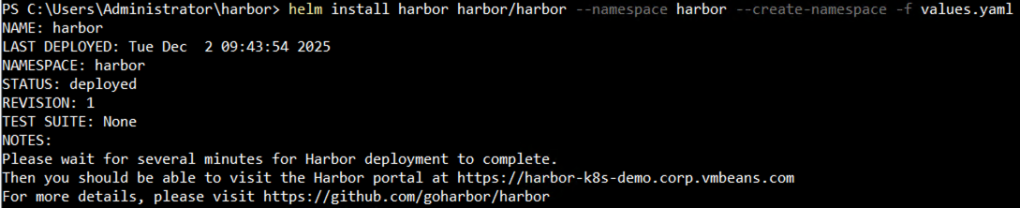
- Verify the Deployment: Monitor the deployment status of the Harbor pods.
|
1 |
kubectl get pods -n harbor |
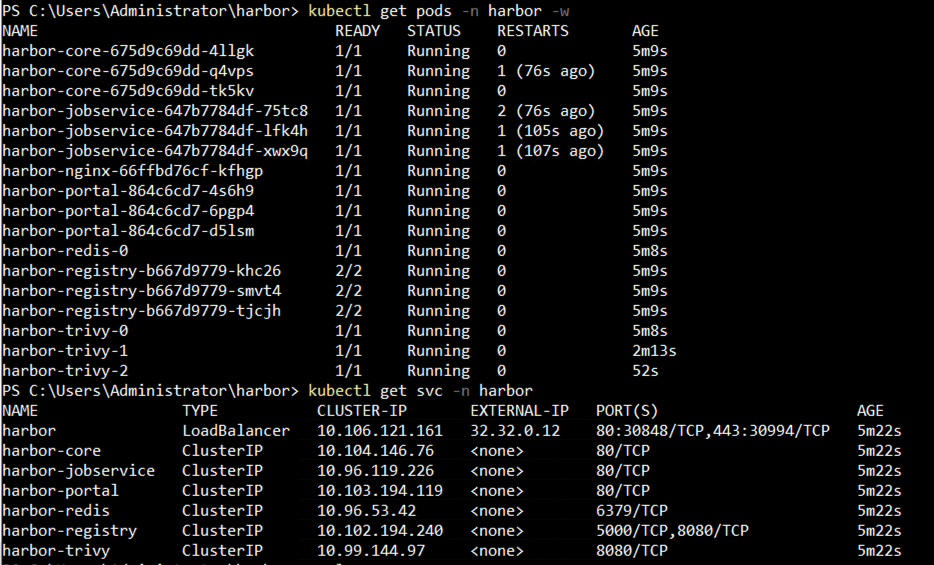
All Harbor components (like core, jobservice, and registry) should eventually reach the Running state. Note that no database pod will be deployed since we configured Harbor to use an external database. The deployment will connect to the PostgreSQL database hosted by DSM.
Step 4: Verification and Maintenance
Once Harbor is deployed, verify its connection to the external database and understand how DSM assists with ongoing maintenance.
- Test Harbor Access: Access the Harbor UI via the configured Load Balancer service. Log in using the credentials configured in
values.yamlfile. Successful login confirms that Harbor is operational and can communicate with the PostgreSQL backend.
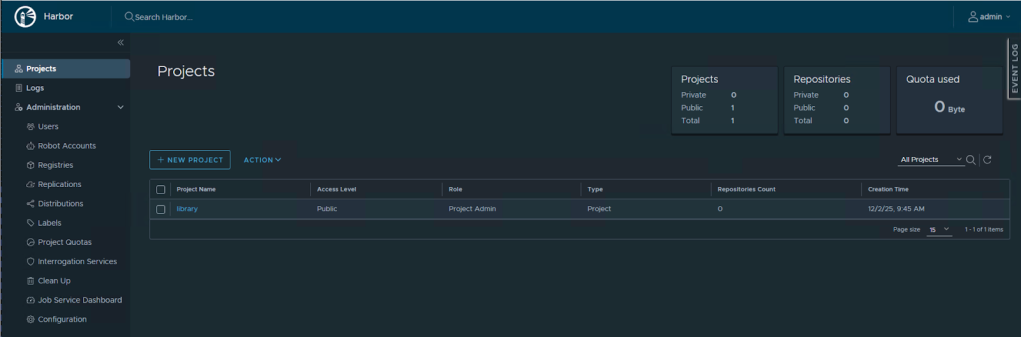
- Verify Database Connectivity: To confirm that Harbor is actually using the DSM-managed PostgreSQL database, let’s connect directly to the database and inspect its contents.
First, ensure you have the psql client tool installed on a system that has network connectivity to the database. Then, connect to the Harbor external PostgreSQL instance:
|
1 |
psql "host=10.1.1.6 port=5432 dbname=postgres-harbor user=pgadmin password=db-password" |

Once connected, list all databases to confirm the postgres-harbor database exists:
|
1 |
\l |
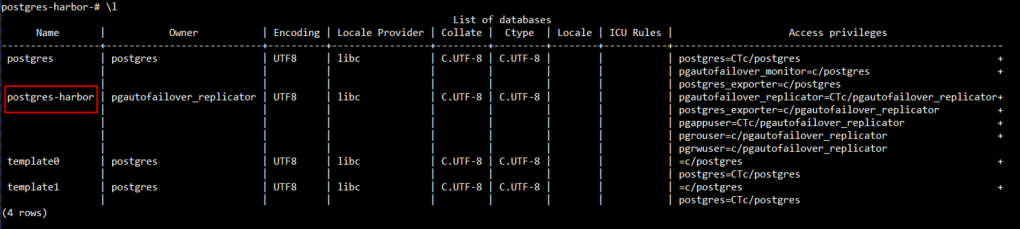
Connect to the postgres-harbor database:
|
1 |
\c postgres-harbor |

List all the tables in the database:
|
1 |
\dt |
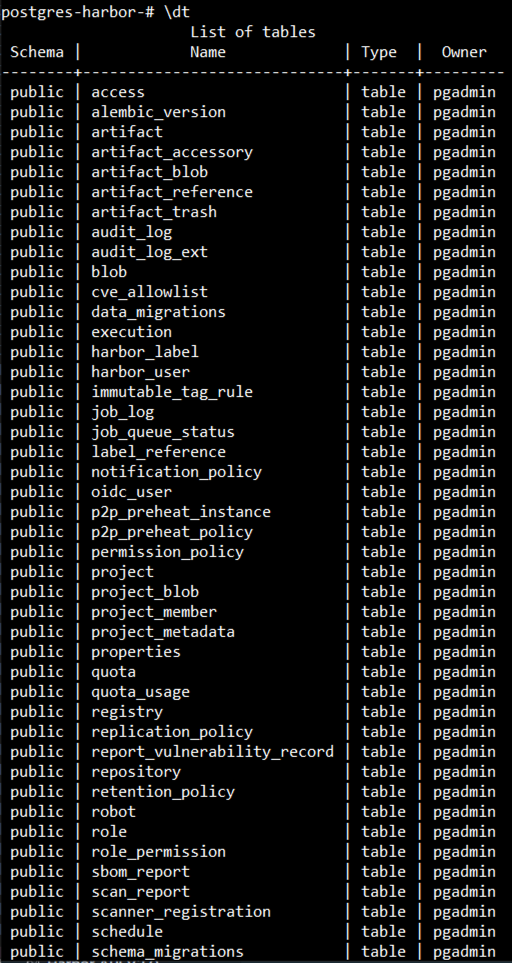
You should see all Harbor-related tables such as harbor_user, p2p_preheat_policy and sbom_report. This confirms that Harbor has successfully configured this external PostgreSQL database and is using it as its backend datastore.
- Leverage DSM for Operations: One of the key advantages of using VMware DSM is simplified database lifecycle management. Any future database operations can be managed and automated efficiently through the DSM console:
- Scaling: Adjust compute resources by changing the VM Class, or increase database storage capacity as Harbor’s usage grows
- Backups: Configure automated backup schedules
- Point-in-Time Recovery: Restore the database to any previous state in case of data corruption
- Patching and Upgrades: Apply PostgreSQL security patches and version upgrades with minimal downtime
- Monitoring: Track database performance metrics, query statistics, and resource utilization
This approach significantly reduces the operational overhead typically associated with managing persistent storage for critical applications, allowing your team to focus on Harbor operations rather than database administration.
Conclusion
By combining the Database-as-a-Service capabilities of VMware Data Services Manager with the robust orchestration of Kubernetes and the Helm ecosystem, you can establish a highly available and easily manageable backend for your Harbor container registry.
This architecture separates the database lifecycle from the application lifecycle, providing several key benefits:
- Enhanced Reliability: High availability configurations protect against database failures
- Simplified Operations: DSM automates routine database management tasks
- Better Scalability: Database and application can scale independently based on actual needs
- Improved Security: Centralized database management with consistent policies and patching
- Reduced Complexity: Focus on application operations while DSM handles database administration
This approach allows you to leverage the advanced features of DSM for database resilience and simplified management, while keeping your application deployment agile on Kubernetes, the best of both worlds for a production-ready Harbor registry.
Follow our Harbor blog series:
- Blog 1 – Harbor: Your Enterprise-Ready Container Registry for a Modern Private Cloud
- Blog 2 – Reducing Harbor Deployment Complexity on Kubernetes
- Blog 3 – Making Harbor Production-Ready: Essential Considerations for Deployment
- Blog 4 – Integrating VMware Data Services Manager with Harbor for a Production-Ready Registry
- Blog 5 – Using Harbor as a Proxy Cache for Cloud-Based Registries
Discover more from VMware Cloud Foundation (VCF) Blog
Subscribe to get the latest posts sent to your email.