So far in this blog series, we have highlighted the value that NVMe Memory Tiering delivers to our customers and how this is driving adoption. Who doesn’t want to reduce their cost by ~40% just by adopting VMware Cloud Foundation 9?! We’ve also touched on pre-requisites, and hardware in Part 1, and design in Part 2; so, let’s now talk about properly sizing your environment so you can maximize your investment while reducing your cost.
Proper sizing for NVMe Memory Tiering is mainly on the hardware side, but there are two possible ways to look at this; greenfield and brownfield deployments. Let’s start with brownfield deployments, which is adopting Memory Tiering on existing infrastructure. You’ve came to the realization that VCF 9 is truly an integrated product delivering a cohesive cloud like solution and decided to deploy it but just learned about Memory Tiering. Don’t worry, you can still introduce NVMe memory Tiering after deployment of VCF 9. After reading Part 1 and Part 2, we’ve learned the importance of the NVMe performance and endurance classes as well as the understanding the 50% active memory requirement. This means that we need to think about purchasing an NVMe device that is at least the same size of our DRAM, since we will double our memory capacity. So, if each of your hosts have 1TB of DRAM we should at least have 1TB NVMe devices, easy enough. However, we can go bigger and still be cheaper than buying more DIMMS, let me explain.
I’ve made it a point to say “buy an NVMe device to be at least the same size of DRAM”, and this is because we use a DRAM:NVMe ratio of 1:1 by default, so half of the memory comes from DRAM and half comes from NVMe. Now, there are workloads that may not be doing a whole lot as far as memory activity, think some VDI workloads. If I have workloads with 10% active memory on a consistent basis for example, I could really take advantage of the advanced features of NVMe Memory Tiering. The default ratio of 1:1 is there for a reason, as most workloads fit nicely within that split, but that DRAM:NVMe ratio is an advanced configuration parameter that we can change, and we can go up to 1:4, yes 400% more memory. So, for those workloads with very low active memory, having a ratio of 1:4 could maximize your investment. How does that change my sizing strategy?
I’m glad you’ve asked, because DRAM:NVMe can be changed just as your workload’s memory activeness can change, we should account for this possibility during our NVMe procurement phase. Going back to the previous example of a host with 1TB of DRAM, we’ve decided having at least 1TB NVMe made perfect sense, but with workloads with very low active memory this 1 TB may not be giving you the best bang for your buck. In this case, having a 4TB NVMe would allow you to use that 1:4 DRAM:NVMe ratio and increase your memory by 400%. This is why looking into your workload’s active memory before purchasing NVMe devices is so important.
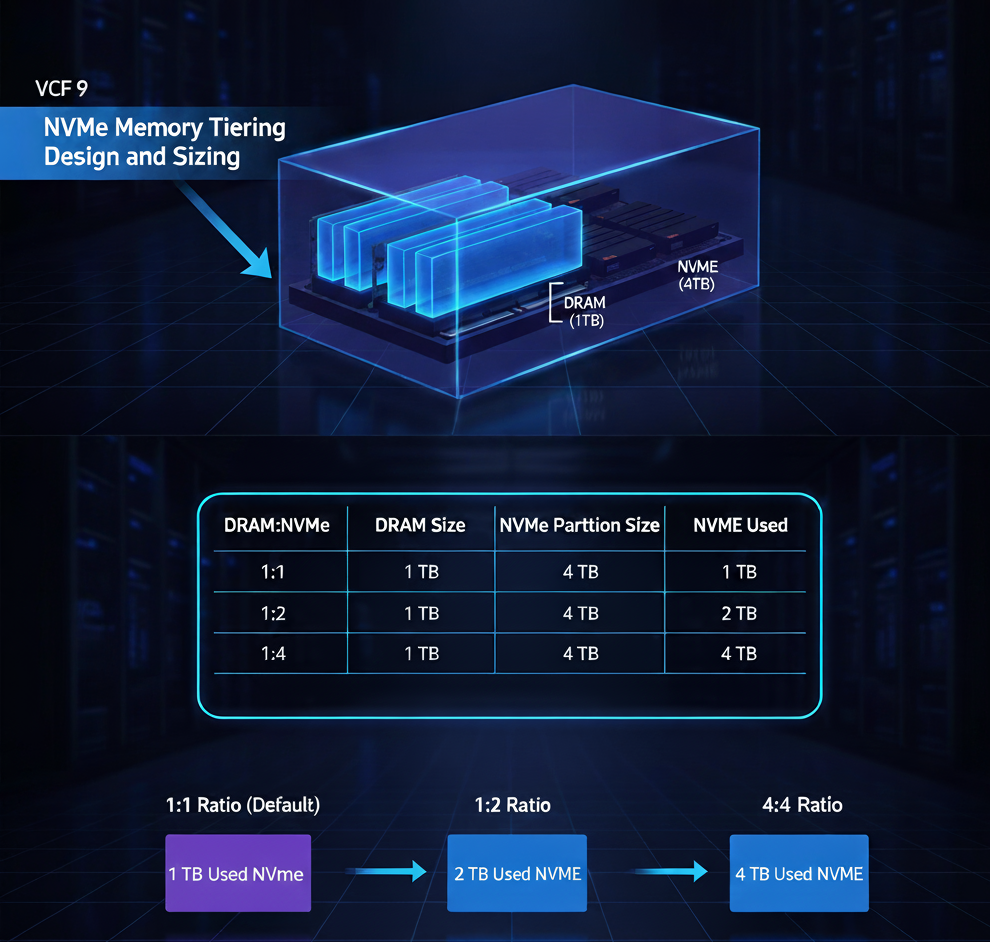
Another aspect that plays into sizing is the partition size. When we create a partition on the NVMe prior to configuring NVMe Memory Tiering, we type a command but typically don’t pass a size to it, as it will automatically create a partition with the size of the drive up to 4TB. The amount of NVMe that will be used for Memory Tiering is a combination of the NVMe partition size, the amount of DRAM, and the configured DRAM:NVMe ratio. Let’s say we want to maximize our investment and future proof the hardware by buying a 4TB SED NVMe device, even though our hosts only have 1TB DRAM. Once configure with the default options, the partition size would be 4TB (this is the max size supported currently), but the amount of NVMe used for tiering is 1TB as we are using the default ratio of 1:1. If our workloads change, or we change the configuration of the ratio to let’s say 1:2, the partition size stays the same (no need to recreate), but we will now use 2TB of NVMe instead of just 1TB by just changing the ratio. It is important to understand that we do not recommend changing this ratio without properly doing due diligence and making sure the active memory of your workloads fit into the DRAM available.
| DRAM:NVME | DRAM Size | NVMe Partition Size | NVMe Used |
| 1:1 | 1 TB | 4 TB | 1 TB |
| 1:2 | 1 TB | 4 TB | 2 TB |
| 1:4 | 1 TB | 4 TB | 4 TB |
So, for NVMe sizing consider the maximum supported partition size (4TB), and the ratios that can be configured based on your workloads’ active memory. This is not only a cost decision but also a scale decision. Keep in mind that even with large NVMe devices, you will save a substantial amount of money compared to DRAM alone.
Now, let’s talk about greenfield deployment use cases, where you are aware of Memory Tiering and need to buy some servers, you can now use this feature as a parameter into your cost calculation. The same principles as brownfield deployments apply, but If we are planning on deploying VCF, it makes sense to really investigate how NVMe Memory Tiering can substantially reduce the cost of your server purchase. As stated before, it is super important to make sure your workloads are adequate for Memory Tiering (most workloads are), but you should always check. Once you’ve done your research you can make decisions on hardware, based on workload qualification. Let’s say all your workloads qualify for Memory Tiering, in fact, most of them are around 30% active memory. In this case, it is still recommended to stay in the conservative side and size with the default DRAM:NVMe ratio of 1:1, so If you need 1TB of memory for your workloads per host, you can opt to decrease the DRAM quantity to 512MB and 512MB of NVMe, this will give you the total amount of memory needed, and based on your research you know that the active memory of the workloads will fit in DRAM at all times. Aside from that, the quantity of NVMe devices per host and RAID controller would be a separate decision that won’t really affect NVMe available space as we still need to provide one logical device whether it is one single, standalone NVMe device or 2 or more devices in a RAID configuration. This decision though would affect cost, and redundancy.
On the other hand you can also choose to keep the amount of DRAM of 1TB, and still add add another 1TB of memory though Memory Tiering. This would allow you to have denser servers, resulting in less server required to accommodate your workloads. In this case your cost savings come from less hardware and components, as well less cooling and power.
In conclusion, when it comes to sizing, it is important to account for all the variables which are amount of DRAM, size of NVMe device(s), partition size, and DRAM:NVMe ratio. In addition to those variables, a deeper study should be done for greenfield deployments, which is where you could further your cost savings by only purchasing DRAM for your active memory and not for the entire memory pool as we’ve done for years. Speaking of considerations and planning, another area to keep in mind is compatibility of Memory Tiering and vSAN which will be covered in the next Part of this series (Part 4).
Blog series:
PART 1: Prerequisites and Hardware Compatibility
PART 2: Designing for Security, Redundancy, and Scalability
PART 3: This Blog
PART 4: vSAN Compatibility and Storage Considerations
PART 6: End-to-End Configuration
Additional information on Memory Tiering
Discover more from VMware Cloud Foundation (VCF) Blog
Subscribe to get the latest posts sent to your email.