
VMware Cloud Foundation (VCF) delivers unmatched benefits for virtual desktop infrastructure (VDI). Even after the spin-out of VMware’s End User Computing (EUC) business group into Omnissa, the fundamentals of this combined solution remain intact. However, the release of VCF 9.0 deserves revisiting those fundamentals to expose how the platform holds up.
VCF 9.0 consolidates the private-cloud substrate (vSphere, vSAN, NSX) with cloud automation (VCF Automation), integrated Kubernetes (VMware vSphere Kubernetes Service / VKS) and other advanced services such as VCF Private AI Services and VMware Data Services Manager (DSM). These innovations, among many others, benefit the Omnissa Horizon VDI solution by providing an intrinsically secure, optimized and scalable foundation for the most demanding virtual desktops.
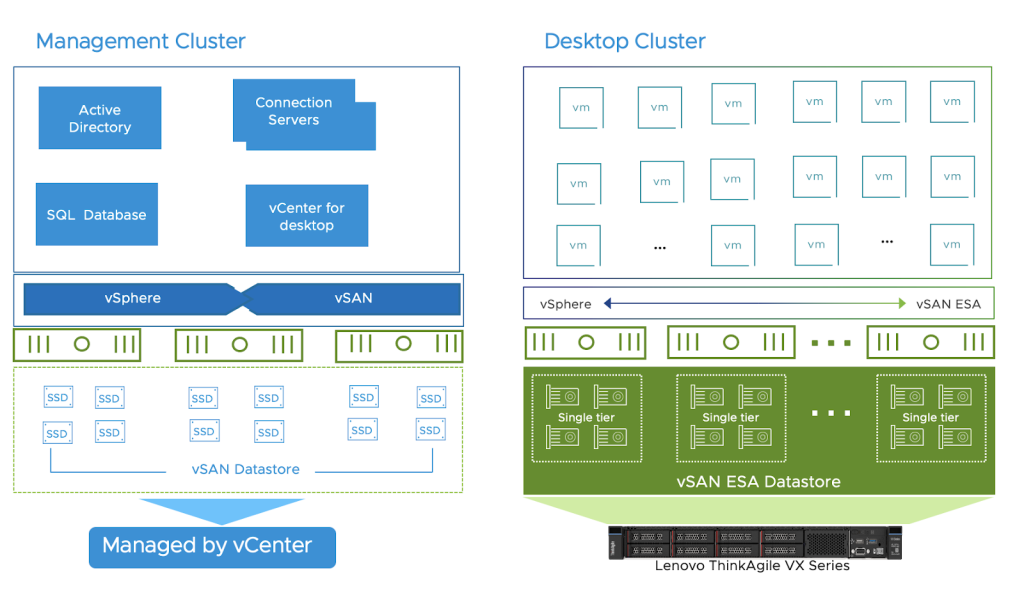
Running Horizon on VCF 9.0 allows customers to benefit from the full set of services of a unified private cloud platform. VCF delivers workload domains, orchestrated upgrades, VPC-based network isolation, and a modern consumption API. It’s a platform that treats desktops as first-class workloads.
Security and Compliance
Security is where VCF immediately shines. Use NSX firewall to wrap a least-privilege policy around Horizon Connection Servers, UAGs, and desktop pools without hair-pinning traffic into external firewalls. VCF 9.0’s VPC constructs enable stamping out a repeatable network perimeter for each Horizon function:
- Edge (UAG)
- Brokering (Connection Servers)
- Desktops
- Shared services
These protections scale with the fleet instead of complicating it. VCF 9.0 also introduces a suite of integrated security and compliance features critical for VDI environments:
- Centralized network policy management with NSX bolster lateral traffic protection for sensitive VDI desktops, aligning with stringent compliance frameworks.
- Micro-segmentation and VPC isolation let you attach policies to assets, not subnets. That is resilient in production and defensible in audits.
- Immutable snapshots, ransomware protection, and integrated disaster recovery with vSAN ESA and VMware Live Recovery, ensuring business continuity and swift recovery from attacks or failures, which is essential for maintaining desktop uptime and compliance.
For industries with strict compliance (healthcare, financial services, government), VCF’s security certifications (TLS 1.3, FIPS 140-3, DISA STIG) allow desktop environments to meet the most demanding standards.
Efficiency and Resource Optimization
With storage deduplication, advanced memory management, and higher host utilization, VCF 9.0 enables significant reductions in TCO. Cost efficiency in this context isn’t simply “buy fewer servers”. It’s about converting every unit of compute, storage, network, and overhead operations into more productive users without compromising the experience.
- Improved CPU and memory consolidation ratios allow more concurrent desktops per server, directly translating to lower infrastructure costs and simplified scaling for large deployments.
- vSAN ESA with global dedupe can reduce storage costs for persistent VDI pools, while background operations minimize performance impact on desktop users.
- vSAN storage policies can be assigned per desktop pool so task-worker images don’t pay the same storage tax as data or graphics-heavy pools. That precision keeps IOPS where they are most needed and eliminates the practice of overprovisioning across the board “just in case”.
With VCF’s Memory Tiering feature, vSphere continually keeps hot pages in DRAM and moves cold pages to local NVMe, essentially tapping local NVMe as a secondary memory tier. In recent Login Enterprise benchmarks, this helped to achieve a reliable 2x increase in VM density per host. This capability dramatically boosts hardware utilization, allowing you to run more virtual desktops on less infrastructure.
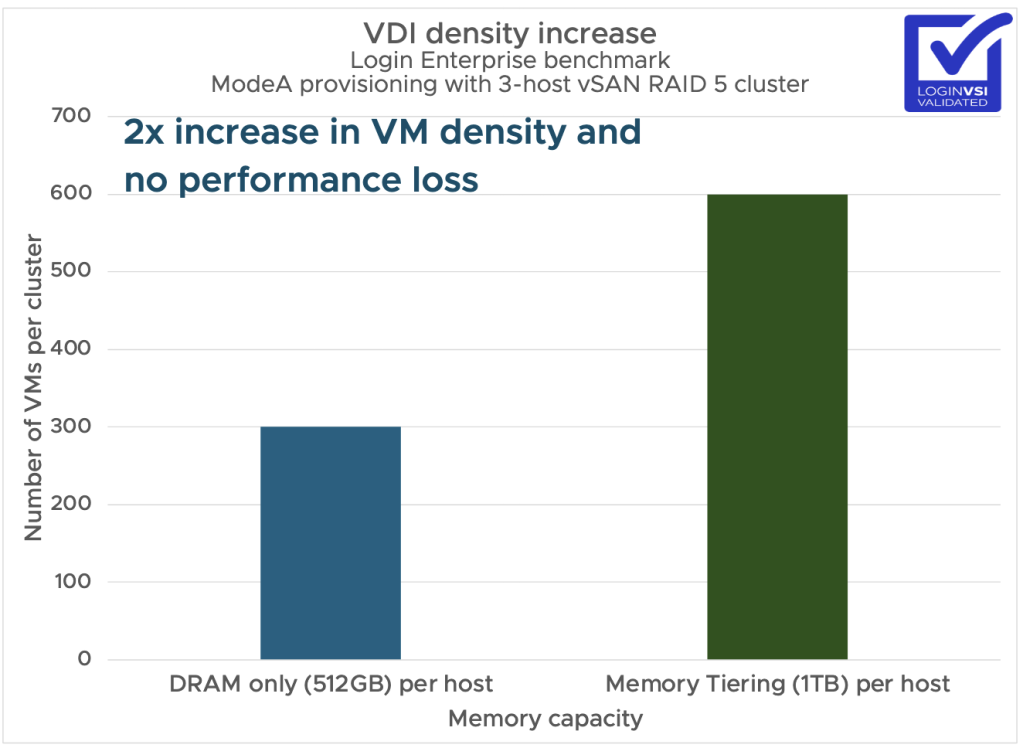
You can read more about memory tiering performance in VCF 9.0 here.
Unfettered Performance
VCF 9.0 provides a substrate that makes Horizon’s performance predictable. This starts with compute – vSphere’s distributed resource scheduler (DRS) helps ensure bursty desktop pools are scheduled with NUMA locality across the physical cluster, which helps ensure allocated vCPUs hit a single NUMA node for fewer cross-socket hops, lower latency, and an overall smoother experience. This is especially critical during boot storms and application spikes.
Memory
Memory is often the bottleneck for VDI. As previously highlighted, VCF 9’s Memory Tiering pushes density without the usual performance or UX impact. This is especially true for desktop pools with lower hot memory demand (e.g. task workers). The practical effect during peaks – morning logons, app launches, etc. – is fewer stalls and less input lag.
Storage
With vSAN (and especially the Express Storage Architecture on NVMe), you get a write-optimized path and the option to use per-desktop-pool storage policies that are optimized for the job:
- RAID-1 mirroring and higher stripe counts for ultra-demanding power users
- RAID-5/6 for task workers,
- Object-space reservations for golden desktop images that see heavy read amplification during app layering.
Because it’s all policy driven, you don’t have to over-engineer every pool for the worst case scenario, yet your infrastructure sits optimized for daily clone storms, patch rollouts, and Monday morning login spikes. The net effect is stable latency under load and faster app open times when everyone clicks at once.
Network
NSX data-plane services run in-kernel, which means network traffic avoids physical infrastructure detours that eat host cycles and increase latency. Combine that with VPC segmentation and desktop pools gain deterministic routes with fewer hops in the path. The outcome is less overhead, and more bandwidth for the traffic that matters. Additionally, the NSX Distributed Firewall (licensed separately with the VMware vDefend advanced service) can be used to enforce east-west firewall policy at the host’s pNIC, so there’s no hair-pinning through external appliances that would add unwanted jitter.
Graphics
Horizon with NVIDIA vGPU on VCF lets you choose vGPU profiles per pool while still enjoying the benefits of DRS for optimal desktop placement. That means you can consolidate demanding 3D users and lighter GPU-assisted tasks on the same physical hosts while maintaining high GPU utilization.
Day-2 Operations
VCF’s lifecycle and fleet management is another instant win for admins who have struggled to balance maintenance and desktop pool availability. VCF 9.0 orchestrates platform lifecycle tasks per workload domain, so you can upgrade in tight windows without dragging environments into long maintenance outages or leaving clusters in mixed-mode limbo. That keeps DRS fully effective and storage policies consistent to ensure desktop pools remain accessible and performant. VCF orchestrates rolling upgrades across the stack, per workload domain, with health checks and operational processes.
- Lifecycle automation for private cloud infrastructure simplifies patching, upgrades, and capacity planning for large Horizon deployments, allowing admins to focus on user experience and innovation instead of repetitive management.
- Platform-wide monitoring and troubleshooting tools accelerate issue resolution and optimize end-user experience metrics, minimizing downtime and maximizing productivity.
Use Case: Developer Workbench as a Service
With VKS and the DSM advanced service add-on, organizations can attach K8s-based lightweight services and internal development tools close to the developer desktop pools. That turns VDI from “remote desktop” into a governed developer workspace platform with services on tap.
- VKS is a first-class, decoupled service with faster lifecycles and declarative consumption APIs.
- Platform engineers and app teams can quickly spin up VKS-based developer environments, cutting dev/test setup time dramatically.
With these capabilities, developers can self-serve namespaces, VKS clusters, and gain access to DSM-managed PostgreSQL/MySQL/etc. Everything is tagged for cost, policy, and data sovereignty at the platform level.
Additional Use Cases
Beyond traditional persistent and non-persistent desktops, the VCF 9.0 + Omnissa Horizon combination unlocks several advanced capabilities:
- Leverage stretched or multi-site architectures to extend VDI services across VCF clouds, supporting fluid bursting and disaster recovery scenarios.
- Platform engineers and app teams can self-serve and quickly spin up VKS-based developer environments, cutting dev/test setup time dramatically.
- VCF’s integrated VMware Private AI Services and vGPU support as a service lets organizations easily deploy AI-Powered virtual desktops.
Introducing the “Omnissa Horizon 8 on VMware Cloud Foundation” Reference Architecture
This reference architecture documents a validated, production-ready design for running Omnissa Horizon 8 on VMware Cloud Foundation (VCF). It’s built to answer a simple question with rigor: what’s the fastest, safest, and most economical way to deliver enterprise virtual desktops today?
The reference architecture highlights hands-on engineering, repeatable patterns, and measurable results into a service blueprint organizations can adopt with confidence—whether you’re modernizing an existing Horizon estate or building a new platform.
Wrapping Up
Even with Omnissa now operating as a standalone company, nothing has changed the fundamentals of what makes a great cloud infrastructure platform for virtual desktops:: consistent segmentation and security, performance, scalability, lifecycle, and the ability to layer useful services. That’s exactly what VCF 9.0 delivers, and why it remains the best substrate for Horizon Desktops.
If you care about virtual desktop infrastructure that isn’t just good for today, but future-ready, then running Horizon on VCF 9.0 is the ideal solution. It solves all the classic headaches – security, uptime, performance, and upgrades – while opening the door to next-gen features like AI and developer-ready desktops, and multi-site bursting.
Additional Resources
- Horizon 8 on VCF Reference Architecture
- Horizon 8 Architecture (Omnissa)
- VCF 9 Reference Architecture
Discover more from VMware Cloud Foundation (VCF) Blog
Subscribe to get the latest posts sent to your email.